Establishing secure connection…Loading editor…Preparing document…

Easement Deed

This template is fully customizable. Edit the text, fill out the fields, and send it for signature. Give it a try!
Easement Deed

What an Easement Deed Is and when it’s used

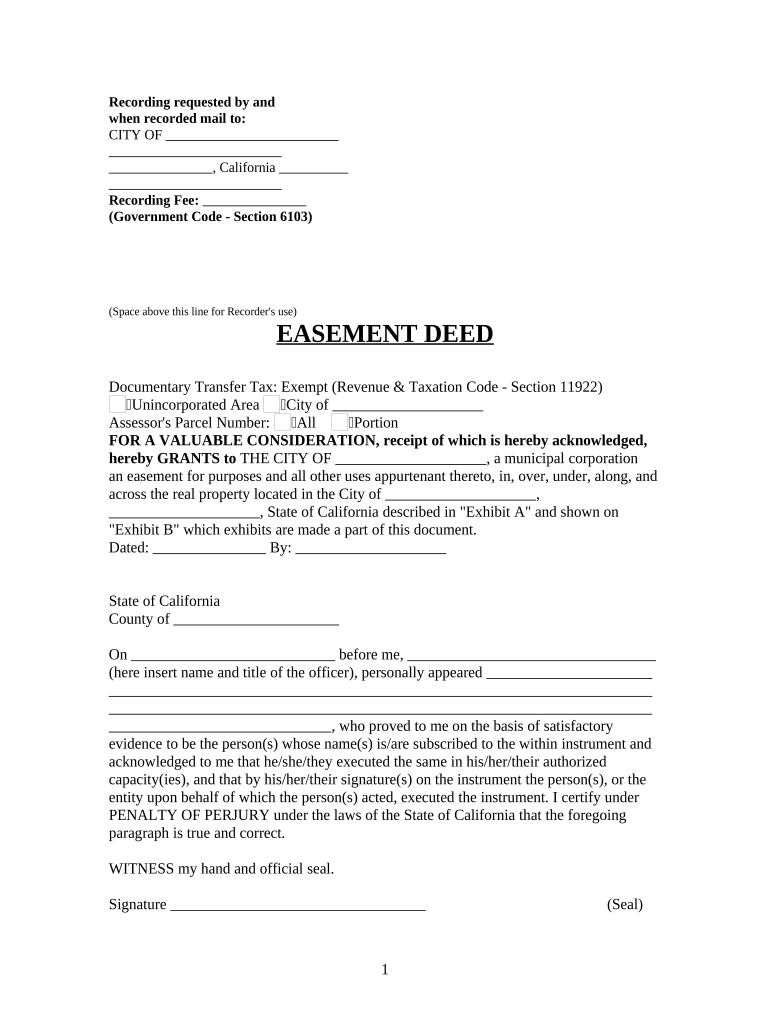
An Easement Deed is a written instrument that grants a property right in land to a party other than the owner, typically for access, utilities, or drainage. It describes the easement area, the parties, any limitations on use, and whether the easement is exclusive, nonexclusive, or appurtenant. Easement Deeds are recorded in the county where the property is located to provide public notice and preserve priority against subsequent purchasers. Proper legal description, execution, and recording determine whether the easement is enforceable and serves its intended long-term purpose.

Why a clear Easement Deed matters

A precise Easement Deed protects property rights, reduces future disputes, and ensures public notice through recording. It clarifies permitted uses, maintenance responsibilities, duration, and remedies for breach.

Why a clear Easement Deed matters

Which parties typically prepare and sign an Easement Deed

Common participants include property owners, utility companies, municipalities, surveyors, and title professionals.

  • Property owners and land developers who grant or reserve permanent or temporary use rights.
  • Utility companies and contractors needing rights-of-way for lines, pipes, or access.
  • Municipalities and government agencies securing public access, drainage, or conservation easements.

Each party should confirm authority to sign and follow local recording and notarization rules to protect priority and enforceability.

Core components to include in a professional Easement Deed

A complete Easement Deed combines legal description, parties, scope, and execution language to create an enforceable property interest.

Legal Description

A metes-and-bounds or recorded-plat description that precisely identifies the easement area; imprecise descriptions cause boundary disputes and recording rejections.
Granting Clause

Clear language stating grantor, grantee, and the exact rights conveyed (e.g., access, installation, maintenance), including whether rights are exclusive or nonexclusive.

Purpose and Scope

Limits on permitted activities, width, vertical clearances, permitted equipment, and any prohibited uses to reduce ambiguity and future litigation risk.

Duration

Whether the easement is perpetual, for a fixed term, or conditional; include termination triggers, renewal procedures, and transferability provisions.

Maintenance and Liability

Who maintains the easement area, who bears repair costs, indemnity language, and insurance expectations to reduce operational disputes.

Recording and Notices

Instructions for recording, address for notices, and dispute resolution or governing law clauses to clarify enforcement and jurisdiction.

Essential information to collect before drafting

Grantor Name: Exact legal name
Grantee Name: Exact legal name
Property Description: Full parcel description
Easement Area: Measured bounds
Consideration: Amount or statement
Effective Date: MM/DD/YYYY format

Step-by-step: preparing and executing an Easement Deed

Follow a consistent sequence to prepare, sign, and record the deed so it creates the intended property right and protects priority.

  • 01
    Gather records: Obtain title report and existing plat.
  • 02
    Draft deed: Include legal description and scope.
  • 03
    Execute and notarize: All parties sign before notary.
  • 04
    Record deed: File with county recorder.

How to configure an online workflow for execution

Set up roles, fields, and authentication so the deed flows to each signer in order and produces a complete audit trail.

Field Configuration
Signature Required; signer-specific placement
Date Auto-fill MM/DD/YYYY
Legal Description Locked text field; no edits by signer
Notary Block Place last; requires notarization

Where to send and file the executed Easement Deed

After execution and notarization, the deed should be routed for recording and distributed to interested parties to preserve notice and enforceability.

  • County Recorder: Record original instrument to establish public notice.
  • Title Company: Send recorded copy for title updates.
  • Grantee Records: Provide copy to easement holder for operations.
  • Grantor Files: Keep original and recorded copy for closing file.

Digital signing and file-sharing considerations

Use a platform that supports secure e-signature events, conditional fields, audit trails, and accepted export formats.

  • File formats: PDF, DOCX supported
  • Authentication: Email or SMS codes
  • Integrations: Salesforce, NetSuite, Box

Ensure the chosen solution can produce an unalterable executed PDF with notarization evidence and meets any industry compliance needs before relying on electronic execution.

Timelines and timing considerations for Easement Deeds

Timing affects priority, tax reporting, and development schedules. Record promptly after execution to protect against later conveyances.

Effective Date:

Date in deed controls when rights begin and affects priority.

Recording Timing:

Record as soon as practicable to protect against subsequent interests.

Tax Assessment:

Notify assessor where easement affects valuation or parcel boundaries.

Construction Start:

Coordinate start dates with recorded rights and permits.

Document Retention:

Keep executed originals for title and audit purposes.

Risks and adverse outcomes from incorrect Easement Deeds

Unrecorded Easement: Loss of priority
Ambiguous Description: Boundary disputes
Lack of Authority: Conveyance voidable
Missing Notarization: Recording rejection
Improper Scope: Operational conflicts
No Maintenance Terms: Cost disputes

Common preparation mistakes to avoid

  • Using a generic property description instead of the recorded legal description, which leads to ambiguity and title problems.
  • Failing to specify maintenance responsibilities and access times, which creates recurring disputes between owner and holder.
  • Skipping a county recording search for prior easements or encumbrances, which can leave the new easement subordinate or redundant.
  • Not confirming signer authority for entities or trusts, often requiring corrective affidavits or re-execution.

Who is authorized to sign an Easement Deed

Grantor Owner

The grantor is the current title holder or authorized representative (for corporations, an officer with signatory authority). Confirm authority via title report or corporate resolutions.

Grantee Representative

The grantee may be an individual, utility, or government agency; signatory authority should be documented and match recorded entity names to avoid rejection.

Practical tips for accurate and efficient completion

Adopt these practices to reduce recording delays and legal exposure when preparing an Easement Deed.

Use recorded legal descriptions
Copy the exact legal description from the current deed or plat to prevent boundary disputes and ensure the recorder accepts the instrument.
Confirm signatory authority
Obtain corporate resolutions, trust certifications, or homeowner association authorization when an entity signs to avoid later challenges to validity.
Coordinate recording order
Record immediately after notarization and before related conveyances to protect the easement's priority and prevent conflicting interests.
Keep complete audit records
Retain executed originals, recorded copies, and electronic audit trails showing who signed, when, and how the document was authenticated.

Practical examples of Easement Deed use

Real-world scenarios illustrate how easements are drafted, executed, and recorded for different needs.

Municipal Access Easement

A city grants a public access easement for a pedestrian path adjoining private lots to ensure connectivity.

  • The easement specifies width, permitted uses, and maintenance.
  • Recording the deed and updating municipal maps prevented future development conflicts and clarified park maintenance responsibilities for decades.

Utility Line Easement

A utility acquires a nonexclusive easement to install underground conduits across multiple parcels.

  • The deed limits surface disturbance and requires restoration.
  • Clear maintenance obligations and recorded notice minimized later disputes and supported coordinated construction across affected properties.

Comparison: eSignature vendor basics for executing Easement Deeds

Simple vendor feature and pricing comparisons can inform which eSignature solution supports notarization, bulk workflows, and compliance needs.

signNow DocuSign Adobe Sign PandaDoc HelloSign
Starting Price $8/user/mo $15/user/mo $14/user/mo $19/user/mo $15/user/mo
Free Trial 7-day free trial, no credit card No No Yes, limited Yes, limited
Bulk Send Yes Yes Yes Yes No
Audit Trail Yes Yes Yes Yes Yes
HIPAA Compliant Yes Yes Yes No No

Frequently asked questions about Easement Deeds

Answers to common execution, recording, and modification questions when working with Easement Deeds.


Need help? Contact support

be ready to get more
Join over 28 million airSlate SignNow users