Establishing secure connection…Loading editor…Preparing document…

California Energy Intake Form

This template is fully customizable. Edit the text, fill out the fields, and send it for signature. Give it a try!
California Energy Intake Form

What the California Energy Intake Form Is and when it's used

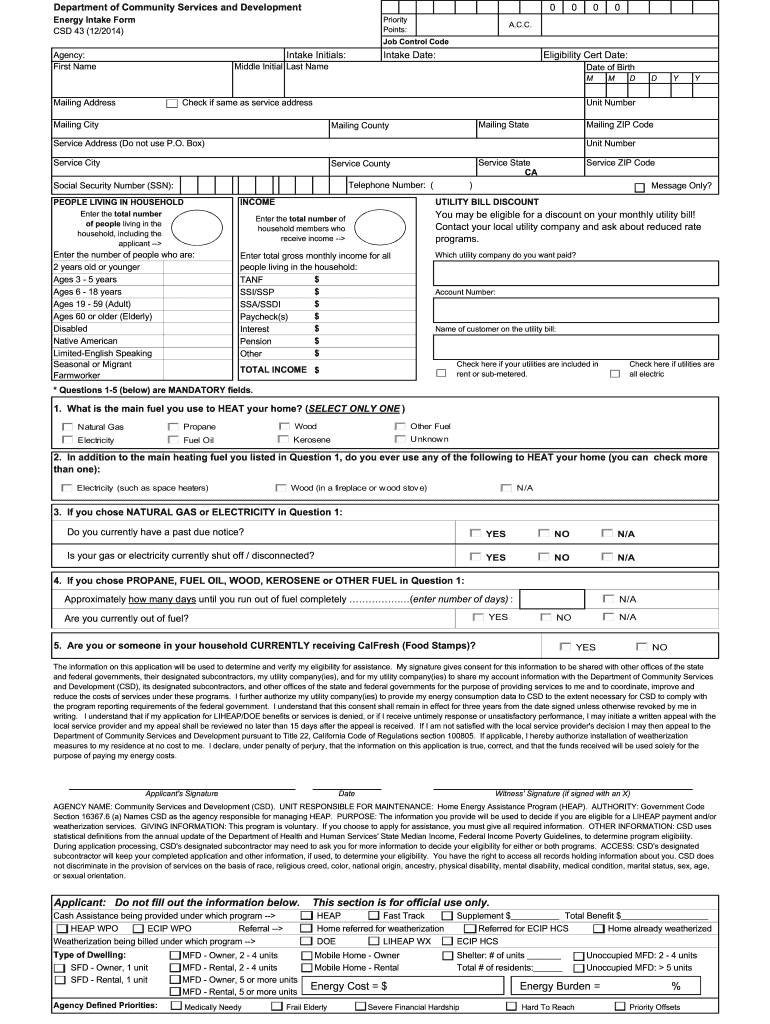
The California Energy Intake Form is a standardized document used by utilities, program administrators, contractors, and property managers to collect customer and site information needed for account setup, program enrollment, audits, or energy-efficiency incentives. It typically captures customer identity, service address, meter and account details, recent usage, device or equipment information, and explicit consent for data access and sharing. The form is designed for both paper and electronic completion; electronic execution is enforceable under the ESIGN Act (15 U.S.C. ch. 96) and state electronic transaction law when consumer-disclosure and intent requirements are met.

Why a standardized intake form matters for California energy programs

A consistent intake form reduces processing time, minimizes data-entry errors, and documents consent for utility data access. It supports regulatory compliance, creates a clear audit trail for approvals, and simplifies routing to program workflows while enabling lawful electronic signatures under ESIGN and state law.

Why a standardized intake form matters for California energy programs

Who completes and relies on the California Energy Intake Form

Typical users span utilities, program administrators, contractors, and property representatives who need accurate site and consent data before work or enrollment.

  • Utility staff and program admins responsible for enrollment, billing setup, and verifying eligibility for incentives or demand-response programs, often requiring meter and account validation.
  • Contractors and auditors who perform on-site assessments or installations and who need authorization to access utility consumption data and to document installed equipment.
  • Property owners, property managers, and tenants who provide the service address, account numbers, and sign consent for data access and service changes.

Essential sections to include in a professional intake form

A complete California Energy Intake Form should be organized into clear sections so staff and signers can find, verify, and authorize information quickly while preserving auditability and compliance.

Customer Contact

Primary name, phone, email, and preferred contact method for notices and follow-up; critical for identity proofing and service coordination.
Service Address

Street, city, state, ZIP, and unit number when applicable; differentiates billed property from mailing address and affects program eligibility.

Account & Meter

Utility account number, meter number, and utility name to match records and avoid misapplied enrollments or incentive payments.

Usage & Equipment

Recent energy usage, existing equipment details, and project descriptions that determine incentive levels and technical qualification.

Consent & Authorization

Explicit data-access consent, authorization to act on behalf of customer, and disclosure of rights under applicable consumer privacy laws.

Attachments

Supporting documents such as ID, ownership proof, invoices, or photos that substantiate eligibility and speed verification.

Security, privacy, and compliance checkpoints

Encryption: TLS 1.2/1.3 in transit, AES-256 at rest
Access Controls: Role-based permissions and audit logging
Authentication: Email, SMS code, or stronger ID verification
Audit Trail: Timestamps, IPs, and action history retained
HIPAA Consideration: BAA required if health data included
Data Minimization: Collect only fields necessary for purpose

Simple step-by-step: completing and submitting the form

Follow these sequential steps to gather required materials, complete the form, and ensure lawful electronic execution and delivery.

  • 01
    Gather Documents: Collect ID, recent utility bill, and any proof of ownership.
  • 02
    Complete Form: Fill all required fields using MM/DD/YYYY for dates.
  • 03
    Review & Sign: Confirm details, sign electronically per ESIGN requirements.
  • 04
    Submit: Send to the listed program contact or upload as directed.

Configuring the form for online workflows

Design the online workflow so required fields, conditional logic, and authentication match the program's risk and compliance needs.

Field Configuration
Required Fields Make name, address, account number mandatory
Conditional Fields Show equipment questions when incentive type selected
Authentication Level Email + SMS code for consumer-facing enrollments
File Uploads Allow PDF/JPEG, limit size to 10 MB

Typical online submission flow for the Intake Form

The online flow should be linear and produce a verifiable record: upload, authorize, sign, and archive for auditability.

  • Submit Online: User completes form and uploads attachments
  • Identity Check: Verify signer via email or SMS code
  • Consent Capture: Signer electronically accepts data-access language
  • Archive: System stores signed copy and audit trail

Technical and format requirements for e-submission

Ensure the platform supports PDF and DOCX uploads, audit trails, and secure storage to meet compliance needs.

  • File Formats: PDF, DOCX, and common image types accepted
  • Integrations: API or connector to CRM and billing systems
  • Authentication: Email/SMS or multi-factor methods supported

Key timing considerations and typical deadlines

Timelines vary by program; track enrollment windows, documentation deadlines, and response times to avoid lost incentives or processing delays.

Program Enrollment Window:

Submit intake before the program's published close date

Documentation Deadline:

Provide required attachments within program-specified days

Data Access Response:

Utilities typically process usage-authority requests within 30 days

Correction Period:

Allow a short period to correct clerical errors after submission

Incentive Claim Date:

Installations must meet program timelines to remain eligible

Consequences of incorrect or incomplete intake forms

Processing Delays: Missing data can stall enrollment
Denial of Benefits: Incomplete eligibility documentation may void incentives
Billing Errors: Wrong account or meter numbers cause misapplied charges
Privacy Fines: Noncompliance with CCPA or HIPAA triggers penalties
Invalid Consent: Unsigned consent prevents data access
Record Rejection: Unsigned or improperly signed forms may be rejected

Common mistakes to avoid when preparing the form

  • Entering abbreviated or inconsistent names that do not match government ID or utility account records, which often requires re-submission and delays processing.
  • Providing an incorrect meter or account number copied from the wrong property, leading to misapplied enrollments or billing disputes that take time to resolve.
  • Failing to attach required supporting documents such as proof of ownership or recent bills, which can result in temporary denial of program participation.
  • Using low-quality photos or scans for uploads that are unreadable, which forces manual follow-up and extends processing timelines.

eSignature vendor comparison for electronic Intake Form workflows

Compare per-user pricing, core features, and caps for common eSignature platforms to plan implementation costs and compliance capabilities.

signNow DocuSign Adobe Sign PandaDoc HelloSign
Starting Price $8/user/mo $15/user/mo $14/user/mo $19/user/mo $15/user/mo
Free Trial 7-day free trial, no credit card Varies by vendor Varies by vendor Varies by vendor Varies by vendor
Bulk Send Yes (Business Premium) Yes Yes Yes No
Audit Trail Yes Yes Yes Yes Yes
HIPAA Compliant Yes (BAA available) Yes Yes No No

Frequently asked questions about the California Energy Intake Form

Practical answers to common questions about signing, correcting, and storing intake forms, with attention to electronic execution and privacy.


Need help? Contact support

be ready to get more
Join over 28 million airSlate SignNow users