Establishing secure connection…Loading editor…Preparing document…

Explanation of Rights and Plea of Guilty Form

This template is fully customizable. Edit the text, fill out the fields, and send it for signature. Give it a try!
Explanation of Rights and Plea of Guilty Form

What the Explanation of Rights and Plea of Guilty Form Is

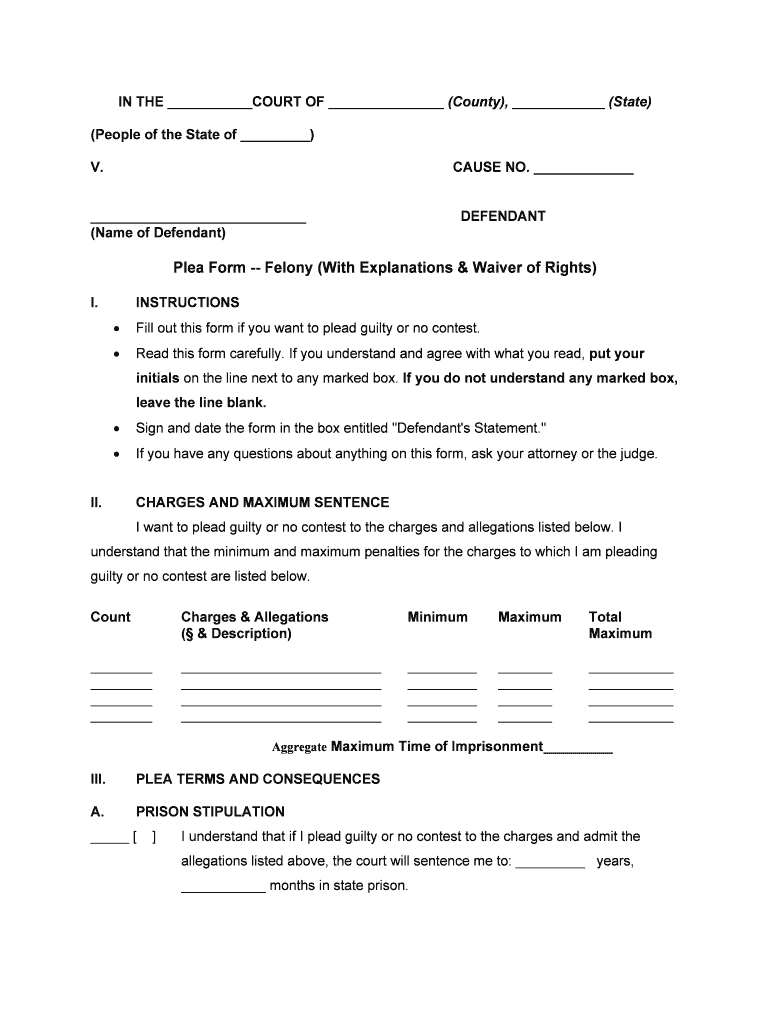
An Explanation of Rights and Plea of Guilty Form records a defendant’s voluntary guilty plea and documents the court’s advisements about constitutional and statutory rights that are being waived by pleading guilty. The form commonly lists the right to counsel, the right to a jury trial, the right to confront witnesses, the privilege against self-incrimination, and potential sentencing ranges and collateral consequences such as immigration, registration obligations, restitution, or driver license actions. It is signed and dated for the court record before judgment is entered.

Why this Form Matters in Plea Proceedings

Using a formal Explanation of Rights and Plea of Guilty Form ensures the court documents an informed and voluntary waiver of rights, creates a reliable record for appeals or collateral review, and reduces later disputes about whether the plea was knowing and voluntary.

Why this Form Matters in Plea Proceedings

Who Completes and Relies on This Form

This form is completed or reviewed by the key participants in a criminal plea process to document the defendant’s understanding and the court’s advisements.

  • Defense attorneys — prepare the form, explain constitutional rights, and verify the plea is voluntary.
  • Prosecutors — review charges, confirm a factual basis, and ensure prosecutorial disclosures are noted.
  • Judges and clerks — accept plea, record advisements on the docket, and enter judgment into the court file.

Step-by-Step: Completing the Plea Form

Follow these sequential steps to complete, review, and submit the Explanation of Rights and Plea of Guilty Form accurately to the court.

  • 01
    Confirm Case Info: Enter court, case number, and defendant identifiers.
  • 02
    Read Advisements: Carefully read each right and consequences aloud to defendant.
  • 03
    Record Plea: Mark guilty or no contest and state factual basis.
  • 04
    Sign and Date: Defendant, counsel, and judge must sign and date.

Essential Data Elements to Include

Defendant Name: Full legal name
Case Number: Court docket identifier
Offense Citation: Statute and charge
Waivers Checkboxes: Each right indicated
Signatures: Defendant, counsel, judge
Date Filed: MM/DD/YYYY date

Configuring an Online Plea Form Workflow

Configure an online workflow to collect signatures, authenticate signers, and route the completed form into the court record or attorney file.

Field Configuration
Signer Order Defendant > Counsel > Judge
Authentication Method Email link, SMS code, or court-approved KBA
Signature Type Accept image, typed or cryptographic signature per court rules
Storage Location Secure court EFS or encrypted cloud storage

Where to File and Who Receives the Form

The filing workflow shows who receives the form, where it is filed, and how the court record is updated after acceptance.

  • Court Clerk: Reviews form, files in case docket, and updates electronic record
  • Defense Counsel: Keeps client copy, files objections, and advises on consequences
  • Prosecutor: Confirms factual basis and records plea for sentencing
  • Probation/Records: Receives copy for supervision and pre-sentence reporting

Digital Signing and eSubmission Essentials

Electronic submission requires compatible PDF/Word documents, secure upload channels, and authentication methods accepted by the receiving court or agency.

  • File Formats: PDF/A or DOCX preferred
  • Integrations: Supports Salesforce, NetSuite, Google Workspace
  • Authentication: Email, SMS, or court-approved KBA

Typical Timelines and Deadlines to Expect

Timelines vary by jurisdiction; common milestones include plea entry, sentencing date, appeal deadlines, and pre-sentence report deadlines.

Plea Entry:

Filed in court record immediately upon acceptance

Sentencing:

Typically scheduled weeks to months after plea, varies

Appeal Period:

Waivers may limit appeal; consult counsel for deadlines

Pre-Sentence Report:

Probation prepares report prior to sentencing hearing

Record Retention:

Court retains form per retention rules and statutes

Common Mistakes to Avoid

  • Incomplete defendant identification can misfile case records, delay hearings, and complicate later appeals when identity verification is required by the court or probation officers.
  • Failing to document a clear factual basis for the plea invites claims of involuntariness and may result in plea withdrawal or vacatur on post-conviction review.
  • Omitting advisements about collateral consequences such as immigration or sex-offender registration can produce irreversible consequences and post-conviction relief claims.
  • Using unsigned or improperly witnessed forms risks rejection by the court, requiring re-administration and possibly delaying sentencing or supervision.

Penalties and Risks from an Incorrect or Incomplete Form

Invalid Plea: Conviction vacated on review
Waiver Loss: Loss of appeal rights
Immigration Impact: Deportation risk
Enhanced Sentence: Aggravating factors apply
Financial Liability: Restitution or fines
Record Consequences: Collateral disabilities

Vendor Pricing and Feature Snapshot for eSigning

This vendor pricing snapshot highlights common starter plans and technical features relevant to form signing and secure submission workflows.

signNow DocuSign Adobe Sign PandaDoc HelloSign
Starting Price $8/user/mo $15/user/mo $14/user/mo $19/user/mo $15/user/mo
Free Trial 7-day free trial Varies Varies Yes Yes
Bulk Send Yes Yes Yes Yes No
Audit Trail Yes Yes Yes Yes Yes
HIPAA Compliant Yes Yes Yes No No
Envelope Cap No cap 100 envelopes/user/year Varies by plan Varies by plan Varies by plan

Practical Examples of the Form in Use

Two illustrative scenarios show how the form documents plea advisements and supports case administration in court and defense practice.

Public Defender Example

A public defender completes the form during an arraignment to record the defendant’s understanding of rights

  • The attorney initials each waiver and notes the factual basis
  • The signed form becomes part of the docket, helping preserve the record for any later motion or appeal regarding voluntariness.

Prosecutor Submission

A prosecutor attaches the plea form to the case file when presenting a negotiated disposition

  • The document lists the agreed sentencing recommendation
  • The court reviews and signs the form, then the clerk files it as the official record for sentencing and post-conviction reference.

Practical Tips for Accurate and Efficient Completion

Follow consistent procedures and documentation habits to reduce errors, speed processing, and protect the integrity of the plea record.

Have Counsel Present
Ensure defense counsel is present when advisements are read; attorney participation helps demonstrate the defendant’s waiver was knowing and voluntary and strengthens the record against later challenges.
Document Collateral Consequences
Explicitly list immigration, registration, and licensing consequences where applicable so defendants acknowledge collateral impacts that may not be reversible after conviction.
Verify Signatures and Dates
Confirm all required signatures and dates before filing; unsigned or back-dated forms can be rejected and delay sentencing or supervision timelines.
Preserve Supporting Records
Retain copies of advisements, counsel notes, and any exhibits (medical or investigative) used to establish factual basis; these records aid in sentencing, parole, and post-conviction review.

FAQs: Common Questions About Plea Forms and Electronic Submission

Answers below address common concerns about waivers, withdrawal, e-sign acceptance, counsel presence, immigration effects, and record custody.


Need help? Contact support

be ready to get more
Join over 28 million airSlate SignNow users