Establishing secure connection…Loading editor…Preparing document…

Expungement Record

This template is fully customizable. Edit the text, fill out the fields, and send it for signature. Give it a try!
Expungement Record

What an Expungement Record Is and when it applies

An Expungement Record is the formal petition and supporting documentation filed with a court to request sealing or destruction of criminal records. It identifies the individual, the case or conviction to be sealed, the disposition, and statutory grounds for relief. Courts use the record to assess eligibility, notify prosecutors, and issue an order that limits public access to arrest or conviction information when granted.

Why an accurate Expungement Record matters

Filing a complete, well-prepared Expungement Record increases the chance of timely review, reduces procedural delays, and minimizes opportunities for administrative rejection.

Why an accurate Expungement Record matters

Who prepares and relies on an Expungement Record

Typical preparers and recipients are listed below to clarify roles in the filing process.

  • Individuals seeking relief: completes personal details, signs petition, and provides supporting proof of eligibility.
  • Defense attorneys or public defenders: drafts legal argument, prepares exhibits, and represents petitioner in hearings.
  • Court clerks and prosecutors: review filing, check statutory compliance, and may file objections or consent.

Primary signers and their responsibilities

Petitioner — Applicant

The petitioner is the individual whose record is at issue. You provide identifying information, case details, and sign declarations under penalty of perjury. Accurate dates, names, and case numbers are essential for court matching and notification.

Attorney — Counsel

An attorney files on behalf of the petitioner when engaged, prepares legal argument, and may handle service and hearing scheduling. Counsel ensures statutory citations and attachments meet local court rules and evidentiary requirements.

Essential parts of a professional Expungement Record

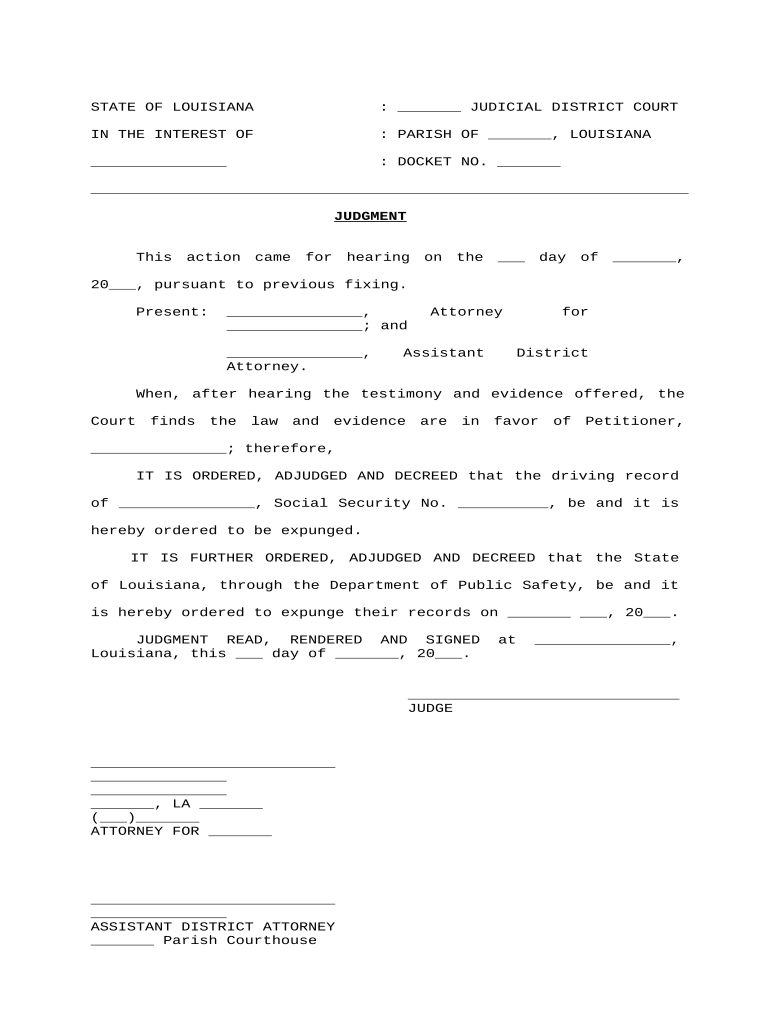
A complete Expungement Record organizes identification, case data, legal grounds, supporting exhibits, signatures, and proposed orders to make judicial review straightforward.

Caption

Court name, case number, parties, and title of the petition for easy docket identification and routing.
Petitioner Details

Full legal name, aliases, DOB, current address, and contact information to confirm identity and service.

Case History

Arrest dates, charge descriptions, case numbers, disposition dates, and sentencing details the court will verify.

Legal Basis

Statute citations and eligibility assertions showing why sealing or expungement is permitted under state law.

Supporting Documents

Certificates of disposition, docket entries, proof of completion, and any rehabilitation evidence attached as exhibits.

Proposed Order

Draft sealing order that identifies records to be restricted and the effective date if the court grants relief.

Required information fields for the Expungement Record

Full Legal Name: Exact name as on ID
Date of Birth: MM/DD/YYYY format
Case Number: Court docket or file number
Disposition: Guilty, dismissed, acquitted
Filing Court: Court name and county
Signature: Signed and dated by petitioner

Step-by-step: preparing and submitting an Expungement Record

Follow these sequential steps to assemble the petition, attach supporting documents, and submit to the appropriate court or clerk's office.

  • 01
    Verify Eligibility: Confirm statutory waiting periods and dispositional requirements before preparing the petition.
  • 02
    Gather Records: Obtain certified dispositions, sentencing documents, and any required certificates from the clerk.
  • 03
    Complete Petition: Fill fields accurately, attach exhibits, and include draft order for the judge.
  • 04
    File and Serve: File with court clerk and serve prosecutor per local rules; retain stamped copies.

How to configure an online workflow for an Expungement Record

When using an e-filing or eSignature platform, set up authentication, templates, and retention to align with court and privacy rules.

Field Configuration
Authentication Email + SMS code or stronger, depending on court rules
Template Prepopulate repetitive fields and attach required exhibits automatically
Conditional Fields Show eligibility questions only if earlier answers qualify petitioner
Notifications Send copies to petitioner, counsel, and clerk upon completion

End-to-end eSubmission flow for an Expungement Record

This simplified flow shows how a petition moves from preparation to court acceptance when submitted electronically.

  • Prepare Petition: Complete form and attach certified exhibits before beginning submission.
  • Add Signers: Include petitioner and attorney; set signing order if multiple signatures required.
  • Authenticate Signers: Use email link, SMS code, or stronger verification as required.
  • File to Court: Transmit signed file to court e-filing portal or deliver to clerk as required.

Technical and format considerations for digital submission

Courts and clerks accept different file types and authentication levels; verify local e-filing rules before submission.

  • Accepted Formats: PDF/A preferred; DOCX accepted by some portals
  • Authentication: Email, SMS, or multi-factor per court policy
  • Integrations: Works with common storage and case management systems

Typical timelines and processing expectations

Processing times vary by jurisdiction; use these typical benchmarks to set expectations and follow up appropriately.

Eligibility Waiting Period:

Often months to years from disposition; varies by statute

Filing Window:

File as soon as eligibility criteria are met to avoid delays

Court Review:

Clerks may take 2–8 weeks to docket and notify parties

Hearing Scheduling:

If required, hearings often set 4–12 weeks after filing

Order Issuance:

Once granted, clerk issues order; indexing agencies notified thereafter

Common mistakes that delay or derail expungement filings

  • Using an incorrect case number or year that misdirects the petition and delays court matching.
  • Failing to attach certified dispositions or sentencing documents required to prove eligibility.
  • Submitting unsigned petitions or not following local signature/notarization rules for judicial filings.
  • Not serving the prosecutor or other required parties according to local rules, causing procedural rejection.

Consequences of errors or omissions

Filing Rejection: Clerk returns or refuses to docket
Missed Deadlines: Statutory windows may lapse
Perjury Risk: False statements can carry criminal penalties
Delayed Relief: Processing delays extend exposure
Service Failures: Improper service may void proceedings
Administrative Fines: Court sanctions for repeated noncompliance

Real-world examples of expungement record use

Two illustrative scenarios show common filing paths and how the record is used to obtain relief.

Public Defender Clinic

A public defender files a petition on behalf of a client with multiple dispositions

  • Clinic attaches certified minutes and a rehabilitation letter
  • The court issues a sealing order within eight weeks after reviewing the complete record and hearing limited argument.

Self-Represented Petitioner

An individual prepares the petition using a standardized template and obtains certified disposition from the clerk

  • Petitioner serves the prosecutor per local rules
  • The court schedules a brief hearing and grants an order after verifying identity and eligibility.

Comparison: eSignature vendor pricing and core features

Basic pricing and feature availability across common eSignature vendors. signNow is listed first per vendor comparison conventions.

signNow DocuSign Adobe Sign PandaDoc HelloSign
Starting Price $8/user/mo $15/user/mo $14/user/mo $19/user/mo $15/user/mo
Free Trial 7-day free trial Varies by plan Varies by plan Varies by plan Varies by plan
Bulk Send Yes (plan-dependent) Yes Yes Yes No
Audit Trail Yes Yes Yes Yes Yes
HIPAA Compliant Yes Yes Yes No No

Common questions about completing and submitting an Expungement Record

Answers to frequent practical and technical questions about preparing, signing, and filing expungement petitions.


Need help? Contact support

be ready to get more
Join over 28 million airSlate SignNow users