Caption
Include the court name, county, case number, and party names in the caption. A precise caption ensures the notice links to the correct docket and avoids clerical rejection by the court clerk.
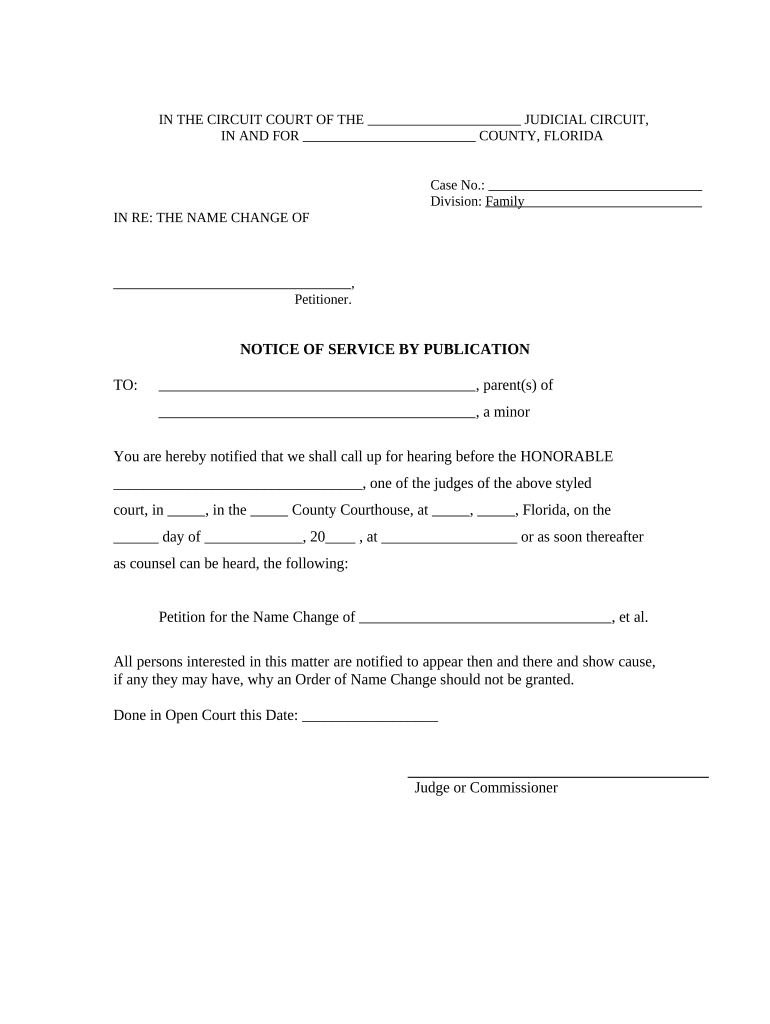
Using a Florida Notice of Service by Publication for Name Change ensures the court's jurisdictional requirements are met when personal service is impracticable, preserves the petitioner's timeline, and creates an official public record of the proceeding while protecting due-process rights for absent respondents.

Petitioners, private attorneys, and court clerks commonly prepare or review this notice when personal service cannot be completed in Florida name-change proceedings.
Include the court name, county, case number, and party names in the caption. A precise caption ensures the notice links to the correct docket and avoids clerical rejection by the court clerk.
State the petitioner's request for a legal name change, summarize grounds if required, and explain that service is being made by publication due to inability to locate the respondent.
Describe the respondent with last known address, physical description, aliases, or other identifying details to support the court's finding of diligent search before approving publication.
List the name of the newspaper, dates of publication, frequency, and affidavit references to create a clear public record and proof of service for the court.
Specify the date by which the respondent must file a written response or appear; use MM/DD/YYYY format and include consequences of default under applicable law if statutory.
Provide instructions to file the affidavit of publication, include the publisher's certification, and request the clerk enter the publication as proof of service in the official docket.
| Field | Configuration |
|---|---|
| Template | PDF with fillable fields |
| Signers | Petitioner and court clerk |
| Authentication | Email link; consider SMS code if required |
| Storage | Save signed PDF and affidavit to court folder |
Technical and platform requirements for publishing and e-filing the Florida Notice of Service by Publication for Name Change.
| signNow | DocuSign | Adobe Sign | PandaDoc | HelloSign | |
|---|---|---|---|---|---|
| Starting Price | $8/user/mo | $15/user/mo | $14/user/mo | $19/user/mo | $15/user/mo |
| Free Trial | Yes, 7-day trial | No | No | Yes, limited | Yes, limited |
| Bulk Send | Yes | Yes | Yes | Yes | No |
| Audit Trail | Yes | Yes | Yes | Yes | Yes |
| HIPAA Compliant | Yes | Yes | Yes | No | No |