Establishing secure connection…Loading editor…Preparing document…

Foreign Judgment

This template is fully customizable. Edit the text, fill out the fields, and send it for signature. Give it a try!
Foreign Judgment

What a Foreign Judgment Is and why it matters

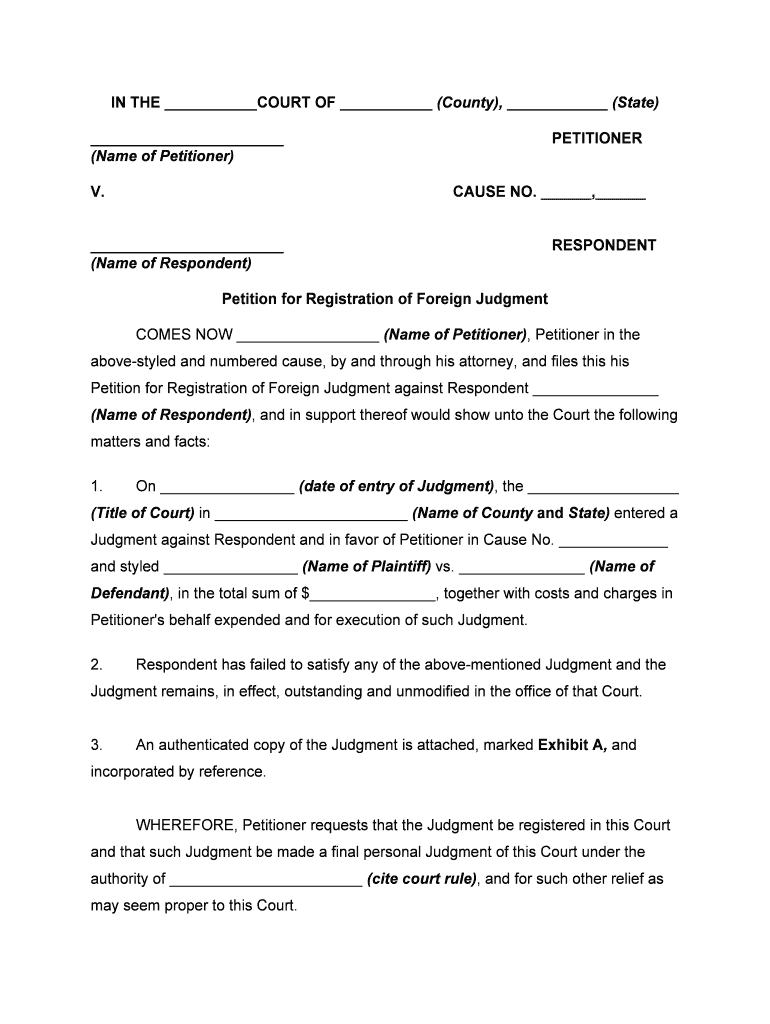
A Foreign Judgment is a court decision entered in one jurisdiction that a party seeks to recognize and enforce in another jurisdiction. In the U.S. context this usually means taking a judgment issued by a foreign country or by a court in a different U.S. state and converting it into an enforceable domestic judgment so creditors can collect, levy assets, or record liens. Recognition procedures vary by source jurisdiction and by the forum state’s statutes and rules; successful enforcement typically requires certified copies, service documentation, and adherence to local filing steps.

Why recognizing a Foreign Judgment is important

Recognition creates a domestic basis to execute remedies — garnishment, liens, asset seizure — without retrying the original dispute. Proper domestication reduces delay and litigation cost, preserves remedies across jurisdictions, and clarifies claimant and debtor rights under state registration statutes.

Why recognizing a Foreign Judgment is important

Who commonly deals with Foreign Judgments

Each user group typically follows the same core steps but adapts filings, authentication, and service methods to the forum state’s rules.

  • Law firms representing creditors seeking enforcement in a different state or country.
  • Banks and financial institutions pursuing judgment collection or lien placement.
  • In-house counsel and collection agencies coordinating filing, service, and enforcement steps.

Who can sign or file a Foreign Judgment

Court Clerk

A court clerk certifies filings, records docket entries, and issues certified copies or exemplified records when required by the receiving jurisdiction; clerks do not provide legal advice but process domesticating paperwork per local rules.

Authorized Creditor Representative

An attorney or designated agent signs affidavits and filing declarations on behalf of the judgment creditor; they must be authorized in writing and may need to file a power of attorney or representation notice with the receiving court.

Essential components to include with a Foreign Judgment filing

A complete domesticating package reduces rejection risk and speeds enforcement. Include certified records, statutory affidavits, accurate translations, and proof of service tailored to the receiving state’s requirements.

Certified Judgment

A court-certified or exemplified copy of the foreign judgment showing the issuing court’s seal and judgment text; many states require a certified copy for registration.
Apostille / Auth

When the judgment comes from a Hague Convention state, include an apostille or appropriate authentication to verify the document’s official origin.

Translation

Certified translation into English for non-English judgments, with translator affidavit confirming accuracy and translator credentials.

Affidavit of Judgment

A sworn affidavit from the judgment creditor or counsel summarizing the judgment, amounts owed, and that the judgment is final and enforceable in the issuing jurisdiction.

Proof of Service

Court or process-server returns showing notice to the judgment debtor as required by the forum state for registration or enforcement.

Registration Filing

A completed registration or domestication form required by the receiving court, plus any local filing fee and cover sheet.

Step-by-step: domesticating and enforcing a Foreign Judgment

Follow a consistent sequence to convert a foreign judgment into a domestic enforceable judgment and preserve collection options.

  • 01
    Obtain certified record: Request a certified or exemplified judgment from the issuing court.
  • 02
    Authenticate or apostille: Add apostille or embassy authentication if required.
  • 03
    File registration: File the registration or domestication petition in the chosen forum state.
  • 04
    Serve and enforce: Serve the debtor per local rules then pursue enforcement remedies.

Where to file, submit, and serve a Foreign Judgment

The receiving venue and service method determine how the court will treat your registration. Choose the correct clerk’s office and follow local service and filing rules.

  • State Court Clerk: File the registration petition or domesticating affidavit at the civil clerk’s office where enforcement is sought.
  • County Recorder: Record the judgment lien with the county recorder or land records office when attaching a lien to real property.
  • Service on Debtor: Serve the debtor using the state’s approved methods: sheriff, process server, or certified mail where allowed.
  • Supporting Filings: File translations, apostilles, affidavits, and proof of service required by the receiving court.

Digital signing, notarization, and file formats to use

Confirm the receiving court’s local rules for electronic filing, remote notarization acceptance, and required file naming conventions before eSubmitting documents.

  • Accepted Formats: PDF, PDF/A, DOCX
  • Authentication: Email, SMS code, or KBA
  • Notarization: In-person or RON where allowed

Consequences of incorrect or incomplete Foreign Judgment filings

Unenforceable Filing: Missed formalities can render a judgment non-enforceable
Dismissal: Court may dismiss registration without prejudice
Delay: Errors cause procedural delays and added costs
Extra Litigation: Debtor may successfully challenge recognition
Fee Loss: Nonrefundable filing or notary fees
Ethical Risk: Misstated affidavits risk sanctions for counsel

Common mistakes to avoid when preparing a Foreign Judgment filing

  • Submitting uncertified or uncertified-appearing copies instead of exemplified or certified records is a frequent cause of rejection by receiving clerks.
  • Failing to include a required apostille or authentication for judgments from Hague Convention countries often results in administrative refusal.
  • Not providing a certified translation or translator affidavit for non-English judgments delays processing and can lead to additional briefing.
  • Using inconsistent party names, incorrect case numbers, or mismatched dates triggers verification queries and may stall enforcement actions.

Practical tips for accurate, efficient Foreign Judgment processing

Follow a verification checklist and confirm requirements of the receiving court before submission to prevent common rejections and speed enforcement.

Verify local rules first
Consult the receiving court’s local civil rules and clerk’s office for registration forms, filing fees, and accepted authentication methods to avoid unnecessary rework.
Use certified originals
Obtain exemplified or certified copies from the issuing court with visible seals to satisfy domestic registration requirements and reduce authentication questions.
Include clear calculations
Provide a detailed post-judgment amounts schedule showing principal, interest, costs, and calculation dates to prevent disputes over enforceable totals.
Document service thoroughly
Keep and file proof of service or process returns matching the receiving state’s rules to preclude jurisdictional challenges by the debtor.

Real-world examples of remote and cross-jurisdictional document workflows

Organizations handling cross-border or interstate enforcement often rely on digital workflows for speed and traceability when preparing recognition packages.

Brian Fitzgibbons — COO

Teams need simple, reliable document flows for cross-jurisdiction work

  • Accessibility for external parties matters during enforcement
  • The interface is simple and easy-to-use for our team; more importantly, it is just as easy for our customers.

Kodi-Marie Evans — Director

Large organizations require flexible formats and integrations to link case systems

  • Integration with back-office tools prevents errors
  • airSlate SignNow provides us with the flexibility needed to get the right signatures on the right documents, in the right formats, based on our integration with NetSuite.

How to configure an online workflow for a Foreign Judgment package

Set up a reproducible template that attaches certified copies, translations, and affidavit fields so each new registration follows the same validation steps.

Field Configuration
Certified Copy Required attachment; PDF/A preferred
Translator Affidavit Optional conditional field if language != English
Apostille Upload Optional attachment with validation checkbox
Service Proof Required after filing; allow multiple file uploads

Supporting documents and authentication to include

Certified Judgment: Certified copy
Apostille: Authentication
Translator Affidavit: Signed affidavit
Affidavit of Service: Proof of notice
Fee Receipt: Court fee proof
Power of Attorney: If representative signs

eSignature vendor comparison for document signing and notarization

Compare starting price and core capabilities relevant to Foreign Judgment workflows: per-user price, trial availability, bulk send, audit trail, HIPAA compliance, and envelope or session limits.

signNow DocuSign Adobe Sign PandaDoc HelloSign
Starting Price $8/user/mo $15/user/mo $14/user/mo $19/user/mo $15/user/mo
Free Trial 7-day free trial No No No No
Bulk Send Yes Yes Yes Yes No
Audit Trail Yes Yes Yes Yes Yes
HIPAA Compliant Yes Yes Yes No No

Frequently asked questions about Foreign Judgment filings

Answers to common procedural and technical questions to help avoid delays during registration, service, and enforcement of foreign judgments.


Need help? Contact support

be ready to get more
Join over 28 million airSlate SignNow users