Establishing secure connection…Loading editor…Preparing document…

Guam Wage and Tax Statement

This template is fully customizable. Edit the text, fill out the fields, and send it for signature. Give it a try!
Guam Wage and Tax Statement

What the Guam Wage and Tax Statement Is

The Guam Wage and Tax Statement is a standardized employer-issued payroll report used in Guam to summarize an employee’s annual wages, tax withholdings, and related payroll information. Employers complete one statement per employee and provide copies to both the employee and the Guam Department of Revenue and Taxation or other designated territory tax authority. The form mirrors mainland U.S. wage reporting practices and is used to reconcile income for individual returns, determine payroll tax liabilities, and support withholding and benefits calculations during the tax year.

Why Accurate Statements Matter

A Guam Wage and Tax Statement provides employees and tax authorities with a concise record of earnings and withholdings, helps employers meet local reporting obligations, and supports accurate individual tax filings and payroll tax reconciliation for the territory.

Why Accurate Statements Matter

Who prepares and relies on the Guam Wage and Tax Statement

Employers, payroll administrators, and HR teams in Guam use the Wage and Tax Statement to report wages and withholdings to employees and territorial tax authorities.

  • Private employers reporting employee compensation and tax withholding for annual reconciliation.
  • Payroll service providers preparing statements for multiple employer clients across Guam.
  • Employees receiving the statement to confirm wages, withholdings, and year-end totals.

Step-by-step: prepare and distribute the wage statement

Follow these sequential steps to prepare and distribute the Guam Wage and Tax Statement for each payroll year.

  • 01
    Gather payroll data: Compile wage, withholding, and benefits totals for the tax year.
  • 02
    Complete form fields: Enter employer and employee details and dollar amounts accurately.
  • 03
    Validate TINs: Confirm Social Security numbers and FEINs match official records.
  • 04
    Distribute copies: Provide statements to employees and file required copies with Guam tax agency.

Set up an electronic workflow for Guam wage statements

Configure an electronic workflow to populate, review, and deliver Guam Wage and Tax Statements while preserving audit trails and signer authentication.

Field Configuration
Field mapping from payroll system Import CSV to auto-fill wages, taxes, and names.
Signer authentication and verification options Enable email, SMS code, or KBA as needed.
Audit trail retention and export settings Record timestamps, IPs, and action history.
Template versioning and approval gates Lock approved templates to prevent unauthorized edits.

Technical requirements for electronic delivery and storage

For eSubmission and electronic distribution, ensure platform support for secure PDFs, audit trails, and signer authentication.

  • File formats: PDF, DOCX, and CSV supported.
  • Authentication Methods: Email, SMS, and multi-factor options.
  • Integrations: Connect to payroll, HR, and cloud storage.

Typical eSubmission workflow at a glance

Typical eSubmission workflow moves from data import to signature collection, then distribution and record retention.

  • Upload document: Import the populated statement as a PDF or template.
  • Place fields: Add signature, date, and checkbox fields for each signer.
  • Send to signer: Deliver via email link or secure signing portal.
  • Store signed copy: Save completed PDF with audit trail and access logs.

Key delivery and filing deadlines to track

Key deadlines for providing and filing wage statements affect employee filing and employer compliance with territorial and federal reporting timelines.

Employee delivery deadline:

Provide statement to employee by January 31 each year.

Filing to territorial agency:

File required copies with Guam tax authority by January 31.

Electronic filing options and deadlines:

If filing electronically, follow Guam agency instructions and deadlines.

Correction and amended statements:

Issue corrected statements promptly; follow territorial correction procedures.

Payroll record retention requirement:

Retain payroll records for at least three years from filing.

Penalties and common compliance risks

Late filing penalties: Penalties start at $60 per late form.
Failure to supply to employee: May trigger $60–$330 per form penalties.
Intentional disregard: $660+ per form with no maximum cap.
Incorrect TIN consequences: Backup withholding at 24% may apply.
I-9 paperwork fines: $281–$2,789 per violation possible.
Administrative delays: Late reports can cause audits and interest charges.

Security and compliance considerations for electronic statements

Encryption: TLS 1.2/1.3 and AES-256 at rest.
Audit trail: Comprehensive timestamps, IPs, and actions.
HIPAA support: BAA available for covered entities.
Compliance certifications: SOC 2 Type II, ISO 27001, PCI DSS.
21 CFR Part 11: Support for FDA-regulated records.
Access controls: Role-based permissions and SSO options.

Essential components of a professional wage and tax statement

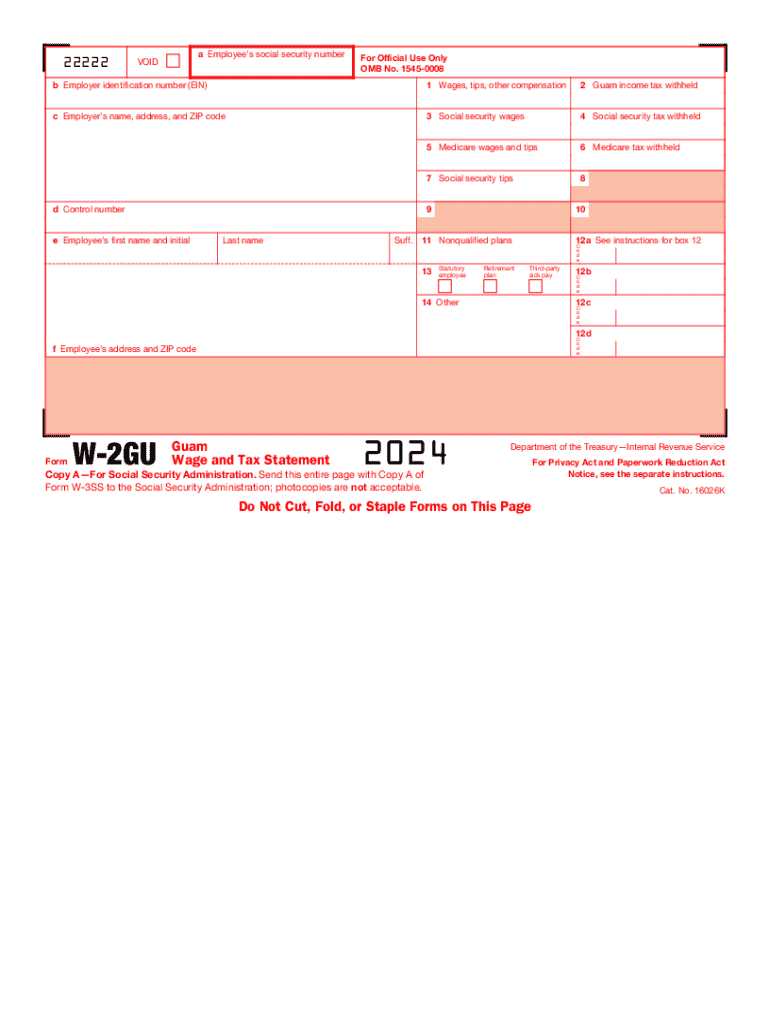
A complete Guam Wage and Tax Statement includes employer and employee identifiers, reported wages, tax withholdings, benefits adjustments, and official certification or signature blocks.

Identifiers

Employer FEIN and legal name plus employee legal name and TIN must appear. Accurate identifiers enable proper tax reporting, reconciliation, and cross-referencing with payroll tax accounts.
Wage totals

Detailed year-to-date wages, including regular pay, overtime, tips, and bonuses. Clearly separate taxable and non-taxable items to avoid reporting discrepancies and ensure correct tax calculations.

Withholdings

Federal, territorial, and other withholdings should be itemized. Social Security, Medicare, and income tax amounts must match payroll records to prevent withholding disputes and penalties.

Benefits and deductions

Pre-tax contributions, retirement deferrals, and employer-paid benefits should be listed. These entries affect taxable wages and may require separate reporting on other forms.

Certification

Authorized representative or payroll officer should certify accuracy. Signature or electronic attestation provides legal responsibility and supports audit defense in case of discrepancies.

Year-end summaries

Totals for the tax year, including taxable wages and withheld taxes, enable employees to prepare returns and allow tax authorities to reconcile reported income.

Comparing eSignature vendors for Guam Wage and Tax Statement workflows

Compare baseline pricing and common capabilities for signing and delivering Guam Wage and Tax Statements; signNow is listed first for direct comparison of starting price and core features.

signNow DocuSign Adobe Sign PandaDoc HelloSign
Starting Price $8/user/mo $15/user/mo $14/user/mo $19/user/mo $15/user/mo
Free Trial 7-day free trial Varies by plan Varies by plan Varies by plan Varies by plan
Bulk Send Yes Yes Yes Yes No
Audit Trail Yes Yes Yes Yes Yes
Envelope Cap No envelope cap 100 envelopes/user/year Varies Varies Varies

FAQs and troubleshooting for common issues

[INTRO] Answers to frequent questions about completing, filing, correcting, and distributing the Guam Wage and Tax Statement in Guam payroll operations.


Need help? Contact support

be ready to get more
Join over 28 million airSlate SignNow users