Establishing secure connection…Loading editor…Preparing document…

Guardian Ad Litem

This template is fully customizable. Edit the text, fill out the fields, and send it for signature. Give it a try!
Guardian Ad Litem

What a Guardian Ad Litem Is and When Courts Use One

A Guardian Ad Litem (GAL) is a person appointed by a court to investigate and represent the best interests of a minor, incapacitated adult, or other protected party in legal proceedings. Courts commonly appoint GALs in child custody, abuse, neglect, guardianship, and probate matters. The GAL may interview parties, review records, visit the subject, and file a written report and recommendation with the court. The appointment is a judicial order that defines the GAL’s scope, duties, and time frame under local court rules and applicable state statutes.

Why a Clear, Accurate GAL Report Matters

A properly prepared Guardian Ad Litem report gives the court objective findings and practical recommendations, helps protect the subject’s interests, reduces delays, and creates a documented record the court can rely on when making legal decisions.

Why a Clear, Accurate GAL Report Matters

Who Prepares, Signs, and Relies on a Guardian Ad Litem

Accurate preparation reduces contested filings and supports timely judicial decisions; confirm roles with the assigning court before filing.

  • Judges and court clerks — Receive and review GAL appointments, set deadlines, and rely on the report for custody or guardianship rulings.
  • Attorneys and Guardian Ad Litem designees — Prepare, file, and may sign the report; communicate findings to the court and parties.
  • Child welfare and social services — Provide records, cooperate with investigations, and implement court-ordered protections following a GAL recommendation.

Essential Components of a Professional GAL Report

A complete report organizes findings, documents investigative steps, and sets clear recommendations so the court can act without further delay.

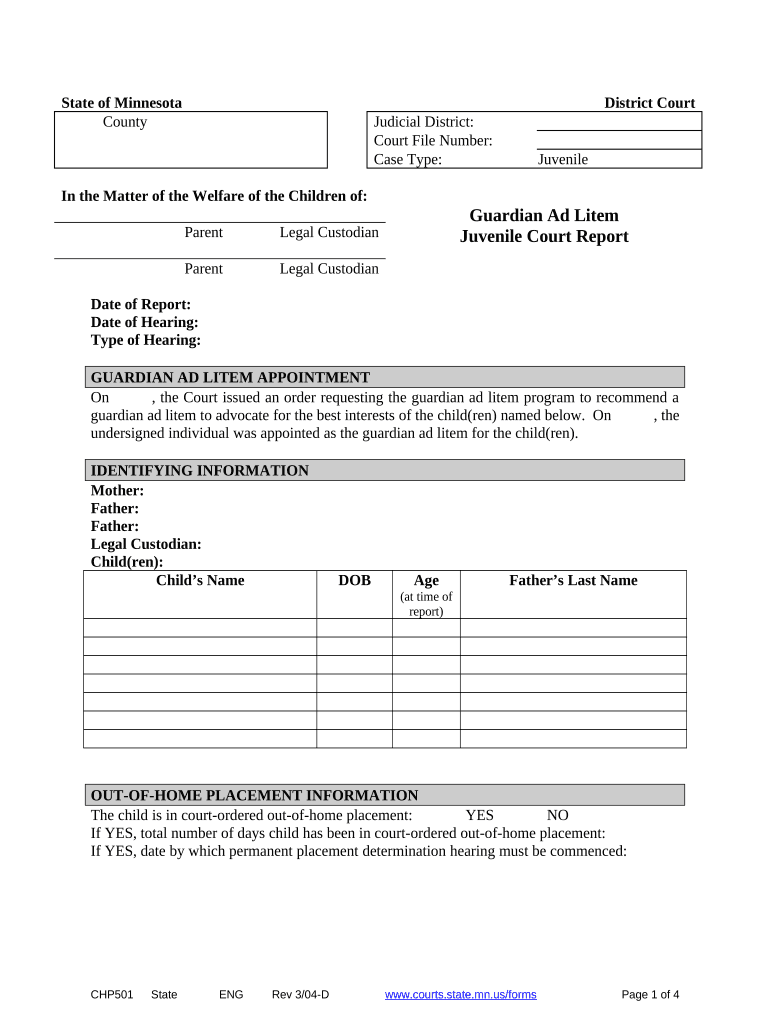
Appointment Order

Include the court order date, docket number, appointing judge, and specific authority or limitations granted to the GAL for transparency and jurisdictional context in the case file.
Scope of Duties

State the GAL’s precise duties: interviews, medical and school record review, home visits, safety assessments, and whether the GAL provides an independent legal recommendation.

Case Background

Summarize procedural history, parties involved, prior findings, and relevant filings so the court can see how the current investigation fits the case chronology.

Investigative Findings

Detail observations, interview summaries, collateral contacts, and factual evidence with dates and sources to support conclusions and minimize hearsay disputes.

Recommendations

Provide clear, prioritized recommendations for custody, placement, visitation, services, or further evaluation, linking each recommendation to specific facts or safety concerns.

Signature and Date

Include the GAL’s printed name, title, signature, contact information, and the date signed. Note any supervising attorney or certifying credential if required.

Required Case and Party Information

Full Legal Name: Name as on ID
Date of Birth: MM/DD/YYYY
Court Case Number: Docket or case ID
Contact Information: Address and phone
Appointing Judge: Judge name
GAL Credentials: License or certification

Step-by-Step: Prepare and File the Guardian Ad Litem Document

Follow these steps to assemble the report, confirm authority, obtain signatures, and submit to the court according to local rules.

  • 01
    Gather records: Collect medical, school, and case files before drafting.
  • 02
    Draft report: Write findings with dated citations and source identifiers.
  • 03
    Sign and date: Affix signature and include contact and credential details.
  • 04
    File with court: Submit per court clerk instructions and serve parties.

Configuring an Online GAL Workflow for Electronic Completion

Set up authentication, role assignments, and document routing to match court service and privacy requirements before sending for signature.

Field Configuration
Authentication Email or SMS code
Signer Order Sequential or parallel
Document Security Password and encryption
Retention PDF plus audit trail

Where to File and How to Serve the Completed Report

Filing and service requirements differ by jurisdiction; confirm exact clerk procedures and approved e-filing portals for your court before submission.

  • File with clerk: Submit original to the assigned court clerk.
  • Serve parties: Provide copies by mail or e-service per local rule.
  • Upload to portal: Use court e-filing if available and permitted.
  • Retain copies: Keep signed originals and electronic audit trail.

Digital Signing and Distribution Tools to Support GAL Workflows

Ensure the chosen platform meets court acceptance, confidentiality obligations, and any applicable HIPAA or state privacy rules before relying on e-submission.

  • signNow Integration: Integrates with Salesforce, NetSuite
  • Document Formats: PDF, DOCX, HTML supported
  • Authentication Options: Email, SMS, KBA

Typical Timelines and When the Court Expects a GAL Report

Expect timing to vary by court type and local rule; these are typical industry expectations and should be verified with the assigning court.

Appointment to Investigation:

Often begins within 7–14 days of appointment

Report Due Date:

Commonly 30–90 days unless court orders otherwise

Request for Extension:

File a motion to extend before the original due date

Objection Period:

Parties may object within time set by local rule

Hearing Scheduling:

Judge may set a hearing after report filing

Common Preparation Mistakes to Avoid

  • Missing or incorrect case numbers and docket references that cause the clerk to reject or misfile the report.
  • Incomplete source citations for findings, leaving conclusions unsupported and vulnerable to admissibility challenges.
  • Using vague or conclusory language instead of objective observations, which weakens the document’s utility for judicial decision making.
  • Failing to serve all parties properly under local rules, which can necessitate refiling and cause hearing delays.

Consequences of an Incorrect or Incomplete GAL Filing

Case Delays: Proceedings postponed
Report Rejection: Clerk returns filing
Court Sanctions: Possible monetary or directive sanctions
Appointment Vacated: GAL removed or reassigned
Evidence Excluded: Findings may be inadmissible
Professional Liability: Potential malpractice exposure

Frequently Asked Questions About Guardian Ad Litem Forms and Filing

Answers to common questions on authority, signatures, electronic filing, and retention to reduce confusion and prevent filing errors.


Need help? Contact support

be ready to get more
Join over 28 million airSlate SignNow users