Establishing secure connection…Loading editor…Preparing document…

Petition for Writ of Habeas Corpus

This template is fully customizable. Edit the text, fill out the fields, and send it for signature. Give it a try!
Petition for Writ of Habeas Corpus

What a Petition for Writ of Habeas Corpus Is and When It’s Used

A Petition for Writ of Habeas Corpus is a formal request to a court to review whether a person is lawfully detained and to order release if detention is unlawful. It identifies the petitioner and detainee, explains the custodial facts, sets out legal grounds for relief, and asks the court to grant a writ. Petitions may be filed in state or federal court depending on the underlying conviction and claims. Common grounds include constitutional violations, jurisdictional errors, or newly discovered evidence affecting custody.

Why Filing a Clear, Complete Habeas Petition Matters

A well-prepared petition defines legal issues, preserves claims for review, and minimizes procedural rejection.

Why Filing a Clear, Complete Habeas Petition Matters

Who Typically Prepares or Files These Petitions

Choose the appropriate filer based on legal complexity, available counsel, and statutory filing rules.

  • Pro se petitioners seeking release or relief without an attorney; must be precise and follow court rules.
  • Public defenders and criminal defense attorneys representing clients in state or federal post-conviction proceedings.
  • Civil rights and appellate lawyers handling constitutional claims or jurisdictional issues on behalf of detainees.

Core Parts of a Professional Petition for Writ of Habeas Corpus

A complete petition follows court formatting and includes consistent, well-organized sections so judges and clerks can evaluate jurisdiction, timeliness, factual record, and requested relief without ambiguity.

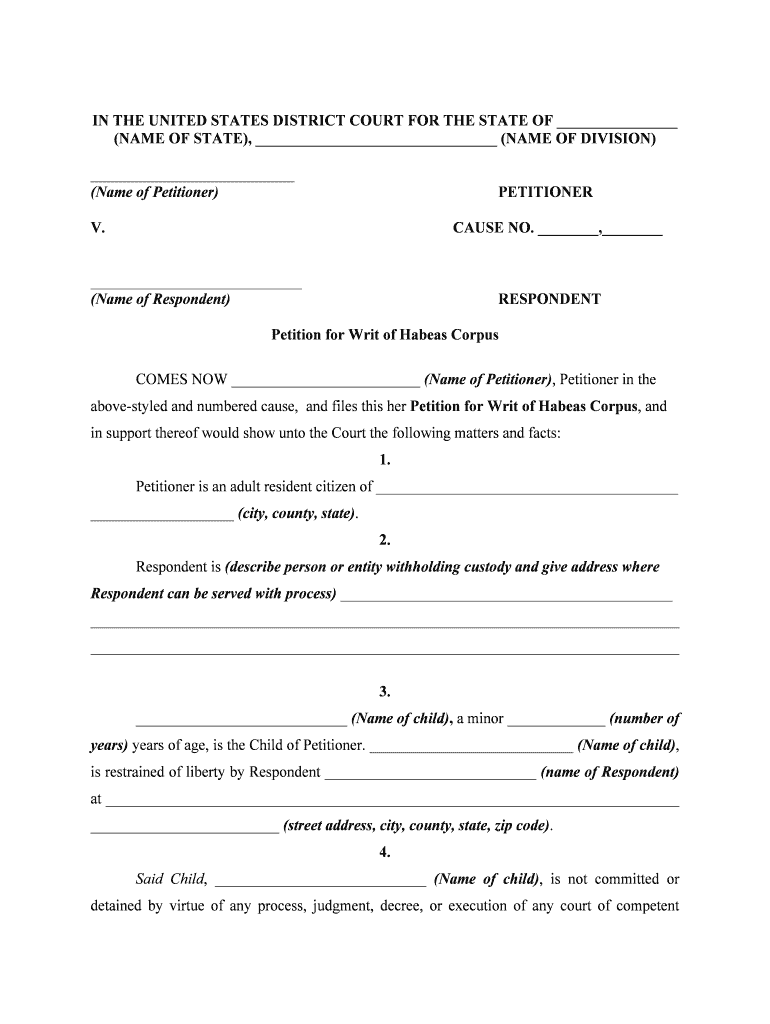
Case Caption

Clear caption naming petitioner, detainee, respondent (custodian), and the court; includes case number if available and proper venue identification to establish jurisdiction and procedural posture.
Jurisdictional Statement

Concise legal basis for federal or state habeas jurisdiction, identifying statutes or rules that authorize the court to issue the writ and why this court is the correct venue.

Statement of Facts

Chronological, factual account of detention including dates of conviction, execution of sentence, and specific events or errors that support the petitioner's claim of unlawful custody.

Legal Grounds

Numbered claims explaining constitutional or statutory violations, legal citations to controlling law, and the legal theory that connects facts to entitlement to relief.

Supporting Evidence

List and attach documentary exhibits, transcripts, affidavits, and records that corroborate factual claims and establish what evidence the court must consider.

Prayer for Relief

Specific requests such as vacatur of judgment, resentencing, a new trial, or immediate release, plus any ancillary remedial requests like appointment of counsel.

Step-by-Step: Completing a Petition for Writ of Habeas Corpus

Follow these sequential steps to draft, substantiate, review, and file a petition that meets court rules and preserves the record for review.

  • 01
    Draft Petition: Write caption, facts, grounds, and requested relief with clear headings and numbered claims.
  • 02
    Attach Evidence: Add transcripts, judgment copies, and affidavits; label exhibits and reference them in the petition.
  • 03
    Check Timeliness: Confirm statute of limitations and confirm whether tolling or equitable exceptions apply before filing.
  • 04
    File and Serve: File in the correct court, pay fee or request IFP, and serve the custodial respondent per local rules.

Configuring an Online Workflow to Prepare and File the Petition

Set up a repeatable online workflow that collects required inputs, builds exhibits, and routes the petition for signature and submission.

Field Configuration
Template Preload caption, standard headings, and numbered claim sections for reuse across filings.
Signer Roles Assign roles for petitioner, attorney, and court clerk with required authentication levels.
Conditional Fields Show or hide sections like IFP request based on prior answers to save time.
Document Assembly Automate exhibit merging and PDF conversion to produce a court-ready packet.

Where to File and How Documents Flow After Filing

Understanding jurisdiction, filing location, and service procedures is essential to ensure the petition is accepted and routed correctly.

  • Determine Venue: File in state or federal court as applicable to the conviction and claims.
  • Clerk Filing: Submit the petition to the clerk — e-filing where accepted or in-person otherwise.
  • Serve Respondent: Serve the custodian and any named respondents in accordance with local rules.
  • Court Response: Court may order an answer, stay, or schedule briefing and hearings.

Digital Signing, Authentication, and File Format Considerations

Use authenticated e-signatures, PDF/A output, and secure attachments to meet court and evidence requirements.

  • File Formats: PDF or PDF/A preferred for court filings.
  • Authentication: Use multi-factor authentication for attorney signatures.
  • Audit Trail: Preserve timestamps, IP, and signer identity logs.

Essential Information to Include in the Petition

Petitioner: Full legal name
Detainee: Legal name and aliases
Custodian: Facility name and official
Detention Location: Facility and address
Grounds: Specific legal claims
Requested Relief: Precise remedy sought

Key Timing Rules, Deadlines, and What to Expect After Filing

Habeas petitions face strict timing rules and procedural thresholds; confirm applicable limits and immediate relief standards before filing.

Statute of Limitations:

Often subject to a one-year limitations period; verify jurisdictional timing rules.

Emergency Relief:

Seek stay or injunction promptly where release is time-sensitive.

Service Deadlines:

Serve respondent per local rules after filing to trigger response timeline.

Answer Period:

Respondent typically has a fixed period to file an answer or motion.

Appeal Timelines:

If denied, appellate deadlines are short — preserve issues in the record.

Common Mistakes to Avoid When Preparing a Habeas Petition

  • Failing to exhaust available state remedies before seeking federal habeas consideration can lead to dismissal on procedural grounds.
  • Overlooking the precise caption, respondent name, or correct facility can delay service and court acceptance of the filing.
  • Attaching incomplete transcripts or failing to label exhibits makes it difficult for the court to assess the factual record.
  • Missing timeliness calculations or failing to explain equitable tolling risks immediate dismissal on statute of limitations grounds.

Consequences and Risks of an Incorrect or Incomplete Petition

Dismissal: Case may be dismissed
Delay: Processing and relief delayed
Sanctions: Court sanctions possible
Loss of Rights: Claims may be forfeited
Denial of Relief: Merits not reached
Increased Costs: More attorney time required

Representative eSignature Vendor Pricing and Feature Snapshot

Comparison of starter pricing and common enterprise features across eSignature vendors. Choose based on HIPAA needs, envelope caps, and bulk-send requirements.

signNow DocuSign Adobe Sign PandaDoc HelloSign
Starting Price $8/user/mo $15/user/mo $14/user/mo $19/user/mo $15/user/mo
Free Trial 7-day free trial Varies by plan Varies by plan Varies by plan Varies by plan
Bulk Send Yes Yes Yes Yes Varies by plan
Audit Trail Yes Yes Yes Yes Yes
HIPAA Compliant Yes Yes Yes No No

Representative Use Cases for Habeas Petitions

Real-world examples illustrate how petitions address custody errors, procedural defaults, and newly discovered evidence.

Case Study 1

A petitioner discovered excluded evidence that undermined a conviction

  • Counsel filed a timely petition raising due process and new evidence claims
  • The petition compiled trial transcripts, affidavits, and forensic records to support a merits review and request for relief.

Case Study 2

A parole revocation led to immediate custody concerns

  • The petitioner sought emergency relief alleging procedural defects
  • The petition presented institutional records, hearing transcripts, and witness statements to seek an expedited review and correction.

Frequently Asked Questions About Preparing and Filing a Habeas Petition

Answers to common procedural and practical questions when drafting, signing, and submitting petitions for writs of habeas corpus.


Need help? Contact support

be ready to get more
Join over 28 million airSlate SignNow users