Establishing secure connection…Loading editor…Preparing document…

Complaint for Discrimination Under Title VII

This template is fully customizable. Edit the text, fill out the fields, and send it for signature. Give it a try!
Complaint for Discrimination Under Title VII

What a Complaint for Discrimination Under Title VII Is and When it’s Used

A Complaint for Discrimination Under Title VII is the civil pleading filed in court to start a lawsuit alleging employment discrimination under Title VII of the Civil Rights Act (42 U.S.C. §2000e et seq.). The complaint states the parties, jurisdiction and venue, a clear statement of facts describing the adverse employment actions, the statutory bases for relief (for example, disparate treatment, disparate impact, or retaliation), the administrative-exhaustion history (EEOC or state agency charge), and the specific remedies requested such as back pay, reinstatement, injunctive relief, or damages. Complaints may include related state-law claims when permitted by the court.

Why a Well-Prepared Complaint Matters

A clear, complete complaint preserves legal rights, documents exhaustion of administrative remedies, and frames the factual record for discovery and motion practice. It helps the court and opposing counsel assess jurisdiction, scope of claims, and potential remedies.

Why a Well-Prepared Complaint Matters

Who Typically Drafts or Files This Complaint

Parties should work with counsel to confirm administrative exhaustion, applicable statutes, and the proper federal district venue before filing.

  • Individual employees pursuing claims against an employer, asserting protected-class discrimination or retaliation.
  • Employment attorneys or legal aid organizations representing claimants and drafting pleadings and attachments.
  • Human resources or in-house counsel when refiling defense pleadings or coordinating responses with outside counsel.

Step-by-Step: From Intake to Filing

A focused sequence reduces errors and preserves deadlines when preparing a Title VII complaint.

  • 01
    File EEOC Charge: Submit a charge to EEOC or state agency and obtain a charge number.
  • 02
    Collect Evidence: Gather emails, performance reviews, witness names, and any contemporaneous documents.
  • 03
    Draft Complaint: Write jurisdiction, factual allegations, statutory claims, and demanded relief clearly.
  • 04
    File and Serve: File with the appropriate federal district clerk and arrange service on the defendant.

Where the Complaint Is Filed and What Happens Next

Filing triggers the court process: the complaint is docketed, the defendant is served, and the litigation schedule begins with responses, discovery, and potential motions.

  • Federal District Court: Most Title VII suits are filed in federal district court under federal question jurisdiction.
  • Service of Process: Arrange service on the employer per Federal Rules of Civil Procedure Rule 4.
  • Defendant Response: Defendant typically files an answer or Rule 12 motion to dismiss.
  • Discovery and Motions: Parties exchange documents, take depositions, and may seek summary judgment.

Digital Workflow Settings for Preparing and Filing the Complaint

Configure an online filing workflow to capture evidence, assemble exhibits, and prepare final PDF pleadings for court filing or e-filing systems.

Field Configuration
Document Upload Scan pleadings and exhibits as searchable PDF, keep original filenames.
Signer Setup Add attorney or pro se signer with role and email address.
Authentication Enable email or SMS verification for the signing party.
Delivery Method Choose court-ready PDF export and record an audit trail for e-filing.

Technical Considerations for eSubmission and Signatures

Preserve the audit trail (timestamps, IP addresses, signer identity) and store exports in a secure location for court and discovery.

  • Supported Formats: PDF, PDF/A, and Word DOCX exports
  • Authentication: Email, SMS code, or advanced signer verification
  • Integrations: Works with common systems like Salesforce and NetSuite

Security and Compliance Features to Protect Complaint Data

Encryption in Transit: TLS 1.2 / TLS 1.3
Encryption at Rest: AES-256
Certifications: SOC 2 Type II
Healthcare Compliance: HIPAA (BAA available)
eSignature Law: ESIGN and UETA compliance
Standards: ISO 27001 certified

Consequences of Errors or Omitted Steps

Failure to Exhaust: May lead to dismissal for lack of administrative exhaustion
Missed Deadlines: Statute of limitations can bar the claim
Insufficient Specificity: Court may dismiss for failure to state a claim
Service Defects: Improper service can delay or void proceedings
Sanctions Risk: False statements or frivolous claims may trigger sanctions
Evidence Loss: Poor recordkeeping can undermine damages and credibility

Common Pitfalls to Avoid When Preparing the Complaint

  • Failing to include EEOC or state charge information and dates, which risks dismissal for lack of exhaustion or jurisdictional deficiencies.
  • Providing a conclusory recital of discrimination without specific facts, witnesses, or documents to support essential elements of disparate treatment.
  • Overly broad or vague venue and jurisdiction statements that invite early motion practice or transfer requests from defendants.
  • Neglecting to attach or index key exhibits (charge, termination letter, performance reviews) that are referenced in the complaint.

Anatomy of a Strong Title VII Complaint

A well-structured complaint contains discrete sections that present facts, claims, and the relief requested in a way the court and opposing counsel can immediately evaluate.

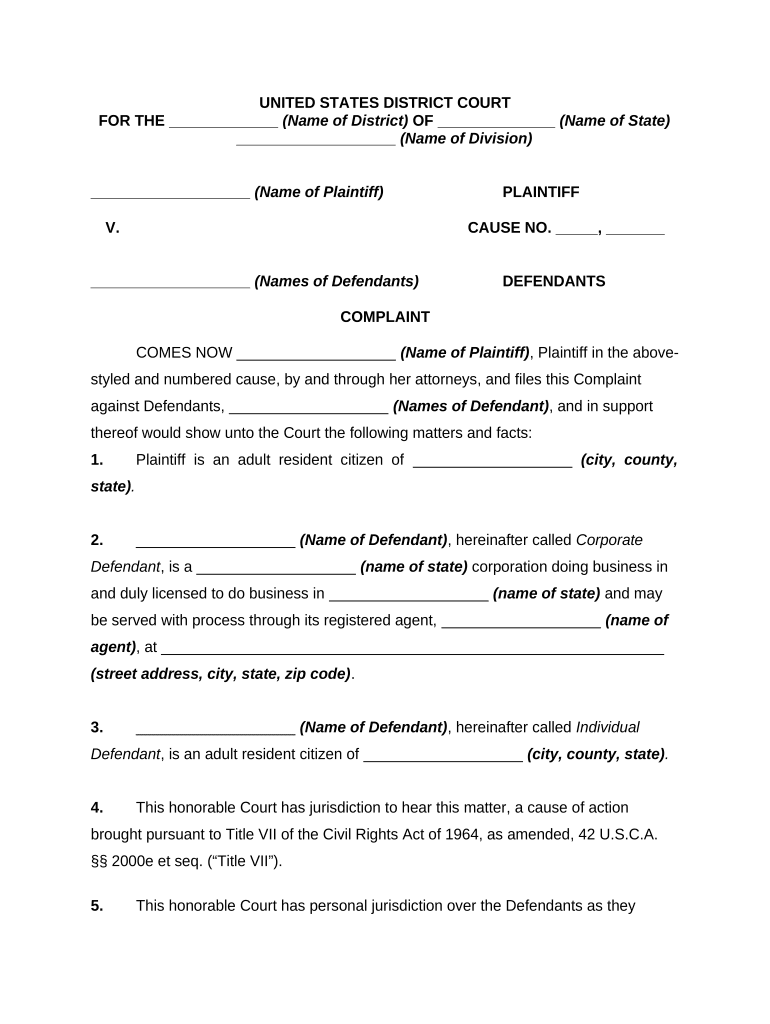
Court Caption

Identifies the court, case title, and parties; essential for proper filing and service and must use exact legal names.
Jurisdiction and Venue

Explains why the federal court has authority and why the chosen district is the proper venue for the defendant and facts.

Statement of Facts

A clear chronology of incidents, dates, witnesses, and adverse actions that supports each pleaded claim and shows causation.

Causes of Action

List each statutory claim (for example, Title VII disparate treatment, disparate impact, retaliation) with reference to the supporting facts.

Request for Relief

Specify remedies sought such as back pay, reinstatement, injunctive relief, compensatory/punitive damages, and attorney’s fees when authorized.

Exhibits and Attachments

Attach the EEOC/state charge, relevant correspondence, performance evaluations, and other documentary evidence cited in the complaint.

Practical Tips for Accuracy and Efficiency

Use the following practices to reduce errors and accelerate processing when preparing and filing a Title VII complaint.

Confirm Administrative Exhaustion
Before filing, verify charge filing date and agency correspondence; ensure the right-to-sue notice has been obtained when required.
Organize Exhibits Chronologically
Number exhibits and reference them in the complaint to streamline read-through, discovery, and potential motions.
Use Precise Factual Allegations
Include dates, locations, actor names, and direct communications to meet pleading standards and survive a Rule 12 motion.
Keep a Secure Audit Trail
Record signatures, timestamps, and file versions to support authenticity and evidentiary admissibility during litigation.

Key Administrative and Litigation Deadlines to Track

Title VII claims require strict attention to administrative filing deadlines and court filing windows; missing a deadline can be dispositive.

EEOC Charge Filing Window:

Generally file within 180 days of the alleged act or 300 days in a state with a deferral agency.

Right-to-Sue Letter Deadline:

After receiving the EEOC right-to-sue, you typically must file suit within 90 days of that notice.

Service Timing:

Follow federal rules for service of process; most districts require service shortly after filing to avoid dismissal.

Discovery Deadlines:

Court issues a scheduling order that sets discovery and motion deadlines—adhere to the timeline closely.

Appeal Timeframes:

If judgment is entered, appeals must be filed according to federal appellate rules, usually within 30 days.

Typical Case Milestones from Charge to Trial

A sequence of milestones commonly occurs after a charge, each requiring timely action by the claimant and counsel.

01

Charge Filed

EEOC or state agency intake and charge number issuance; triggers administrative processing.

02

Investigation / Mediation

Agency may investigate or offer mediation; settlement can resolve claims before court.

03

Right-to-Sue Issued

Agency issues a notice allowing the claimant to file a civil action in federal court.

04

Court Filing and Discovery

Complaint filed, defendant served, and the court schedule establishes discovery and motion practice.

Realistic Complaint Scenarios to Guide Drafting

Two concise scenarios illustrate how factual presentation and attachments typically appear in a complaint.

Scenario 1

A former sales manager alleges repeated demotions after raising pay-equity concerns, supported by emails and performance reviews.

  • The claimant includes charge number and dates of adverse actions.
  • The complaint attaches performance evaluations, a termination notice, and EEOC charge documentation to show chronology and damages.

Scenario 2

A nurse claims pregnancy-related discrimination and denial of leave, citing supervisor emails and schedule changes.

  • The nurse references her state agency charge and date filed.
  • The complaint includes medical leave requests, scheduling logs, witness contacts, and the state charge to support entitlement to reinstatement and damages.

eSignature Vendor Comparison for Completing and Serving Pleadings

Choose an eSignature provider that meets legal and security needs for signing, archiving, and producing court-ready PDF pleadings; signNow appears first for reference.

signNow DocuSign Adobe Sign PandaDoc HelloSign
Starting Price $8/user/mo $15/user/mo $14/user/mo $19/user/mo $15/user/mo
Free Trial 7-day free trial Trial available Trial available Trial available Trial available
Bulk Send Yes Yes Yes Yes No
Audit Trail Yes Yes Yes Yes Yes
HIPAA Compliant Yes Yes Yes No No
Envelope Cap No cap 100 envelopes/user/year Varies Varies Varies

FAQs and Troubleshooting for Title VII Complaints

Answers to common questions about procedural and document issues when preparing and filing a Title VII complaint.


Need help? Contact support

be ready to get more
Join over 28 million airSlate SignNow users