Establishing secure connection…Loading editor…Preparing document…

Revocation of Declaration for Mental Health Treatment

This template is fully customizable. Edit the text, fill out the fields, and send it for signature. Give it a try!
Revocation of Declaration for Mental Health Treatment

What the Revocation of Declaration for Mental Health Treatment Is

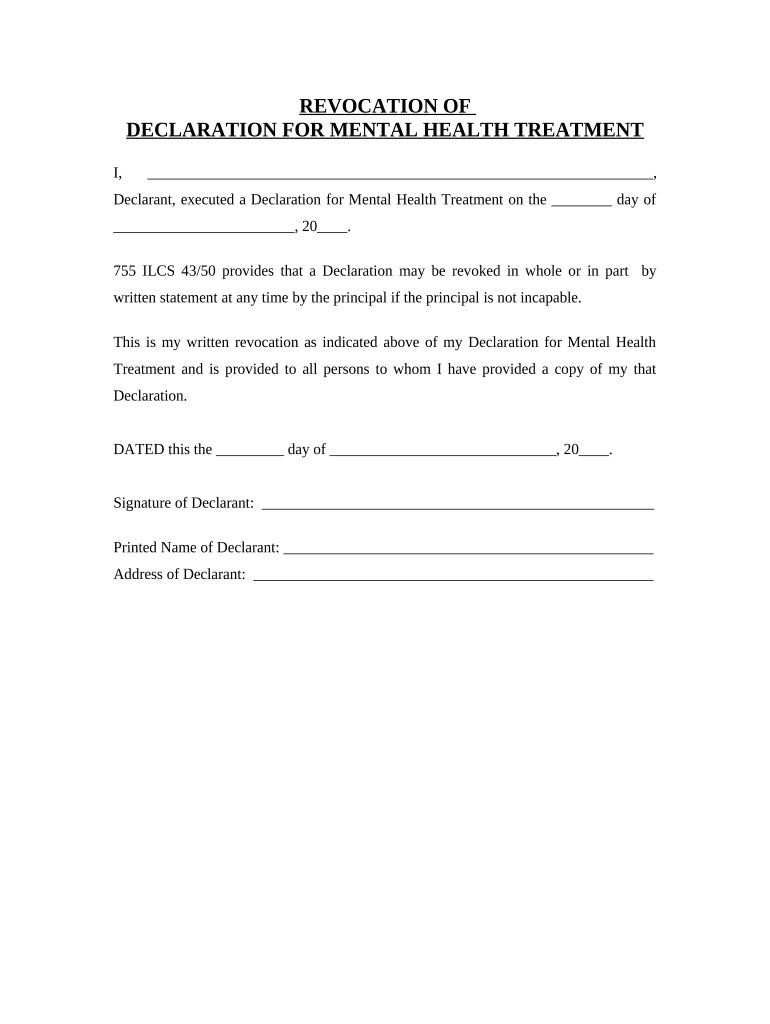
A Revocation of Declaration for Mental Health Treatment is a signed statement by which an individual withdraws a previously executed declaration that authorized another person or specified conditions for mental health treatment. It terminates the legal effect of the original declaration so that prior treatment authorizations no longer apply once revocation requirements are met. State rules control execution formalities such as witnesses, notarization, or filing; federal frameworks (ESIGN, UETA) allow electronic execution where state law does not prohibit it. Use clear dated language to specify which prior document is revoked and notify health providers and designees promptly.

Why Revoking a Mental Health Treatment Declaration Matters

A formal revocation restores your current decision-making status and ensures that health providers and surrogates follow your updated wishes under applicable state law.

Why Revoking a Mental Health Treatment Declaration Matters

Who Typically Prepares and Receives This Revocation

People revoke a declaration when their preferences or circumstances change, or when a prior document was created mistakenly or under undue influence.

  • Individuals who originally executed a mental health treatment declaration and later change their treatment preferences or designees.
  • Family members, legal representatives, or healthcare proxies who assist a competent principal in documenting revocation and distributing notice.
  • Clinical providers, hospital legal teams, and behavioral health coordinators who must update records and confirm the revocation before changing care plans.

Notify providers, any named agents, and the original document custodian immediately to ensure the revocation is honored in practice.

Key Parties Who May Sign or Accept the Revocation

Principal

The person who originally executed the mental health treatment declaration. Their signature and clear identification establish intent to revoke; competence at the time of signing is required under many state laws.

Health Provider

Hospitals, clinics, or mental health professionals who receive the revocation must record it in the medical chart, verify identity, and treat the revocation as an operative change to the patient’s directives.

Essential Data to Include on the Revocation

Full Legal Name: Provide exact legal name.
Date of Original Declaration: Specify original document date.
Statement of Revocation: Clear, unambiguous text.
Effective Date: Use MM/DD/YYYY format.
Signature and Date: Principal signs and dates.
Witness/Notary: Include if required.

Risks and Legal Consequences of an Improper Revocation

Invalid Revocation: May leave the prior declaration in force.
Healthcare Delay: Providers may continue prior orders.
Disputes: Family disagreements can cause litigation.
Proof Challenges: Missing notarization can undermine enforcement.
Record Inconsistency: Conflicting charts risk treatment errors.
Statutory Noncompliance: May violate specific state rules.

Common Pitfalls to Avoid When Revoking a Declaration

  • Failing to reference the original declaration precisely, which can leave ambiguity about what is revoked and create enforcement problems.
  • Not notifying healthcare providers or custodians promptly, allowing the old declaration to remain in clinical use until discovered.
  • Skipping required formalities such as witnesses or notarization where state law mandates them, which can invalidate the revocation.
  • Relying solely on verbal notice without a signed, dated written statement and proper distribution to record custodians.

Step-by-Step: How to Complete the Revocation Form

Follow these core steps to create a valid revocation and communicate it to all relevant parties.

  • 01
    Identify Document: Reference the original declaration by title and date.
  • 02
    State Revocation: Include a clear sentence that the prior document is revoked.
  • 03
    Sign and Date: Principal signs, dates, and prints name.
  • 04
    Notify Parties: Send copies to providers, agents, and custodians.

How Revocation Is Processed in Clinical and Legal Workflows

A typical processing flow tracks identification, execution, verification, and record updating across involved parties.

  • Draft Revocation: Create a concise written statement of revocation.
  • Verify Identity: Confirm signer identity per state or facility policy.
  • Witness/Notarize: Complete required authentication steps, if any.
  • Record Update: File into medical chart and notify designees.

Key Elements Every Professional Revocation Should Include

A well-drafted revocation balances legal precision with clarity so healthcare teams can implement the change without delay.

Clear Revocation Clause

Explicit language that revokes the named mental health treatment declaration and identifies it by title and date to avoid ambiguity or partial revocation disputes.
Principal Identification

Full legal name, date of birth, and current address to ensure the revocation is attributed to the correct individual and to minimize misidentification.

Effective Date

A specific effective date (MM/DD/YYYY) indicates when the revocation takes force and helps providers determine which orders to follow.

Signature Block

Placement for the principal's signature and date; include printed name and any capacity statement if signing as conservator or legal representative.

Authentication Details

Space for witness signatures and notary acknowledgment where state law or institutional policy requires formal validation of the revocation.

Distribution Instructions

Short directions for sending copies to named health providers, agents, and the original document custodian to ensure records are updated efficiently.

Supporting Sections to Add for Practical Use

Include practical attachments or fields that make implementation straightforward for care teams and legal staff.

Provider Notification List

A checklist of clinical departments, primary clinician, behavioral health liaison, and legal custodian with spaces for dates and initials when copies are delivered.

Agent Contact Details

Current contact information for any previously named agent so the revocation can be communicated to them directly and their authority can be curtailed in records.

Record Location

Reference where the original declaration was filed or stored (medical chart, attorney, registrar) to help custodians locate and remove or annotate the prior document.

Replacement Document

Optional space noting whether a new directive is attached or will be executed, including a target effective date for the replacement document.

Practical Tips for a Clean, Enforceable Revocation

Use straightforward language, follow statutory formalities, and ensure distribution so the revocation is recognized promptly.

Reference the Original Declaration Precisely
Cite the original document title and date to avoid uncertainty about which declaration is being revoked; ambiguity can lead to differing interpretations in clinical settings.
Confirm Competence and Capacity
If capacity is in question, document contemporaneous clinical findings or obtain legal counsel. A challenged revocation is more likely if competence is not clearly established.
Follow State Authentication Rules
Check whether your state requires witnesses, notarization, or filing; meeting statutory requirements reduces the risk that the revocation will be rejected by institutions or courts.
Keep Proof of Distribution
Retain receipts, certified mail records, or electronic delivery confirmations to demonstrate that providers and agents received the revocation and had notice of the change.

Timing Considerations and When the Revocation Becomes Effective

Timing affects when providers must stop following the previous declaration; plan execution and notification accordingly.

Immediate Effect:

Effective upon signing if no later effective date is specified.

Specified Effective Date:

If you set a future date, the prior declaration remains effective until then.

Provider Processing Time:

Allow 1–2 business days for healthcare records staff to update charts.

Notary or Witness Delays:

Scheduling can add days to execution in some locales.

Legal Challenge Window:

Litigation or dispute resolution may extend the practical effect.

Real-World Scenarios Where a Revocation Is Used

Practical examples illustrate why a formal revocation and prompt distribution matter for patient care and legal clarity.

Case Study 1

A patient regains capacity after hospitalization and signs a revocation to cancel an earlier directive dated six months prior.

  • The hospital records are updated the same day.
  • The revocation, with notarization and scanned copy, prevented an unnecessary involuntary treatment episode and clarified the care team’s orders to follow current consent.

Case Study 2

An individual moves to a new state with different statutory witness rules and executes a local revocation.

  • Staff verify identity and witnesses.
  • Timely notification to the prior agent and the medical records custodian avoided conflicting instructions and ensured the new state’s preferences were honored.

Electronic Execution and Submission Considerations

Electronic signing can be valid under ESIGN and UETA when state law permits; platforms must support required authentication and retention.

  • Integrations: Salesforce, NetSuite, Google Workspace support
  • File Formats: PDF, DOCX, and standard scanned images
  • Authentication: Email link, SMS code, or advanced KBA

Choose a platform that preserves a tamper-evident audit trail, supports required notarization options, and stores records per HIPAA and state retention rules.

Configuring an Electronic Revocation Workflow

Recommended workflow settings streamline execution, verification, and distribution of the signed revocation.

Field Configuration
Authentication Enable email verification and optional SMS code
Signature Type Visible signature with audit trail metadata
Notary Block Include jurat or acknowledgment for notarization
Retention Set document retention per HIPAA and state rules

How This Revocation Differs from Related Documents

A quick comparison highlights differences between revoking a mental health treatment declaration and other related instruments.

Criteria Revocation Form Advance Directive
Notarization sometimes required often recommended or required
Witnesses varies by state typically required in many states
Filing Required rare occasionally required for state registries
Can Be E-signed yes if state permits yes if state permits

eSignature Vendor Pricing and Capability Snapshot

Comparison of common vendor starting prices and capabilities relevant to executing and storing signed revocation documents; signNow is listed first per table convention.

signNow DocuSign Adobe Sign PandaDoc HelloSign
Starting Price $8/user/mo $15/user/mo $14/user/mo $19/user/mo $15/user/mo
Free Trial 7-day free trial, no credit card Varies by vendor Varies by vendor Varies by vendor Varies by vendor
Bulk Send Yes Yes Yes Yes No
Audit Trail Yes Yes Yes Yes Yes
HIPAA Compliant Yes Yes Yes No No
Envelope Cap No cap 100 envelopes/user/year Varies by plan Varies by plan Varies by plan

Key Milestones from Signing to Record Update

This sequence outlines typical stages after signing a revocation and what to monitor until records reflect the change.

01

Execution

Principal signs and dates the revocation document.

02

Authentication

Witness or notary authentication as required by jurisdiction.

03

Distribution

Send copies to providers, agents, and custodian quickly.

04

Chart Update

Clinical records are annotated and the old declaration is marked revoked.

Frequently Asked Questions About Revoking a Mental Health Treatment Declaration

Answers to common concerns cover validity, execution steps, and how to ensure providers recognize the revocation.


Need help? Contact support

be ready to get more
Join over 28 million airSlate SignNow users