Grantor Identification
Full legal name of the grantor, current address, and marital status where relevant, to match title records and government ID.
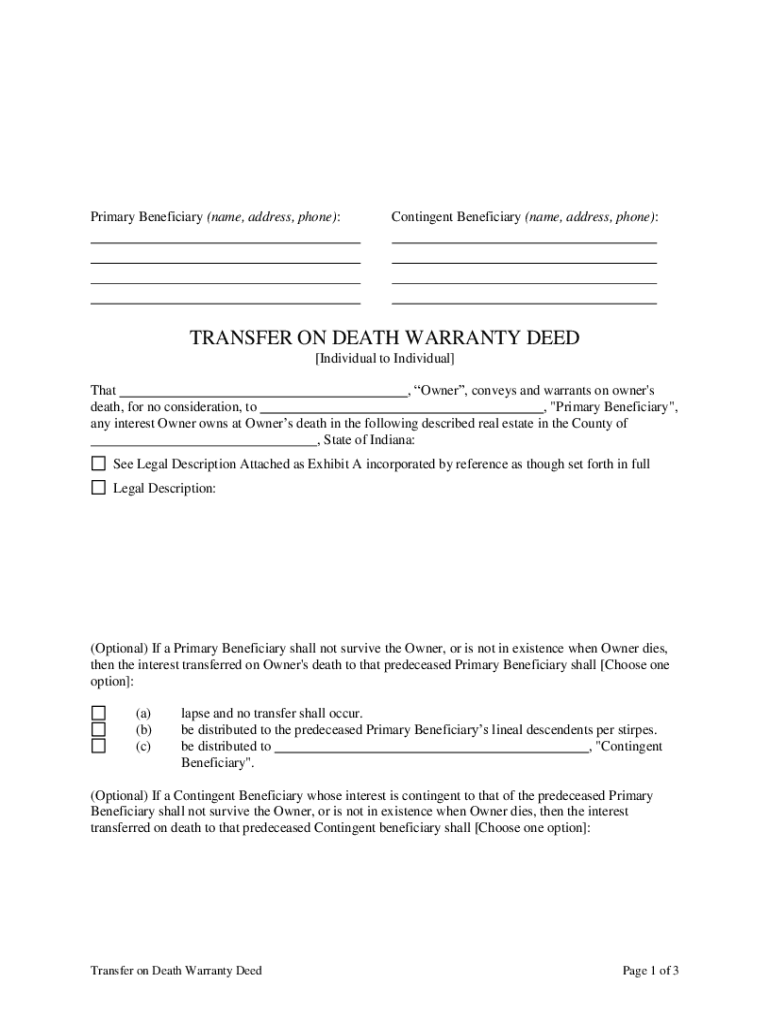
The deed can avoid probate for the specific parcel, simplify transfer to named beneficiaries, and preserve the grantor’s control during life. It does not change creditor rights and must meet state execution, notarization, and recording rules to be effective.

Typical users include property owners planning estate transfers, real estate attorneys, title companies, and family members coordinating end-of-life affairs.
The grantor is the current legal owner who executes the deed voluntarily and must sign before a notary. Accurate legal name and identity verification are essential to avoid later challenges.
An attorney or closing/title agent commonly prepares the deed and checks for encumbrances, ensuring recording language and beneficiary designation conform to Indiana recording office practices.
Full legal name of the grantor, current address, and marital status where relevant, to match title records and government ID.
Complete legal description of the property (not a mailing address) consistent with the county deed record or survey.
Clear beneficiary name(s) with relationship, contact information, and alternative beneficiary provisions to avoid ambiguity.
Explicit statement that transfer occurs at grantor’s death and that ownership remains with grantor during life.
A recital of consideration (often nominal) or declaration the deed is a transfer-on-death instrument, depending on form requirements.
Proper notary block signed and dated; Indiana requires notarization for recording real property deeds.
| Field | Configuration |
|---|---|
| Signature Field | Require handwritten-style signature, notarization placeholder |
| Date Field | MM/DD/YYYY format, auto-populate disabled |
| Legal Description Field | Multi-line text, required validation |
| Beneficiary Contact | Optional, used for post-death notification |
Electronic completion is possible for preparatory drafting, but notarization and recording rules determine final acceptance at the county office.
Record as soon as practicable after notarization to protect beneficiary rights
Note potential estate or property tax implications at death; consult tax counsel
Provide recorded deed copy to title insurer promptly for coverage verification
Beneficiary should be informed of designation and kept contact details
Ensure notary commission is active on signing date to avoid re-execution
Prepare deed language and verify legal description
Sign in presence of notary (and witnesses where required)
File original with county recorder for public notice
Beneficiary records death certificate and transfers title
| signNow | DocuSign | Adobe Sign | PandaDoc | HelloSign | |
|---|---|---|---|---|---|
| Starting Price | $8/user/mo | $15/user/mo | $14/user/mo | $19/user/mo | $15/user/mo |
| Free Trial | 7-day free trial | Varies by plan | Varies by plan | Varies by plan | Varies by plan |
| Bulk Send | Yes | Yes | Yes | Yes | Varies |
| Audit Trail | Yes | Yes | Yes | Yes | Yes |
| HIPAA Compliant | Yes | Yes | Yes | No | No |
| Envelope Cap | No envelope cap | 100 envelopes/user/year | Varies | Varies | Varies |