Establishing secure connection…Loading editor…Preparing document…

Indiana Easement

This template is fully customizable. Edit the text, fill out the fields, and send it for signature. Give it a try!
Indiana Easement

What an Indiana Easement Is and why it matters

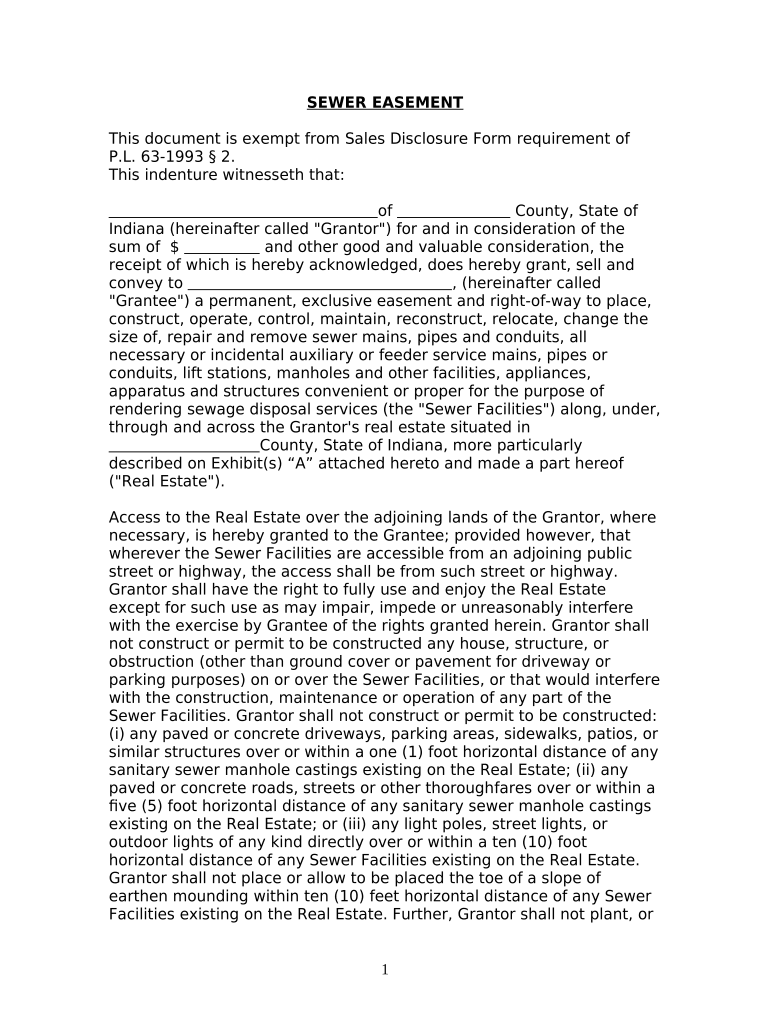
An Indiana Easement is a written legal instrument that grants a defined right to use another party's real property for a specific purpose while title remains with the property owner. Common forms include easements appurtenant (tied to land) and easements in gross (personal or commercial use). In Indiana, properly drafted and recorded easements affect title, run with the land when recorded in the county recorder's office, and create enforceable rights and restrictions between the parties and subsequent owners. Accurate legal descriptions and valid execution are essential to prevent clouds on title.

Why you would use an Indiana Easement

An easement clarifies access, utilities, maintenance responsibilities, and long‑term rights so parties and future owners have clear expectations and marketable title.

Why you would use an Indiana Easement

Who typically prepares or signs an Indiana Easement

Common users include property owners, utilities, developers, and title professionals who need binding use rights without transferring ownership.

  • Property owners and buyers who grant or receive access rights for driveways, walkways, or shared services.
  • Utility companies and municipalities establishing lines, pipes, drainage, or maintenance corridors over private land.
  • Developers and contractors arranging temporary construction easements or permanent access for future subdivision parcels.

Essential elements every professional Indiana Easement should include

A complete easement clearly identifies parties and land, explains permitted uses, limits duration, and includes execution and recording details so it binds successors and avoids title disputes.

Parties

Full legal names of the grantor (owner) and grantee (beneficiary), including business entity types and signing authorities to ensure enforceability against successors.
Legal Description

Precise metes-and-bounds or recorded plat reference for the servient and dominant tenements; approximate descriptions or street addresses alone are insufficient.

Scope of Use

Clear statement of permitted activities (pedestrian, vehicular, utility access), maintenance obligations, and any limitations to avoid future disputes.

Duration & Termination

Specify whether the easement is perpetual, for a fixed term, or conditional; include termination events, reversion language, and transfer rules.

Consideration

Detail monetary payment, reciprocal rights, or other consideration; vague descriptions (e.g., 'reasonable consideration') can create ambiguity.

Execution & Recording

Signature blocks, notary acknowledgment as required by the county, and instructions for recording with the county recorder to provide public notice.

Step-by-step: completing an Indiana Easement

Follow these steps to prepare, execute, and record an enforceable easement in Indiana.

  • 01
    Gather documents: Obtain deed, survey, and title report.
  • 02
    Draft easement: Use precise legal descriptions and clear scope.
  • 03
    Sign and notarize: Have authorized parties sign before a notary.
  • 04
    Record: File with county recorder and obtain recorded copy.

How to customize and complete the easement using online tools

Configure a digital workflow to collect signatures, attach exhibits, and produce a recording-ready PDF for the county recorder.

Field Configuration
Upload Document Start with a DOCX or PDF master that includes blank signature and notary blocks.
Place Signature Fields Add signer, date, and initial fields aligned with the signature block layout.
Authentication Choose email or SMS code authentication and optional ID verification for stronger proof of identity.
Attach Exhibits Append surveys, plats, and a certified legal description as exhibits to the main instrument.

Where to file, send, or submit the recorded easement

Record and distribute the executed document so it provides public notice and each party retains a certified copy.

  • County Recorder: Record the original in the county where the property is located.
  • Title Company: Provide recorded copy to the title insurer for escrow and closing.
  • Grantee / Grantor: Send certified recorded copies to each party for their records.
  • Mortgagee / Lienholders: Notify affected lenders if the easement alters encumbrances or access.

Digital delivery and format considerations for an Indiana Easement

Use PDF/A or print-quality PDF for recording; include embedded exhibits and a clear signature page.

  • File Formats: PDF, PDF/A, or flattened PDF
  • Integrations: Works with document management and title systems
  • Authentication: Email or SMS code options

Timing considerations: execution and recording expectations

Easements have no universal statutory recording deadline, but recording promptly protects priority and notice to subsequent purchasers.

Record Promptly:

Record before sale or financing to secure priority and avoid competing claims.

Title Update:

Allow 1–3 business days for county recording and posting, depending on county workload.

Survey Timing:

Obtain a survey before drafting to ensure accurate legal description and monument locations.

Closing Coordination:

Coordinate recording with closing agent to ensure recorded instrument is delivered to lender or buyer.

Record Retention:

Keep the original recorded instrument for the life of the interest plus applicable retention period.

Common mistakes to avoid when preparing an Indiana Easement

  • Using street addresses instead of an exact legal description, which can make the easement ambiguous or unrecordable.
  • Failing to verify the signer's authority for entities, causing defective execution and potential invalidation.
  • Omitting maintenance, repair, or access responsibilities, leading to disputes and costly litigation.
  • Not attaching or labeling exhibits and plats clearly, so boundaries and easement dimensions become unclear.

Risks and potential consequences of an incorrect easement

Cloud on Title: May impair sale or financing
Enforceability: Court may void ambiguous provisions
Liability: Unclear maintenance obligations expose owners to costs
Tax Impact: Recorded easements can affect assessments
Reformation Costs: Corrective deeds or quiet title actions required
Recording Rejection: County may refuse incomplete submissions

Comparing eSignature options commonly used for easement workflows

Easement workflows often use eSignature platforms to collect signatures, notarize, and produce recording-ready PDFs. Below is a concise vendor comparison.

signNow DocuSign Adobe Sign PandaDoc HelloSign
Starting Price $8/user/mo $15/user/mo $14/user/mo $19/user/mo $15/user/mo
Free Trial 7-day free trial Varies by vendor Varies by vendor Varies by vendor Varies by vendor
Bulk Send Yes (Business Premium) Yes Yes Yes No
Audit Trail Yes Yes Yes Yes Yes
HIPAA Compliant Yes Yes Yes No No
Envelope Cap No envelope cap 100 envelopes/user/year Varies by plan Varies by plan Varies by plan

Real-world examples of electronic easement workflows

These customer examples show practical scenarios where digital signing and careful documentation streamlined property workflows.

Optica Ventures — Closing Efficiency

Optica consolidated signature collection across remote owners to finalize easement terms quickly

  • Needed a simple signing experience for nontechnical parties
  • The result preserved transaction timelines and delivered recorded easements to the title company without in-person meetings.

Martin Properties — Compliance and Mobility

A small development firm replaced paper routing for temporary construction easements

  • Required recorded copies delivered to multiple stakeholders
  • Digital execution and distribution reduced delays and ensured the recorded instrument was available to lenders and contractors.

Best practices for accurate, efficient Indiana Easement completion

Follow these practical steps to reduce errors, speed recording, and maintain clear title.

Use precise legal descriptions
Copy the exact metes-and-bounds or plat reference from a certified survey; confirm parcel identifiers to prevent ambiguity and recording rejection.
Confirm signing authority
Verify corporate resolutions or trustee authority for entities before signature to avoid defective execution and the need for corrective documents.
Attach exhibits and maps
Label surveys and plats as exhibits referenced in the instrument so boundary and dimension information is part of the recorded public record.
Obtain recorded copies
Secure a certified recorded copy from the county recorder and distribute it to title insurers, lenders, and all named parties for their permanent files.

Indiana Easement — Frequently asked questions

Answers to common questions about validity, recording, notary needs, and electronic signing for easements in Indiana.


Need help? Contact support

be ready to get more
Join over 28 million airSlate SignNow users