Establishing secure connection…Loading editor…Preparing document…

Indiana Release Form

This template is fully customizable. Edit the text, fill out the fields, and send it for signature. Give it a try!
Indiana Release Form

What the Indiana Release Form Is and when it's used

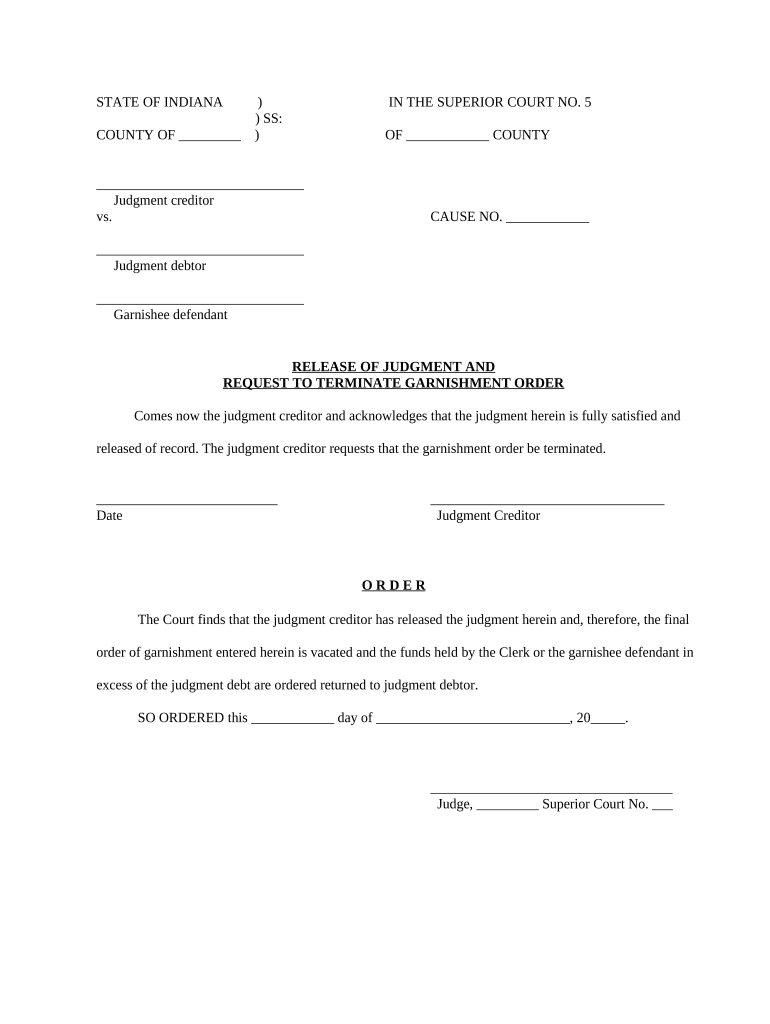
An Indiana Release Form is a written agreement in which a person or entity (the releasor) gives up, limits, or transfers claims or liability against another party (the releasee). Commonly used after incidents, for event participation, or to resolve disputes, the document records the scope of surrendered rights, the effective date, and signatures of the parties. In Indiana the form may be used in personal injury releases, contractor project closeouts, employee separation agreements, and settlement negotiations. Properly completed releases reduce uncertainty about future claims and document the parties' intent to resolve matters.

Why an Indiana Release Form matters

A clear release defines what rights are waived, when the waiver takes effect, and who is covered, which reduces litigation risk and clarifies settlement scope. For businesses and individuals it preserves evidence of consent and establishes a record that obligations were settled or claims extinguished.

Why an Indiana Release Form matters

Who commonly completes an Indiana Release Form

The Indiana Release Form is used by a range of parties depending on context.

  • Individuals resolving personal injury or consumer claims — sign and exchange settlements.
  • Employers and HR professionals — finalize separation agreements and release severance terms.
  • Businesses and contractors — close out project liabilities and attach release exhibits.

Step-by-step: completing an Indiana Release Form

Follow these ordered steps to prepare a clear, enforceable release that minimizes later disputes.

  • 01
    Prepare draft: Identify parties, scope, and consideration; attach exhibits.
  • 02
    Review terms: Confirm specific claims and dates covered by the release.
  • 03
    Authenticate signers: Require ID, consider notarization or two-factor eSignature authentication.
  • 04
    Execute and retain: Collect signatures and save the executed copy with retention metadata.

Common e-sign workflow settings for this release

Configure fields and authentication to match the legal sensitivity of the release and the parties involved.

Field Configuration
Authentication Email link or SMS code; use KBA for higher risk
Signature Type Standard electronic signature or PKI-based digital signature
Notarization Optional RON session or in-person notarization if required
Storage Encrypted at rest (AES-256) with audit trail retention

Typical electronic signing flow for a release

A standard digital workflow reduces turnaround while preserving evidence of intent, timestamp, and signer attribution.

  • Upload document: Sender uploads the release document to the signing platform.
  • Place fields: Add signature, initials, date, and optional attestations.
  • Send to signer: Generate secure email or direct signing link.
  • Capture audit trail: System records timestamps, IP, and authentication events.

Key elements to include in a professional Indiana Release Form

A professional release is concise but comprehensive: it names parties, defines released claims, states consideration, and documents execution details clearly.

Parties

Identify the releasor and releasee with full legal names, and include parent entities or assigns when applicable.
Scope

Define precisely which claims, dates, incidents, or causes of action are being released to prevent later disputes over ambiguity.

Consideration

Record any payment or non-monetary exchange given in return for the release; specificity supports enforceability.

Representations

Include statements that the releasor has read and understood the release and consult legal counsel if desired.

Notary/Witness

Specify whether notarization or witness signatures are required based on jurisdiction or industry practice.

Survival

State which provisions survive termination, such as confidentiality or indemnity covenants tied to the release.

Practical tips to improve accuracy and enforceability

Use plain language, attach exhibits, and document the exchange of consideration to reduce ambiguity and costly disputes.

Be specific about claims
List incidents, dates, or claim types where possible so the release cannot later be read to cover unintended matters.
Avoid blanket language without context
If you use 'all claims' language, add clarifying language describing the subject matter and timeframe to limit overbreadth.
Document consideration clearly
Record the exact payment amount, method, or non-monetary exchange and whether funds are payable on execution.
Confirm signer authority
If an organization signs, include the signer’s title and ensure corporate authorization or board approval where required.

Timing considerations and typical deadlines

Some releases are time-sensitive for tax, statute of limitations, or payroll purposes; calendar these downstream obligations when executing the form.

Effective Date:

Enter as MM/DD/YYYY to fix when rights are waived

Tax reporting:

Report any taxable settlement payments per IRS rules for the year paid

Statute of Limitations:

Execution may affect applicable limitations periods in Indiana

Payroll withholding:

Withhold taxes on settlement pay per employer obligations

Record retention:

Store executed releases per retention policy (see below)

Common mistakes to avoid when preparing a release

  • Using vague scope language that fails to identify the specific claim or incident can invite later litigation.
  • Failing to document or describe the consideration leaves the release open to claims of invalidation for lack of consideration.
  • Mismatched party names or unsigned signature blocks can render the release unenforceable or delay settlement payments.
  • Skipping authentication or notarization when required by contract or industry practice may reduce the release’s weight in disputes.

Risks and legal consequences of an incorrect release

Voidable release: Court may void if unconscionable
Tax exposure: Incorrect reporting triggers IRS audit
Future liability: Incomplete scope may allow new claims
Contract breach: Violating prior agreements risks damages
Notary issues: Improper notarization may impair proof
Ineffective waiver: Lack of consideration can nullify waiver

Recommended configuration for secure e-submission

Choose authentication and storage options that match the release’s sensitivity and regulatory context.

Field Configuration
Authentication Email link or SMS code; KBA for high-risk signers
Audit Trail Capture IP, timestamp, and action log
Notarization Enable RON session or in-person notarization as required
Export Format Save signed PDF/A or DOCX with embedded audit data

Technical considerations for eSigning and storage

Use a platform that supports secure signatures, audit trails, and commonly used file formats.

  • File formats: PDF, DOCX supported
  • Integrations: Salesforce, NetSuite, Google Workspace
  • Security: TLS in transit; AES-256 at rest

Paper release versus electronic release — quick comparison

Both methods can be legally valid; differences center on proof, storage, and convenience.

Criteria Paper Electronic
Legal Validity
Proof of Identity limited strong options
Storage physical file encrypted digital
Notary Support in-person only ron or in-person

eSignature vendor comparison for executing release forms

Cost and feature differences matter for high-volume or regulated workflows; signNow appears first for direct feature comparison.

signNow DocuSign Adobe Sign PandaDoc HelloSign
Starting Price $8/user/mo $15/user/mo $14/user/mo $19/user/mo $15/user/mo
Free Trial 7-day trial Varies by vendor Varies by vendor Varies by vendor Varies by vendor
Bulk Send Yes Yes Yes Yes No
Audit Trail Yes Yes Yes Yes Yes
HIPAA Compliant Yes Yes Yes No No

Example scenarios showing how releases are used

These brief case arcs show typical situations where an Indiana Release Form resolves claims or clarifies obligations.

Settlement Agreement

A motorist signs a release after a minor collision to settle medical payments.

  • The release lists dates, injuries, and payment amounts.
  • Executed release eliminates future claims for the same accident and documents consideration for insurer and payer records.

Contractor Final Release

A contractor signs a conditional release upon final payment for a remodel.

  • The release references invoice numbers and retainage.
  • This prevents lien claims and confirms acceptance of work when payments clear.

Key processing milestones after sending a release

Track these stages to monitor execution, payment, and record retention following signing.

01

Draft completion

Finalize terms and attachments before sending

02

Signer authentication

Verify identity and obtain signatures

03

Payment processing

Confirm consideration has been transferred

04

Record retention

Store executed copy with audit metadata

Frequently asked questions about Indiana Release Forms

Answers to common legal and practical questions to help ensure a valid and enforceable release.


Need help? Contact support

be ready to get more
Join over 28 million airSlate SignNow users