Establishing secure connection…Loading editor…Preparing document…

Wisconsin Dismissal Order (Injunction/Restraining Order)

This template is fully customizable. Edit the text, fill out the fields, and send it for signature. Give it a try!
Wisconsin Dismissal Order (Injunction/Restraining Order)

What the Wisconsin Dismissal Order (Injunction/Restraining Order) Is

A Wisconsin Dismissal Order for an injunction or restraining order is a signed court document that ends, dissolves, or vacates a previously entered provisional or permanent order. It is issued by a judge or authorized judicial officer, entered on the case docket, and filed with the county clerk. The dismissal order records the court’s findings, the relief granted or removed, and any directions for service or enforcement. Because this is a judicial order, filing and entry procedures follow court rules rather than ordinary contract-signature practices.

Why a Clear Dismissal Order Matters

A precise dismissal order ends legal restraints, removes obligations tied to the injunction, and creates a clear record for enforcement or appeal; it reduces ambiguity about parties’ rights after the order is entered.

Why a Clear Dismissal Order Matters

Who Frequently Prepares or Receives This Order

Parties and their counsel, judges, and court clerks interact with dismissal orders during case resolution and docket management.

  • Plaintiff and defendant counsel who draft stipulated or contested dismissal language for court entry.
  • Presiding judges who sign orders after hearing or motion resolution.
  • Court clerks who docket and serve filed orders per local rules.

Primary Roles Associated with the Order

Presiding Judge

The judge or judicial officer reviews motions or stipulations and signs the dismissal order. The judge’s signature and written findings convert a procedural request into an enforceable court entry that the clerk will docket and circulate.

Court Clerk

The clerk of court files the signed order, adds it to the official case record, and issues certified copies or notices of entry as required by Wisconsin court rules. Clerk entry often triggers deadlines and service obligations.

Key Information Required on the Dismissal Order

Case Caption: Parties and court
Case Number: County docket number
Order Title: Clear descriptive title
Findings: Basis for dismissal
Signature Block: Judge name and date
Clerk Entry: Filing stamp and date

Step-by-Step: Completing a Wisconsin Dismissal Order

Follow these core steps to prepare a Dismissal Order that the court can enter and the clerk can docket without delay.

  • 01
    Prepare Caption: Enter full party names and the county case number exactly as on prior filings.
  • 02
    Draft Order Text: State the relief: vacate, dismiss, or dissolve the injunction with concise operative language.
  • 03
    Add Findings: Include the court’s factual or legal basis supporting the dismissal when ordered after a hearing.
  • 04
    Obtain Signature: Request judge’s signature and ensure clerk stamps the document on entry.

Typical Workflow from Draft to Docket Entry

The dismissal process follows a predictable path from motion or stipulation to signed and docketed order; understand each handoff.

  • Draft and Review: Draft order and circulate to opposing counsel for accuracy.
  • Submit to Court: File the proposed order under the correct motion or hearing docket.
  • Judge Signs: Judge signs at hearing or on submitted paperwork.
  • Clerk Dockets: Clerk stamps, enters, and serves per local rules.

Configuring an Online Workflow for Dismissal Orders

When preparing the order electronically, set field behaviors and routing to match court requirements and reduce manual steps.

Field Recommended Setting
Case Number Field Required; single-line; exact-format validation
Judge Signature Field Place as final signature; restrict access to judicial role
Clerk Filing Stamp Set as post-signature field for clerk use only
Service Routing Automatic copy to parties and court e-filing address

Technical Considerations for eFiling and eSubmission

Where possible, use PDF/A for final documents and follow the court’s e-filing instructions to ensure acceptance and timely docketing.

  • Accepted Formats: PDF/A or PDF
  • Authentication: Court e-file credentials or judge-specified signing
  • Integrations: E-filing portals, document management systems

Common Timing Points to Expect

Timelines vary by county and by whether the order follows hearing or stipulation; check local court rules for precise deadlines.

Post-Hearing Entry:

Clerk typically enters order the same day or within a few business days

Service to Parties:

Served per local rules after docket entry

Appeal Window:

Standard appeal windows apply after entry

Stipulated Orders:

Can be entered immediately if signed by judge

Ex Parte Orders:

Temporary duration set by court; follow-up hearing often required

Key Milestones from Motion to Final Entry

A typical sequence runs from filing to judge decision to clerk entry and service; each milestone may trigger deadlines or further obligations.

01

Motion Filed

Party files motion or stipulation seeking dismissal.

02

Hearing Scheduled

Court sets a hearing or reviews submitted stipulation.

03

Judge Issues Order

Judge signs the dismissal or vacatur order.

04

Clerk Dockets and Serves

Clerk stamps, enters, and serves the order to parties.

Common Preparation Errors to Avoid

  • Using an inaccurate case caption or wrong party name that prevents correct docket association and delays service.
  • Omitting the case number or misformatting it, which causes clerks to return or misfile the document.
  • Failing to include clear operative language (vacate, dismiss, dissolve) so enforcement or compliance is unclear.
  • Routing the proposed order to the wrong judicial role or failing to secure the judge’s signature before filing.

Consequences of an Incorrect or Missing Dismissal Order

Contempt: Possible contempt proceedings
Civil Liability: Damages risk for wrongful enforcement
Clerical Rejections: Filing returned to counsel
Appeal Complications: Extended appeal timelines
Enforcement Gap: Unclear restraint status
Reissuance Delay: Additional court time required

How a Judge-Issued Dismissal Order Differs from a Stipulated Dismissal

Compare the typical attributes of a court-issued dismissal order and a stipulated dismissal executed by the parties.

Criteria Dismissal Order (Judge-issued) Stipulated Dismissal (Party-agreed)
Primary Signer judge parties (then court)
Court Entry Required
E-sign Possibility depends on court parties may e-sign
Typical Use court-ordered vacatur settlement or mutual dismissal

Essential Elements to Include in a Professional Dismissal Order

A well-structured order reduces post-entry disputes and clarifies the scope and timing of relief; include the following elements.

Case Caption

Full party names and court identification at the document top so the order is properly associated with the underlying case file and docket.
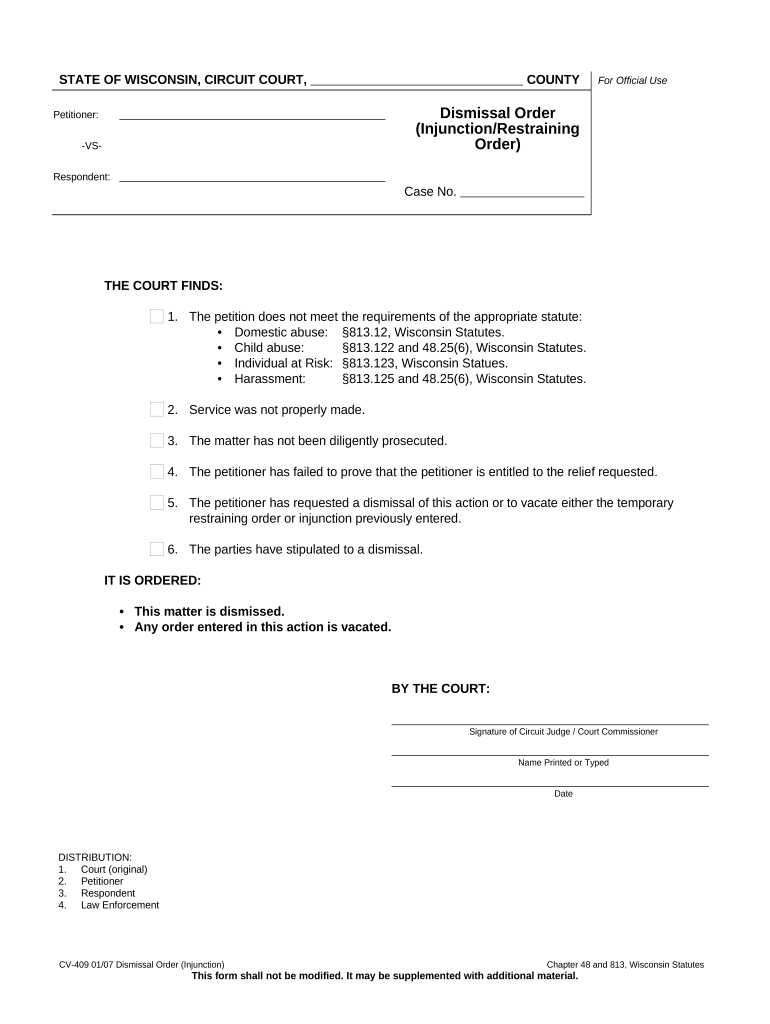
Order Title

A precise title such as 'Order Vacating Temporary Restraining Order' that summarizes the document’s purpose for future reference.

Findings

Concise factual or legal statements supporting the dismissal when the court makes findings after hearing or review.

Operative Relief

Clear directive stating the injunction is vacated, dismissed, or dissolved and describing the scope of any remaining restrictions.

Service Instructions

Specify how and when parties will be served, including who is responsible for service and any required notice periods.

Signature Block

Designated area for the judge’s signature, printed name, title, and signature date; space for clerk filing stamp.

Realistic Use Cases for a Dismissal Order

Examples show how dismissal orders function across common scenarios and why clear wording matters.

Family Law Example

After a contested hearing the court vacated a temporary restraining order

  • Judge issued findings on changed circumstances
  • The dismissal order clearly ended the injunction and directed clerk entry and service to both parties, avoiding further enforcement confusion.

Civil Litigation Example

Parties submitted a signed settlement and asked the court to dismiss an injunction

  • Court reviewed the stipulation and signed an order dismissing the injunction
  • The order documented the settlement terms, specified dismissal conditions, and instructed the clerk to enter judgment accordingly.

Tips for Accurate and Efficient Completion

Adopt these practices to reduce rework, ensure timely entry, and preserve enforceability.

Use Exact Case References
Always copy the case caption and number directly from the court docket to avoid misfiling or clerical rejection.
Be Explicit About Relief
State the exact action (vacate, dismiss, dissolve) and avoid ambiguous language that could lead to enforcement disputes.
Coordinate Signatures
Confirm whether the judge will sign at hearing or if the court accepts submitted proposed orders; secure clerk’s entry stamp after signing.
Preserve Service Evidence
Keep certified mail receipts, e-service logs, or clerk-issued notices to document compliance with service requirements.

Frequently Asked Questions About Wisconsin Dismissal Orders

Answers to common questions about drafting, filing, signatures, and the enforceability of dismissal orders in court practice.


Need help? Contact support

eSignature Vendor Comparison Relevant to Filing and Signing Court Documents

Compare common plan and capability differences for electronic signing platforms often used to prepare or route court documents; signNow is listed first per platform data.

signNow DocuSign Adobe Sign PandaDoc HelloSign
Starting Price $8/user/mo $15/user/mo $14/user/mo $19/user/mo $15/user/mo
Free Trial 7-day free trial Varies by plan Varies by plan Varies by plan Varies by plan
Bulk Send Yes Yes Yes Yes No
Audit Trail Yes Yes Yes Yes Yes
HIPAA Compliant Yes Yes Yes No No
Envelope Cap No cap 100 envelopes/user/year Varies Varies Varies
be ready to get more
Join over 28 million airSlate SignNow users