Establishing secure connection…Loading editor…Preparing document…

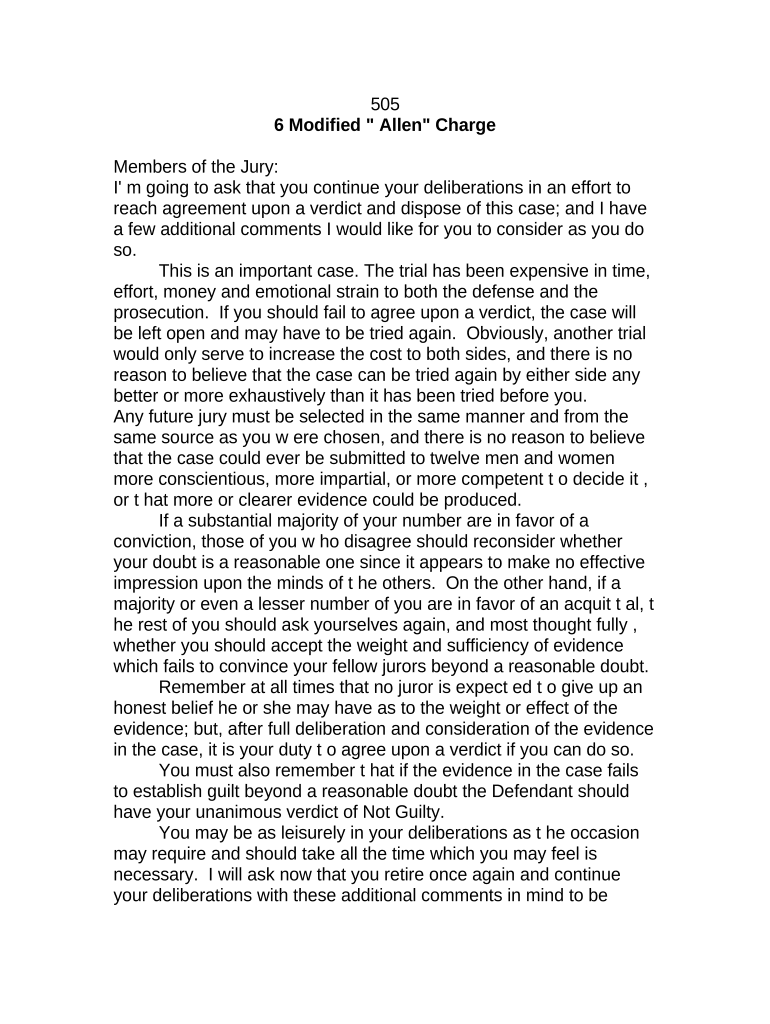
Modified Allen Charge Instructions

This template is fully customizable. Edit the text, fill out the fields, and send it for signature. Give it a try!
Modified Allen Charge Instructions

What the Modified Allen Charge Instructions Are

The Modified Allen Charge Instructions are judicial directions provided to a deliberating jury when discussion stalls to encourage continued deliberation and possible consensus. Derived from the Allen v. United States plurality guidance and refined in state courts, a Modified Allen Charge urges jurors in the minority to reexamine their views and the majority to listen without coercion. It balances encouraging agreement with protecting individual conscience, emphasizing that no juror should surrender honest convictions. Courts vary in wording and usage; attorneys and judges tailor language to local rules and appellate precedents.

Why a Clear Modified Allen Charge Instructions Matters

A clear Modified Allen Charge Instructions helps juries avoid hung verdicts while preserving fairness; it provides structured guidance that encourages continued deliberation, clarifies standards for compromise versus conscience, and reduces the risk of retrial or reversible error on appeal.

Why a Clear Modified Allen Charge Instructions Matters

Who Typically Prepares and Uses These Instructions

Typical users include trial judges, court clerks, defense and prosecution attorneys, and court administrators responsible for jury management.

  • Trial judges issuing a supplemental instruction to encourage continued deliberations without coercion.
  • Defense attorneys who assess potential prejudice and object to language they consider coercive.
  • Court clerks and administrators coordinating timing, recordkeeping, and providing copies to jurors and counsel.

Core Elements of a Professional Modified Allen Charge Instructions

A professional Modified Allen Charge Instructions combines neutral language, legal citations, clear timing, accommodation for dissenting jurors, and a verifiable court record for appellate review.

Neutral Language

Use phrasing that invites jurors to reexamine opinions while expressly forbidding coercion; balanced wording encourages dialogue between majority and minority without implying penalties for honest disagreement, reducing appellate reversal risk.

Legal Citations

Cite controlling precedent or statutory authority supporting the instruction's text; including authorities on jury deliberation standards helps justify the charge and provides appellate courts a clear record of legal foundations.

Record Entry

Create a concise docket entry and transcript notation describing why the charge was given, juror polling or ballot results, counsel's positions, and any objections to preserve issues for appeal.

Timing Guidance

Specify whether deliberations continue immediately or resume after recess, indicate expected duration, and avoid instructions that could be construed as demanding a particular outcome from jurors.

Juror Protections

Explicitly tell jurors they should not surrender honest convictions for the sake of agreement; emphasize that individual votes reflect personal judgment and must be made without coercion.

Appellate Considerations

Draft language mindful of appellate standards; avoid expressions suggesting juror blame or undue pressure, and include record items that demonstrate the court's neutral intent and careful exercise of discretion.
Step-by-Step: Preparing and Delivering the Instruction

Follow these steps to prepare and deliver a Modified Allen Charge Instructions consistent with court rules and appellate guidance.

  • 01
    Evaluate Deadlock: Assess juror count, ballot results, and likelihood of compromise.
  • 02
    Draft Language: Use neutral, non-coercive phrasing tailored to jurisdictional precedents.
  • 03
    Notify Counsel: Inform parties, allow objections, put record on the docket.
  • 04
    Deliver Charge: Read instruction in open court and provide copies to jurors.

How to Configure an Online Workflow for the Instruction

Configure a digital workflow for drafting, reviewing, and e-signing a Modified Allen Charge Instructions to preserve audit trails and court records.

Field Configuration
Document Template and Version Control Store approved wording; lock edits after judicial sign-off.
Signer Authentication and Access Controls Use email plus SMS or KBA for identity verification.
Audit Trail and Retention Settings Capture timestamps, IPs, and action logs for records.
Counsel Review and Objection Logging Allow tracked comments and require on-record objections before filing.

Platform and Format Requirements for eSubmission

Use these platform and file-format requirements when e-signing and filing a Modified Allen Charge Instructions.

  • Supported Formats: PDF, DOCX, and searchable PDF/A preferred.
  • Integrations Available: Salesforce, Microsoft 365, NetSuite, Google Workspace.
  • Authentication Methods: Email link, SMS code, KBA, SSO options.

Where to File, Send, and Archive the Instruction

This workflow outlines preparing, approving, delivering, and filing a Modified Allen Charge Instructions consistent with court procedures.

  • Prepare Draft: Confer with judge and counsel; finalize neutral wording.
  • Record Objections: Place objections and offers of alternative language on record.
  • Provide Copies: Give signed instruction to jurors and file copy with clerk.
  • Docket Entry: Make a clear docket and transcript notation for appeal.

Common Preparation Mistakes to Avoid

  • Using coercive language that pressures minority jurors to abandon honest beliefs, creating reversible error on appeal and undermining the fairness of deliberations.
  • Failing to place a clear docket entry and transcript notation explaining why the charge was given, which can leave appellate courts without necessary context.
  • Delivering the charge without allowing counsel to object on the record or propose alternative wording, reducing procedural safeguards and increasing litigation risk.
  • Omitting juror protections or failing to remind jurors they may maintain honest convictions, which increases the chance of coercion claims.

Legal Risks and Consequences of Improper Instructions

Coercion Finding: May reverse verdict.
Mistrial Risk: Hung jury likelihood increases.
Ineffective Assistance: Defense claim on counsel conduct.
Juror Complaint: Could prompt investigation.
Delay Costs: Additional trial sessions required.
Appeal Grounds: Record omissions weaken defense.

Timing and Deadlines to Track

Key timing considerations include when to request the instruction, how long to continue deliberations, and deadlines for post-trial motions or appeals.

When to Request the Charge:

Typically requested after clear impasse and multiple ballots or extended deliberations.

Extra Deliberation Before Declaring Mistrial:

Court sets reasonable time; avoid indefinite continuances that pressure jurors.

Transcript and Docket Entry Timing:

Make immediate transcript notation and docket entry when charge is given.

Deadline to File Post-Trial Motions:

Follow state rules; typical motion timeframe varies by jurisdiction.

How to Preserve Issues for Appeal:

Object on record and include objections in transcript to preserve appellate review.

Key Milestones From Deadlock to Record Filing

Follow these sequential milestones from deadlock detection through filing a record to support any appellate review.

01

Detect Deadlock

Identify evidence of impasse: repeated ballots or conflicting votes.

02

Confer with Counsel

Judge invites positions on language and records objections.

03

Enter Instruction

Read the Modified Allen Charge in open court and record it.

04

File Transcript

Ensure transcript and docket entry reflect ballots and counsel objections.

Security and Compliance Points to Capture

ESIGN/UETA Compliance: ESIGN and UETA legal equivalence.
Authentication Needed: Signer identity verification recommended.
Audit Trail: Timestamp, IP, and action log.
Encryption in Transit: TLS 1.2/1.3; AES-256 at rest.
HIPAA Considerations: BAA required for protected health information.
Retention & Records: Maintain signed copy in official court file.

Pricing and Feature Comparison for eSignature Options

Compare common eSignature plan features and starting prices for handling Modified Allen Charge Instructions and related court filings.

signNow DocuSign Adobe Sign PandaDoc HelloSign
Starting Price $8/user/mo $15/user/mo $14/user/mo $19/user/mo $15/user/mo
Free Trial 7-day free trial Varies Varies Varies Varies
Bulk Send Yes Yes Yes Yes No
Audit Trail Yes Yes Yes Yes Yes
HIPAA Compliant Yes Yes Yes No No

Frequently Asked Questions About Modified Allen Charge Instructions

Common questions about preparing, delivering, and preserving Modified Allen Charge Instructions and how to avoid procedural pitfalls are answered below.


Need help? Contact support

be ready to get more
Join over 28 million airSlate SignNow users