Establishing secure connection…Loading editor…Preparing document…

Jury Instruction Form

This template is fully customizable. Edit the text, fill out the fields, and send it for signature. Give it a try!
Jury Instruction Form

What the Jury Instruction Form Is and when it applies

A Jury Instruction Form is a formal submission of proposed instructions and associated authority presented to the court for use by the jury when deciding issues of law and fact. It typically includes numbered instructions, citation to controlling authority, party names, and a signature block for counsel. Courts use these forms in civil and criminal trials to ensure jurors receive legally correct guidance on elements, burdens of proof, and applicable definitions. Local rules often control format, deadlines, and service requirements, so practitioners tailor the form to the court’s procedure.

Why an accurate Jury Instruction Form matters

Clear, well-supported jury instructions reduce the risk of reversible error, preserve issues for appeal, and ensure jurors apply the correct legal standards.

Why an accurate Jury Instruction Form matters

Who prepares and files Jury Instruction Forms

Several parties routinely prepare or submit proposed jury instructions depending on case posture and jurisdiction.

  • Plaintiff counsel prepares instructions supporting elements and burden of proof, including citations to statutes and controlling case law.
  • Defense counsel proposes instructions addressing affirmative defenses, burden-shifting, and limitations on liability or damages for the jury.
  • The court clerk or judge’s chambers compiles final instructions, may edit language, and issues the jury charge at trial.

Step-by-step: preparing a Jury Instruction Form

Follow a consistent process from drafting through filing to reduce errors and ensure compliance with court rules.

  • 01
    Draft Instructions: Draft clear numbered instructions tied to claims and defenses.
  • 02
    Support with Authority: Attach concise case or statutory citations for each instruction.
  • 03
    Meet Local Format: Format per local rules: font, margins, numbering, and cover sheet.
  • 04
    File and Serve: File with the clerk and serve opposing counsel within time limits.

Configuring an online workflow for Jury Instruction Forms

Set up a digital workflow that mirrors the court’s filing and service steps to securely prepare and share proposed instructions.

Field Configuration
Document Format PDF/A with embedded bookmarks for each instruction
Signer Authentication Email + optional SMS code or SSO for attorneys
Service Tracking Automatic delivery receipts and timestamped audit trail
Retention Automatic archive of signed packet and metadata

Where to send and how the Jury Instruction Form is handled

After finalizing, routing typically moves from counsel to clerk and then to the judge; the court may edit and adopt instructions before charging the jury.

  • File with Clerk: File the form via court e-filing or paper per local procedures.
  • Serve Opposing Counsel: Serve all parties and include proof of service with filing.
  • Judge’s Review: Judge edits, accepts, or rejects instructions during charge conference.
  • Deliver to Jury: Court issues the finalized charge and instructions to the jury.

Digital signing and submission considerations

Use a platform that supports required document formats and preserves an audit trail when e-signing or e-filing jury instructions.

  • Supported Formats: PDF, DOCX, HTML, Excel
  • Integrations: Salesforce, Microsoft 365, NetSuite, Google Workspace
  • Audit Capabilities: Audit trail, timestamps, signer attribution

eSignature vendor comparison for filing and signing

Basic pricing and core feature availability for common eSignature providers. signNow is listed first to reflect comparative configurations across plans.

signNow DocuSign Adobe Sign PandaDoc HelloSign
Starting Price $8/user/mo $15/user/mo $14/user/mo $19/user/mo $15/user/mo
Free Trial 7-day trial Varies by plan Varies by plan Varies by plan Varies by plan
Bulk Send Yes (Premium) Yes Yes Yes No
Audit Trail Yes Yes Yes Yes Yes
HIPAA Compliant Yes (BAA) Yes (BAA) Yes (BAA) No No

Typical timing and filing deadlines to track

Deadlines for submitting jury instructions vary by jurisdiction and judge; planners should confirm local rules and the trial scheduling order early.

Pretrial Submission Deadline:

Often due 7–14 days before trial, per local rule

Opposition Deadline:

Usually within days after service—check scheduling order

Charge Conference:

Occurs just before or during trial; timing set by the court

Amendment Window:

Courts may allow edits up to the charge conference

Service Requirement:

Proof of service typically filed with the clerk

Key procedural milestones from draft to jury

A short milestone timeline helps counsel coordinate drafting, service, and courtroom presentation of jury instructions.

01

Drafting Complete

Finalize proposed instructions and citations before service.

02

Serve Opposing Counsel

Serve proposals and proofs of service per local rules.

03

Charge Conference

Judge and counsel discuss edits and finalize language.

04

Read to Jury

Court issues the final instructions during jury charge.

Security and compliance checklist for electronic Jury Instruction Forms

Encryption: TLS 1.2/1.3 in transit; AES-256 at rest
Audit Trail: Tamper-evident logs with timestamps and IP
Authentication: Email, SMS codes, SSO, or advanced methods
Regulatory Fit: ESIGN and UETA recognized for enforceability
HIPAA Consideration: BAA required when PHI is included
Certifications: SOC 2 Type II and ISO 27001 available

Consequences of errors or late submissions

Judge Rejection: Court may refuse or edit improperly supported instructions
Waived Issues: Failure to timely submit can forfeit appellate review
Sanctions: Improper filings may risk cost-shifting or sanctions
Case Delay: Late or defective filings can delay trial schedule
Confusion for Jury: Ambiguous instructions increase the risk of misapplication
Malpractice Exposure: Persistent drafting errors can raise professional-liability claims

Common drafting pitfalls to avoid

  • Overly technical language that jurors cannot understand; prefer plain terms tied to legal elements and definitions.
  • Failing to cite controlling authority for nonstandard instructions; unsupported wording is often struck by the court.
  • Inconsistent numbering or cross-references across documents that confuse the judge and opposing counsel during the charge conference.
  • Submitting multiple competing instruction sets without clear priority or proposed judge-controlled language, creating unnecessary disputes.

Anatomy of a professional Jury Instruction Form

A complete form organizes instructions, citations, and case metadata so judges and counsel can reference and discuss each item efficiently.

Case Caption

Top-of-form header with court, case number, and parties; ensures the instructions are connected to the correct docket and file.
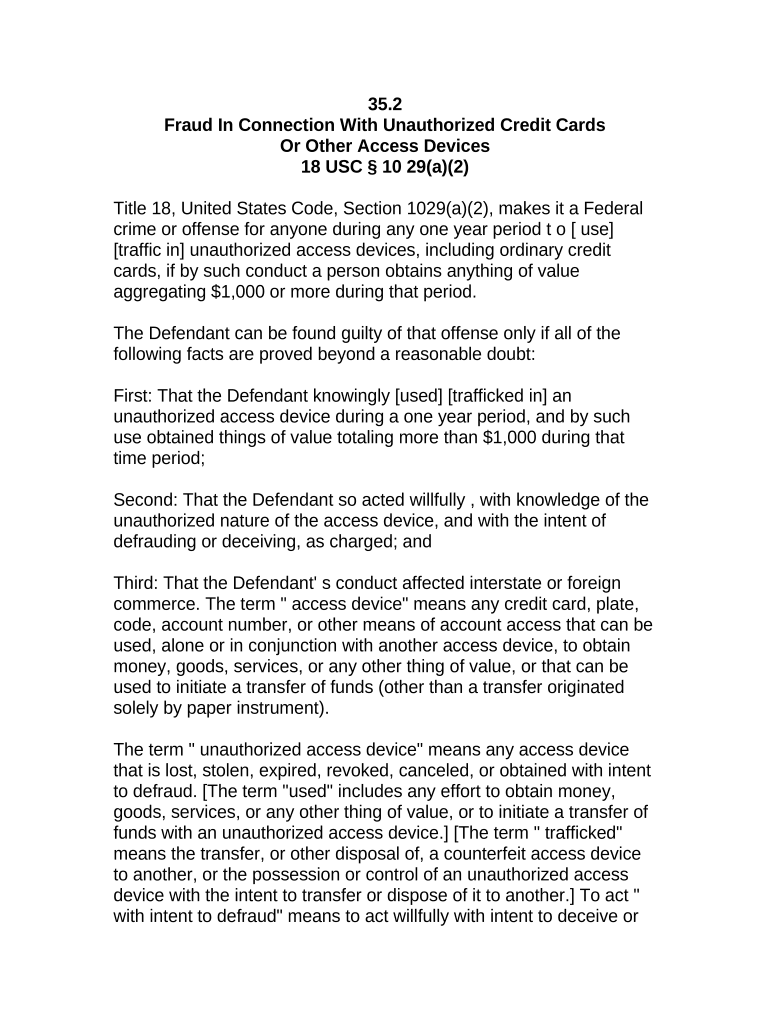
Instruction Text

Clear, numbered language stating the legal standard or element for the jury in plain, neutral phrasing suitable for jury comprehension.

Authority

Concise citations to statutes, model instructions, or controlling case law that justify the proposed language and support its acceptance.

Verdict Forms

If applicable, include proposed verdict or special interrogatory forms tied to instructions to assist juror findings and verdict entry.

Submission Notes

Short notes on disputed language, alternatives offered, and any proposed bracketed text for the court’s consideration.

Signature Block

Counsel’s signature, bar number, contact information, and date; indicates formal submission and responsibility for proposed language.

Practical tips for accurate and efficient completion

Follow these guidelines to improve clarity, reduce disputes, and speed court acceptance of proposed instructions.

Use Model Instructions
Start with jurisdictional model or pattern instructions when available, then tailor language to case facts and supporting authority to minimize court edits.
Keep Language Plain
Write jury-friendly instructions that explain legal elements in straightforward terms so jurors can accurately apply standards to the evidence.
Cite Precisely
Provide precise citations to statutes and controlling opinions for each instruction; include short parentheticals to indicate relevance when useful.
Track Versions
Maintain version control and a dated filing archive to avoid confusion about which instructions were proposed, opposed, or adopted by the court.

Use-case examples for Jury Instruction Forms in practice

Below are two typical scenarios illustrating how proposed instructions are drafted and processed in trial practice.

Civil Plaintiff Example

A plaintiff’s attorney drafts instructions focused on negligence elements and damages

  • Includes cited cases supporting proximate cause language
  • The attorney files instructions seven days before trial and provides a one-page supporting memo for the judge.

Criminal Defense Example

Defense counsel submits instructions emphasizing burden of proof and affirmative defenses

  • Presents model jury instruction authority for intent and self-defense
  • The court incorporates portions, edits phrasing, and reads the final charge to the jury.

Frequently asked questions about the Jury Instruction Form

Answers to common questions about preparation, filing, signatures, and electronic submissions for jury instructions.


Need help? Contact support

be ready to get more
Join over 28 million airSlate SignNow users