Establishing secure connection…Loading editor…Preparing document…

Order of Adjournment in Contemplation of Dismissal

This template is fully customizable. Edit the text, fill out the fields, and send it for signature. Give it a try!
Order of Adjournment in Contemplation of Dismissal

What the Order of Adjournment in Contemplation of Dismissal Is

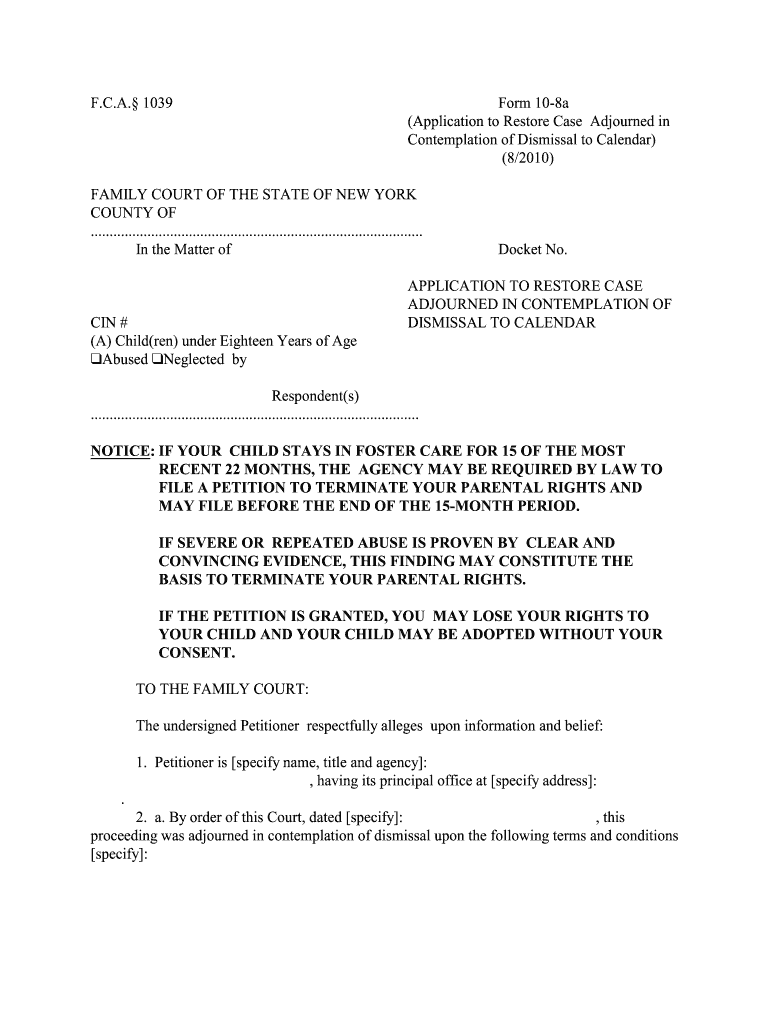
An Order of Adjournment in Contemplation of Dismissal is a court-issued directive that pauses prosecution for a charged matter while conditions are met, often leading to dismissal if the defendant complies. The document records the case caption, terms of adjournment, any conditions or treatment requirements, and the clerk’s instructions for sealing or sealing limitations. It is commonly used in low-level criminal matters and diversionary programs; precise effect and labeling vary by jurisdiction, so local court rules and statutory provisions should be checked before relying on a template.

Why a Clear Order Matters

A properly completed Order of Adjournment in Contemplation of Dismissal clarifies the terms the defendant must follow, documents the court’s intent to dismiss, and reduces future procedural disputes. Clear language preserves eligibility for sealing, immigration analysis, and administrative processing.

Why a Clear Order Matters

Who Prepares and Relies on This Order

Accurate preparation protects parties’ rights and aids later record requests, sealing petitions, or background-check reviews.

  • Prosecutors and court clerks who draft and file the formal order for entry
  • Defense counsel who review terms and advise clients on compliance and collateral consequences
  • Court administrators who process sealing, diversion completion, and docket notations

Step-by-step: Completing the Order of Adjournment in Contemplation of Dismissal

Follow these core steps to prepare a court-ready order that captures the case details, conditions, and disposition pathway.

  • 01
    Identify Case: Enter court, docket number, and parties exactly as in complaint.
  • 02
    State Terms: List adjournment length and any treatment or reporting conditions.
  • 03
    Specify Outcome: State that matter will be dismissed upon successful compliance.
  • 04
    Sign and File: Judge signs; clerk files and notes sealing or public access rules.

Frequently asked questions about Orders of Adjournment in Contemplation of Dismissal

Common procedural and evidentiary questions about drafting, filing, and enforcing the order are summarized below with concise answers.


Need help? Contact support

Risks when the order is incomplete or incorrect

Voidable Order: May be set aside if essential terms omitted
Enforceability Issue: Ambiguous conditions can impede dismissal
Administrative Delay: Clerical errors slow sealing or closure
Collateral Effects: Immigration or licensing consequences may persist
Reopening Risk: Improper procedure may permit case reopening
Recordkeeping Gap: Missing certified copies complicate future petitions

Common preparation mistakes to avoid

  • Using informal or abbreviated court names that prevent clerks from matching the order to the correct docket entry.
  • Leaving conditions vague such as 'continue treatment' without specifying provider, reporting schedule, or measurable benchmarks.
  • Failing to capture exact docket numbers or dates, which can cause administrative rejection or misfiling.
  • Omitting instructions about sealing or public access, creating uncertainty for record requests and background checks.

Key security and compliance considerations for electronic handling

Encryption: TLS 1.2/1.3 in transit
Data at Rest: AES-256 encrypted storage
HIPAA: BAA required for PHI
Audit Trail: Detailed timestamps and logs
Regulatory: ESIGN and UETA compliant
Certifications: SOC 2 Type II, ISO 27001

Digital signing and submission: platform checklist

Confirm the court accepts electronic filings and whether a certified or original signed order must be delivered in paper; integrate with court e-filing if available.

  • Authentication: Email, SMS code, or advanced methods
  • Audit Records: IP, timestamp, action log available
  • Export Formats: PDF/A and DOCX supported

Typical digital workflow for an adjournment order

A consistent digital workflow reduces errors and preserves the signing audit trail required for court or administrative review.

  • Draft Document: Prepare order template with fillable fields
  • Place Fields: Add signature, date, and clerk fields
  • Signatures: Judge signs (electronic or wet) and clerk certifies
  • File Copy: Store certified copy in court file and counsel records

Essential parts of a professional Order of Adjournment in Contemplation of Dismissal

A complete order balances legal precision with administrative clarity; each section reduces ambiguity and supports downstream sealing or dismissal steps.

Case Caption

Full court name, case caption, and docket number exactly matching the charging instrument to ensure the order is associated with the correct proceeding.
Recitation of Charge

Specific statutory citations and short-form charge labels help determine collateral consequences and diversion eligibility on record checks.

Adjournment Term

Clear start and end dates, including any review dates, that define the monitoring period and timeframe for compliance evaluation.

Conditions of Adjournment

Detailed, measurable obligations such as treatment provider, reporting intervals, restitution amounts, or community service hours to avoid vagueness.

Disposition Pathway

Explicit statement that successful compliance will result in dismissal and any automatic sealing or steps required for formal dismissal entry.

Certification Block

Judge’s signature line, clerk filing date, and space for clerk certification or court stamp to validate the official record.

Typical timelines and deadlines to note

Timeframes vary by jurisdiction; the following are common milestones to include or track when using an adjournment order.

Adjournment Length:

Often set for months; jurisdictions commonly use 6 to 12 months depending on program.

Compliance Reporting:

Interim reporting dates or treatment checkpoints specified within the adjournment term.

Dismissal Entry:

Clerk enters dismissal after confirmation of successful compliance per order terms.

Motion Deadlines:

Any motion to modify terms generally requires judicial leave; local rules govern timing.

Record Requests:

Requests for certified copies or sealing petitions should follow local court schedule and fees.

Comparing eSignature vendors for preparing and distributing orders

This table compares basic pricing and capabilities for common eSignature platforms; signNow is shown first per publisher guidelines.

signNow DocuSign Adobe Sign PandaDoc HelloSign
Starting Price $8/user/mo $15/user/mo $14/user/mo $19/user/mo $15/user/mo
Free Trial 7-day free trial Varies by plan Varies by plan Varies by plan Varies by plan
Bulk Send Yes Yes Yes Yes No
Audit Trail Yes Yes Yes Yes Yes
Envelope Cap No cap 100 envelopes/user/yr Varies Varies Varies
be ready to get more
Join over 28 million airSlate SignNow users