Establishing secure connection…Loading editor…Preparing document…

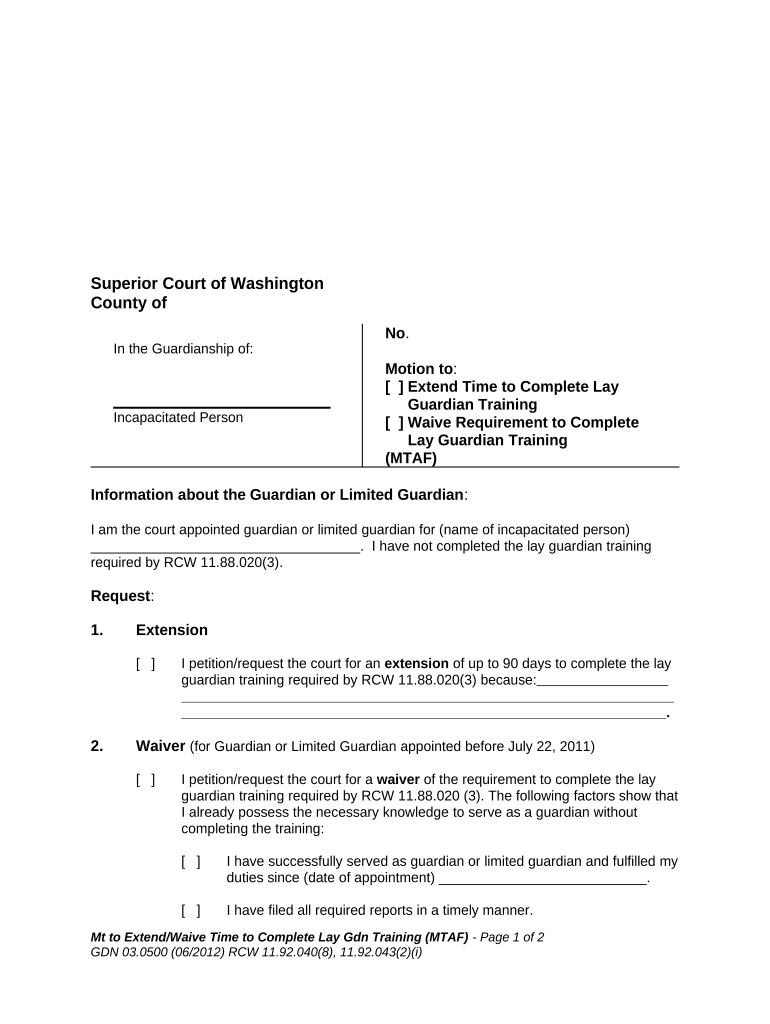
Washington Motion to Extend or Waive Lay Guardian Training

This template is fully customizable. Edit the text, fill out the fields, and send it for signature. Give it a try!
Washington Motion to Extend or Waive Lay Guardian Training

What the Washington Motion to Extend or Waive Lay Guardian Training Is

The Washington Motion to Extend or Waive Lay Guardian Training is a court filing asking a probate or superior court to either postpone the training deadline for a lay guardian or excuse the guardian from completing statutorily required training. The motion explains the factual and legal basis for relief, attaches supporting documents (medical records, travel evidence, scheduling conflicts, disability documentation, or proof of alternative training), and requests a specific order. Courts decide the motion under local probate rules and applicable state statutes; parties must follow service and timing requirements for probate motions.

Why This Motion Matters for Guardians and the Court

A successful motion preserves the guardian’s ability to act while addressing reasonable barriers to training and helps the court ensure the guardian meets competency expectations. It creates an evidentiary record supporting any temporary accommodations or alternative training arrangements.

Why This Motion Matters for Guardians and the Court

Who Typically Prepares or Files This Motion

Parties should confirm local probate rules, required service methods, and any standard forms used by the county court before filing.

  • Guardian or Guardian's Counsel: Prepares factual declarations and legal argument to justify extension or waiver of training.
  • Court-appointed Caseworker: Submits reports about the guardian's performance and training alternatives.
  • Interested Parties or Family Members: Provide supporting declarations or medical documentation when in favor or opposition.

Key Roles Who Sign or Approve the Motion

Lay Guardian

An appointed lay guardian signs or authorizes the motion and provides a declaration describing why training cannot be completed on schedule and what steps will be taken to meet competency requirements.

Attorney

When counsel files the motion, the attorney signs the pleading, certifies compliance with local rules, and attaches any declarations and exhibits needed to support the extension or waiver request.

Essential Data Points to Include on the Motion

Case Caption: Court name, case number
Party Names: Guardian and protected person
Relief Requested: Extend or waive training
Factual Basis: Dates and reasons
Supporting Docs: Medical or travel records
Proposed Order: Draft order attached

Risks of an Incomplete or Incorrect Motion

Court Rejection: Motion denied
Delay: Training deadline missed
Adverse Findings: Court questions competence
Sanctions: Possible fee sanctions
Service Defect: Motion voided
Record Gaps: No evidentiary basis

Common Preparation Mistakes to Avoid

  • Failing to attach a sworn declaration documenting the specific reasons training cannot be completed and the proposed alternative accommodations.
  • Using a generic or non-court caption that omits the case number, judge name, or court division, which can cause the clerk to reject or misfile the motion.
  • Neglecting to check and follow local probate rules for service, signatures, page limits, and required proposed orders, leading to procedural denial.
  • Omitting supporting exhibits such as medical records, airline itineraries, employer letters, or proof of alternative training, reducing the persuasive weight of the request.

Step-by-Step: How to Complete the Motion

Follow this sequence to prepare a clear, court-ready motion to extend or waive lay guardian training.

  • 01
    Draft Caption: Enter court name, case number, and parties exactly.
  • 02
    State Relief: Clearly request extension or waiver and the time requested.
  • 03
    Attach Evidence: Add sworn declarations and supporting exhibits.
  • 04
    Proposed Order: Include a clean, signable proposed order for the judge.

Filing Flow: From Preparation to Court Ruling

This is the typical end-to-end process for filing and obtaining a ruling on the motion.

  • Prepare Motion: Draft and assemble exhibits and declarations.
  • File with Clerk: Submit paper or e-file per county rules.
  • Serve Parties: Serve all interested parties and file proof of service.
  • Judge's Ruling: Judge issues order granting, modifying, or denying.

Configuring a Digital Workflow for the Motion

Set up a document workflow that captures signatures, attachments, and a court-ready PDF.

Field Configuration
Document Type PDF/A for court filings
Signatures Signature + date fields for declarant and attorney
Attachments Append exhibits as separate labeled PDFs
Audit Trail Enable timestamp and IP capture

Digital Signing and Delivery Considerations

Verify the court accepts electronically signed filings or e-filed versions and whether the local clerk requires original signatures for certain pages.

  • File Formats: PDF, PDF/A or flattened PDF
  • Authentication: Email or SMS code for signer attribution
  • Retention: Secure storage with exportable audit logs

Timing and Typical Deadlines to Watch

Deadlines vary by county and local rule; confirm timing with the probate clerk before filing to avoid procedural dismissal.

Before Training Deadline:

File as soon as inability is known to avoid compliance lapse.

Service Timing:

Serve other parties according to local rule timelines.

Hearing Date:

Court may set a hearing; calendar availability varies.

Response Period:

Opposing parties typically have limited days to respond.

Order Entry:

Judge signs order; clerk enters it in case docket.

Key Milestones from Filing to Final Order

Track these sequential milestones to ensure timely filings and service during the motion lifecycle.

01

Prepare Record

Assemble motion, declarations, and exhibits for filing.

02

E-File or Paper

Submit to the clerk or e-filing system per local rules.

03

Serve Parties

File proof of service and allow response period.

04

Court Decision

Judge issues order; ensure docket reflects the ruling.

Example Scenarios Where Courts Grant or Consider Relief

These illustrative scenarios show typical factual bases and how courts may evaluate a motion to extend or waive lay guardian training.

Medical Excuse Example

A guardian presents a physician declaration confirming a medical condition prevented travel for training.

  • The guardian proposed remote coursework as an alternative.
  • The court continued the deadline and ordered completion of specified online modules within 90 days, noting the credible medical evidence and proposed remediation plan.

Scheduling Hardship Example

A guardian documents employment and caregiving duties that conflicted with scheduled training dates.

  • County caseworker confirmed efforts to reschedule.
  • The judge granted a short extension and required the guardian to enroll in the next available local or online session, with a status report due to the court.

Practical Tips for a Clean, Persuasive Motion

Follow these best practices to improve the chances of a favorable ruling and minimize procedural obstacles.

Use Clear, Concise Declarations
Draft a short sworn declaration that states facts in chronological order, cites exhibits, and avoids legal argument overload to allow the judge to focus on key disability, travel, or scheduling facts.
Attach Credible Evidence
Include relevant records such as physician notes, employer letters, flight itineraries, or alternate training certificates to substantiate claims rather than relying on unspecific assertions.
Follow Local Rules Closely
Confirm page limits, service methods, e-filing requirements, and proposed order format with the county clerk to avoid rejection for procedural noncompliance.
Propose Clear Remedies
Offer specific accommodations—exact extension length, online training providers, or competency benchmarks—so the court can grant practical, enforceable relief.

Comparing eSignature Vendors for Court-Ready Filings

Basic vendor differences influence cost, HIPAA support, bulk send capability, and envelope limits; signNow is listed first for comparison purposes.

signNow DocuSign Adobe Sign PandaDoc HelloSign
Starting Price $8/user/mo $15/user/mo $14/user/mo $19/user/mo $15/user/mo
Free Trial 7-day trial Yes Yes Yes Yes
Bulk Send Yes Yes Yes Yes No
Audit Trail Yes Yes Yes Yes Yes
HIPAA Compliant Yes Yes Yes No No
Envelope Cap No cap 100 envelopes/user/year Varies Varies Varies

Frequently Asked Questions About the Motion

Answers to common procedural and technical questions about preparing, filing, and signing the motion.


Need help? Contact support

be ready to get more
Join over 28 million airSlate SignNow users