Establishing secure connection…Loading editor…Preparing document…

Letter of Invitation to Going-Away Party

This template is fully customizable. Edit the text, fill out the fields, and send it for signature. Give it a try!
Letter of Invitation to Going-Away Party

What a Letter of Invitation to Going-Away Party Is

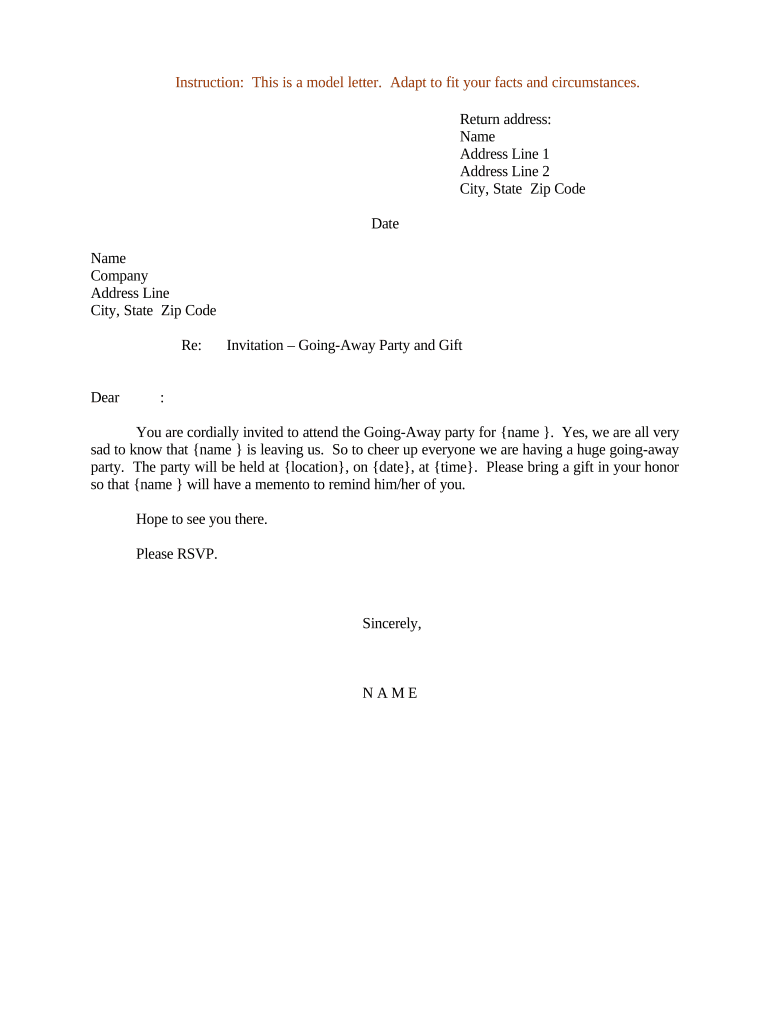
A Letter of Invitation to Going-Away Party is a concise, written notice sent by a host to invitees that communicates event purpose, date, time, location, RSVP instructions, and any special details. It can be used for informal social gatherings, workplace farewells, or community send-offs, and is commonly delivered by email, printed card, or e-invitation. The letter sets expectations about dress code, gifts, and whether guests may bring companions, and it helps organizers plan capacity, catering, and travel logistics.

Why a Clear Invitation Matters

A well-written invitation reduces confusion, improves RSVP response rates, and helps hosts coordinate venue, catering, and guest accommodations. It establishes tone and accessibility expectations for attendees while documenting key event details for follow-up and recordkeeping.

Why a Clear Invitation Matters

Who Typically Prepares This Invitation

Hosts across personal and professional settings prepare going-away invitations to coordinate guest lists and logistics.

  • Individual hosts and family members organizing private farewell gatherings.
  • Office managers or team leads arranging workplace send-offs and group events.
  • Volunteer coordinators or community organizers managing neighborhood or club good-byes.

The tone and formality vary by audience: personal letters are informal, while workplace invitations are brief and professional.

Typical Signers and Preparers

Event Planner

A professional or volunteer organizer who drafts the invitation, coordinates logistics, and manages RSVPs. They often include venue details, accessibility notes, and a deadline for responses to ensure accurate headcount and vendor coordination.

Team Lead

A manager or team representative who composes a workplace going-away letter on behalf of colleagues. The document typically mentions work-related highlights, official send-off schedule, and guidance on group gifts or voluntary contributions.

Essential Elements to Include

A professional invitation should be complete but concise; include core details so invitees can decide and respond quickly.

Event Title

A short descriptive name (for example, 'Maria's Going-Away Party') so recipients immediately recognize the purpose of the invitation.
Date and Time

Provide the full date and start/end times in MM/DD/YYYY and 12-hour or 24-hour format to prevent scheduling misunderstandings.

Location Details

Include full street address, venue name, and room or entrance instructions; add public transit options and parking notes where applicable.

RSVP Instructions

State a clear RSVP deadline, contact name, preferred method (email, phone, form), and how to indicate guest count or dietary needs.

Dress & Etiquette

Indicate dress code (casual, business casual, formal) and any guest restrictions or expected conduct relevant to the event setting.

Additional Notes

Mention whether gifts are optional, if children are welcome, and include accommodations or accessibility details as needed.

Privacy and Security Considerations

Encryption: AES-256 at rest
In Transit: TLS 1.2/1.3
Authentication: Email or SMS code
Audit Trail: Signing timestamps
Compliance: ESIGN / UETA
HIPAA Note: BAA required if PHI shared

Step-by-Step: Create and Send the Invitation

Follow these steps to prepare a clear invitation, collect RSVPs, and manage guest logistics efficiently.

  • 01
    Draft Content: Write a concise message with date, time, place, and RSVP details.
  • 02
    Confirm Logistics: Verify venue availability, capacity, and any vendor needs before sending.
  • 03
    Add RSVP Method: Include contact, deadline, and how to report dietary needs.
  • 04
    Distribute: Send via email, e-invite, or printed card and track responses.

Where to Send or Store Invitations

Choose distribution and storage methods that match your audience and recordkeeping needs.

  • Email: Direct delivery and easy reply tracking.
  • e-Invite Services: Use RSVP dashboards for guest management.
  • Printed Card: Traditional option for formal events.
  • Shared Folder: Store final versions in cloud storage for access.

Digital Tools and Format Support

Use tools that export stable, accessible file types and integrate with your calendar and guest-tracking systems.

  • File Types: PDF, DOCX, HTML
  • Calendar Sync: iCal or Google Calendar
  • Integrations: Google Workspace, Microsoft 365

Select platforms that match your privacy needs and offer clear access controls; confirm recipients can open your chosen file types.

Common Timelines and Deadlines for Invitations

Plan deadlines around event scale and vendor lead times to ensure accurate attendance counts and timely arrangements.

Invitation Lead Time:

2–4 weeks for casual events; 6–8 weeks for larger gatherings.

RSVP Deadline:

Typically 7–14 days before the event to finalize numbers.

Vendor Cutoffs:

Caterers and venues may require final counts 3–7 days prior.

Reminder Timing:

Send one reminder 3–5 days before RSVP deadline.

Last-Minute Updates:

Communicate changes immediately by email and calendar update.

Common Mistakes Hosts Make

  • Vague date or time information leads to guests arriving at different times and can create confusion for group activities or venue staffing.
  • Failing to include a clear RSVP method causes lower response rates and makes it difficult to confirm headcount for catering or seating.
  • Omitting accessibility or parking notes can leave guests with mobility limitations without necessary accommodations or clear directions.
  • Using inconsistent formats or abbreviations for addresses and times may cause navigation errors or calendar import issues for invitees.

Practical Risks of an Incorrect Invitation

Overbooking: Exceeds venue capacity
Understaffing: Insufficient catering
Privacy Exposure: Guest contact data leaked
Miscommunication: Wrong date or time
Accessibility Failures: No accommodations noted
Reputational Harm: Confused or upset guests

Practical Use Examples

Two concise scenarios illustrate how invitation letters are used and adapted to context and audience.

Office Farewell

A manager sends a brief team invitation highlighting recognition and time.

  • Include RSVP and gift collection details to coordinate group contributions.
  • The invitation keeps tone professional, notes if attendance is optional, and directs colleagues to RSVP by a set date so catering and name tags can be ordered.

Neighborhood Get-Together

A neighbor sends a casual card inviting nearby families to an informal backyard send-off.

  • Provide directions, parking notes, and whether children are welcome.
  • The message suggests potluck items, requests RSVP for headcount, and offers contact info for last-minute questions or weather-related changes.

How to Save and Export the Invitation

Save final versions in interoperable formats and maintain a copy for RSVP tracking and future reference.

Save as PDF

Export an immutable PDF to preserve layout and prevent accidental edits; PDFs are widely shareable and suitable for email attachments and printing.

Keep Editable Copy

Store a DOCX or source file for last-minute edits or variant messages; maintain naming conventions with version dates for clarity.

Calendar Export

Include an .ics file or calendar link with the invitation so recipients can add the event to Google, Outlook, or Apple calendars.

Archive Copies

Archive sent invitations and RSVP records in cloud storage for at least one year to reconcile expenses and vendor billing if needed.

Sample eSignature Vendor Comparison for Sending Invitations

Comparison of common vendor attributes for eSignature and distribution; signNow appears first per platform comparison conventions.

signNow DocuSign Adobe Sign PandaDoc HelloSign
Starting Price $8/user/mo $15/user/mo $14/user/mo $19/user/mo $15/user/mo
Free Trial 7-day free trial Varies by region Varies by plan Varies by plan Varies by plan
Bulk Send Yes Yes Yes Yes No
Audit Trail Yes Yes Yes Yes Yes
HIPAA Compliant Yes Yes Yes No No
Envelope Cap No cap 100 envelopes/user/year Varies by plan Varies by plan Varies by plan

FAQs and Troubleshooting for Invitations

Answers to common questions about drafting, distributing, and updating invitations, including legal and privacy considerations.


Need help? Contact support

be ready to get more
Join over 28 million airSlate SignNow users