Establishing secure connection…Loading editor…Preparing document…

Notice of Lien on Real Estate for Criminal Bond

This template is fully customizable. Edit the text, fill out the fields, and send it for signature. Give it a try!
Notice of Lien on Real Estate for Criminal Bond

What the Notice of Lien on Real Estate for Criminal Bond Is

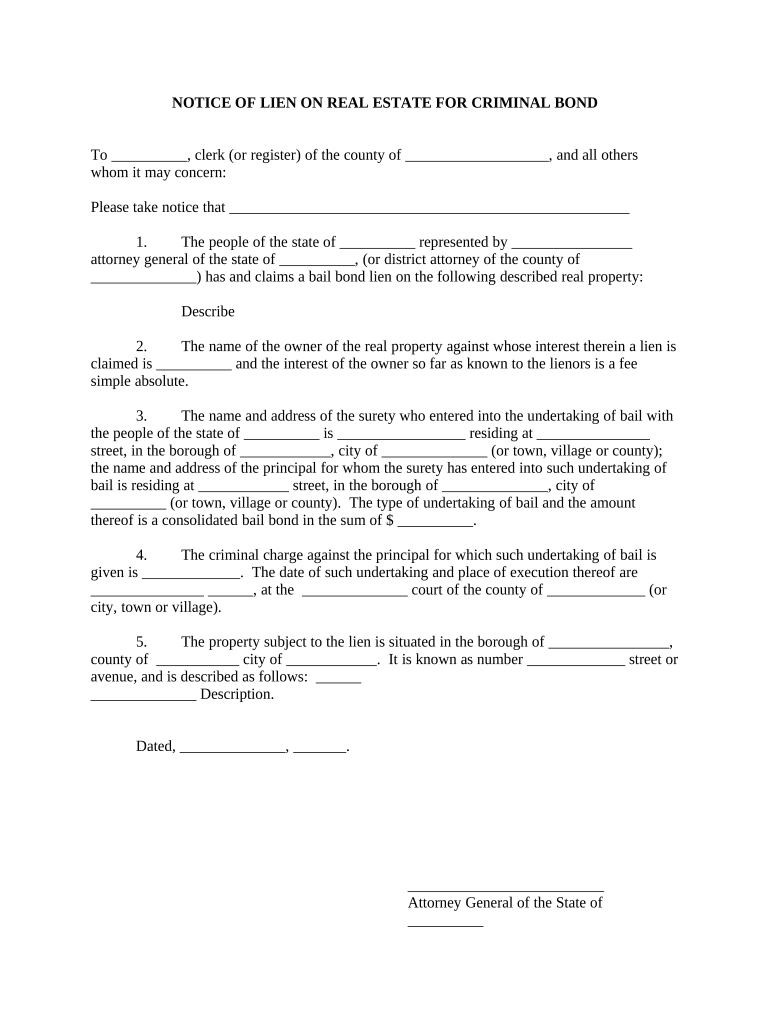
A Notice of Lien on Real Estate for Criminal Bond is a recorded instrument that notifies third parties of a security interest in real property created to secure obligations under a criminal bond or bail bond. It identifies the obligor, the bonded amount or obligation, and the property encumbered, and it is usually recorded in the county recorder or land records office where the property is located. Recording provides public notice that the lien exists and can affect title searches and subsequent transfers until the lien is released or satisfied.

Why a Notice of Lien Matters for Bond Claims

Filing a Notice of Lien preserves the bonding party’s security interest, creates public notice that can deter attempts to transfer encumbered property, and establishes priority for recovery if the underlying obligations are not met. Properly executed and recorded notices support enforcement and reduce disputes over priority among creditors.

Why a Notice of Lien Matters for Bond Claims

Who Typically Prepares and Uses This Notice

Government prosecutors, bail bond companies, and county recording offices are the principal users and filers of this notice.

  • Prosecuting authorities who need to secure restitution or bond-related liens against defendant property for public protection and recovery.
  • Bail bond companies seeking to protect reimbursement rights when a defendant defaults or forfeits bond conditions.
  • Title companies and county recorders who receive, index, and note recorded liens against property records for public notice.

Each party’s role differs: filers prepare and record the notice, recorders index it, and title examiners rely on it during conveyances.

Primary Roles Who Sign or File

County Recorder

County recording offices process and index the Notice of Lien; staff verify required stamps, recording fees, and that the instrument meets local format rules before acceptance for public records.

Bail Bond Agent

A bail bond agent or company representative typically prepares the notice or instructs counsel; they must ensure the lien language matches the bond agreement and include necessary signatures and notarization per state law.

Required Information Elements

Defendant Name: Full legal name
Property Description: Legal description
Bond Reference: Court case or bond ID
Lien Amount: Dollar amount
Recording County: County name
Signature Block: Signer and notary

Consequences of an Incorrect or Defective Notice

Unenforceable Lien: May be invalidated
Title Clouding: Creates disputes in conveyances
Delayed Recovery: Slows enforcement actions
Filing Rejection: County may refuse recordation
Financial Exposure: Increased collection costs
Statute Bar: Time limits may expire

Common Preparation Errors to Avoid

  • Using an incomplete or nonstandard legal description that does not match county land records, causing rejection or ambiguity in what property is encumbered.
  • Listing an incorrect property owner or misspelled defendant name, which can make the notice ineffective against third-party purchasers and title searchers.
  • Failing to include required notarization or witness attestation where the county or state requires it, resulting in recordation denial or later challenges.
  • Omitting the bond or case reference details that connect the lien to the underlying criminal bond obligation, weakening enforceability.

Step-by-Step: Preparing and Recording the Notice

Follow these steps to prepare, notarize, and record a Notice of Lien on Real Estate for Criminal Bond correctly.

  • 01
    Confirm Authority: Verify your legal right to file the lien before preparing the notice.
  • 02
    Draft Notice: Include parties, bond reference, amount, and full property description.
  • 03
    Notarize: Sign before a notary as required by state or local rules.
  • 04
    Record: Submit to the county recorder with required fee and copies.

How to Configure an Online Filing Workflow

Set up a consistent digital workflow to prepare, route, and record notices while preserving an audit trail.

Field | Configuration Purpose | Value
Authentication Level Email link with optional SMS code
Document Types Accepted PDF/A or PDF is preferred
Notary Integration Support for RON or local notary workflows
Recording Submission Export signed PDF for county upload

Where to File and How Recording Works

Recording procedures vary by county; use the recorder office where the property is located for official indexing and public notice.

  • Prepare Notice: Complete fields and attach bond documentation.
  • Notarize Document: Obtain in-person or RON notarization as allowed.
  • Pay Fees: Include county recording fee and any page charges.
  • Submit to Recorder: File in person, by mail, or via authorized e-recording channel.

Digital Signing, Formats, and Integration Considerations

Choose a platform that supports secure eSignature, preserves an audit trail, and exports court-ready PDFs.

  • File Formats: PDF, PDF/A, DOCX supported
  • Integrations: Works with common CRMs and cloud storage
  • Security: TLS in transit; AES-256 at rest

Ensure your provider supports RON where permitted, can produce notarized certificates, and supplies a tamper-evident signed PDF for county recorders.

Practical Tips for Accurate and Efficient Completion

Follow consistent drafting, notarization, and recording practices to reduce rejections and strengthen enforceability.

Verify Property Data
Cross-check the legal description against the county deed and tax records; use exact metes and bounds or lot and block language rather than approximate addresses to ensure correct indexing.
Use Precise Bond References
Include the full court case number, bond file number, and issuing court to clearly tie the lien to the underlying criminal bond and avoid later evidentiary disputes.
Confirm Notary and Witness Rules
Check the recording county’s notary, signature, and witness requirements before execution; where allowed, use RON only if the county accepts electronically notarized recorded instruments.
Keep Audit Trail Records
Retain signed PDFs, notarization certificates, mailing receipts, and any eDelivery evidence to document service, chain of custody, and signing events for enforcement or title exam purposes.

Key Components to Include in a Professional Notice

A clear, complete notice improves acceptance by recorders and strengthens later enforcement; include the following components precisely.

Parties

Identify the lien claimant, the obligor (defendant), and any lienholder or co-obligors with full legal names and business entities when applicable.
Property Description

Provide the exact legal description from the deed or tax assessor’s records; add parcel or APN numbers and street address for cross-reference.

Bond Reference

Cite the court, case number, bond instrument, and date to tie the notice to the criminal bond obligation explicitly.

Amount Secured

State the dollar amount or specific financial obligation covered by the lien, including interest, penalties, or statute-authorized costs if applicable.

Recording Details

Include a space for recorder stamps, book and page or instrument number, and the filing date to show official recordation particulars.

Execution Block

Provide signature lines for authorized signers and a notary acknowledgement formatted to the county’s requirements for recordable instruments.

Real-World Filing Examples

These examples show common situations where a Notice of Lien on Real Estate for Criminal Bond is used and how it functions in practice.

Bail Bond Company Filing

A bail bond company files a lien after a defendant forfeits bond to secure reimbursement of costs and forfeited amounts.

  • The lien cites the bond and court case number.
  • Properly recorded, the notice notifies title searchers and preserves the company’s priority for collection if the property is sold or refinanced, reducing collection litigation costs.

Prosecutor Recovery Notice

A prosecutor records a lien to secure restitution ordered in a criminal case where defendant owns real property.

  • The notice links to the court order.
  • Recording creates public notice during title searches and supports civil collection remedies to satisfy restitution while the lien remains active.

eSignature Platform Pricing Comparison for Document Execution

Basic pricing and feature availability can affect the cost and compliance of executing Notices of Lien; signNow appears first for ease of comparison.

signNow DocuSign Adobe Sign PandaDoc HelloSign
Starting Price $8/user/mo $15/user/mo $14/user/mo $19/user/mo $15/user/mo
Free Trial 7-day free trial Varies Varies Varies Varies
Bulk Send Yes Yes Yes Yes No
Audit Trail Yes Yes Yes Yes Yes
HIPAA Compliant Yes Yes Yes No No
Envelope Cap No cap 100 envelopes/user/year Unknown Unknown Unknown

Frequently Asked Questions About Notices of Lien on Real Estate for Criminal Bond

Answers to common questions about legal validity, notarization, filing, and how eSignature or RON may apply.


Need help? Contact support

be ready to get more
Join over 28 million airSlate SignNow users