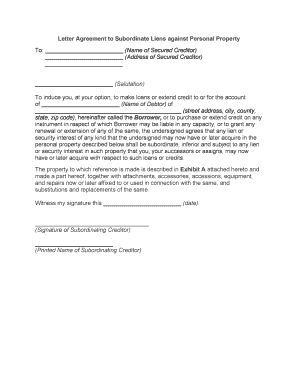
Letter Agreement to Subordinate Liens Against Personal Property
What this Letter Agreement Is and when it’s used
Why a clear subordinate-letter matters to lenders and borrowers
A professionally drafted letter reduces disputes over lien priority, supports lender underwriting, and enables new financing or refinances that rely on predictable collateral ranking under the UCC. It provides evidence of agreed priority among creditors and helps downstream parties evaluate risk and enforceability.
Who typically prepares, signs, and relies on this letter
Clear signatures, dates, and references to financing statements help all parties rely on the agreement and reduce post-closing litigation risk.
- Senior lenders and agents who require clear priority for loan collateral.
- Borrowers arranging new credit or refinancing existing secured obligations.
- Counsel and title/closing agents preparing intercreditor language and ensuring proper documentation.
Step-by-step: completing the Letter Agreement
-
01Identify parties: Confirm legal names and capacities before drafting.
-
02Specify collateral: Use the exact description matching UCC records.
-
03Reference filings: Cite UCC-1 financing statement numbers and jurisdictions.
-
04Execute and record: Obtain authorized signatures and retain signed copies.
How the subordination process typically flows
-
Request and negotiation: Borrower or new lender requests subordination; parties negotiate terms.
-
Drafting: Counsel prepares the letter referencing UCC filings.
-
Execution: Authorized signatories execute; notary if required.
-
File and retain: Record if necessary and store executed copies with loan file.
Digital workflow options for preparing and sending this letter
| Field | Configuration |
|---|---|
| Signer order | Sequential or parallel signing, set by lender preference |
| Authentication | Email link, SMS code, or KBA as required |
| Attachments | Add UCC-1 screenshot or financing statement PDF |
| Audit trail | Capture IP, timestamps, and completion certificate |
What to check when using an eSignature platform
Verify integrations with your document management or loan origination systems so signed letters are stored securely and indexed with collateral records.
- File formats: PDF and DOCX supported
- Authentication: SMS, email, and advanced options
- Audit trail: Comprehensive timestamped history
Timing considerations and typical deadlines
Before funding:
Obtain executed subordination prior to disbursement when required
UCC search window:
Verify current financing statements within 30 days of closing
Notarization window:
Complete notarization at execution if state law requires
Record promptly:
File any required documents to reflect priority
Retention:
Keep executed copies per retention policy
Common pitfalls to avoid when preparing the letter
- Using informal or inconsistent party names that do not match corporate filings or UCC-1 statements and create search mismatches.
- Vague collateral descriptions that fail to tie the letter to recorded financing statements, leaving priority ambiguous.
- Missing or incorrect UCC-1 filing numbers or jurisdictions causing uncertainty in lien ranking.
- Failing to secure authorized signatories or corporate approvals, which can render the agreement voidable.
Practical risks and legal consequences of errors
Representative scenarios where a subordinate-letter is used
Refinance Example
A borrower seeks new senior financing from Lender A and requests Lender B to subordinate an existing lien
- Lender B agrees conditioned on payoff and updated UCC-1 filings
- The agreement is executed, UCC-1s are updated, and funding proceeds with clarified priority and documented audit trail.
Intercreditor Arrangement
Multiple creditors negotiate collateral priorities for project financing
- Parties document carve-outs and enforcement priorities in the letter
- The intercreditor letter prevents disputes during a borrower default and allocates remedies among secured creditors.
eSignature platform pricing and features to consider
| signNow | DocuSign | Adobe Sign | PandaDoc | HelloSign | |
|---|---|---|---|---|---|
| Starting Price | $8/user/mo | $15/user/mo | $14/user/mo | $19/user/mo | $15/user/mo |
| Free Trial | 7-day free trial | Varies | Varies | Varies | Varies |
| Bulk Send | Yes | Varies | Varies | Varies | Varies |
| Audit Trail | Yes | Yes | Yes | Yes | Yes |
| HIPAA Compliant | Yes | Yes | Yes | No | No |
Practical tips for accurate and efficient completion
Frequently asked questions about subordinate letters
-
Can a subordination letter be e-signed?
Yes. Electronic signatures are generally valid under the ESIGN Act (15 U.S.C. ch. 96) and UETA where adopted, provided the signature demonstrates intent, consent, attribution, and retention. Confirm any industry exceptions and collect consumer disclosures when required.
-
Is notarization required?
Not usually for UCC subordination letters, but some states or specific recording offices may require notarization for related documents. Check the applicable state filing rules before execution.
-
What if names don’t match financing statements?
A mismatch can undermine a lender’s ability to identify its interest in a search. Correct names on either the UCC-1 or the letter before finalizing to avoid priority disputes.
-
Do I need to record the letter anywhere?
Subordination letters themselves are typically not filed with UCC filing offices, but parties often attach them to loan files and may record related documents per lender or jurisdictional practices.
-
Who should sign on behalf of a corporation?
An authorized officer or agent should sign. Verify corporate authority via board resolution or officers’ certificate when appropriate to avoid later challenges.
-
How long should I retain the executed letter?
Retain for the loan’s active period plus at least three years; industry-specific rules (e.g., HIPAA six years, IRS three years) and state retention laws may require longer retention.