Establishing secure connection…Loading editor…Preparing document…

Louisiana Community Property Divorce

This template is fully customizable. Edit the text, fill out the fields, and send it for signature. Give it a try!
Louisiana Community Property Divorce

What the Louisiana Community Property Divorce document is

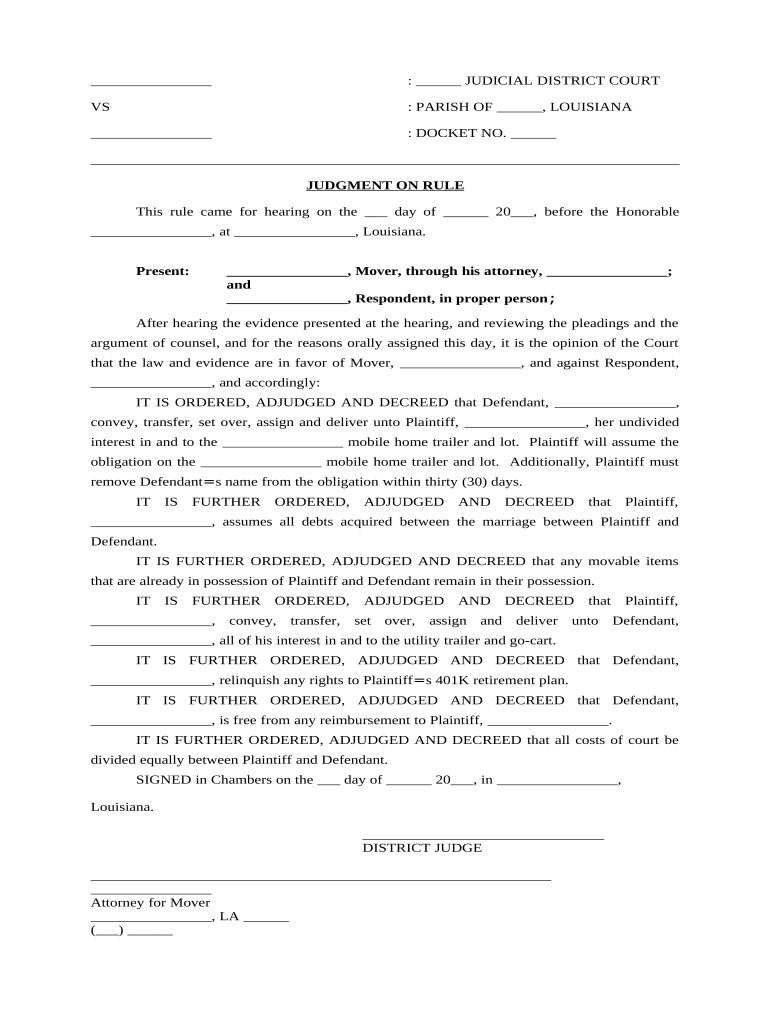
A Louisiana Community Property Divorce document records the division and settlement of community and separate property under Louisiana civil law during divorce proceedings. It sets out which assets and debts are community property subject to division, which are separate, and any agreed compensation or partition between spouses. This document can include spousal support terms, property transfers, and consent to specific court judgments. Because Louisiana follows a community property regime distinct from common law states, the form must reflect local rules on community, quasi-community, and separate assets to be enforceable in state courts.

Why a clear community property settlement matters

Using a properly completed Louisiana Community Property Divorce clarifies ownership, reduces litigation over asset division, and creates a written record enforceable by state courts. It helps parties and courts apply Louisiana's civil-law definitions of community, quasi-community, and separate property consistently.

Why a clear community property settlement matters

Who prepares and signs this document

Parties and professionals commonly involved include divorcing spouses, family law attorneys, notaries, and court clerks coordinating property partition and settlement filings.

  • Divorcing spouses negotiating equitable division under Louisiana community property rules.
  • Family law attorneys drafting agreements and advising on community versus separate assets.
  • Notaries public and court clerks processing acknowledgments and submitting judgments for recordation.

Essential sections to include in the settlement

Core sections of the Louisiana Community Property Divorce should precisely define assets, debts, partition terms, and obligations to create a complete, enforceable settlement.

Parties

Identify each spouse by full legal name, date of birth, and current address; specify marital status and date of separation where relevant to characterize property as community or separate.
Asset Schedule

List all community and separate assets with descriptions, approximate values, acquisition dates, and title records; include bank accounts, retirement plans, real estate, vehicles, and business interests with supporting documentation references.

Debt Allocation

Specify division of liabilities including mortgages, credit accounts, and loans; state who is responsible for post-divorce payments and any indemnity obligations to the other party.

Spousal Support

Record any agreed alimony terms, payment schedule, duration, modification triggers, and tax treatment to avoid later disputes and ensure enforceability under state law.

Property Transfer

Describe conveyance mechanics, including partition acts, notarial acknowledgments required under Louisiana law, titles to be transferred, recording steps for immovable property, and physical delivery of movable items.

Court Approval

Specify whether the agreement is submitted for homologation by the court, the proposed judgment language, and any agreed procedural waivers or reserved rights.

Step-by-step: from drafting to filing

Follow these steps to complete, notarize, and submit a Louisiana Community Property Divorce form accurately for court consideration.

  • 01
    Gather Documents: Collect titles, deeds, account statements, and appraisal reports for all listed property.
  • 02
    Draft Agreement: Document partition, debt allocation, and any spousal support terms clearly.
  • 03
    Notarize & Witness: Sign before a Louisiana notary public and comply with witness rules.
  • 04
    File with Court: Submit agreement with proposed judgment or motion for homologation.

Typical processing flow for settlement and recordation

This flow outlines filing, court processing, and recordation steps when submitting a community property settlement in Louisiana.

  • Prepare Package: Assemble agreement, exhibits, and proposed judgment language.
  • Notary & Witness: Execute with required notarization and witness attestations.
  • File to Clerk: File with parish or district court clerk per local rules.
  • Record Transfers: Record deeds at the parish recorder or assessor as needed.

Configure an online workflow for drafting and signing

Configure digital workflow settings to match legal requirements and court preferences before sending for signatures.

Field Configuration
Authentication Method Email link with optional SMS code
Signer Order Simultaneous or sequential signer order
Notarization Required Use in-person or RON if permitted by court
Document Retention Store signed copy in case file; export PDF/A for records

Technical requirements and digital format guidance

Digital submission and e-signature options vary by parish; verify local court rules before electronic filing or RON use.

  • Browser Support: Modern Chrome, Edge, Safari supported.
  • File Formats: PDF, DOCX accepted; prefer flattened PDF.
  • Integrations: Works with case management or cloud storage.

Timing and filing deadlines to watch

Common filing and procedural deadlines related to property settlement and judgment submission in Louisiana are summarized below.

Agreement Execution Timing:

No universal deadline; complete before final hearing to ensure enforceability.

Submitting for Homologation:

Submit agreement with proposed judgment when filing for divorce decree homologation.

Recording Immovable Transfers:

Record deeds at the parish recorder immediately after judgment to protect title.

Notary Certificate Retention:

Keep notary records per state rules; Louisiana notarial acts must be preserved.

Tax Filings & Disclosures:

Report transfers for tax purposes; consult IRS guidance and state authorities.

Common mistakes to avoid

  • Failing to identify and attach supporting evidence for asset valuations leading to disputes and possible court delays.
  • Using ambiguous transfer descriptions that do not specify deed instrument numbers or account identifiers; creates recording and enforcement problems.
  • Omitting spouse signatures, notarial acknowledgments, or required witness attestations which may render parts of the settlement unenforceable.
  • Relying on electronic signatures for court-decreed judgments without verifying that the specific parish and judge accept e-filed or electronically signed family law instruments.

Key risks and consequences of incorrect documentation

Void Transfers: Improper form can nullify property transfers.
Tax Liability: Unreported transfers trigger tax audits or penalties.
Execution Delays: Court rejection or need for amendment.
Enforcement Risk: Judgment may be unenforceable across states.
Notary Sanctions: Notary errors can lead to professional penalties.
Increased Legal Costs: Additional counsel and litigation expenses.

E-signature plan comparison for signing and submitting legal settlements

Comparison of common e-signature plans and capabilities relevant when signing and submitting legal documents like community property settlements.

signNow DocuSign Adobe Sign PandaDoc HelloSign
Starting Price $8/user/mo $15/user/mo $14/user/mo $19/user/mo $15/user/mo
Free Trial Yes, 7-day trial Varies by vendor Varies by vendor Varies by vendor Varies by vendor
Bulk Send Yes (Business Premium) Varies by plan Varies by plan Varies by plan Varies by plan
Audit Trail Yes Yes Yes Yes Yes
HIPAA Compliant Yes Yes Yes No No
Envelope Cap No envelope cap 100 envelopes/user/year Varies by plan Varies by plan Varies by plan

Answers to frequent questions about Louisiana community property settlements

Answers to common questions about completing, notarizing, and electronically signing a Louisiana Community Property Divorce are provided below.


Need help? Contact support

be ready to get more
Join over 28 million airSlate SignNow users