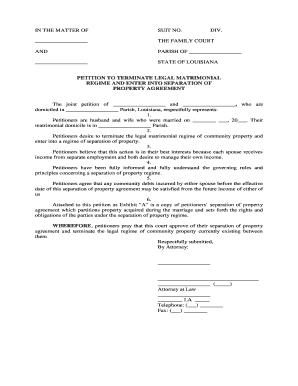
Louisiana Petition to Terminate Legal Matrimonial Regime
What the Louisiana Petition to Terminate Legal Matrimonial Regime Is
Why this petition matters for property and liability clarity
Terminating a legal matrimonial regime clarifies each spouse's property rights, assigns responsibility for debts, and creates a judicial record that can prevent future disputes over ownership. A clear termination helps with title transfers, creditor notice, estate planning, and accurate recordkeeping.
Who typically prepares or files this petition
Attorneys, self-represented spouses, and estate or family law specialists commonly prepare the petition to ensure statutory requirements and factual allegations are presented correctly.
- Family law attorneys and firms representing spouses in regime termination or partition matters.
- Self-represented spouses who meet statutory criteria and elect to file pro se petitions.
- Title companies and real estate counsel when a property transfer depends on termination.
Selection of the filer often depends on complexity: contested asset allocation or creditor issues typically require counsel, while agreed, uncontested terminations may be completed by the parties with checklist support.
Step-by-step: completing and submitting the petition
-
01Prepare facts: Describe marriage, matrimonial regime type, and reasons for termination.
-
02List assets: Itemize property, debts, and proposed post-termination ownership.
-
03Attach exhibits: Include deeds, marriage certificate, prior matrimonial agreements, and financial statements.
-
04File and serve: File with the court of proper venue and serve other parties per rules.
Customizing the petition for online completion and routing
| Upload Document | PDF or DOCX accepted; preserve original formatting. |
|---|---|
| Template Fields | Preplace name, date, and checkbox fields for repeatable use. |
| Signer Roles | Assign roles for Petitioner, Respondent, and Notary if required. |
| Authentication | Use email or SMS code to verify signer identity. |
| Notifications | Set automatic reminders and completion copies to all parties. |
Where to file and how documents typically move through the process
-
File: Submit the petition to the appropriate family or district court clerk.
-
Service: Serve opposing spouse and interested creditors per procedural rules.
-
Hearing: Appear at hearing if contested; court may request evidence.
-
Judgment: Court issues order terminating or modifying the matrimonial regime.
Digital signing and technical compatibility
Use platforms that support PDF and DOCX, secure authentication, and audit trails when collecting signatures for legal filings.
- File formats: PDF, DOCX supported
- Integrations: Works with NetSuite, Google Workspace
- Authentication: Email or SMS code options
Ensure any electronic signature process used for document preparation or internal approvals aligns with court requirements and any statutory restrictions on electronic court filings.
eSignature vendor pricing and compliance at a glance
| signNow | DocuSign | Adobe Sign | PandaDoc | HelloSign | |
|---|---|---|---|---|---|
| Starting Price | $8/user/mo | $15/user/mo | $14/user/mo | $19/user/mo | $15/user/mo |
| Free Trial | 7-day trial | Varies by vendor | Varies by vendor | Varies by vendor | Varies by vendor |
| Bulk Send | Yes | Yes | Yes | Yes | No |
| Audit Trail | Yes | Yes | Yes | Yes | Yes |
| HIPAA Compliant | Yes | Yes | Yes | No | No |
Key risks and potential consequences of errors
Common mistakes to avoid when preparing the petition
- Using inconsistent names or dates across exhibits, which complicates service and verification and may cause clerks to reject filing.
- Failing to include certified copies of deeds or marriage certificates required to establish property classification or marital status.
- Omitting creditor notice language or failing to identify encumbrances, leading to unresolved liens after termination.
- Relying on unsigned or improperly witnessed documents when the court or registry requires notarization or authenticated records.
Use-case examples showing how petitions are used in practice
Uncontested Termination
A married couple agrees to end their community regime and submit a joint petition describing asset division.
- They attach deeds and a proposed consent judgment.
- The court issues an uncontested decree enabling clear title transfers and removes uncertainty for lenders and title companies, avoiding contested litigation costs.
Contested Creditor Issue
One spouse seeks termination while creditors assert claims against community property.
- The petition outlines disputed debts and requests partition.
- The court adjudicates creditor priorities and may order partition or sale, ensuring creditors and spouses have a clear judicial map for rights and liabilities.
Practical tips for accurate and efficient completion
Frequently asked questions about the Louisiana Petition to Terminate Legal Matrimonial Regime
-
Can this petition be signed electronically?
Electronic signatures meet the ESIGN Act (15 U.S.C. ch. 96, 2000) and UETA in most states, but court filings and family-law decrees may be subject to local rules or exceptions. Confirm the clerk and the applicable local rules before relying solely on electronic signatures for the filed petition.
-
Who must sign the petition?
The petitioner must sign the petition; where both spouses join the petition, both should sign. If a party is represented, counsel’s signature may also be required. Check local procedural rules for required verifications and attorney signature blocks.
-
Is notarization always required?
Notarization is often required for instruments affecting title and for certain acknowledgements, but the petition itself may or may not require a notary depending on the parish. Verify whether attached deeds or agreements need notarization to be effective.
-
What supporting documents are commonly required?
Common exhibits include marriage certificate, recorded deeds, prior matrimonial agreements, account statements, and any proposed consent judgment. Complete and legible exhibits reduce the likelihood of continuance or rejection.
-
How long does processing usually take?
Processing times vary by parish and case complexity. Uncontested matters can resolve in weeks, while contested petitions requiring hearings may take months. Local court calendars and service timelines affect overall duration.
-
How can the petition be revoked or amended?
A petitioner can generally move to withdraw or amend before a final judgment, subject to court approval and notice to interested parties. Consult the court’s procedural rules and, if necessary, file a motion to amend or dismiss the petition.