Establishing secure connection…Loading editor…Preparing document…

Louisiana Affidavit of Notary and Attesting Witnesses

This template is fully customizable. Edit the text, fill out the fields, and send it for signature. Give it a try!
Louisiana Affidavit of Notary and Attesting Witnesses

What the Louisiana Affidavit of Notary and Attesting Witnesses Is

The Louisiana Affidavit of Notary and Attesting Witnesses is a sworn written statement executed before a commissioned notary public and signed by one or more attesting witnesses as required by Louisiana civil procedure or specific transaction rules. It documents facts, identity, and the circumstances of a signature or act, and often includes a jurat or acknowledgement block for the notary. The affidavit is used in legal, real estate, estate, and administrative contexts where notarized witness testimony or attestation is needed to establish authenticity or to support subsequent filings.

Why this affidavit matters for valid notarization

A properly completed Louisiana Affidavit of Notary and Attesting Witnesses ensures that the signatory’s statement is sworn, that identity was verified, and that the notary and witnesses followed required formalities under ESIGN/UETA and state notarial law.

Why this affidavit matters for valid notarization

Who typically prepares and relies on this affidavit

Common users prepare, sign, or collect this affidavit when formal proof of identity, signature, or witnessed statements are required.

  • Notaries and notary offices who must document the oath or acknowledgement and verify identification for recordkeeping.
  • Attesting witnesses called to confirm the affiant’s signature and the circumstances of execution in real property or estate matters.
  • Title companies, law firms, and government clerks who require notarized affidavits to support filings, transfers, or probate petitions.

The affidavit supports downstream acceptance by courts, registries, and service providers when formality, identity, and a contemporaneous record are required.

Primary signers and their roles

Notary Public

A commissioned notary public administers the oath or acknowledgement, verifies identity, completes the jurat or acknowledgement block, and records the notarial act in the official journal; the notary’s signature and commission details authenticate the affidavit for legal use.

Attesting Witness

An attesting witness observes the affiant sign or affirm the statement, signs the witness block, and may later testify to the circumstances if the affidavit’s validity is challenged in court or at a registry.

Required fields for a valid Louisiana affidavit

Affiant Name: Full legal name
Affiant Address: Street, city, state, ZIP
Date of Oath: MM/DD/YYYY date
Witness Names: Printed names of witnesses
Notary Block: Jurat or acknowledgement
ID Shown: Type and number presented

Consequences of incorrect or incomplete affidavits

Perjury risk: Criminal penalties if false statements.
Notarial rejection: Clerk or recorder may refuse filing.
Probate delay: Estate administration may be postponed.
Civil dispute: Affidavit credibility may be attacked.
Administrative fines: Fees or penalties may apply.
Record invalidation: Instrument may be declared void.

Common mistakes to avoid when preparing the affidavit

  • Using initials or nicknames instead of the affiant’s full legal name can create identity disputes and may cause rejection by title companies or courts.
  • Omitting the notary’s jurat, commission expiration date, or the notary seal often results in the document being considered improperly notarized and unacceptable for filing.
  • Failing to have the attesting witnesses sign in the presence of the notary or affiant undermines the witness statement and may lead to evidentiary challenges.
  • Providing inconsistent dates, incomplete descriptions of the facts sworn to, or failing to include an identification method increases the risk of rejection or later litigation.

Step-by-step: Completing the Louisiana affidavit correctly

Follow these sequential steps to prepare, notarize, and distribute the affidavit so it meets Louisiana practice and common filing requirements.

  • 01
    Prepare document: Enter full legal names and clear statement of facts.
  • 02
    Gather IDs: Affiant brings government-issued photo ID to notary.
  • 03
    Witness presence: Attesting witness signs in the notary’s presence.
  • 04
    Notarial act: Notary completes jurat, signs, and affixes seal.

How the notarization and witness process typically flows

This high-level process shows the usual sequence from preparation through notarization and delivery of the final affidavit.

  • Upload or prepare: Draft affidavit and place signature blocks.
  • Verify identity: Notary checks government ID and records details.
  • Witness execution: Witnesses sign in presence of notary.
  • Record and distribute: Notary completes journal entry and provide copies.

Setting up a digital workflow for the affidavit

Configure signing order, authentication, and mandatory fields when you complete or send the affidavit electronically.

Field Configuration
Authentication Email plus SMS code for signer verification
Audit Trail Enable to capture timestamps and IPs
Field Validation Enforce MM/DD/YYYY for dates
Notary Block Place jurat field for in-person or RON notarization

Technology and format considerations for eSubmission

Choose platform features that support notarization, witness collection, and secure storage for legal acceptance.

  • Integrations: Salesforce, NetSuite, Google Workspace
  • File formats: PDF and DOCX supported
  • Authentication: Email, SMS code, KBA, or SSO

Ensure the provider supports audit trails, tamper-evident signed PDFs, and any RON features required by Louisiana or other jurisdictions.

Essential components of a professional Louisiana affidavit

A complete affidavit contains specific sections and notarial elements so it is accepted for legal or administrative use.

Caption

Case or transaction identification at top of document, specifying parties and subject matter to connect the affidavit to the underlying record.
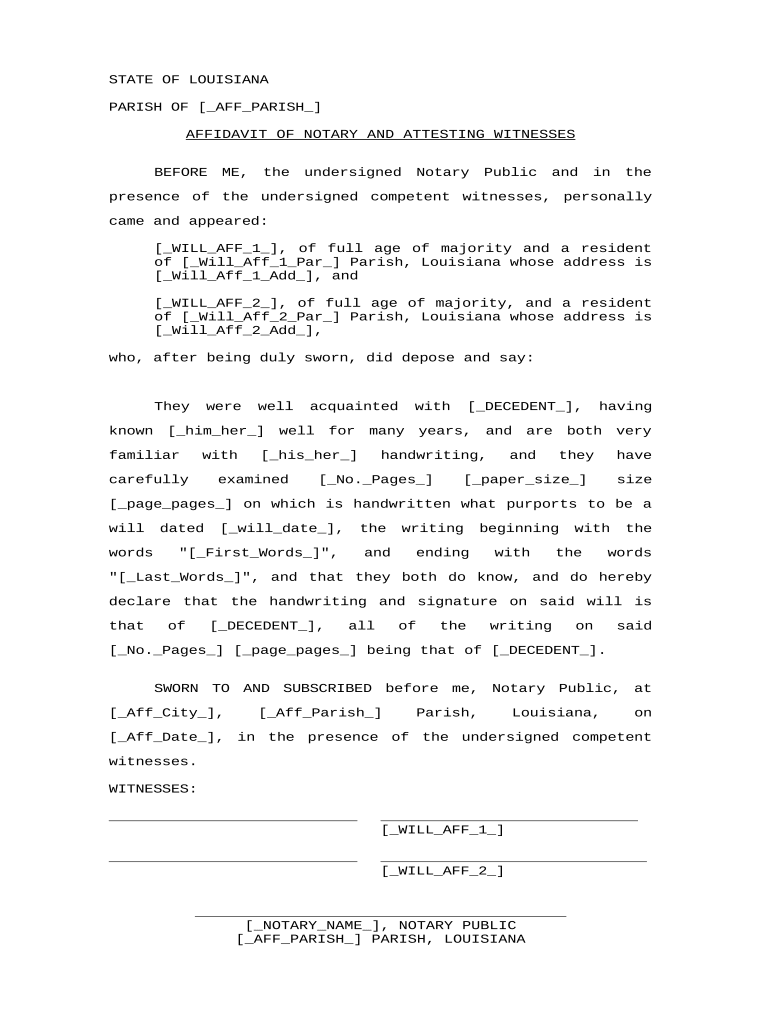
Affiant Statement

A clear, first-person declaration of facts the affiant swears to, written in plain language and limited to necessary details for specificity.

Venue

Place and parish/state where oath was taken, which helps establish jurisdiction for filing or later challenges to validity.

Witness Block

Printed names, signatures, and dates for each attesting witness confirming they observed the affiant sign or took the oath.

Notarial Jurat

Notary’s jurat or acknowledgement language, signature, commission number, expiration date, and official seal or stamp to validate the notarization.

Exhibits

Attachments or identification documents referenced in the affidavit, clearly labeled and incorporated by reference when relevant.

Download, save and supporting document formats

Store and share the completed affidavit in standard formats and include supporting documents commonly required for verification.

Preferred Format

Save executed affidavits as PDF/A for archival integrity and compatibility with court or registry systems that accept PDFs.

Editable Copy

Keep an editable DOCX master for template updates and version control, but circulate only final signed PDFs for legal use.

Supporting IDs

Attach copies of government-issued photo ID, passport, or credential analysis results used during identity verification.

Related Filings

Include any certificate of service, recording cover sheet, or filing transmittal required by the receiving office or clerk.

Practical tips for accurate and efficient completion

Follow these practical practices to reduce errors, speed processing, and preserve evidentiary value for the affidavit.

Use full names
Always enter full legal names and avoid abbreviations; confirm spelling against government identification to prevent mismatches.
Check dates
Ensure the notarization date, signing dates, and any effective dates are consistent and use MM/DD/YYYY format for clarity.
Document IDs
Record the type and number of ID presented by the affiant in the notary journal and optionally on the affidavit.
Maintain copies
Provide each signer and witness a copy; the notary should retain the notarial journal entry per state requirements.

Real-world scenarios where this affidavit is used

Sample situations illustrate typical uses and why the notarized witness attestation matters in practice.

Title and Closing

A title company requires a sworn affidavit to clear a defect in chain of title

  • The attesting witness confirms the signature on a prior deed
  • The notarized affidavit enabled the county recorder to accept the correction and complete the transaction without litigation.

Estate Administration

An executor submits an affidavit to support a beneficiary claim

  • Witnesses verify that the affiant signed under oath
  • A properly notarized affidavit reduced probate delays and minimized trustee inquiries.

Typical eSignature vendor pricing and compliance comparison

Compare baseline pricing and common capabilities relevant to notarized affidavits and secure witness workflows; signNow is listed first per platform data.

signNow DocuSign Adobe Sign PandaDoc HelloSign
Starting Price $8/user/mo $15/user/mo $14/user/mo $19/user/mo $15/user/mo
Free Trial 7-day trial Varies by vendor Varies by vendor Varies by vendor Varies by vendor
Bulk Send Yes Yes Yes Yes No
Audit Trail Yes Yes Yes Yes Yes
HIPAA Compliant Yes Yes Yes No No

Frequently asked questions about the Louisiana affidavit

Answers to common questions about execution, notarization, witness requirements, and electronic alternatives for Louisiana affidavits.


Need help? Contact support

be ready to get more
Join over 28 million airSlate SignNow users