Establishing secure connection…Loading editor…Preparing document…

Maryland Renunciation and Disclaimer of Property

This template is fully customizable. Edit the text, fill out the fields, and send it for signature. Give it a try!
Maryland Renunciation and Disclaimer of Property

What the Maryland Renunciation and Disclaimer of Property Is

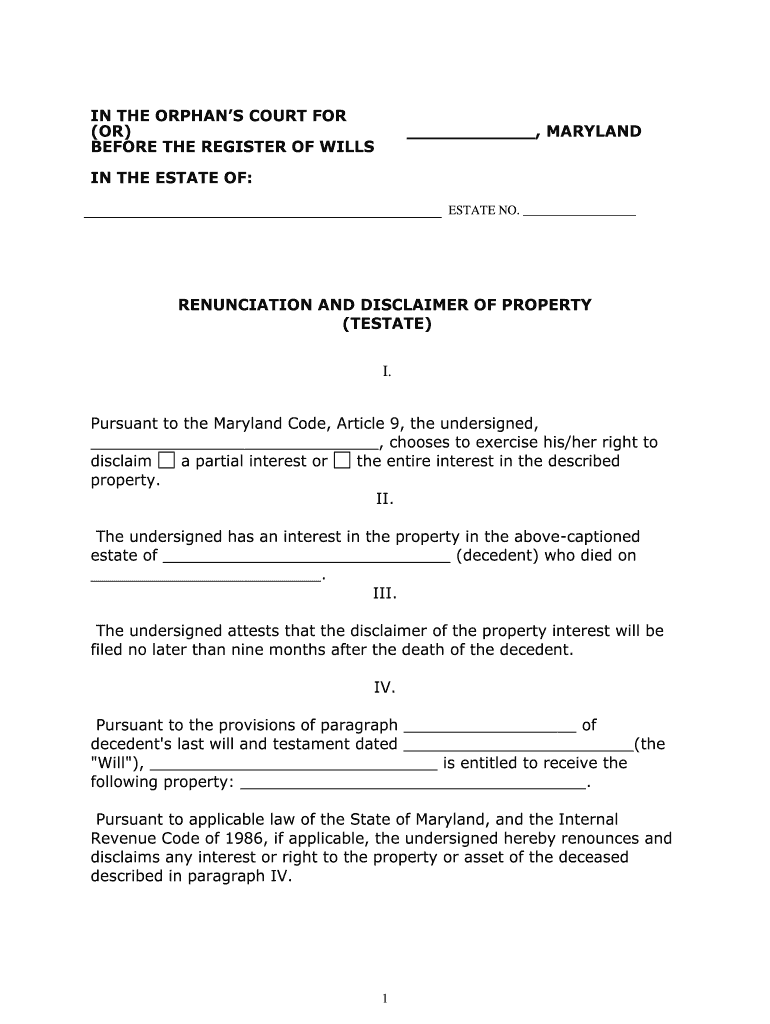
A Maryland Renunciation and Disclaimer of Property is a formal written statement by which a person entitled to an interest in real or personal property declines or disclaims that interest. Commonly used in estate and probate contexts, a disclaimer lets an heir or beneficiary redirect property to alternate beneficiaries without accepting ownership, gift, or tax consequences. The instrument must identify the property interest being disclaimed, the disclaimant, and the legal basis for the refusal, and it is often executed to preserve tax planning or to avoid fiduciary complications in the estate settlement process.

Why a Formal Renunciation or Disclaimer Matters

A clear renunciation preserves intended distributions, avoids inadvertent acceptance of property, and can protect tax or benefit positions while maintaining the estate plan’s integrity. Properly executed disclaimers can be faster and less costly than transfers or probate litigation.

Why a Formal Renunciation or Disclaimer Matters

Who Typically Prepares or Signs This Document

Individuals, representatives, and professionals who interact with estates use renunciations to decline property interests and direct distributions per the decedent’s or trust’s terms.

  • Heirs and beneficiaries who decline an inheritance and want it redirected under the will or statute.
  • Personal representatives or executors who record disclaimers to finalize estate distributions.
  • Estate attorneys and tax advisors preparing language to preserve tax or benefits outcomes.

Consult counsel when tax consequences, gift issues, or creditor rights are a concern before signing or filing a disclaimer.

Signers and Preparers

Beneficiary

A person entitled to an inheritance who elects to disclaim. The beneficiary must understand how the disclaimer affects downstream recipients, potential gift tax exposure, and any time-limited election windows in state law. Legal advice is commonly recommended.

Representative

An executor, personal representative, or trustee may prepare and record disclaimers on behalf of the estate. The representative ensures the disclaimer is properly executed, notarized when required, and submitted to the appropriate recorder, court, or fiduciary for effect.

Step-by-Step: Completing a Maryland Disclaimer

Follow these sequential steps to prepare, execute, and file a renunciation or disclaimer in Maryland, and note timing and authentication needs.

  • 01
    Identify Interest: Locate deed, trust, or account references.
  • 02
    Draft Language: Use clear statutory or attorney-drafted wording.
  • 03
    Execute Document: Sign, date, and notarize or witness as required.
  • 04
    Record or Notify: File with recorder or deliver to fiduciary promptly.

Essential Elements of a Professional Disclaimer

A well-drafted renunciation includes elements that ensure legal effect, clarity of intent, and correct routing to the recorder, trustee, or personal representative.

Clear Intent

Explicit statement that the signer disclaims and refuses the specified property interest, avoiding ambiguous phrasing that could be read as conditional acceptance.
Precise Identification

Detailed description of the property or interest being disclaimed, including parcel numbers, deed book/page, account numbers, or trust references to prevent misapplication.

Effective Date

The date the disclaimer becomes effective, stated in MM/DD/YYYY format, which affects tax timing and statutory acceptance windows.

Signature and Authentication

Signature block with printed name, date, and notary acknowledgment or witness signatures where required by Maryland or recording office rules.

Recipient Direction

Optional language directing how the disclaimed interest should pass under the governing will, trust, or statute to avoid future disputes.

Filing Instructions

Clear instructions for recording or delivering the disclaimer to the county recorder, trustee, or personal representative and retention of a certified copy.

How the Disclaimer Process Typically Flows

A disclaimer moves from preparation to execution to distribution; each step creates records that establish timing and intent.

  • Prepare Document: Draft using statutory or attorney-approved text.
  • Authenticate: Sign before notary or required witnesses.
  • Deliver: Provide to trustee, executor, or recorder.
  • Retain Records: Keep certified copies and proof of delivery.

Digital Workflow Setup for Online Completion

Configure an online form to match legal and recording requirements, ensuring fields capture required metadata and audit details.

Field Configuration
Name Field Required; verify with ID check
Property ID Field Required; formatted text
Signature Field Signer signature with timestamp
Notary Block Optional; include date and official seal field

Digital Signing and Platform Considerations

Use platforms that capture robust audit trails, retain signed copies, and support notarization workflows when required.

  • Audit Trail: IP, timestamp, and action log
  • File Formats: PDF/A and DOCX supported
  • Integrations: Connects with cloud storage and case management

Ensure the chosen provider supports the authentication, notarization, and retention requirements applicable to Maryland disclaimers.

Timing Considerations and Deadlines

Observe statutory windows and recorder office deadlines; untimely disclaimers risk invalidation or unintended transfer effects.

Statutory Window:

Some states impose time limits for disclaimers.

Recording Promptness:

Record quickly to update title and beneficiary records.

Tax Year Impact:

Effective date may affect tax reporting year.

Fiduciary Deadlines:

Executors should note probate timelines.

Attorney Review:

Allow time for legal review before signing.

Comparing eSignature Vendor Pricing and Features

Basic price and feature differences for common eSignature vendors. signNow appears first; plan features and caps vary by vendor and plan tier.

signNow DocuSign Adobe Sign PandaDoc HelloSign
Starting Price $8/user/mo $15/user/mo $14/user/mo $19/user/mo $15/user/mo
Free Trial 7-day free trial Varies Varies Varies Varies
Bulk Send Yes (Premium) Yes Yes Yes No
Audit Trail Yes Yes Yes Yes Yes
HIPAA Compliant Yes Yes Yes No No
Envelope Cap No cap 100 envelopes/user/year Varies Varies Varies

Real-World Examples of Disclaimers in Practice

These short examples show how and why disclaimers are used to shape estate outcomes without acceptance of property.

Estate Tax Planning

A beneficiary declines a legacy to allow assets to pass to a trust for tax efficiency.

  • The disclaimer prevents receipt of taxable property.
  • The result preserves the estate’s tax structure and avoids a formal transfer that could trigger gift or estate tax consequences.

Title Correction

An heir renounces interest to clear title for sale to a third party.

  • The renunciation clarifies ownership.
  • Recording the disclaimer with the county recorder avoids clouds on title and expedites closing without litigation over ownership claims.

Common Preparation Errors to Avoid

  • Using vague or nonstatutory language that fails to express unconditional refusal; courts or recorders may not accept unclear disclaimers.
  • Failing to identify the property precisely, such as omitting parcel numbers or deed book references, which can lead to rejection or misapplication.
  • Skipping notarization or witness steps required by local recording offices, causing delays or invalidation of the recorded instrument.
  • Accepting a disclaimer without reviewing tax or creditor consequences; unintended tax reporting or creditor claims can follow a poorly timed renunciation.

Security and Compliance Considerations

Encryption in Transit: TLS 1.2/1.3
Encryption at Rest: AES-256
Regulatory Certifications: SOC 2 Type II
Healthcare Compliance: HIPAA (BAA required)
Signature Laws: ESIGN and UETA compliance
Accessibility: WCAG 2.0 Level AA

Consequences of an Incorrect or Untimely Disclaimer

Invalid Disclaimer: No legal effect
Tax Exposure: Gift or estate tax issues
Creditor Claims: Subject to creditor challenges
Title Problems: Recording rejection
Probate Delay: Extended administration
Legal Fees: Increased attorney costs

Practical Tips for Accurate and Efficient Completion

Follow consistent procedures to reduce risk: confirm identity, use precise legal descriptions, and retain notarized records.

Confirm Identity Before Acceptance
Verify the disclaimant’s identity with government-issued ID and, where appropriate, include multi-factor or in-person notarization to strengthen attribution and reduce later disputes.
Use Statutory or Attorney-Reviewed Language
Adopt language that satisfies state statutory requirements so the disclaimer is recognized as unconditional and effective under local law rather than relying on ambiguous phrasing.
Record or Deliver Promptly
File with the county recorder or provide an executed copy to the trustee or executor quickly to update title records and avoid downstream complications or competing claims.
Keep Certified Copies and Audit Trails
Retain notarized originals, recorded copies, and digital audit trails including timestamps and signer authentication evidence to support the disclaimer’s validity.

Frequently Asked Questions

Answers to common questions about using and validating a Maryland Renunciation and Disclaimer of Property.


Need help? Contact support

be ready to get more
Join over 28 million airSlate SignNow users