Establishing secure connection…Loading editor…Preparing document…

Minnesota Motion Form

This template is fully customizable. Edit the text, fill out the fields, and send it for signature. Give it a try!
Minnesota Motion Form

What the Minnesota Motion Form Is and when it’s used

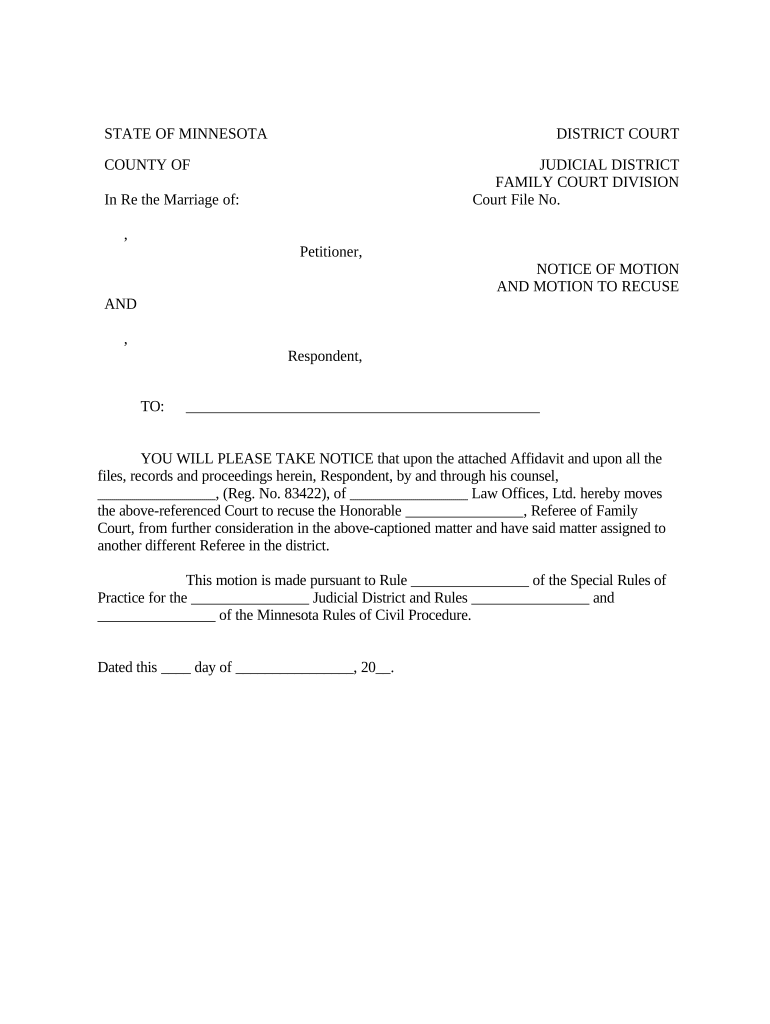
The Minnesota Motion Form is a standardized court pleading used to request a judge’s action or ruling in Minnesota state courts. It frames a specific legal request—such as a motion to dismiss, motion for continuance, or motion for protective order—by stating the relief sought, factual support, and legal arguments. Parties filing the form must follow Minnesota Rules of Civil Procedure and local district court requirements for formatting, service, and timing. Accurate completion clarifies the request and improves judicial review, whether filed pro se or through counsel.

Why a correctly prepared Minnesota Motion Form matters

A properly prepared Minnesota Motion Form communicates the specific relief sought, organizes supporting facts and legal authority, and notifies opposing parties per procedural rules. It reduces delays, helps the court evaluate the issue efficiently, and establishes a clear record for appeal or subsequent motions.

Why a correctly prepared Minnesota Motion Form matters

Who typically completes the Minnesota Motion Form

Used by attorneys, self-represented litigants, paralegals, and court clerks when seeking judicial action in Minnesota civil or family cases.

  • Civil litigation attorneys drafting motions for summary judgment, discovery disputes, or sanctions.
  • Family law practitioners filing motions for custody changes, temporary orders, or contempt hearings.
  • Individuals representing themselves (pro se) using standardized forms and local rules to present requests.

Step-by-step: prepare, serve, and file a motion

Follow these steps to prepare, serve, and file a motion in Minnesota state court efficiently.

  • 01
    Prepare: Identify relief, cite authority, attach supporting exhibits and declaration.
  • 02
    Format: Use caption, case number, judge, and correct filing format.
  • 03
    Serve: Serve opposing parties per Minn. R. Civ. P. or local rule.
  • 04
    File: File with court clerk, pay fees, and submit proof of service.

Configure an online workflow for Minnesota motions

Set up document templates, signer order, and server-side routing to mirror local court filing and service requirements.

Field Configuration
Template Name Use case-specific template with caption fields prefilled.
Signer Order Set to plaintiff, defendant, then counsel to match service rules.
Authentication Use email plus optional SMS code or KBA for sensitive filings.
Automatic Attachments Attach exhibits and declarations as combined PDF in order.

How electronic motion submission typically flows

This flow summarizes key steps from drafting to receiving the court-stamped copy after filing electronically.

  • Draft: Prepare motion, declarations, and exhibit PDF attachments.
  • Place Fields: Mark signature, date, and notary fields where required.
  • Authenticate: Confirm signer identity via email or stronger method.
  • File: Upload to court e-filing portal or file in person as directed.

Sharing, integrations, and transmission considerations

Use compatible PDF, completed forms, and secure delivery channels when sharing motions with counsel or court.

  • Formats: PDF/A recommended for court filings.
  • Integrations: Works with e-filing portals and cloud storage.
  • Authentication: Support email, SMS, and third-party SSO.

eSignature vendor pricing and feature snapshot for Minnesota motions

Compare baseline pricing and essential feature availability across common eSignature vendors when preparing Minnesota motions for e-filing.

signNow DocuSign Adobe Sign PandaDoc HelloSign
Starting Price $8/user/mo $15/user/mo $14/user/mo $19/user/mo $15/user/mo
Free Trial 7-day free trial Varies by vendor Varies by vendor Varies by vendor Varies by vendor
Bulk Send Yes (Business Premium) Yes Yes Yes Varies
Audit Trail Yes Yes Yes Yes Yes
HIPAA Compliant Yes Yes Yes No No
Envelope Cap No cap 100 envelopes/user/year Varies by plan Varies by plan Varies by plan

Common mistakes that delay or derail motions

  • Incomplete captions or wrong case numbers cause rejected filings and misdirected service; verify the docket number and party names before submission.
  • Missing proof of service or incorrect service method can lead to motion dismissal or delay; follow Minn. R. Civ. P. and local rules precisely.
  • Unclear relief or inconsistent facts between affidavit and motion reduces credibility and may result in denial; cross-check exhibits carefully.
  • Failing to attach required exhibits or failing to paginate exhibits makes it harder for judges and clerks to review submissions quickly.

Potential legal and procedural consequences

Motion Denial: Request may be denied for procedural defects.
Sanctions: Court can award fees or impose sanctions.
Contempt: False declarations risk contempt charges.
Fee Loss: Paid filing fees are usually nonrefundable.
Appeal Impact: Procedural errors weaken appellate arguments.
Service Failure: Improper service can void a motion.

Security and compliance considerations for e-submissions

Encryption: TLS 1.2/1.3 in transit; AES-256 at rest.
Certifications: SOC 2 Type II and ISO 27001 certified.
Legal Acts: Compliant with ESIGN and UETA standards.
HIPAA: HIPAA compliant; BAA required for PHI workflows.
Audit Trail: Full timestamped audit logs and certificates.
Access Controls: SSO, role-based access, and two-factor options.

Frequently asked questions about the Minnesota Motion Form

Answers to common procedural and technical questions about completing, signing, and filing a Minnesota Motion Form in state court.


Need help? Contact support

be ready to get more
Join over 28 million airSlate SignNow users