Establishing secure connection…Loading editor…Preparing document…

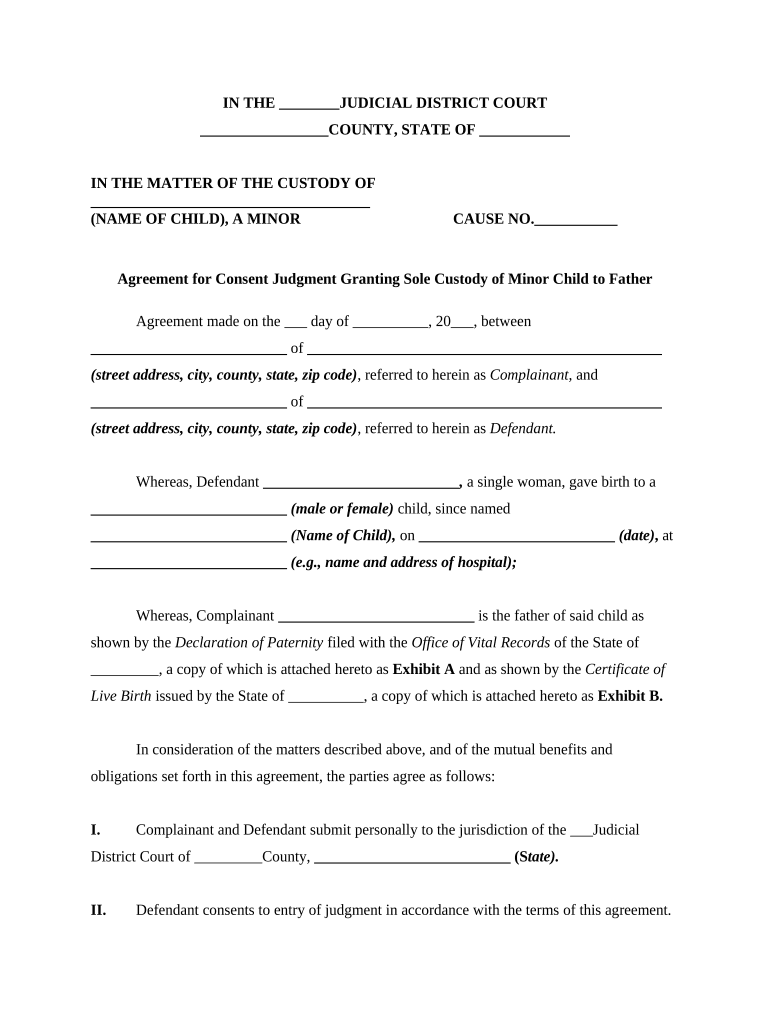
Agreement for Consent Judgment Granting Sole Custody of Minor Child

This template is fully customizable. Edit the text, fill out the fields, and send it for signature. Give it a try!
Agreement for Consent Judgment Granting Sole Custody of Minor Child

What this Agreement Is and when it applies

An Agreement for Consent Judgment Granting Sole Custody of Minor Child is a written settlement between parents or guardians that the court enters as a consent judgment, awarding sole legal and physical custody to one parent. It records the parties' mutual agreement on custody, visitation, decision-making authority, and support-related matters and becomes a court order once signed by a judge. Use this agreement when both parents reach terms and request the court adopt their arrangement to avoid a contested custody trial and to create an enforceable custody order under family court procedures.

Why a consent judgment matters for custody disputes

A consent judgment binds the parties and the court to an agreed custody arrangement, reducing litigation risk, clarifying parental responsibilities, and establishing an enforceable court order that third parties can rely on.

Why a consent judgment matters for custody disputes

Who typically prepares and signs this consent judgment

Courts review and may adopt the agreement as a consent judgment if it serves the child’s best interests and meets local family court requirements.

  • Parents and guardians who have reached a negotiated custody arrangement and want a court order without trial
  • Family law attorneys preparing court submissions and confirming procedural compliance
  • Mediators or custody evaluators documenting settlement terms for court approval

Representative roles and perspectives

Parent / Litigant

A parent who is granted sole custody has primary decision-making and residential responsibility; they must understand obligations for visitation, child support, and continuing court jurisdiction to modify the order if circumstances change.

Family Law Attorney

An attorney drafts clear custody language, confirms jurisdiction and filing procedures, verifies statutory compliance, and submits the consent judgment to the appropriate family court for entry as a binding court order.

Core elements to include in the consent judgment

A professional consent judgment sets out custody, decision-making authority, parenting time, child support references, dispute-resolution, and modification procedures in clear, enforceable language.

Custody Grant

Specify sole legal and physical custody to the named parent, including scope of decision-making (education, medical, religion). Use precise phrasing to avoid ambiguity.
Parenting Time

Describe visitation rights for the noncustodial parent, including a regular schedule, holiday rotation, and procedures for missed visits or relocation.

Child Support

Reference applicable state child support guidelines, payment method, arrears handling, and responsibilities for uninsured medical expenses.

Legal Decision-Making

Clarify who makes major decisions and process for consultation; specify limitations or areas reserved to the custodial parent.

Modification Terms

State conditions and jurisdiction for modification, required notice period, and whether mediation or parenting coordination is required before court.

Enforcement

Include remedies for noncompliance, contempt provisions, and agreement that court retains jurisdiction to enforce or adjust the order.

Step-by-step: completing and submitting the consent judgment

Follow these sequential steps to prepare the agreement, obtain signatures, and lodge the consent judgment with family court.

  • 01
    Draft Agreement: Prepare clear custody and parenting time terms for both parties.
  • 02
    Review with Counsel: Have attorneys or mediator review language and attachments.
  • 03
    Sign and Notarize: Obtain required signatures; notarize if state or court requires.
  • 04
    File with Court: Submit proposed consent judgment to family court for entry by a judge.

How the consent judgment becomes an enforceable court order

Understand the procedural flow from agreement to court-ordered judgment so parties and counsel can plan next steps and timelines.

  • Agreement Execution: Parties sign the written settlement and attach relevant exhibits.
  • Filing: File the proposed consent judgment with the family court clerk's office.
  • Judge Review: Judge reviews terms for the child’s best interests and may request revisions.
  • Entry as Judgment: Once signed by the judge, the document becomes a binding court order.

Typical digital workflow settings for eSubmission

Configure a predictable signing and filing workflow when using eSignature platforms to ensure authenticated signatures and a court-ready record.

Field Configuration
Signer Authentication Email + SMS code or ID verification
Signature Order Sequential signing: custodial parent, noncustodial parent, notary
Audit Trail Enable IP, timestamp, and action log capture
File Format Finalize as PDF/A for court submission

Digital signing and court filing considerations

Confirm local court rules before e-filing; where RON or e-notary is accepted, include the notary certificate and recorded session per state requirements.

  • Document Format: PDF/A or standard PDF
  • Authentication: Audit trail plus signer ID
  • Notarization: In-person or RON per state

Security and compliance basics for electronic custody agreements

Transport Encryption: TLS 1.2/1.3
Data at Rest: AES-256 encryption
Authentication Standards: ESIGN and UETA compliance
Healthcare Compliance: HIPAA (BAA required)
Audit Trail: Comprehensive timestamped logs
Certifications: SOC 2 Type II, ISO 27001

Risks and legal consequences of errors or omissions

Improper Names: May invalidate enforcement
Missing Notarization: Court may reject or require re-execution
Incomplete Schedule: Leads to enforcement disputes
Incorrect Child Info: Jurisdictional challenges possible
Failure to File: No court order exists
Unsupported E-Sign: Court may require wet signatures

Common preparation mistakes to avoid

  • Leaving custody and visitation terms vague, which makes enforcement and court review difficult and prolongs disputes
  • Using initials or unsigned signature blocks rather than full dated signatures, causing clerks to reject the submission
  • Failing to confirm local court rules on e-signatures, notarization, and required attachments before filing
  • Neglecting to attach required exhibits such as support worksheets, parenting plans, or proposed orders for judge signature

eSignature platform pricing and capability snapshot for custody document workflows

Comparison of common vendor starting prices and select capabilities relevant to preparing and signing custody consent judgments; signNow is listed first per platform naming conventions.

signNow DocuSign Adobe Sign PandaDoc HelloSign
Starting Price $8/user/mo $15/user/mo $14/user/mo $19/user/mo $15/user/mo
Free Trial Yes, 7-day trial Varies by plan Varies by plan Varies by plan Varies by plan
Bulk Send Yes Yes Yes Yes Varies
Audit Trail Yes Yes Yes Yes Yes
HIPAA Compliant Yes Yes Yes No No

Frequently asked questions about consent judgments and e-signatures

Answers to common legal and practical questions when preparing, signing, and filing a consent judgment awarding sole custody.


Need help? Contact support

be ready to get more
Join over 28 million airSlate SignNow users