Establishing secure connection…Loading editor…Preparing document…

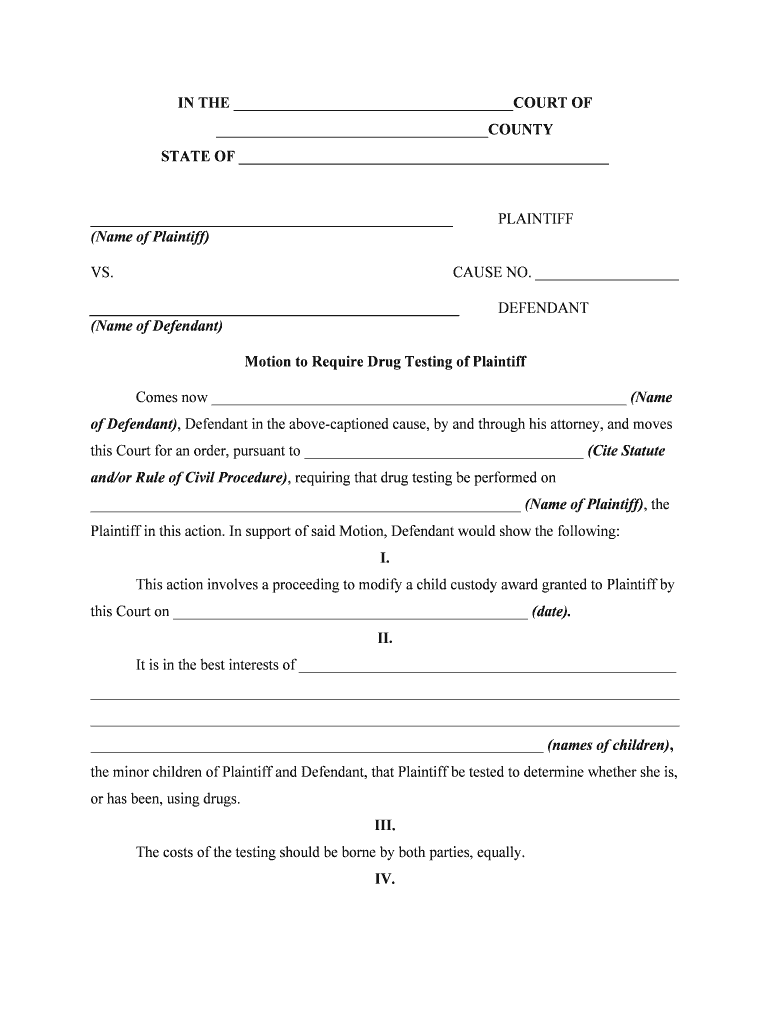
Motion to Require Drug Testing of Plaintiff

This template is fully customizable. Edit the text, fill out the fields, and send it for signature. Give it a try!
Motion to Require Drug Testing of Plaintiff

What this Motion Is and when it’s used

The Motion to Require Drug Testing of Plaintiff is a court filing that asks a judge to order the plaintiff to submit to chemical testing for controlled substances and to produce the results under a specified chain of custody. Practitioners typically attach a supporting affidavit or declaration, specify the testing method and laboratory, propose an order for the court to sign, and identify how results will be admitted into evidence. The motion is used in disputes where substance use is directly relevant to claimed injuries, credibility, causation, or damages and must comply with applicable procedural and evidentiary rules.

Why a targeted drug-testing motion matters

A properly drafted motion narrows factual disputes, creates a record supporting admissibility of test results, and helps the court weigh credibility and causation while protecting due-process and privacy interests.

Why a targeted drug-testing motion matters

Who typically prepares and relies on this motion

The motion is most often prepared by defense counsel in civil litigation, insurance adjusters, or institutional defendants seeking to verify claims tied to impairment or drug use.

  • Defense attorneys or litigation firms representing employers, insurers, or defendants needing evidence of impairment or rebuttal to causation claims.
  • Insurers and claims examiners who may require testing as part of subrogation or coverage investigations.
  • Court-appointed guardians or opposing parties in family law or custody disputes where substance use affects fitness or custody determinations.

Tailor the motion to the case type and local rules; courts balance probative value against privacy, relevance, and constitutional protections.

Who signs and files this motion

Lead Counsel

The filing attorney signs as counsel of record and certifies compliance with local civil rules, service requirements, and any meet-and-confer obligations. The attorney must be authorized to file pleadings in that court and to request evidentiary orders.

Affiant / Witness

A factual declarant (investigator, employer representative, or treating clinician) often signs the accompanying affidavit under penalty of perjury to establish probable cause, testing necessity, and chain-of-custody expectations.

Core parts every professional motion should include

A complete Motion to Require Drug Testing of Plaintiff combines procedural compliance with factual specificity and a proposed order so the court can act without further drafting.

Case Caption

Complete court caption and case number showing parties, venue, and judge so the clerk can immediately docket the motion without clerical corrections.
Statement of Facts

A concise factual narrative citing specific incidents, observations, or medical findings that tie suspected impairment to elements at issue in the case.

Legal Basis

Cite applicable rules and case law supporting compulsion of testing, showing relevance and proportionality under local evidentiary or discovery standards.

Testing Protocol

Specify sample type (urine, blood, hair), collection procedure, accredited laboratory, and chain-of-custody to prevent later evidentiary challenges.

Relief Requested

Plainly state the requested order, any deadlines, and whether results must be produced confidentially to counsel or filed under seal.

Proposed Order

Attach a short, ready-to-sign order that authorizes testing, designates the lab, and defines obligations for producing and preserving results.

Step-by-step filing and service workflow

Follow a clear sequence from preparation to enforcement to avoid procedural pitfalls and to preserve evidentiary value.

  • 01
    Prepare Motion: Draft facts, law, affidavit, and proposed order.
  • 02
    File with Clerk: E-file or file in person according to local court rules.
  • 03
    Serve Opposing Party: Serve per local rules and certificate of service.
  • 04
    Set Hearing / Obtain Order: Request expedited hearing or submit the proposed order for in-chambers signature.

Setting up an e-filing and e-submission workflow

Map each document and exhibit to the court e-filing steps and choose secure delivery methods for sensitive results.

Document Upload Upload PDFs with searchable text and flattened signatures when required by local e-filing rules.
Signature Fields Place attorney signature and date fields; do not place signature fields on affidavit jurat lines unless notarized.
Exhibit Attachments Label exhibits in the PDF bookmark and filename (Exhibit A — Affidavit, Exhibit B — Lab Protocol).
Service Method Set electronic service to opposing counsel and register any required courtesy copies for chambers.
Confidential Delivery Choose secure upload or sealed filing options for test results where local rules permit protective orders.

Where the motion goes and how results are routed

Understand each recipient and the typical path of the motion and subsequent test results to maintain chain-of-custody and confidentiality.

  • Court Clerk: Receives and dockets the motion for judge assignment or hearing.
  • Opposing Counsel: Served with the motion and any supporting affidavits or exhibits.
  • Accredited Lab: Receives the specimen and returns certified results with chain-of-custody documentation.
  • Court / Records: Results may be filed under seal or produced per court order.

Technical and file-format considerations for electronic submission

Verify the court's e-filing system and permitted document formats before assembling the submission.

  • Supported Formats: PDF and DOCX are commonly accepted; courts typically prefer PDF/A for final filings.
  • Authentication: E-filing accounts and e-signatures should meet court authentication requirements.
  • Integrations: Use supported integrations (case management or cloud storage) for exhibit delivery and recordkeeping.

For secure e-signature and document handling, choose platforms compatible with court systems and able to preserve an audit trail and file integrity.

Typical deadlines and timing considerations

Timing depends on local rule sets and whether the motion seeks expedited relief; account for service, response windows, and testing turnaround time.

Service Deadline:

Serve per local civil procedure; many courts require service at least 14 days before hearing.

Response Period:

Opposition often due 14–21 days after service unless shortened by order.

Expedited Hearings:

Requesting expedited relief can shorten notice periods; show good cause for expedited treatment.

Testing Schedule:

Allow laboratory turnaround time—24–72 hours for initial screen, longer for confirmations.

Result Production:

Specify date by which results must be produced and whether they must be filed under seal.

Key milestones from filing to enforcement

Track milestones to preserve rights, ensure timely testing, and support admissibility of results.

01

Pre-Filing Investigation

Gather observations, witness statements, and any medical records supporting the request.

02

File Motion

File and serve motion with attached affidavit and proposed order.

03

Court Hearing

Present argument and evidence to obtain an order authorizing testing.

04

Testing and Chain-of-Custody

Collect specimen per order, send to accredited lab, and preserve documentation.

Common drafting and procedural pitfalls to avoid

  • Overbroad requests that lack case-specific facts invite denial as unduly intrusive or irrelevant by the court.
  • Failing to specify testing protocol, lab accreditation, or chain-of-custody opens the door to evidentiary exclusion.
  • Neglecting privacy protections or a sealed-filing request risks disclosure of sensitive medical information.
  • Skipping a meet-and-confer attempt where required by local rules can lead to procedural sanctions or denial.

Consequences of a flawed motion or improper handling

Motion Denied: Court may refuse relief for lack of relevance or undue burden.
Sanctions: Improper conduct or discovery abuse can lead to monetary or evidentiary sanctions.
Privacy Liability: Improper disclosure of health data can trigger HIPAA or state privacy claims.
Evidence Excluded: Poor chain-of-custody can render results inadmissible at trial.
Ethical Violations: Counsel may face discipline for misrepresentations or procedural misconduct.
Reputational Harm: Unnecessary invasions of privacy can harm client or firm reputation.

Handling test results and filings securely

Encryption: TLS 1.2/1.3 in transit; AES-256 at rest.
Access Controls: Role-based access and limited distribution lists.
Audit Trail: Maintain timestamps, IP, and user actions for each record.
HIPAA Compliance: BAA required when storing PHI electronically.
Retention Policy: Preserve chain-of-custody and test records per retention rules.
Secure Delivery: Use sealed filings or secure portals for sensitive results.

eSignature platform comparison for preparing and serving motions

When selecting an eSignature or document platform for motion drafting, preservation, and secure delivery, consider price, bulk capabilities, audit trails, and HIPAA support.

signNow DocuSign Adobe Sign PandaDoc HelloSign
Starting Price $8/user/mo $15/user/mo $14/user/mo $19/user/mo $15/user/mo
Free Trial Yes, 7-day trial Varies by vendor Varies by vendor Varies by vendor Varies by vendor
Bulk Send Yes Yes Yes Yes No
Audit Trail Yes Yes Yes Yes Yes
Envelope Cap No cap 100 envelopes/user/year Varies Varies Varies

Frequently asked questions about the Motion to Require Drug Testing of Plaintiff

Answers below address common procedural, evidentiary, and privacy concerns encountered when seeking court-ordered drug testing.


Need help? Contact support

be ready to get more
Join over 28 million airSlate SignNow users