Establishing secure connection…Loading editor…Preparing document…

Montana Workers' Compensation Form

This template is fully customizable. Edit the text, fill out the fields, and send it for signature. Give it a try!
Montana Workers' Compensation Form

What the Montana Workers' Compensation Form Is

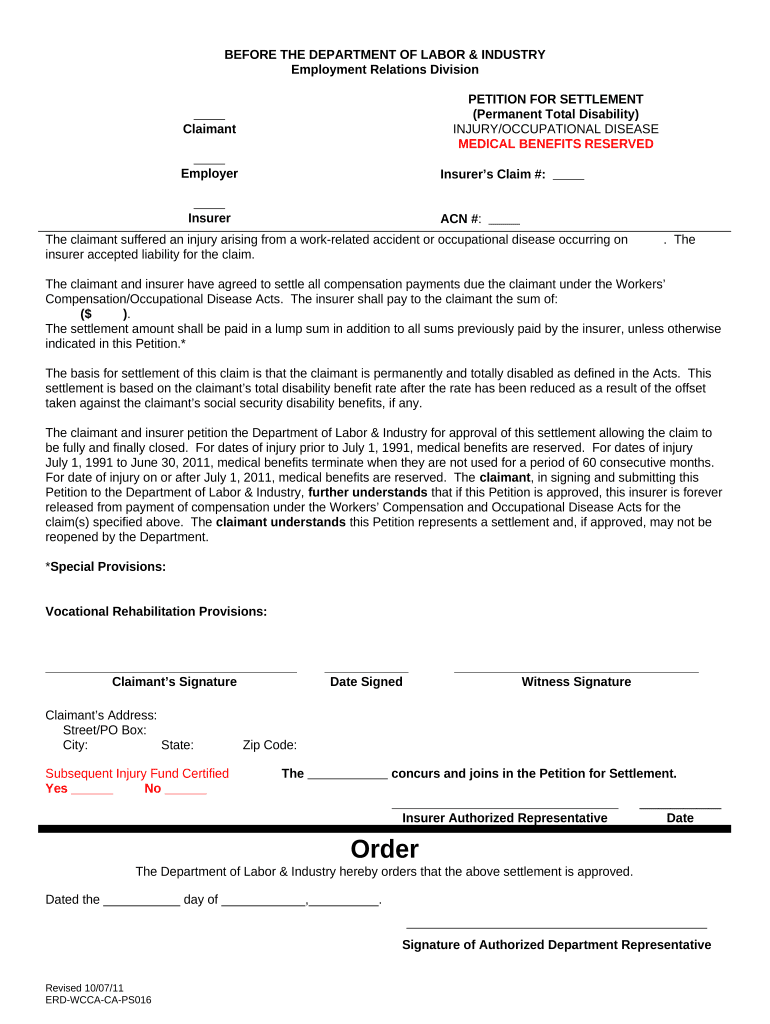
The Montana Workers' Compensation Form is the standard document used to report a workplace injury or occupational illness to an employer, insurer, and relevant state agency. It captures claimant and employer details, date and description of the incident, wage and job information, initial medical treatment, and authorization for records. The form initiates the claims process, supports benefit determinations, and creates a record that both insurers and the Montana Department of Labor & Industry use during adjudication and audits.

Why completing the form correctly matters

Accurate completion establishes eligibility, speeds benefit delivery, and reduces dispute risk. A complete form helps insurers determine temporary and permanent benefits, informs medical authorizations, and creates a durable record for audits and appeals under Montana workers’ compensation practice.

Why completing the form correctly matters

Who normally completes and uses this form

Correct role-based completion reduces processing delays and clarifies responsibilities for follow-up, release of records, and appeals.

  • Employers: HR or safety officer files employer and payroll details, witnesses, and incident investigation notes.
  • Injured employees: Provide personal details, injury description, and signature to preserve benefits and medical access.
  • Medical providers: Submit initial treatment dates, diagnoses, and work restrictions to support the claim.

Primary signer roles and responsibilities

Employer Representative

An HR or safety official who enters employer identification, payroll/wage data, incident report details, and the employer signature; responsible for submitting the form to the insurer and retaining records for compliance and audit.

Injured Worker

The claimant who provides full legal name, contact details, injury description, and signature; responsible for timely reporting, authorizing release of medical information, and cooperating with medical evaluations.

Essential fields on the Montana Workers' Compensation Form

Claimant Name: Full legal name
Social Security: SSN or TIN
Employer Name: Legal business name
Date of Injury: MM/DD/YYYY
Injury Description: Brief incident summary
Medical Provider: Facility and clinician name

Key consequences of incorrect or late filing

Delayed Benefits: Claims processing delayed
Denial Risk: Eligibility disputes may arise
Fines: Potential administrative penalties
Increased Premiums: Higher insurance costs possible
Recordkeeping Violations: Noncompliance exposure
Civil Liability: Third-party or tort claims

Common mistakes to avoid when preparing the form

  • Missing or inconsistent claimant identifiers (name, SSN/TIN) that delay verification and can trigger tax or withholding issues.
  • Incomplete incident details that omit location, witness names, or sequence of events and create evidentiary gaps during adjudication.
  • Failing to attach initial medical reports, work-status notes, or diagnostic testing, which slows benefit determinations and vocational planning.
  • Unsigned or undated notices from the claimant or employer that render portions of the submission invalid for administrative review.

Anatomy of a professional Montana Workers' Compensation Form

A complete form groups claimant data, employer and payroll details, incident narrative, medical treatment, wage-loss data, and authorizations into clear sections to support prompt adjudication.

Claimant Details

Full legal name, date of birth, SSN/TIN, contact information, and employment status; foundational identifiers used to match medical and wage records during claims handling.
Employer and Payroll

Employer legal name, FEIN, payroll period, average weekly wage or earnings, job title, and occupation code to calculate temporary disability and permanent-loss benefits accurately.

Incident Narrative

Precise description of how, when, and where the injury occurred, including witnesses and tools or equipment involved; detail reduces investigation time and dispute likelihood.

Medical Treatment Summary

Initial treating facility, dates of service, diagnosis codes or descriptions, treating clinician, and current work restrictions to support authorization and medical management.

Wage-Loss and Return-to-Work

Pre-injury wages, work hours, missed-shift data, and any transitional duty offers; this section supports temporary disability calculations and vocational rehabilitation planning.

Authorizations and Signatures

Claimant and employer signatures, date, and consent to release medical records; also includes attestations about accuracy and any witness or notarization details if required.

Step-by-step: completing and submitting the form

Follow these sequential steps to reduce errors and speed review by insurers and state agencies.

  • 01
    Gather Records: Collect IDs, payroll records, and medical notes.
  • 02
    Complete Sections: Enter claimant, employer, and incident details carefully.
  • 03
    Attach Evidence: Include medical reports and witness statements.
  • 04
    Submit: Send to insurer and retain a copy.

Where the form goes after submission

Understand recipient roles to track progress and follow up with the right party after you file.

  • Employer to Insurer: Employer forwards completed form to insurer for initial intake.
  • Insurer Acknowledges: Insurer logs claim and assigns a claim number.
  • Medical Providers: Providers receive treatment authorizations and submit bills.
  • State Agency: State office receives reports for oversight and audit.

Configuring an online filing workflow

Set up a digital workflow to save time, reduce rekeying, and maintain a secure audit trail for each claim.

Field Configuration
Authentication Email link + optional SMS code
Template Save form as reusable template
Notifications Email alerts for each status change
Attachments Allow PDF, JPG, PNG uploads

Digital filing and eSignature basics

Choose a platform that preserves an audit trail, supports healthcare privacy where needed, and exports signed records in standard formats.

  • File Formats: PDF, DOCX, HTML supported
  • Integrations: Salesforce, NetSuite, Google Workspace
  • Auth Methods: Email link, SMS code, KBA

Timing and typical processing expectations

Timely reporting and submission shorten adjudication and ensure benefits start promptly; requirements vary by employer policy and insurer procedures.

Employee Report Deadline:

Report injury promptly to employer; check employer policy.

Employer Reporting:

Employer typically notifies insurer per internal timelines.

Insurer Acknowledgment:

Insurer sends claim number and next steps.

Medical Authorization:

Initial treatment approval often within days of receipt.

Appeal Deadlines:

Statutory appeal periods apply; track state deadlines.

Key milestones in the Montana claim lifecycle

Claims move through predictable milestones from notice to resolution; track each stage to meet obligations and preserve rights.

01

Injury Occurs

Event triggers duty to report and preserve evidence.

02

Notice to Employer

Employee provides written or verbal report of injury.

03

Insurer Intake

Insurer opens claim, assigns examiner, and requests records.

04

Adjudication

Insurer evaluates benefits, medicals, and issues determination.

Sample eSignature vendor pricing and features for filing forms

Comparing baseline plans and feature availability helps determine operational and compliance fit for claims workflows.

signNow DocuSign Adobe Sign PandaDoc HelloSign
Starting Price $8/user/mo $15/user/mo $14/user/mo $19/user/mo $15/user/mo
Free Trial 7-day trial Varies Varies Varies Varies
Bulk Send Yes Yes Yes Yes No
Audit Trail Yes Yes Yes Yes Yes
HIPAA Compliant Yes Yes Yes No No

FAQs: common questions about the Montana Workers' Compensation Form

Answers address e-signature validity, correcting errors, notarization, signature authority, and retention to reduce confusion during filing.


Need help? Contact support

be ready to get more
Join over 28 million airSlate SignNow users