Establishing secure connection…Loading editor…Preparing document…

Motion Declaration

This template is fully customizable. Edit the text, fill out the fields, and send it for signature. Give it a try!
Motion Declaration

What a Motion Declaration Is and when it's used

A Motion Declaration is a sworn written statement submitted to a court or tribunal to support a motion, factual assertion, or procedural request. It sets out facts within the declarant's personal knowledge, explains the basis for requested relief, and attaches supporting exhibits such as contracts, emails, or affidavits. Courts treat a properly executed declaration as evidence equivalent to live testimony when the declarant's identity, authorship, and signature are clearly shown. Proper format, accuracy, and timely service are essential to preserve admissibility and avoid sanctions.

Why accuracy and formality matter for a Motion Declaration

A well-prepared Motion Declaration clarifies factual issues for the judge, reduces the need for live testimony, and speeds decision-making. It must present relevant facts, cite exhibits, and be signed under penalty of perjury to be considered reliable evidence.

Why accuracy and formality matter for a Motion Declaration

Who commonly prepares and signs Motion Declarations

Motion Declarations are typically prepared by attorneys, litigants representing themselves, corporate officers, or witnesses with direct knowledge of the facts in dispute.

  • Attorneys preparing evidentiary support and exhibits for motions.
  • Individual litigants (pro se) drafting factual statements for court filings.
  • Corporate signatories or witnesses attesting to transactional or operational facts.

Representative signer profiles

Brian Fitzgibbons, COO

As COO of a small investment firm, Brian prepares declarations that summarize transactional timelines and attach contract exhibits. He certifies that the facts stated are true under penalty of perjury and ensures exhibits are Bates-stamped and organized for court review.

Tim Martin, Founder

As a principal in a property company, Tim signs declarations describing property condition, communications with contractors, and delivery dates. His declarations include supporting invoices and photos and are submitted with a proof of service to the court.

Stepwise process to prepare and file a Motion Declaration

Follow these steps to draft, authenticate, and submit a Motion Declaration that the court will accept.

  • 01
    Draft: Compose concise, numbered factual paragraphs with exhibit references.
  • 02
    Attach Exhibits: Include labeled supporting documents in logical order.
  • 03
    Sign and Jurat: Sign under penalty of perjury and add the date and place.
  • 04
    File and Serve: File with the court and serve all parties per local rules.

Typical eFiling and eSubmission workflow settings

Configure your document and service settings before electronic submission to ensure compliance with court rules and service requirements.

Field Configuration
Document Format PDF/A with searchable text
Signature Method Electronic signature with audit trail
Authentication Email + optional SMS code
Service Method Court eFile plus email service where required

How electronic submission of a Motion Declaration typically proceeds

The following illustrates a common sequence for preparing and delivering a Motion Declaration electronically.

  • Prepare PDF: Create a clean, paginated PDF of declaration and exhibits.
  • Add eSignature: Place signature and date fields then authenticate signer.
  • eFile with Court: Submit via court eFiling portal per local rules.
  • Serve Parties: Email or eServe opposing counsel with proof of service.

Essential parts of a professional Motion Declaration

A Motion Declaration should be documentally complete and legally precise so the court can evaluate facts without additional testimony.

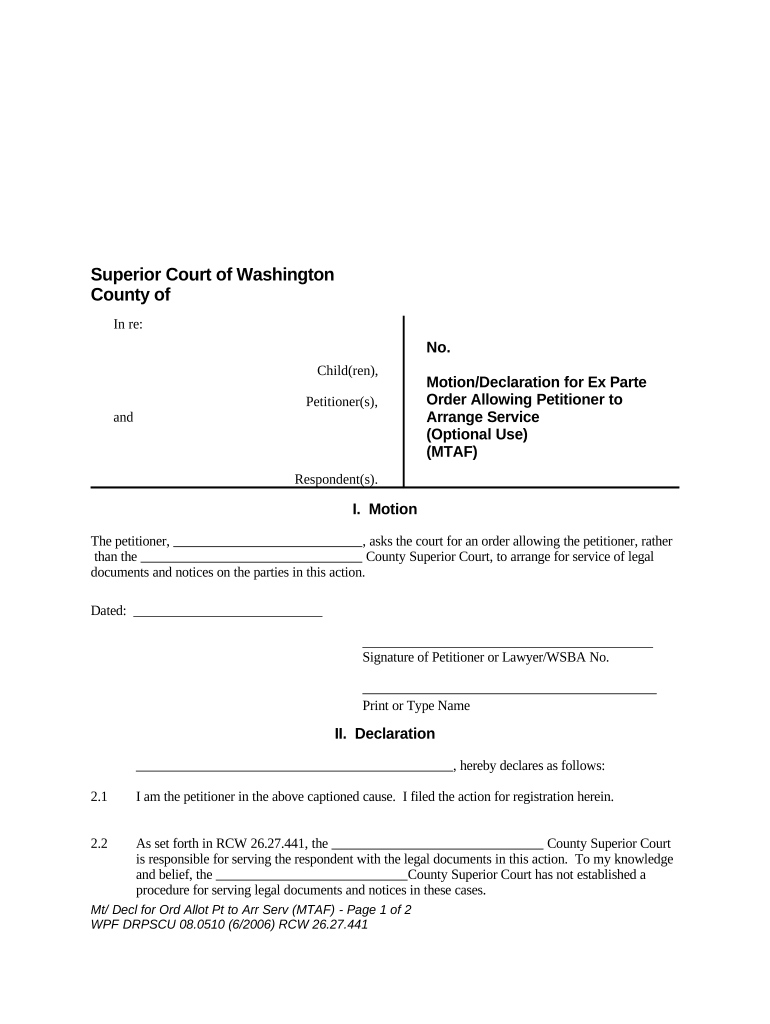
Caption

Court name, case number, and party names must match the underlying pleading exactly to avoid rejection.
Title

State the declarant's name and the motion supported, for example 'Declaration of Jane Doe in Support of Motion for Summary Judgment.'

Organized Facts

Numbered paragraphs that present facts concisely, each limited to a single idea or event and tied to exhibits when appropriate.

Exhibit Cross-Reference

Clear references (Exhibit A, p. 3) and attached documents that corroborate factual assertions and timestamps.

Jurat Language

A sworn-attestation clause declaring truthfulness under penalty of perjury and naming the governing state's laws is required.

Signature Block

Declarant signs, prints name, lists date and location, and includes contact information for verification or follow-up.

Authentication and record integrity items to confirm

Encryption: AES-256 at rest
Transport Security: TLS 1.2/1.3
Audit Trail: Timestamped event log
Access Controls: Role-based permissions
BAA Option: HIPAA BAA available
Certifications: SOC 2 Type II

Consequences and common legal risks

Perjury Exposure: Criminal penalties
Motion Denial: Evidence rejected
Sanctions: Monetary or procedural
Service Defects: Filing delays
Privacy Breach: Protected data exposure
Authentication Failure: Signature invalidated

Common drafting and filing mistakes to avoid

  • Failing to attach referenced exhibits or mislabeling exhibits makes assertions unverifiable and may result in the court disregarding the declaration.
  • Using vague or hearsay statements rather than first-hand factual assertions undermines admissibility and can lead to evidentiary objections.
  • Omitting jurat language or the declarant's place and date of signing can cause the court to reject the document for lack of proper attestation.
  • Incorrect service or filing procedures, such as missing eFile requirements or failing to serve opposing counsel, can delay proceedings or void the filing.

Digital signing and eSubmission technical checklist

Confirm platform capabilities and file formats before preparing an electronic Motion Declaration.

  • File Types: PDF, DOCX supported
  • Integrations: Works with eFile portals
  • Authentication: Email, SMS, or KBA

Typical deadlines and timing considerations

Deadlines for filing or responding to motions vary by court and motion type; follow local rules and the assigned judge's procedures.

Motion Filing:

Follow court rule timeframes specific to the motion type

Opposition Deadline:

Often 14–21 days after motion service

Reply Deadline:

Commonly 7–14 days after opposition

Hearing Notice:

Hearing date set per local calendaring rules

Service Requirements:

Serve parties concurrently with filing per rules

Key milestones in a motion lifecycle

Sequential milestones identify where a Motion Declaration is prepared, filed, and adjudicated; each step affects timing and required documents.

01

Draft Declaration

Prepare facts, exhibits, and jurat before any filing action.

02

Signature and Authentication

Signer executes with appropriate authentication and date of execution.

03

File with Court

Submit via eFile or clerk's office according to local rules.

04

Serve Opposing Parties

Provide proof of service to the court and recipients promptly.

Representative use cases showing Motion Declarations in practice

These short examples illustrate how declarations support different court motions and workflows.

Optica Ventures Example

A COO summarizes transaction chronology and attaches contracts to support a motion for temporary injunctive relief.

  • The declaration lists exhibits and timestamps key emails to establish notice.
  • The court relied on the declaration and exhibits to rule on the preliminary issues without additional witness testimony, reducing hearing time and costs.

Martin Properties Example

A property principal documents damage, repair estimates, and contractor communications in support of a damages motion.

  • Photos and invoices are indexed as exhibits.
  • The organized declaration allowed quick verification by opposing counsel and expedited settlement discussions before a hearing.

Practical tips for preparing an effective Motion Declaration

Follow these best practices to improve clarity, admissibility, and procedural compliance for declarations.

Be concise and factual
State facts plainly in numbered paragraphs and avoid argument or speculation framed as fact.
Reference exhibits precisely
Cite exhibit labels and page ranges in-line to make verification straightforward.
Maintain version control
Use a single, final signed PDF for filing and preserve earlier drafts separately.
Confirm service mechanics
File and serve per local rules and include a proof of service with the filing.

Frequently asked questions about Motion Declarations

Answers to common procedural and technical questions when preparing, signing, and filing Motion Declarations.


Need help? Contact support

be ready to get more
Join over 28 million airSlate SignNow users