Establishing secure connection…Loading editor…Preparing document…

Motion to Preclude Admission of Gruesome Photographs

This template is fully customizable. Edit the text, fill out the fields, and send it for signature. Give it a try!
Motion to Preclude Admission of Gruesome Photographs

What the Motion to Preclude Admission of Gruesome Photographs Is

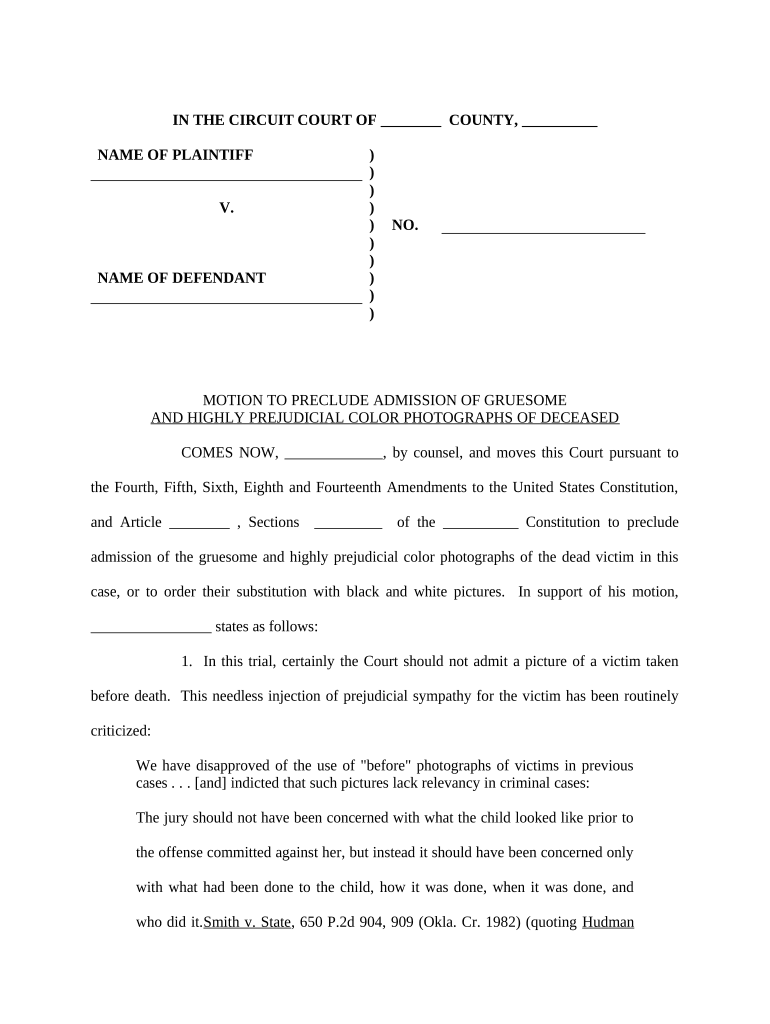
A Motion to Preclude Admission of Gruesome Photographs is a written request filed with a court asking the judge to exclude photographic evidence on grounds that its inflammatory or graphic nature creates unfair prejudice that outweighs probative value. The motion typically invokes Federal Rules of Evidence Rule 403 or an analogous state evidentiary rule, and explains why the images are not necessary to prove a material fact or why alternatives (redaction, limiting instruction, or stipulation) would suffice. It is filed before trial or at a pretrial hearing and supported by a memorandum and exhibits.

Why filing this motion matters for case fairness

The motion protects a party from undue prejudice that might inflame jurors, distract from dispositive evidence, or cause reversible error. Judges balance probative value against prejudicial effect; a clear, narrowly tailored motion can secure exclusion, redaction, or a limiting instruction to preserve a fair trial.

Why filing this motion matters for case fairness

Who typically prepares and uses this motion

The motion may also be filed by either party and should align with local rules and pretrial scheduling orders.

  • Criminal defense counsel seeking to minimize emotional prejudice from crime-scene images or victim photographs.
  • Prosecutors or civil plaintiffs who may move to exclude opposing gruesome imagery to avoid unfair counter-impact.
  • Trial attorneys and evidence clerks preparing pretrial exhibit lists and motions in limine.

Core parts of a professional motion

A complete motion combines procedural context, factual summary, legal argument tied to evidence rules, and a proposed order for the judge to sign.

Caption

Court name, docket number, party names and standard case caption formatted per local rules.
Statement of Facts

Concise description of photographs at issue, how they were obtained, and why they are disputed.

Legal Standard

Cite Rule 403 and related state evidentiary law; explain burden and balancing test succinctly.

Argument

Apply facts to legal standard: limited probative value, cumulative, inflammatory, potential prejudice.

Exhibits

Attach reduced-size exemplar images, exhibit list, and any supporting expert declarations or redaction proposals.

Proposed Order

Provide a clear order for the judge to adopt: exclude, redact, or limit scope of display.

Essential information and fields to include

Court: Full court name
Docket: Case number
Parties: Plaintiff and defendant names
Photograph List: Exhibit identifiers
Grounds: Rule citation and brief basis
Relief: Specific exclusion or limiting order

Consequences of errors or omissions in the motion

Evidence Excluded: Loss of key proof
Sanctions: Court may impose monetary or other sanctions
Reversal Risk: Appellate issues from improper admission
Trial Delay: Proceedings may be postponed
Increased Costs: Additional litigation expense
Credibility Harm: Adverse perception before jury

Common drafting and procedural mistakes to avoid

  • Failing to attach the specific images or adequate descriptions so the judge can assess prejudice and probative value.
  • Relying on broad assertions of prejudice without tying factual records to Rule 403 balancing factors.
  • Missing local rule deadlines for filing motions in limine or pretrial evidentiary motions, which can result in waiver.
  • Neglecting to propose narrower remedies such as redaction, limiting instruction, or in-camera review.

Step-by-step: preparing and filing the motion

Follow a clear sequence from drafting through service and presentation at the hearing to preserve objections and create a record.

  • 01
    Draft Motion: Compose caption, facts, legal argument, and proposed order.
  • 02
    Attach Exhibits: Include exemplar images and exhibit list with Bates or exhibit numbers.
  • 03
    File & Serve: File with clerk (e-file if available) and serve opposing counsel.
  • 04
    Present at Hearing: Argue orally and seek written ruling on the record.

Where the motion goes and how opposing parties receive it

The filing and service process must comply with court rules to ensure timeliness and create an adequate record for rulings.

  • Prepare Draft: Assemble motion, memorandum, and exhibits in court-compliant format.
  • File with Court: Submit via court e-filing system or clerk's office per local procedure.
  • Serve Counsel: Serve opposing counsel per rule: e-service, email, or physical service.
  • Hearing / Ruling: Argue the motion; request a written order if practical.

Configuring an online workflow for the motion and exhibits

Digital workflows help prepare, sign, and store motions and attached exhibits while preserving chain-of-custody and audit logs.

Template Sections Create standardized caption, facts, arguments, and signature blocks.
eSignature Fields Place attorney signature and date fields with required authentication.
Authentication Level Use email + SMS or stronger methods for verification.
File Formats Use searchable PDF or DOCX for filings and redaction capability.
Retention Policy Set retention per litigation hold and jurisdictional rules.

Technical considerations for eSubmission and secure handling

Maintain audit trails and access logs to document who accessed or signed exhibits and when.

  • Supported Formats: PDF, PDF/A, DOCX
  • Integrations: Court e-file portals and document management
  • Authentication: Email, SMS, KBA, or advanced methods

Timing notes and typical deadline windows

Local rules determine specific cutoff dates; calendar accordingly and preserve objections by timely filing and serving.

Pretrial Motion Deadline:

Often 14–30 days before trial per scheduling order

Response Deadline:

Typically 7–21 days after service; check local rules

Reply Deadline:

Often 3–7 days after the response is filed

Hearing Date:

Set by court—may be consolidated with other motions

Record Preservation:

Keep originals and redaction copies until appeals timeframes lapse

eSignature vendor pricing and feature snapshot for motion preparation

Common criteria for choosing an eSignature vendor include starting price, trial availability, bulk send, audit trail, HIPAA support, and envelope limits.

signNow DocuSign Adobe Sign PandaDoc HelloSign
Starting Price $8/user/mo $15/user/mo $14/user/mo $19/user/mo $15/user/mo
Free Trial Yes, 7-day free trial No No Yes, limited Yes, limited
Bulk Send Yes Yes Yes Yes No
Audit Trail Yes Yes Yes Yes Yes
HIPAA Compliant Yes Yes Yes No No

Frequently asked questions about this motion and e-submission

Answers address admissibility concerns, e-signature applicability, filing practice, and how to preserve records for appeal.


Need help? Contact support

be ready to get more
Join over 28 million airSlate SignNow users