Establishing secure connection…Loading editor…Preparing document…

Motion for Reconsideration

This template is fully customizable. Edit the text, fill out the fields, and send it for signature. Give it a try!
Motion for Reconsideration

What a Motion for Reconsideration Is and when it applies

A Motion for Reconsideration asks a court to review and change an earlier order or decision based on an alleged error of law, newly discovered evidence, or an intervening change in controlling law. It is a post‑judgment or post‑order pleading used in trial and some administrative settings to preserve issues for appeal and to seek prompt corrective relief without filing a separate appeal. Procedures and acceptable grounds vary between federal courts (see Federal Rules of Civil Procedure 59 and 60) and state courts, and local rules frequently set strict timing and formatting requirements.

Why a Motion for Reconsideration can matter to your case

Filing a well‑supported motion can correct legal or factual errors, present new material evidence, and preserve appellate rights; it can also shorten litigation by resolving discrete issues without the cost and delay of an appeal.

Why a Motion for Reconsideration can matter to your case

Who commonly prepares and files this motion

The Motion for Reconsideration is filed by parties who believe a court order contains a clear error or omission and who want expedited review before appealing.

  • Defense or plaintiff counsel seeking to correct legal or factual mistakes quickly without waiting for appeal.
  • Pro se litigants who need to preserve issues for appeal while asking the court to revisit its ruling.
  • Administrative appellants who file reconsideration requests under agency rules before escalating to judicial review.

Attorneys typically handle drafting and local‑rule compliance; pro se filers should consult clerk instructions and consider counsel for complex legal issues.

Who can sign and submit the motion

Attorney

An attorney of record signs pleadings on behalf of a party and certifies compliance with local rules and service requirements; signature also establishes professional responsibility under court rules.

Pro Se Litigant

A self‑represented party may sign the motion personally; courts require the signer to attest to truthfulness, and filing rules for service and formatting still apply to pro se submissions.

Key components to include in a professional motion

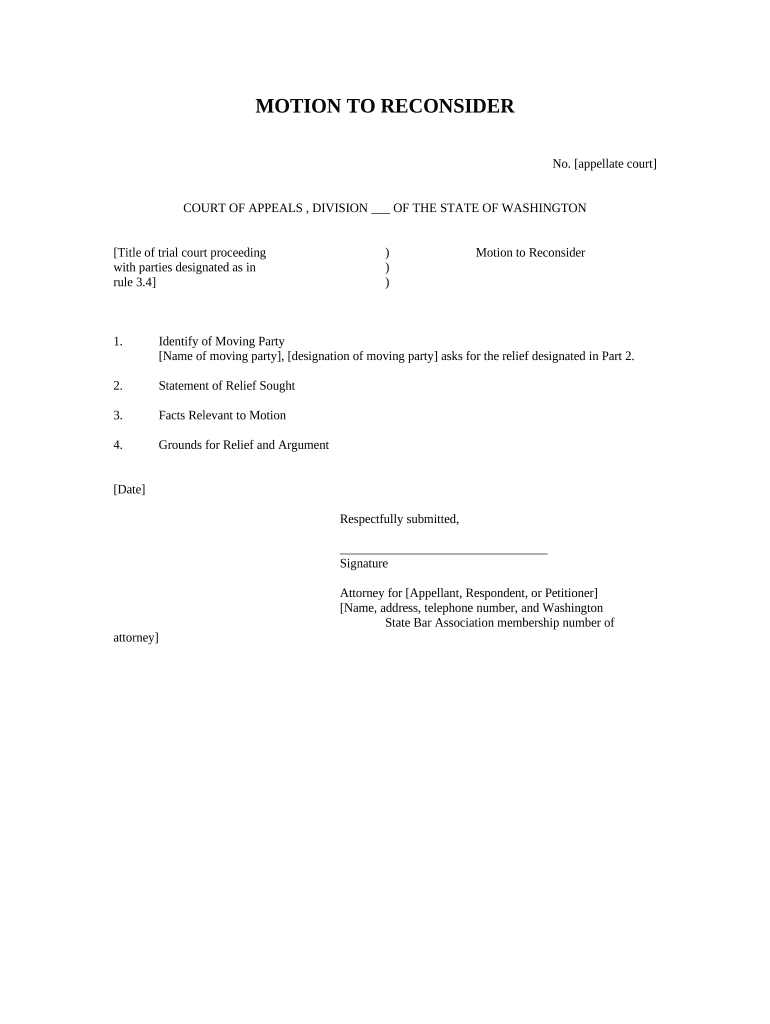
A complete Motion for Reconsideration follows local form, cites precise grounds, and provides a clear proposed order for the court to enter.

Caption

Court name, docket number, and party names formatted exactly as the original case caption; errors here can delay processing.
Introduction

A concise statement identifying the order to be reconsidered and the specific relief requested, stated in plain legal terms.

Statement of Facts

Relevant, narrowly focused facts limited to those that are new or were overlooked, with citations to the record and precise dates.

Legal Grounds

Cite the controlling rule or authority (e.g., FRCP 59/60 in federal court or the applicable state rule) and explain how it applies to the case facts.

Evidence

Attach newly discovered evidence with sworn declarations or admissible exhibits showing why evidence was unavailable earlier.

Proposed Order

Attach a clean proposed order the judge can sign, stating the precise change requested and any timeline for further proceedings.

Stepwise filing checklist for the Motion for Reconsideration

Follow these sequential steps to prepare, file, and serve a motion that complies with typical court and agency expectations.

  • 01
    Review Order: Confirm the exact order and entry date to calculate deadlines.
  • 02
    Draft Motion: Draft focused argument, attach new evidence, and include proposed order.
  • 03
    File With Clerk: eFile or deliver paper copy per court rules and pay any required fee.
  • 04
    Serve Parties: Serve opposing counsel and file a proof of service promptly after filing.

Configuring a digital workflow for this motion

Set up a template and routing that matches the court's filing and service requirements to reduce manual steps and errors.

Template Create a motion template with fixed caption and editable fields.
Signature Fields Add signer name and date fields; enable required‑field validation.
Routing Set signer order and approval steps before eFiling submission.
Attachments Include exhibits and proposed order as separate, clearly labeled files.
Notifications Enable email notices for filing confirmation and service receipts.

How the eSubmission and service process typically flows

A clear end‑to‑end process reduces rejection risk: prepare, authenticate, file, and confirm service.

  • Prepare: Complete document, exhibits, and proposed order in court‑preferred formats.
  • Authenticate: Use permitted signer authentication for eSignature or attorney eFile accounts.
  • File: Submit via the court's eFiling system or deliver to the clerk as required.
  • Serve: Serve opposing parties and upload proof of service to the docket.

Technical considerations for electronic filing and signatures

Confirm the court or agency accepts the document format and eSubmission method you plan to use.

  • Supported Formats: PDF/A or court‑specified PDF formats are most commonly accepted.
  • Signer Authentication: Email link, SMS code, or identity verification where courts require stronger proof.
  • Integrations: Integrate with case management or cloud storage for exhibit organization.

Where courts permit electronic signatures, ensure the platform provides audit trails, tamper‑evident outputs, and a reproducible signed record acceptable under ESIGN (15 U.S.C. ch. 96) and applicable state law (UETA or ESRA).

Timing and deadline considerations

Deadlines differ by forum; missing the filing window often waives reconsideration rights and can foreclose appeal issues.

Federal Civil Rules:

FRCP 59: typically 28 days; FRCP 60: reasonable time, some grounds within 1 year.

State Court:

Deadlines and naming (reconsideration, reargument) vary; consult local rules.

Appellate Impact:

Filing late can forfeit issues on appeal; appellate deadlines are separate and stricter.

Agency Proceedings:

Administrative rules set short windows—check the agency's procedural regulations.

Emergency Relief:

Seek immediate stay or emergency relief where irreparable harm exists.

Milestones from order entry to final disposition

Typical chronological milestones track entry, preparation, filing, response, and judge's decision.

01

Order Entry

Date the court's order is entered on the docket; triggers deadline clock.

02

Motion Preparation

Gather record citations, exhibits, and draft the statement of reasons.

03

File & Serve

File before deadline and serve opposing counsel per rules.

04

Opposition and Reply

Opposing party may file response; judge may permit brief reply.

Common errors to avoid when preparing the motion

  • Missing the deadline for filing or miscalculating the entry date, which can forfeit relief.
  • Relying on the same arguments previously rejected instead of showing new facts or controlling law changes.
  • Failing to attach admissible evidence or a sworn declaration for any newly discovered materials.
  • Not following local formatting, signature, or proof of service requirements; clerks often reject noncompliant filings.

Consequences of a deficient or late motion

Waiver of Grounds: Missed deadlines can waive the issue for appeal.
Sanctions: Frivolous submissions risk monetary sanctions under court rules.
Dismissal: Court may deny or dismiss the motion on procedural grounds.
Delay Costs: Unnecessary filings can increase litigation expenses and delay resolution.
Lost Appeal Rights: Improper procedure can forfeit appellate preservation of issues.
Credibility Harm: Repeated improper filings may harm party credibility before the tribunal.

Realistic use examples for clarity

Two concise scenarios show how a Motion for Reconsideration can resolve narrow errors or preserve appellate issues.

Civil Judgment Correction

A party discovers a calculation error in damages entered by the clerk

  • Error affects award amount
  • The party files a focused motion attaching corrected calculations and a proposed order; the court amends the judgment, avoiding an appeal and reducing litigation costs.

Administrative Ruling Revisited

An appellant obtains new evidence after an agency decision

  • Evidence was unavailable earlier
  • The appellant files reconsideration with sworn declarations; the agency reopens the record and issues a revised determination based on the new material.

Supporting items commonly attached to the motion

Attachments should be clearly labeled and organized to make the judge’s review straightforward.

Exhibits

All documentary evidence referenced in the motion, marked sequentially and described in an exhibit index to facilitate review.

Declarations

Sworn statements attesting to the authenticity of newly discovered evidence and explaining why it was unavailable earlier.

Proof of Service

A completed proof of service form showing how and when opposing parties were served in compliance with rules.

Proposed Order

A ready‑to‑sign order specifying the exact relief and any deadlines or further proceedings to be entered by the court.

How a Motion for Reconsideration compares with nearby remedies

Compare typical features of reconsideration and related post‑order motions to select the correct procedural vehicle.

Comparison Reconsideration New Trial
Purpose correct error obtain new trial
Typical Deadline short 28 days (federal context)
Grounds Required new evidence/manifest error specific trial errors
Relief Outcome amend or vacate order jury retrial or judgment reset

eSignature vendor pricing and capability snapshot

Quick pricing and capability comparison for eSignature options often used to prepare and share legal pleadings; signNow is listed first per vendor order requirements.

signNow DocuSign Adobe Sign PandaDoc HelloSign
Starting Price $8/user/mo $15/user/mo $14/user/mo $19/user/mo $15/user/mo
Free Trial 7-day free trial, no credit card required Varies by vendor Varies by vendor Varies by vendor Varies by vendor
Bulk Send Yes Yes Yes Yes No
Audit Trail Yes Yes Yes Yes Yes
HIPAA Compliant Yes Yes Yes No No

Practical tips for accurate and efficient submission

Adopt consistent workflows and review steps to reduce rejections and to ensure compliance with deadlines and evidence rules.

Use a checklist
Create a pre‑filing checklist that includes caption accuracy, order date verification, exhibit labeling, signature completeness, and proof of service to prevent routine clerical rejections.
Limit the argument
Focus solely on discrete errors or newly available evidence rather than rearguing prior points; courts may deny motions that merely repeat prior briefing.
Prepare a proposed order
Submit a clear, narrowly tailored proposed order to streamline the judge’s work and to reduce uncertainty about the remedy requested.
Confirm eFiling format
Validate PDF compatibility with the court eFiling system, ensure bookmarks and exhibits are accessible, and preserve a signed, tamper‑evident copy for the record.

Frequently asked questions about filing and digital submission

Answers to common procedural and technical questions when preparing or eSubmitting a Motion for Reconsideration.


Need help? Contact support

be ready to get more
Join over 28 million airSlate SignNow users