Establishing secure connection…Loading editor…Preparing document…

Motion Release Bond

This template is fully customizable. Edit the text, fill out the fields, and send it for signature. Give it a try!
Motion Release Bond

What the Motion Release Bond is and when it applies

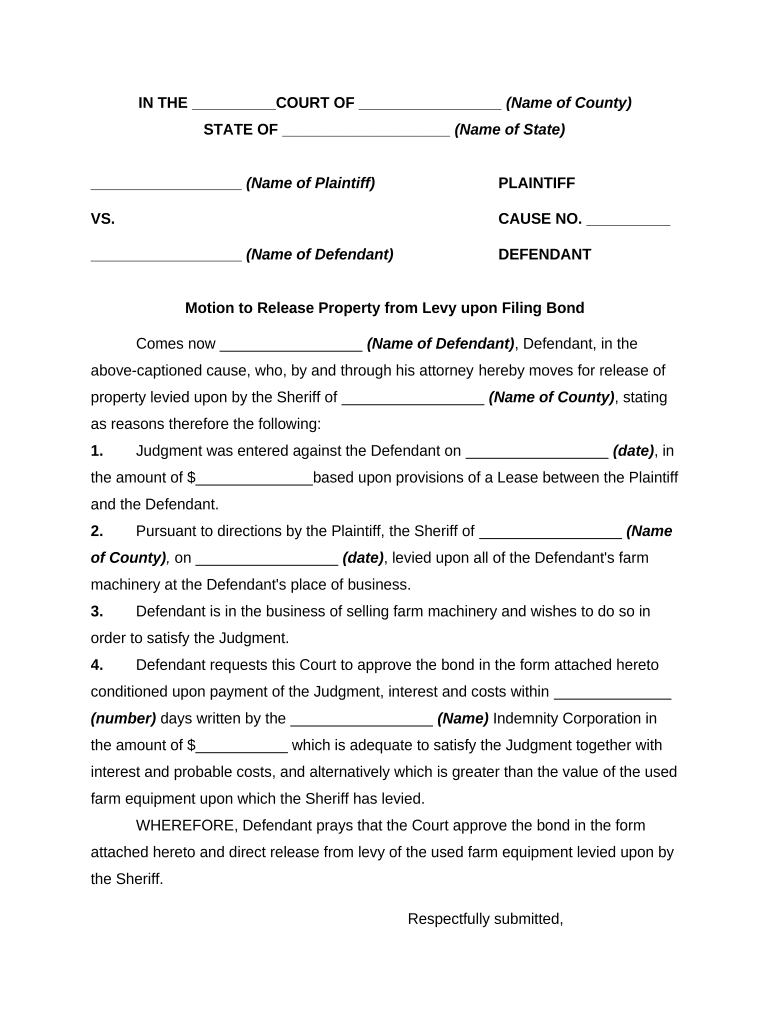
A Motion Release Bond is a court-authorized surety instrument posted to secure the release of property, funds, or a party from custody while a court considers a pending motion or appeal. The bond binds a principal and a surety to satisfy a court-ordered obligation if the release conditions are not met. Typical uses include securing release of seized assets, obtaining temporary possession of property, or staying enforcement pending judicial review. The bond is filed with the court clerk and becomes part of the case record once accepted by the judge.

Why a Motion Release Bond matters in litigation

A Motion Release Bond protects affected parties by ensuring funds or property are available if a court later enforces its order. It minimizes the risk of wrongful release, permits continued business or use of assets during litigation, and demonstrates compliance with court procedures. Where electronic workflows are used, ensure records meet ESIGN (15 U.S.C. ch. 96) and UETA standards to preserve enforceability.

Why a Motion Release Bond matters in litigation

Who commonly prepares and files these bonds

Review local court rules and surety requirements early: the parties listed above must coordinate to avoid delays and defects at filing.

  • Attorneys and legal teams who draft bond language and coordinate court filing, ensuring the principal and surety meet court conditions.
  • Surety underwriters and bond producers who confirm credit, issue the bond instrument, and supply signatures and power-of-attorney documentation.
  • Court clerks and judicial officers who accept, docket, and review the bond for sufficiency and compliance with local rules.

Key role profiles involved in a Motion Release Bond

Surety Producer

A licensed bond producer who evaluates the principal, underwrites the bond, and issues the surety agreement. Responsible for providing the bond form, power of attorney, and financial underwriting documentation required by the court.

Principal / Defendant

The individual or entity requesting release who must provide accurate identity, ownership details, and any collateral. The principal signs the bond and accepts legal obligation if the court enforces the bond.

Security and compliance points for bond documents

Transport Encryption: TLS 1.2/1.3
Data at Rest: AES-256 encryption
Audit Trail: Timestamped event log
HIPAA Support: BAA available
Legal Framework: ESIGN and UETA
Regulatory Certs: SOC 2 Type II

Consequences of an incorrect or deficient bond

Bond Forfeiture: Court may declare bond forfeited
Hearing Denial: Judge can refuse release motions
Civil Liability: Third-party damages or costs
Clerical Rejection: Court clerk may reject filing
Delay Costs: Added attorneys' fees
Administrative Fines: Local rule sanctions possible

Common preparation errors to avoid

  • Using a bond form that omits the court name, case number, or judge — omissions often lead to clerk rejection and filing delays.
  • Mismatched party names between the motion, bond, and identification documents — name discrepancies can invalidate the bond or trigger additional verification.
  • Insufficient surety authority or missing power of attorney — courts commonly require evidence that the surety has executed the bond with binding authority.
  • Failing to confirm notarization or witness requirements for the jurisdiction — missing notarization or improper witnessing can render the bond unacceptable.

Step-by-step: completing a Motion Release Bond

Follow this concise sequence when preparing the bond to reduce submission errors and speed court acceptance.

  • 01
    Confirm parties: Verify legal names and case number exactly.
  • 02
    Specify bond amount: Enter the court-ordered numeric amount, spelled out and in figures.
  • 03
    Attach surety: Include surety name, underwriting reference, and power of attorney.
  • 04
    Notarize and file: Obtain required notarization or RON and submit to the clerk.

Digital workflow settings for online completion

Configure your e-filing workflow to match court and surety requirements before routing to signers.

Field Configuration
Authentication SMS code or email link per court preference
Notarization Enable RON or require in-person notarization
Routing Set signer order: principal, surety, notary
Retention Export signed PDF/A and store securely

Where to submit the completed Motion Release Bond

Understanding submission channels avoids misfiling and speeds court acceptance.

  • Court Clerk: File the original bond with the clerk at the courthouse handling the case.
  • Electronic Filing: Upload signed PDF to the court e-filing system if the court accepts e-filings.
  • Opposing Counsel: Serve the opposing party per local rules and attach proof of service.
  • Surety Records: Provide the surety with a stamped copy for its files and reclamation rights.

Digital signing and technical considerations

Ensure the platform you use preserves an audit trail and can produce court-ready signed PDFs and notarization records when required.

  • Integrations: Salesforce, NetSuite, Google Workspace support
  • File Types: PDF, DOCX export to court e-filing
  • Authentication: SMS, email, or advanced signer verification

Timing considerations and typical deadlines

Deadlines vary by court; plan for underwriting, notarization, and clerk review before the scheduled hearing.

Filing Before Hearing:

Submit the bond early enough for clerk review, typically days to weeks before the hearing.

Surety Approval Window:

Allow time for underwriting and issuance, commonly 24–72 hours for routine bonds.

Notarization Timing:

Have signatures notarized on the date of filing or as the court requires.

Service Deadlines:

Serve opposing parties per local rules, often immediately after filing.

Retention for Audit:

Retain copies for the case file and surety records until matters conclude.

Key processing milestones for a Motion Release Bond

Track these milestones in sequence to keep the bond process on schedule and court-ready.

01

Prepare Bond Package

Draft bond, collect identification, and assemble attachments.

02

Obtain Surety Approval

Underwriter reviews risk and issues the bond instrument.

03

Execute and Notarize

Principal and surety sign; obtain required notary or RON session.

04

File and Serve

File with the clerk and serve opposing counsel per local rules.

Representative eSignature platform pricing and capabilities

Compare common platform features and starting prices to choose an eSignature provider that meets court, surety, and privacy requirements.

signNow DocuSign Adobe Sign PandaDoc HelloSign
Starting Price $8/user/mo $15/user/mo $14/user/mo $19/user/mo $15/user/mo
Free Trial 7-day free trial No No Yes, limited Yes, limited
Bulk Send Yes Yes Yes Yes No
Audit Trail Yes Yes Yes Yes Yes
HIPAA Compliant Yes Yes Yes No No

Real-world examples of electronic bond handling

These short examples show how organizations use digital signing and secure workflows to process court bonds and related documents.

Optica Ventures LLC

Optica streamlined signature collection for legal filings using an integrated eSignature workflow to reduce turnaround times.

  • The interface remained easy for internal teams and external parties.
  • The result was faster submission, fewer clerical corrections, and clearer audit trails for court records.

Martin Properties

Martin Properties processed release-related documents online to avoid in-person delays during litigation.

  • Mobile signing allowed off-site principals to execute documents.
  • This reduced waiting for notarizations and preserved evidence of timely filing and service to the court docket.

Best practices for efficient, compliant bond filings

Apply these practical steps to reduce errors, speed approval, and maintain enforceable records when posting a Motion Release Bond.

Use standardized templates
Start with a court-compliant template that includes required jurat, case caption, and surety language to avoid omissions and simplify clerk review.
Verify signer identity
Confirm identities against government ID and use appropriate electronic authentication or notarization methods accepted by the court.
Preserve audit trail
Ensure the signing platform captures IP, timestamps, signer emails, and any notarization recording to support enforceability.
Coordinate early with surety
Engage the surety before the filing deadline to allow underwriting, power-of-attorney generation, and any required collateral arrangements.

Frequently asked questions about Motion Release Bonds

Answers address common execution, filing, and enforceability issues to help parties avoid clerical problems and preserve court acceptance.


Need help? Contact support

be ready to get more
Join over 28 million airSlate SignNow users