Establishing secure connection…Loading editor…Preparing document…

Mississippi Probate Claim

This template is fully customizable. Edit the text, fill out the fields, and send it for signature. Give it a try!
Mississippi Probate Claim

What the Mississippi Probate Claim Is

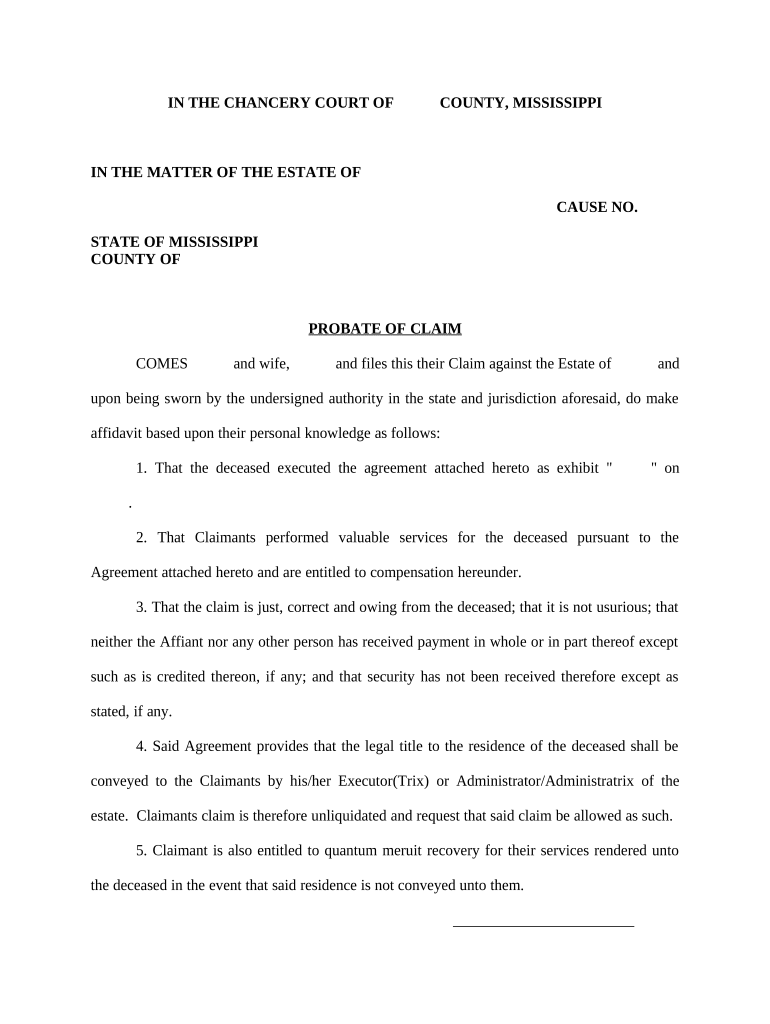
A Mississippi Probate Claim is a formal written statement submitted to the probate court or clerk handling an estate to assert a creditor’s right to payment from a decedent’s assets. The claim identifies the creditor, the amount owed, the basis for the debt, and supporting documentation such as invoices, contracts, or promissory notes. It is a procedural document governed by local probate rules and state statute; timely presentation and correct form are critical because the estate administrator will review and accept, reject, or dispute the claim during estate administration and distribution.

Why a Proper Probate Claim Matters

Filing a correctly completed Mississippi Probate Claim preserves creditor rights, starts verification by the personal representative or executor, and creates a record for court review and distribution. Timely presentation prevents forfeiture and helps ensure debts are considered before estate assets are distributed.

Why a Proper Probate Claim Matters

Who Prepares and Submits These Claims

Each party should follow county probate procedures and retain proof of service and filing for the estate record.

  • Creditor representatives and vendors asserting unpaid invoices or contract balances.
  • Personal representatives, executors, or administrators responding to creditor submissions and reconciling estate liabilities.
  • Estate attorneys who draft, verify, or litigate contested creditor claims in probate proceedings.

Step-by-Step: Completing a Mississippi Probate Claim

Follow these main tasks in sequence to prepare and present a probate claim accurately to the court and estate representative.

  • 01
    Prepare claim: Describe the debt, date, and legal basis concisely with supporting documents.
  • 02
    Attach evidence: Include invoices, contracts, or promissory notes that substantiate the amount claimed.
  • 03
    Notarize if required: Sign and notarize sworn statements or affidavits where the county or court mandates it.
  • 04
    File and serve: Submit to the probate clerk and serve the personal representative per local rules.

Essential Elements of a Professional Probate Claim

Include these components to make the claim clear, verifiable, and court-ready; missing elements are the most common reason for administrative delay or rejection.

Clear identification

Decedent and claimant full names, estate file number or docket reference, and county court designation so the clerk can index the claim correctly.
Detailed amount

Itemized claim total showing principal, fees, and any accrued interest with dates and calculations that allow quick mathematical verification by the estate administrator.

Legal basis

Concise statement of why the obligation exists: contract, promissory note, medical bill, or court-ordered amount, with exhibit references.

Supporting exhibits

Attach copies of invoices, contracts, account statements, correspondence, and any signed agreements that corroborate the claim amount and purpose.

Verification

A signature block for the claimant or authorized agent; include notarization or sworn affidavit if the local court requires it for proof of claim.

Service proof

Include a certificate of service or returned mailing receipt showing the personal representative and interested parties were served per court rules.

Required Data Fields Summary

Claimant Identity: Full legal name
Decedent Identity: Full legal name
Claim Amount: Numeric total
Debt Basis: Contract or invoice
Supporting Docs: Invoices or notes
Contact Details: Address and phone

How to Configure an Online Claim Workflow

Set up an electronic workflow that captures signatures, attachments, and service receipts while respecting court filing limits.

Field Configuration
Claimant signature Require signer, date field, and optional notarization capture
Attachment slot Make mandatory for exhibits with size limits
Certificate of service Auto-generate with date and recipient list
Audit trail Enable IP, timestamp, and action logs

Filing and Service Flow at a Glance

This flow describes common routing steps from preparation through court acceptance and estate review.

  • Prepare: Draft claim, attach evidence, complete required fields
  • Authenticate: Sign and notarize if local rules require original verification
  • File: Submit to the probate clerk physically or via permitted e-filing channel
  • Serve: Serve the personal representative and other interested parties per court rules

Sending, Signing, and Sharing the Claim

Preserve the audit trail, delivery receipts, and any notarization recordings to support claim validity during estate administration.

  • Email delivery: Sufficient for service if court rules allow
  • Registered mail: Commonly required for proof of service
  • E-filing systems: Used where court accepts electronic submissions

Typical Timing and Deadlines to Check

Deadlines for presenting probate claims vary by jurisdiction and notice procedure; confirm local probate code and county clerk instructions before relying on any single timeframe.

Presentation window:

Varies by county; often a short period after estate notice

Notice response:

Personal representative typically has set time to accept or object

Statute of limitations:

Underlying debt statutes still govern collection timing

Service deadlines:

Service methods and timelines set by local court rules

Appeal period:

If claim disputed, court deadlines for response or appeal apply

Key Milestones in a Probate Claim Lifecycle

A sequential view of principal milestones from claim drafting through resolution and potential enforcement.

01

Draft Claim

Assemble documentation and compute amounts due before filing.

02

File with Clerk

Submit claim to the appropriate probate or chancery clerk for docketing.

03

Serve Parties

Provide notice to the personal representative and interested parties as required.

04

Court Consideration

Estate administrator or judge accepts, disallows, or schedules hearing for disputes.

Common Mistakes to Avoid When Preparing a Claim

  • Missing or mismatched names that prevent the clerk from associating the claim to the correct estate, causing administrative delay or rejection.
  • Failing to attach supporting documents such as invoices or contracts, which leaves the claim unsubstantiated and likely disallowed.
  • Incorrect service of the personal representative or interested parties, which can result in a later challenge to the claim’s validity.
  • Submitting unsigned or improperly notarized affidavits when the court or county requires notarization for proof of claim.

Consequences of an Incorrect or Late Claim

Claim Rejection: Loss of recovery
Priority Loss: Unpaid status after distributions
Legal Costs: Additional counsel fees
Late Filing: Statutory bar possible
Service Defects: Motion to strike
Evidence Gaps: Reduced settlement leverage

Real-World Examples of Probate Claims

These illustrative examples show typical claim scenarios, how they were substantiated, and the practical outcomes in estate administration.

Unpaid Invoice Claim

A small vendor submitted an itemized invoice and delivery receipts

  • Claim matched invoice dates
  • The personal representative allowed part of the claim; parties negotiated remaining balance before distribution.

Secured Loan Claim

A financial institution filed a claim with loan agreement and recorded lien

  • Lien priority verified
  • The estate used proceeds from a property sale to satisfy the secured portion before unsecured distributions.

Comparing eSignature Options for Preparing and Signing Claims

Select an eSignature provider that supports notarization workflows, audit trails, and retention; summary comparison below shows typical starting prices and compliance features.

signNow DocuSign Adobe Sign PandaDoc HelloSign
Starting Price $8/user/mo $15/user/mo $14/user/mo $19/user/mo $15/user/mo
Free Trial 7-day free trial Varies by vendor Varies by vendor Varies by vendor Varies by vendor
Bulk Send Yes Yes Yes Yes No
Audit Trail Yes Yes Yes Yes Yes
HIPAA Compliant Yes Yes Yes No No
Envelope Cap No cap 100 envelopes/user/year Varies Varies Varies

Frequently Asked Questions About Mississippi Probate Claims

Answers to common procedural questions about preparing, filing, and validating probate claims in estate proceedings.


Need help? Contact support

be ready to get more
Join over 28 million airSlate SignNow users