Fiduciary details
Name, appointment date, contact information, and court reference to link the Inventory to the estate docket.
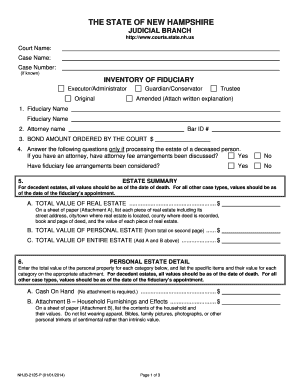
A complete Inventory establishes a clear record of estate assets and obligations, supports accurate tax reporting, helps avoid disputes among beneficiaries, and assists the fiduciary in meeting court and regulatory duties.

Typical users include court-appointed fiduciaries, probate attorneys, financial institutions, and beneficiaries who need a clear record of estate assets.
Depending on the estate’s complexity, accountants, appraisers, and tax advisors may also be involved to verify valuations and prepare tax filings.
| Field mapping and tags | Map name, date, and asset fields to consistent tags for automation. |
|---|---|
| Signer authentication method | Choose email link, SMS code, or stronger methods depending on court guidance. |
| Document attachments | Attach supporting PDFs such as deeds and statements to the inventory record. |
| Audit trail retention | Ensure platform captures timestamps, IP addresses, and action logs. |
| Delivery and access | Configure copies to fiduciary, counsel, and named beneficiaries after signing. |
Choose a platform that preserves a secure audit trail, supports court-admissible exports, and meets applicable privacy rules.
Confirm the chosen platform supports required retention, notarization or RON workflows if the probate court accepts electronic submissions or requires recorded notarizations.
Name, appointment date, contact information, and court reference to link the Inventory to the estate docket.
Legal name, date of death, social security number (redact where appropriate), and last residence to establish jurisdiction.
Parcel numbers, addresses, deeds attached, and current appraised or market values with appraisal date noted.
Bank and brokerage accounts listed with account numbers, balances, statements, and last statement date for verification.
Mortgages, loans, medical bills, and creditor claims with amounts and documentation of priority or liens.
Attached statements, deeds, appraisals, insurance policies, and the fiduciary’s signed declaration and date.
An executor compiles bank statements and real estate deeds for the court
A bank requires a certified inventory before releasing funds to the estate
| signNow | DocuSign | Adobe Sign | PandaDoc | HelloSign | |
|---|---|---|---|---|---|
| Starting Price | $8/user/mo | $15/user/mo | $14/user/mo | $19/user/mo | $15/user/mo |
| Free Trial | 7-day free trial | Varies by vendor | Varies by vendor | Varies by vendor | Varies by vendor |
| Bulk Send | Yes | Yes | Yes | Yes | No |
| Audit Trail | Yes | Yes | Yes | Yes | Yes |
| HIPAA Compliant | Yes | Yes | Yes | No | No |
| Envelope Cap | No cap | 100 envelopes/user/year | Varies by plan | Varies by plan | Varies by plan |
Prepare Inventory promptly after appointment to support early creditor notice and tax planning.
File the Inventory per local probate rules; timing varies by county and judge.
Provide copies to beneficiaries within the timeframe required by local practice or court order.
Coordinate inventory valuations with estate tax and income tax deadlines to ensure accurate filings.
Amend the Inventory when significant assets change before final accounting and distribution.
A court-appointed administrator compiles asset and liability details, coordinates appraisals, works with counsel to meet probate deadlines, and signs court filings to discharge duties and settle estate affairs.
A trustee or institutional officer reviews account positions, provides formal statements required by financial institutions, and ensures distributions comply with fiduciary standards and applicable laws.