Establishing secure connection…Loading editor…Preparing document…

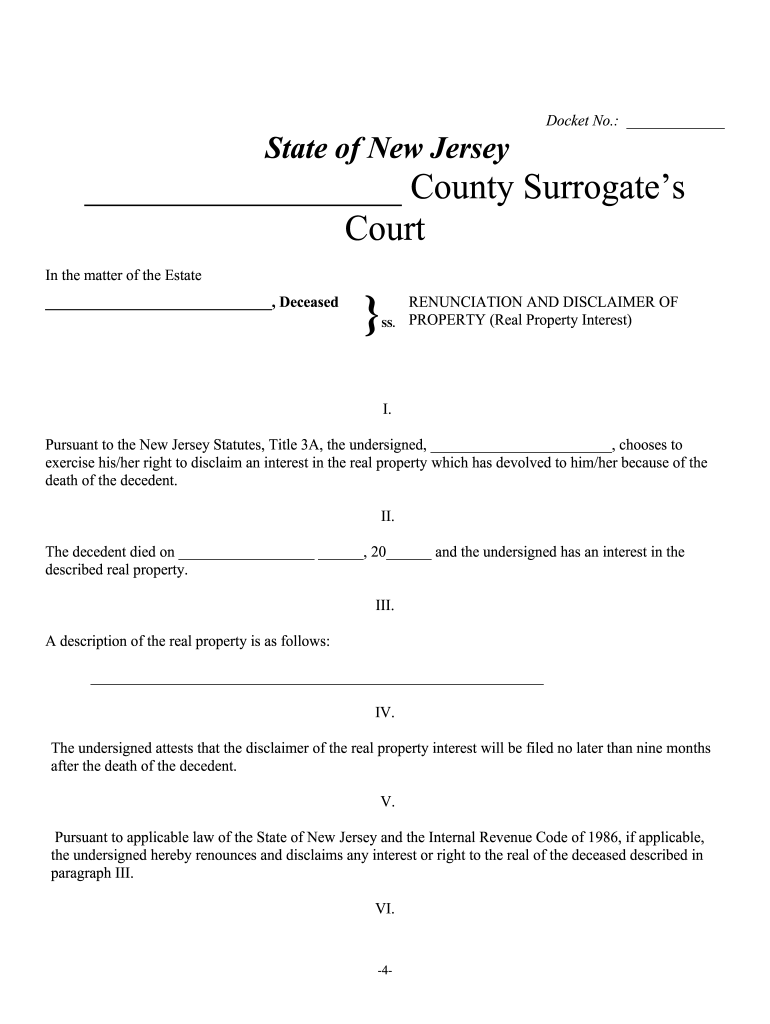
New Jersey Disclaimer

This template is fully customizable. Edit the text, fill out the fields, and send it for signature. Give it a try!
New Jersey Disclaimer

What the New Jersey Disclaimer Is and When It Applies

A New Jersey Disclaimer is a written statement used to limit legal liability, clarify scope of information, or set expectations for specific interactions within New Jersey jurisdiction. It can appear on websites, contracts, marketing materials, reports, professional communications, and transactional documents where parties seek to define responsibilities or exclude certain claims. Unlike formal filings, a disclaimer generally does not require state registration but should be clear, conspicuous, and tailored to the intended use to reduce legal exposure under state and federal consumer protection laws.

Why a Clear New Jersey Disclaimer Matters

A concise, properly worded disclaimer reduces ambiguity about responsibilities, sets expectations for users or counterparties, and can lower the risk of disputes. It supports compliance with consumer protection, privacy, and professional standards when combined with accurate facts and retrievable records.

Why a Clear New Jersey Disclaimer Matters

Who Commonly Provides or Receives This Disclaimer

Organizations and individuals across sectors use disclaimers where communications or materials could be misinterpreted or relied on for actions; the goal is to limit unintended liability and document expectations.

  • Real estate brokers and landlords using property listings or lease addenda that clarify factual limits and responsibilities.
  • Healthcare providers attaching privacy notices or informational disclaimers alongside patient-facing educational materials.
  • Professional service firms (legal, tax, financial) adding disclaimers to documents that are informational but not formal advice.

Essential Elements of a Professional New Jersey Disclaimer

A well-drafted disclaimer combines clarity, scope, and placement so recipients can understand limits of liability and the intended use of information.

Scope Statement

Specify what the disclaimer covers and what it does not cover, such as informational content versus professional advice, so readers know intended limits.
Named Parties

Identify the entity or individual issuing the disclaimer and, where applicable, the parties to whom it applies to avoid ambiguity about responsibility.

Effective Date

Include the date the disclaimer takes effect; this helps determine which version applies if the content or relationship changes over time.

Jurisdiction Clause

State that New Jersey law governs interpretation if the parties intend New Jersey rules to apply and clarify venue for disputes when relevant.

Limitation Language

Use precise limitation of liability language tailored to the subject matter; avoid overly broad or unconscionable exclusions that courts could reject.

Access and Withdrawal

Explain how recipients can obtain a paper copy and any method to revoke consent to electronic delivery when consumer-facing disclosures are involved.

Data and Security Considerations When Distributing Disclaimers

Encryption: TLS 1.2/1.3
Data at Rest: AES-256 encryption
Compliance: ESIGN and UETA
Healthcare: HIPAA available (BAA)
Audit Trails: Timestamps and IP logs
Accessibility: WCAG 2.0 Level AA

Step-by-Step: Prepare and Issue a New Jersey Disclaimer

Follow these steps to draft, review, and distribute a clear disclaimer suited for New Jersey use and for potential electronic delivery under ESIGN/UETA.

  • 01
    Draft core text: Write concise scope, parties, and limitation language tailored to the situation.
  • 02
    Set governing law: Specify New Jersey law where appropriate to reduce forum ambiguity.
  • 03
    Confirm delivery method: Choose web posting, email, or embedded contract clause and note consumer disclosure needs.
  • 04
    Record and retain: Capture the issued version, distribution log, and signed consent if applicable.

How to Customize and Deliver the Disclaimer Online

Configure the digital workflow to ensure the disclaimer is presented, acknowledged, and retained consistently across recipients.

Field Configuration
Template Visibility Public page or restricted link
Conditional Logic Show clauses based on user selections
Authentication Email, SMS, or stronger methods
Retention Save signed copy and audit trail

Where to Send or File a New Jersey Disclaimer

Disclaimers are usually distributed rather than filed; choose the destination that best documents delivery and consent.

  • Website Posting: Post the disclaimer prominently and record the posting date and page URL or location.
  • Contract Attachment: Attach as an exhibit or clause within agreements so it becomes part of the contractual record.
  • Email Delivery: Send to relevant recipients with an acknowledgement or click-to-accept mechanism for proof of receipt.
  • Physical Copy: Provide paper versions where electronic delivery is not permitted or a recipient requests a hard copy.

Technical Considerations for eSubmission and Distribution

Choose tools and formats that preserve text, metadata, and audit logs when distributing disclaimers electronically.

  • File Formats: PDF | DOCX | HTML
  • Integrations: Salesforce, Microsoft 365, Google Workspace
  • Authentication: Email link | SMS code | SSO

Typical eSignature Vendor Pricing and Compliance Snapshot

Compare common plan entry points and compliance factors for eSignature providers used to collect acknowledgements or signed disclaimers. signNow is listed first per vendor comparison rules.

signNow DocuSign Adobe Sign PandaDoc HelloSign
Starting Price $8/user/mo $15/user/mo $14/user/mo $19/user/mo $15/user/mo
Free Trial 7-day trial No No Yes, limited Yes, limited
Bulk Send Yes Yes Yes Yes No
Audit Trail Yes Yes Yes Yes Yes
HIPAA Compliant Yes Yes Yes No No

Real-World Examples of Disclaimer Use

These brief examples show how organizations use disclaimers to set expectations and create an auditable record of information delivery.

Martin Properties

The firm used an online disclaimer on property listings to clarify informational limits

  • It attached the disclaimer to rental applications
  • This helped document acceptance and reduced follow-up disputes by making responsibilities explicit for tenants and agents.

Fertility Centers of Illinois

The clinic provided a patient-facing informational disclaimer during online intake

  • Patients acknowledged receipt electronically
  • The signed records supported compliance and evidence of informed access to non-medical educational content.

Common Mistakes to Avoid When Drafting a New Jersey Disclaimer

  • Using vague language that attempts to exclude all liability; overly broad disclaimers can be struck down by courts and may not protect against negligence claims.
  • Failing to tailor the disclaimer to the delivery method; consumer-facing electronic disclosures require ESIGN-compliant consent and access confirmation to be effective.
  • Omitting the effective date or versioning information, which creates uncertainty about which text applies when disputes arise or the content is updated.
  • Placing the disclaimer where users cannot reasonably see it; a conspicuous location and a clear acceptance mechanism are necessary for enforceability.

Penalties and Risks from an Incorrect or Missing Disclaimer

Contract Risk: Ambiguity damages claims
Regulatory Risk: Enforcement actions possible
Tax Penalty: $60–$330 per form
I-9 Violations: $281–$2,789 per violation
HIPAA Exposure: Civil penalties, corrective action
Reputational: Customer trust loss

Practical Tips for Accurate and Efficient Completion

Apply these practical measures when drafting, publishing, or collecting acknowledgements for a New Jersey Disclaimer to reduce legal risk and administrative overhead.

Keep language plain and focused
Prefer short, precise sentences that define what is covered, who is bound, and any actions recipients should take; specificity reduces interpretive risk and supports enforceability.
Record acceptance consistently
Capture timestamped acknowledgements and the delivery method so you can demonstrate who received the disclaimer and when, which is useful in disputes.
Update and version controls
Include version identifiers and effective dates. When you update a disclaimer, note the change and distribute the new version to affected parties to avoid confusion.
Coordinate with policies
Align disclaimers with privacy policies, terms of service, or contract clauses so documents do not conflict and obligations remain consistent across records.

Who Is Authorized to Sign or Issue the Disclaimer

Company Officer

A named officer or authorized representative should sign or issue disclaimers on behalf of an organization; include title and authority statement to demonstrate signing authority and avoid challenges to attribution.

Individual Owner

Sole proprietors and individuals must sign using their full legal name; when delivered electronically, capture attribution details (email, IP, timestamp) to show intent to sign.

How Disclaimers Differ from Similar Document Types

Compare disclaimers with releases, waivers, and contractual limitation clauses to understand when each instrument is appropriate.

Document Type Primary Purpose Common Formality
Disclaimer limit liability low formality
Release waive claims often signed and notarized
Waiver relinquish rights clear signature required
Contract Clause allocate risk incorporated by reference

Frequently Asked Questions About the New Jersey Disclaimer

Answers to common questions about enforceability, eSignature use, retention, and when to seek legal review.


Need help? Contact support

be ready to get more
Join over 28 million airSlate SignNow users