Establishing secure connection…Loading editor…Preparing document…

Louisiana Motion for New Trial

This template is fully customizable. Edit the text, fill out the fields, and send it for signature. Give it a try!
Louisiana Motion for New Trial

What the Louisiana Motion for New Trial Is

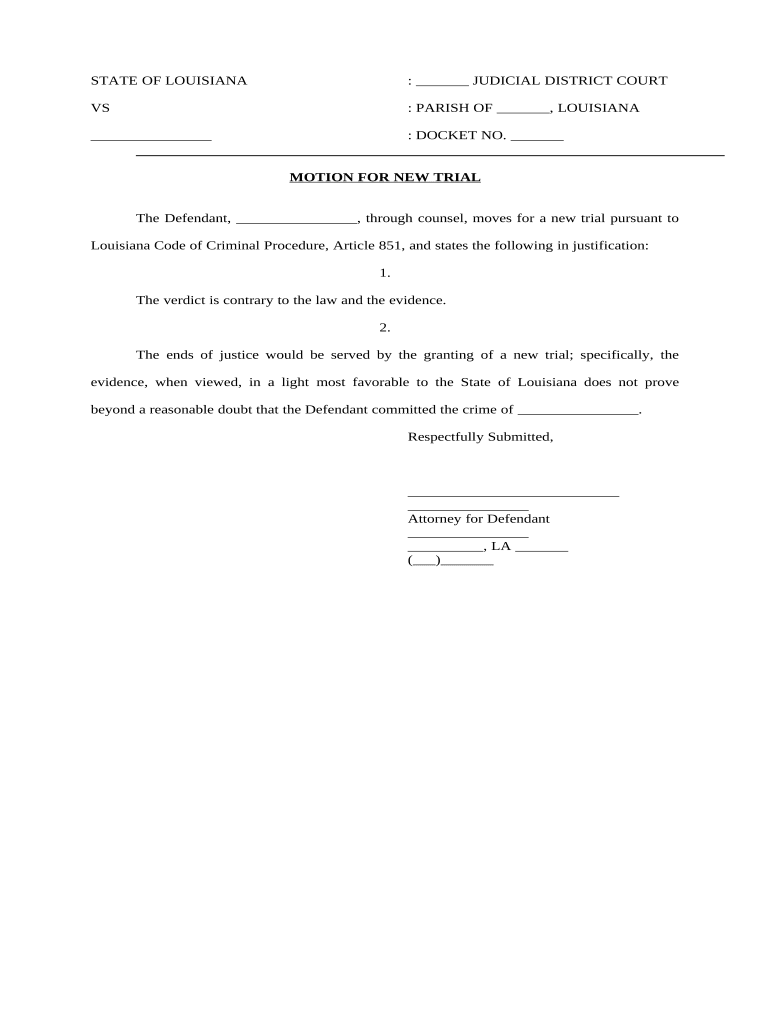
Louisiana Motion for New Trial is a post-judgment pleading filed in state civil or criminal cases to request that the court set aside a judgment and order a new trial. Typically raised after a verdict or judgment, it alleges specific grounds such as procedural errors, incorrect application of law, juror misconduct, newly discovered evidence, or that the verdict is contrary to the weight of evidence. The motion must comply with state procedural rules, include supporting facts and affidavits where required, and be filed within procedural deadlines established by Louisiana court rules.

Why a Motion for New Trial Matters

A Motion for New Trial preserves a party's right to challenge trial errors, present newly discovered evidence, and seek correction without immediate appeal. It can avoid the expense and delay of an appeal by allowing the trial court to remedy reversible errors and ensure a fair factual determination.

Why a Motion for New Trial Matters

Who Typically Prepares and Files This Motion

Common users include litigants, trial counsel, and parties who believe legal or factual errors affected the verdict in Louisiana courts.

  • Individual litigants seeking to overturn or modify a judgment after trial.
  • Civil defense and plaintiff attorneys preparing timely post-judgment relief motions.
  • Criminal defendants or prosecutors in limited cases where statute permits post-verdict motions.

Step-by-Step: Prepare and File the Motion

Follow these steps to prepare, file, and support a Louisiana Motion for New Trial in a civil case.

  • 01
    Identify Grounds: Document specific legal and factual bases supporting a new trial.
  • 02
    Gather Evidence: Collect affidavits, transcripts, and newly discovered materials.
  • 03
    Draft Motion: State precise relief, cite law, and attach exhibits.
  • 04
    File & Serve: File with clerk, serve all parties, and note filing date.

Frequently Asked Questions About Filing and Validity

This FAQ covers typical questions about filing, deadlines, grounds, and electronic signatures related to a Louisiana Motion for New Trial.


Need help? Contact support

Core Elements of a Professional Motion for New Trial

Core elements of a professional Louisiana Motion for New Trial ensure clarity, compliance with court rules, and persuasive factual and legal support.

Caption

Complete court caption with case number, party names, and judge designation. Accurate captioning avoids clerical rejections and ensures the motion is associated with the correct docket for timely consideration.
Statement of Facts

Concise factual summary tied to the trial record, identifying errors or newly discovered evidence. Cite transcript pages or exhibits and avoid argumentative narrative disguised as facts.

Legal Authority

Cite controlling statutes, procedural rules, and case law supporting each ground for relief. Explain how precedent applies to the facts without relying solely on conclusory statements.

Evidence

Attach key excerpts of trial transcripts, documentary exhibits, sworn affidavits, and any media demonstrating juror misconduct or other prejudicial events that support your factual assertions.

Relief

Specify whether you seek a completely new trial, a new trial on limited issues, judgment notwithstanding the verdict, or other corrective measures available under procedure rules.

Certificate

Include a certificate of service showing parties served and method of service, plus a signature block with counsel information and date formatted MM/DD/YYYY.

Security and Compliance Considerations

Encryption in Transit: TLS 1.2 and 1.3 used for transport.
Encryption at Rest: AES-256 encryption applied to stored files.
Regulatory Certifications: SOC 2 Type II, ISO 27001, PCI DSS.
Privacy & HIPAA: HIPAA-compliant with BAA available.
Legal Compliance: ESIGN and UETA legal framework supported.
Audit Trail: Detailed timestamps, IPs, and action logs.

Penalties and Risks of an Incorrect Motion

Waiver of Issues: Late or unspecific grounds may be waived.
Motion Denial: Court can deny without new hearing.
Sanctions Risk: Frivolous motions risk sanctions.
Missed Deadlines: Late filing often precludes relief.
Evidence Excluded: Untimely affidavits may be rejected.
Appeal Limitations: Denial may limit appellate review.

Common Preparation Pitfalls to Avoid

  • Failing to tie asserted grounds to the trial record or to provide transcript citations weakens the motion and invites summary denial.
  • Submitting unsigned or improperly formatted signature blocks, or omitting counsel bar numbers, can lead to clerical rejection by the clerk's office.
  • Overreliance on conclusory assertions without supporting affidavits or exhibits often fails to meet the evidentiary threshold required for relief.
  • Ignoring local rules for page limits, filing formats, or electronic filing procedures increases the risk of dismissal on procedural grounds.

Typical Filing Workflow

Typical workflow: prepare motion, gather evidence, obtain signatures, and file with the clerk or e-file following local procedures.

  • Prepare: Draft motion and assemble exhibits.
  • Sign: Counsel or party signs electronically or in ink.
  • File: Submit via e-filing or clerk's office per rules.
  • Serve: Serve opposing counsel and file certificate.

Digital Workflow Settings for e-Filing and e-Signing

Configure an electronic workflow that meets court rules for signature, authentication, and attachment of supporting exhibits.

Field Configuration
Signature Type Typed name, drawn signature, or digital certificate
Authentication Email link, SMS code, or advanced KBA
File Format PDF/A preferred; Word accepted by some courts
Attachments Include exhibits as separate exhibits or appendices
Notifications Automatic confirmations to signers and filing receipts

Technical Requirements for Electronic Submission

Electronic filing and signing require compatible document formats, stable internet, and authentication methods acceptable to the court.

  • Formats: PDF, DOCX accepted by some courts.
  • Integrations: Court e-filing portals, case management systems.
  • Authentication: Email, SMS, or SSO depending on rules.

Typical Deadlines and Timing Considerations

Deadlines for a Motion for New Trial vary by case type and local rules; verify timing with court clerk or rule book.

Typical Filing Deadline by Jurisdiction:

Varies by jurisdiction; check local rules promptly.

Required Methods for Service to Parties:

Serve all parties per civil procedure rules.

Time Allowed for Opposing Responses:

Opposing parties typically have set days to respond.

Timing for Affidavits and Verifications:

Affidavits verifying new evidence must be timely.

Impact on Appeal Deadlines and Tolling:

Filing may affect appeal deadlines; consult appellate rules.

Sequential Milestones from Verdict to Disposition

Key milestones from verdict to disposition of a Motion for New Trial typically follow this sequential timeline.

01

Verdict Entered

Clerk records judgment; timeline for post-trial motions begins.

02

Motion Filed

Party files motion alleging specific grounds and supporting materials.

03

Hearing Scheduled

Court may set oral argument or decide on papers alone.

04

Court Ruling

Judge grants, denies, or orders new proceedings based on record.

eSignature Pricing and Compliance Snapshot for Filing Documents

Compare baseline eSignature pricing and key compliance features relevant when submitting a Louisiana Motion for New Trial.

signNow DocuSign Adobe Sign PandaDoc HelloSign
Starting Price $8/user/mo $15/user/mo $14/user/mo $19/user/mo $15/user/mo
Free Trial 7-day trial Varies by plan Varies by plan Varies by plan Varies by plan
Bulk Send Yes Yes Yes Yes No
Audit Trail Yes Yes Yes Yes Yes
HIPAA Compliant Yes Yes Yes No No

Best Practices to Improve Acceptance and Persuasion

Follow these best practices to reduce procedural errors and strengthen the factual and legal basis of your Motion for New Trial.

Document the trial record thoroughly and clearly
Identify and cite exact transcript pages and exhibit numbers linked to each asserted error. Create an index of attached materials and explain how each excerpt supports the legal argument to streamline judicial review and reduce opportunity for clerical denial.
Use targeted transcript excerpts and exhibit citations
Avoid submitting full trial transcripts unnecessarily; instead highlight the most probative pages and append a concise explanation of how the testimony or exchange affected the outcome and supports the claimed error.
Verify service and filing procedures in advance
Confirm electronic filing processes, page limits, formatting requirements, and any certificate-of-service wording. Nonconformity with local rules can result in rejection without substantive consideration; a compliance checklist reduces that risk and saves time for counsel and the court.
Include sworn affidavits and authenticated exhibits
Provide sworn affidavits that explain why evidence was not available earlier and attach authenticated exhibits. Address admissibility issues up front and flag any hearsay concerns, so the court can evaluate materiality without separate evidence-limiting proceedings.

Representative Use Cases

Representative examples show how different fact patterns and industries use a Motion for New Trial to raise distinct post-verdict issues.

Civil Case Example

In a bench trial challenging complex contract interpretation, counsel discovered that a critical exhibit was not entered into evidence due to clerical omission.

  • New evidence authenticated after trial.
  • The motion presented the missing exhibit with affidavits explaining the omission and cited case law on admission errors; the court found the omission prejudicial and ordered a new trial limited to disputed contract terms.

Criminal Case Example

After a jury verdict in a misdemeanor matter, counsel learned of juror misconduct involving social media contact that was not investigated at trial.

  • Allegations of juror impartiality and contact.
  • The motion included affidavits, a social media report, and a request for evidentiary hearing; the trial court ordered inquiry, finding the contact likely affected deliberations and ordered a retrial on credibility issues.

Typical Signatories and Preparers

Trial Attorney

Experienced civil litigator who drafts motions for new trial to preserve appellate issues, compiles transcript excerpts, prepares affidavits, and ensures procedural compliance; typically coordinates with court clerks to confirm filing, service, and local format requirements.

Pro Se Litigant

An individual representing themselves who must follow strict court rules, accurately caption documents, assemble exhibits and affidavits, and often seek clerk guidance to meet technical filing requirements and avoid waiver of substantive issues.

be ready to get more
Join over 28 million airSlate SignNow users