Establishing secure connection…Loading editor…Preparing document…

New York Temporary Order of Protection

This template is fully customizable. Edit the text, fill out the fields, and send it for signature. Give it a try!
New York Temporary Order of Protection

What a New York Temporary Order of Protection Is

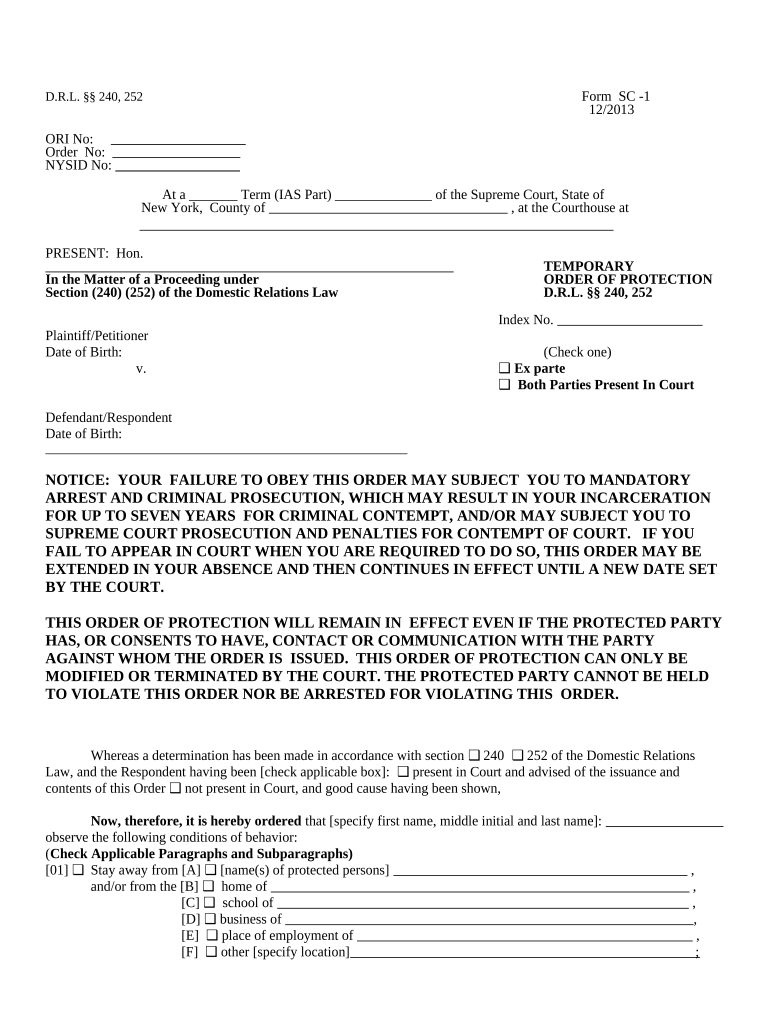
A New York Temporary Order of Protection is a court-issued directive that temporarily restricts contact, communication, or proximity between a petitioner and a respondent while a case proceeds. Courts may issue temporary relief on an emergency, ex parte basis or after a short hearing; the order can cover personal conduct, residence use, child custody access, and property exclusions. Temporary orders are typically followed by a full hearing where a judge decides whether to convert the temporary order into a longer-term order of protection with enforceable conditions.

Why a Temporary Order Matters for Safety and Legal Rights

Temporary orders provide immediate legal protections that can prevent contact, harassment, or abuse while the court schedules a full hearing. They establish enforceable restrictions and create a record that law enforcement and courts can act on if violations occur.

Why a Temporary Order Matters for Safety and Legal Rights

Who Typical Participants Are and How They Use the Form

The New York Temporary Order of Protection is completed by petitioners and processed by court staff; attorneys and victim advocates often assist with preparation.

  • Petitioners and survivors seeking immediate protection from harassment, assault, stalking, or domestic violence.
  • Attorneys and legal advocates who prepare the petition, represent the petitioner at hearings, and request relief.
  • Court clerks and law enforcement who process filings, serve papers, and enforce the order once issued.

Understanding each participant’s role helps ensure correct filing, timely service, and enforceability of the temporary order.

Step-by-step: Filing a Temporary Order of Protection in New York

Follow these core steps to complete and file a temporary order of protection; local court practice may add procedural steps.

  • 01
    Prepare petition: Complete petitioner and incident details accurately.
  • 02
    Request ex parte relief: Ask the judge for immediate temporary protection if needed.
  • 03
    Service: Ensure the respondent is served before or after issuance per court rules.
  • 04
    Attend hearing: Appear at the return date for a full protective order hearing.

Essential Information to Include on the Petition

Petitioner: Full legal name
Respondent: Full legal name and aliases
Relationship: Nature of relationship
Allegations: Brief incident summary
Requested Relief: Specific prohibitions or orders
Service Info: Respondent address for service

Key Parts of a Professional Petition for Temporary Protection

A complete petition organizes identity, facts, relief requests, and supporting evidence so the court can evaluate immediate need and schedule a hearing.

Caption

Court name, index number, and case caption identifying petitioner and respondent; correct court and county are required for jurisdiction.
Petitioner Statement

Concise statement of who you are, your contact details, and any protected parties such as children or dependent adults.

Facts of Incident

Chronological and specific facts showing threats, harassment, or abuse; dates, locations, witnesses, and any prior law enforcement contacts.

Relief Sought

Clear remedies requested: stay-away distances, no-contact directives, temporary custody, exclusive use of residence, or other limited relief.

Evidence and Exhibits

List attachments such as police reports, photos, messages, and medical records that corroborate the petitioner’s allegations.

Return Date Request

Proposed hearing date or request for court-scheduled return date for a full evidentiary hearing and potential final order.

From Filing to Enforcement — Core Process Overview

This workflow outlines the normal processing path after a petitioner submits a temporary order request to the appropriate New York court.

  • Filing: Petitioner files petition with court clerk.
  • Judge review: Judge considers ex parte facts and may grant temporary relief.
  • Service: Process server or law enforcement serves the respondent.
  • Return hearing: Court holds hearing to decide on longer-term protection.

Recommended Digital Workflow Settings for Online Completion

If you prepare the petition online, configure document controls and authentication to preserve integrity and support court acceptance.

Field Platform Setting
Required Fields Lock petitioner, respondent, and incident date fields.
Authentication Use email plus SMS code for signer verification.
Audit Trail Capture IP, timestamp, and change history.
Retention Store final PDF with certificate of completion.

Technical Considerations for eFiling and Electronic Evidence

Courts and clerks may accept electronically prepared documents, but local e-filing rules and formats vary by county and court type.

  • Integrations: Salesforce, NetSuite, Microsoft 365, Google Workspace
  • Formats: PDF and DOCX are commonly required for court submissions
  • Authentication: Email, SMS, optional KBA or 2FA

Confirm county court e-filing rules and required file formats with the clerk before relying solely on electronic submission or signatures.

Typical Deadlines and Timing to Expect

Timing varies by county and case type; these entries show common intervals for temporary protection petitions in New York.

Immediate Effect:

Ex parte temporary orders take effect on issuance, often same day.

Return Date Window:

Return or hearing date is commonly within 7 to 20 days after issuance.

Service Timing:

Respondent must be served before the return hearing when possible.

Hearing Scheduling:

Full hearing is scheduled on the return date for evidence and testimony.

Order Duration:

If converted, a final order’s duration is set by the judge and may be months or years.

Key Milestones from Petition to Final Determination

A typical case follows a discrete sequence of events from filing through final disposition; each milestone triggers specific duties.

01

Petition Filed

Clerk accepts petition and assigns a case number.

02

Ex parte Order

Judge may issue temporary protections without respondent present.

03

Service Completed

Respondent is personally served with paperwork before the hearing when practicable.

04

Final Hearing

Judge rules whether to enter a longer-term order of protection.

Common Preparation Pitfalls to Avoid

  • Incorrect respondent name or address that prevents service and delays the hearing.
  • Vague descriptions of incidents that fail to demonstrate immediate risk for ex parte relief.
  • Missing or unsigned attachments such as police reports or medical records needed to corroborate claims.
  • Failing to check local court e-filing rules which can cause rejection of an electronically prepared petition.

Consequences of Errors or Noncompliance

Service Failure: Hearing delays or dismissal
Contempt: Criminal penalties for violating order
Evidence Loss: Unfiled exhibits may be excluded
Incorrect Parties: Wrong respondent named undermines enforcement
Expired Orders: Protection lapses if not renewed
Privacy Breach: Unsafe information sharing risks victims

Representative Examples of Digital Document Use in Legal Workflows

These examples show how legal and administrative teams use electronic tools to prepare and manage court-related documents while preserving auditability.

Optica Ventures LLC

Optica adopted electronic signing for legal documents to simplify execution.

  • The interface is simple and easy-to-use for our team.
  • The result was faster turnaround and fewer incomplete filings, improving client communication while preserving an auditable record of signatures and document versions.

Fertility Centers of Illinois

A healthcare provider centralized signed consent and court correspondence electronically.

  • The airSlate SignNow team has been exceptional, responsive, the API has been great, and we're extremely happy.
  • Centralized digital records improved retrieval for audits and reduced time staff spent chasing signed paper, while maintaining HIPAA-conscious access controls.

Comparing eSignature Providers for Document Preparation and Evidence Management

Basic pricing and feature availability for common eSignature platforms used to prepare petitions, preserve audit trails, and manage electronic evidence.

signNow DocuSign Adobe Sign PandaDoc HelloSign
Starting Price $8/user/mo $15/user/mo $14/user/mo $19/user/mo $15/user/mo
Free Trial Yes, 7-day free trial Verify Verify Verify Verify
Bulk Send Yes Yes Yes Yes No
Audit Trail Yes Yes Yes Yes Yes
HIPAA Compliant Yes Yes Yes No No

Frequently Asked Questions About New York Temporary Orders of Protection

Answers to common questions about filing, service, e-signatures, enforcement, and modification for temporary orders in New York.


Need help? Contact support

be ready to get more
Join over 28 million airSlate SignNow users