New York Order of Protection
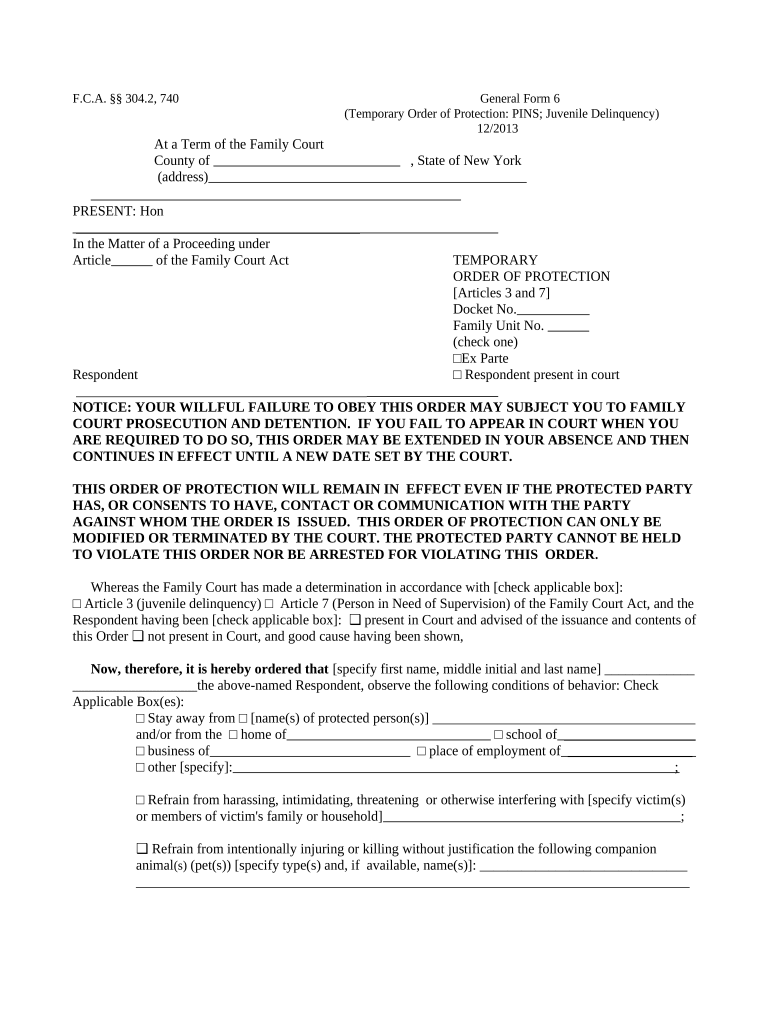
What the New York Order of Protection Is
Why an Order of Protection Matters
An Order of Protection provides enforceable legal restrictions designed to prevent further harm and creates remedies for violations, including arrest and contempt proceedings under state law.

People and Professionals Who Commonly Use This Form
Typical users include individuals seeking immediate safety, attorneys, victim advocates, and court clerks processing filings.
- Self-represented petitioner: Individuals seeking protection without an attorney, often filing at Family or Criminal Court.
- Attorney or legal aid: Lawyers preparing petitions, drafting affidavits, and representing petitioners at hearings.
- Advocates and social workers: Domestic violence advocates who assist with evidence collection and safety planning.
Step-by-step: Filing an Order of Protection in New York
-
01Gather evidence: Collect police reports, photos, texts, and witness names to support your petition.
-
02Complete petition: Fill out court forms with clear incident descriptions and requested relief.
-
03File with court: Submit the petition at the appropriate Family, Criminal, or Supreme Court clerk's office.
-
04Attend hearing: Participate in the scheduled hearing; a judge may issue a final order.
How Filing and Service Typically Work
-
Prepare documents: Assemble petition, affidavits, and exhibits.
-
File petition: Clerk assigns case number and may issue temporary relief.
-
Service: Respondent must be served per court rules for enforcement.
-
Hearing: Judge hears testimony and issues final order if justified.
How to Submit or Share Court Forms Electronically
Courts vary on e-filing and electronic submission; check local rules before relying on electronic delivery.
- Court e-filing: Upload PDFs through the court's e-filing portal where accepted.
- Email / Portal: Some clerks accept filings by secure portal or designated email; verify clerk instructions.
- Physical service: Personal or law-enforcement service remains required for enforcement in many cases.
Practical Tips for an Accurate and Actionable Petition
Common Pitfalls to Avoid
- Incomplete incident details cause delays and reduce perceived urgency by the court.
- Filing in the wrong court leads to transfer delays and missed temporary protections.
- Failure to effect proper service prevents enforcement and can nullify temporary orders.
- Relying solely on informal electronic notices when formal service is required undermines legal effect.
Legal Risks and Consequences of Errors
How to Save, Export, and Share Court Documents
PDF Export
Export the completed petition and attachments as PDF or PDF/A to preserve layout and metadata; courts commonly accept PDFs for e-filing.
Certified Copies
Request or obtain certified court copies for law enforcement and third parties; certified copies carry the court seal and clerk signature.
Audit Trail
Retain a timestamped audit trail showing uploads, signatures, and downloads to document the chain of custody for electronic submissions.
Multiple Formats
Keep an editable original (DOCX) for later amendments and a flattened PDF for filing and service purposes.
Typical Scenarios Where an Order Is Used
Case Study 1
A petitioner documents escalating harassment over three months, files in Family Court
- Judge issues a temporary stay-away order before the hearing
- At the hearing the judge grants a one-year final order with specified no-contact provisions and firearm surrender.
Case Study 2
An overnight emergency arrest prompts a criminal court petition for protection, with police serving the respondent immediately
- Temporary order protects the petitioner during arraignment
- After prosecution and a hearing, the court issues a final protective order aligned with criminal sentencing.
Who Can Sign and Authorize Filings
Petitioner — Individual
The petitioner or their legally authorized representative signs the petition to attest to the facts. If the petitioner is a minor or incapacitated, a guardian or parent may sign on their behalf according to court rules.
Attorney — Counsel
An attorney of record may sign filings and appear on behalf of the petitioner, providing bar number and firm details; counsel handles procedural compliance and represents the client's interests at hearings.
eSignature Platforms Compared for Document Preparation and Submission
| signNow | DocuSign | Adobe Sign | PandaDoc | HelloSign | |
|---|---|---|---|---|---|
| Starting Price | $8/user/mo | $15/user/mo | $14/user/mo | $19/user/mo | $15/user/mo |
| Free Trial | 7-day free trial | Varies by plan | Varies by plan | Varies by plan | Varies by plan |
| Bulk Send | Yes | Yes | Yes | Yes | Varies |
| Audit Trail | Yes | Yes | Yes | Yes | Yes |
| HIPAA Compliant | Yes | Yes | Yes | No | No |
| Envelope Cap | No cap | 100 envelopes/user/year | No cap | No cap | No cap |
Frequently Asked Questions About New York Orders of Protection
-
Can I e-sign the petition?
Some courts permit electronic submission of forms, but final court orders are issued by judges and may require traditional filing methods. Check local court rules and note that certain court filings can be excluded from ESIGN exceptions.
-
How quickly can I get emergency protection?
Courts can issue temporary emergency or interim orders the same day a petition is filed if immediate danger is demonstrated; follow clerk instructions for emergency filings.
-
What if service fails?
If the respondent cannot be located for service, the court may permit alternative service methods; inability to effect proper service can delay enforcement and final hearings.
-
How long does a final order last?
Duration varies by case and judge; orders can be time-limited or indefinite depending on statutory authority and facts presented at the hearing.
-
Can I change or vacate an order?
Either party may request modification or vacatur through the court that issued the order; motions to modify require notice and often a new hearing.
-
Where do I get help with forms?
Legal aid organizations, victim advocates, and court clerk offices provide guidance on forms and filing procedures; attorneys can represent petitioners in hearings.