Establishing secure connection…Loading editor…Preparing document…

New York Supreme Court

This template is fully customizable. Edit the text, fill out the fields, and send it for signature. Give it a try!
New York Supreme Court

What the New York Supreme Court Is and Where It Fits

The New York Supreme Court is the state trial court of general jurisdiction that hears civil litigation and, in many counties, felony criminal cases. It operates at the county level with a separate Supreme Court in each county and handles matters such as breach of contract, tort claims, real property disputes, and complex commercial litigation. The court is distinct from New York's highest court, the Court of Appeals; procedural rules are governed by the Civil Practice Law and Rules (CPLR) and local county rules for filing, service, and form formatting.

Why Proper Preparation Matters for Supreme Court Filings

Accurate, complete filings reduce rejections, preserve procedural rights, and speed case progression. Proper formatting, correct captions, verified pleadings, and timely service are required under CPLR and local rules and affect jurisdiction and relief availability.

Why Proper Preparation Matters for Supreme Court Filings

Who Typically Prepares and Submits These Court Papers

Different users must follow the same form and service requirements; attorneys rely on local practice rules while self-represented parties should verify clerk instructions before filing.

  • Plaintiffs and claimants preparing complaints or motions for monetary relief or injunctive relief.
  • Defense counsel responding with answers, motions, and discovery applications.
  • Pro se litigants filing small-claims appeals or other civil actions without an attorney.

Representative Roles and Responsibilities

Plaintiff / Litigant

An individual or entity initiating an action who must prepare the complaint, assemble exhibits, complete any verification or affidavit, pay filing fees, and effect service of process according to CPLR and county clerk requirements.

Attorney / Counsel

A licensed attorney who prepares pleadings, signs papers on behalf of a client, files electronically or in person, certifies compliance with professional rules, and ensures proper service and calendaring of deadlines for motions and appeals.

Core Components of a Professional New York Supreme Court Filing

A complete filing combines formal captioning, a properly verified pleading, supporting exhibits, required affidavits, proposed orders, and proof of service; each element must comply with CPLR and local rules to avoid rejection or delay.

Caption

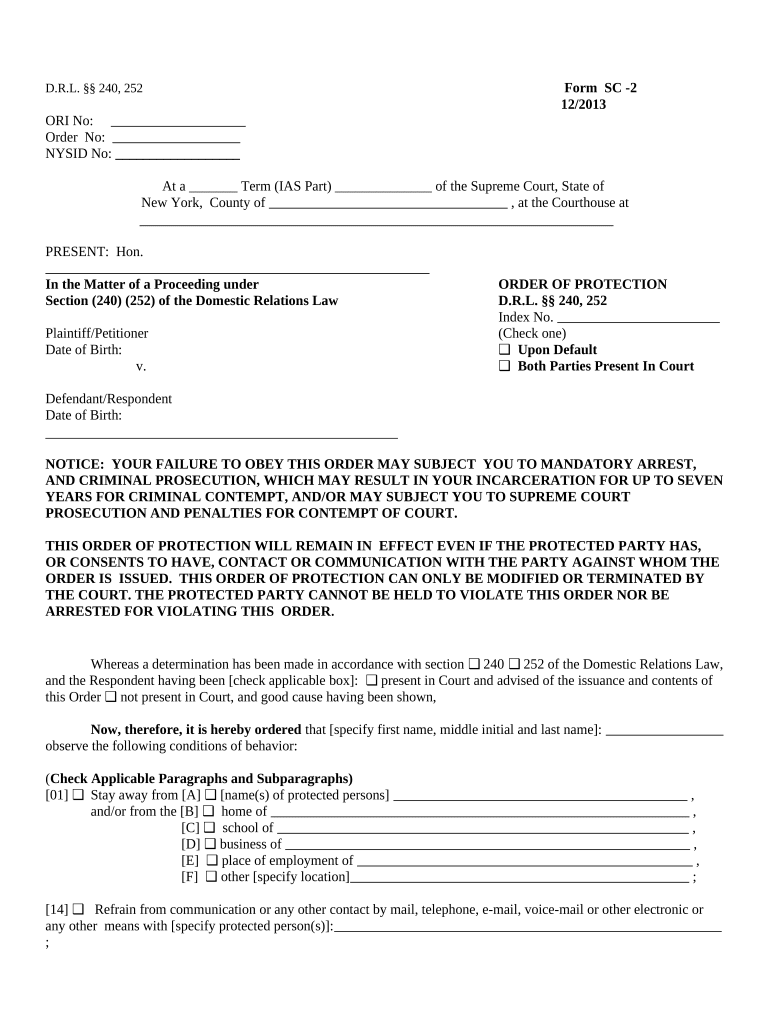
Includes the court name, county, index number (when assigned), party names and designations, and attorney information; inconsistent captions can cause rejection or misdocketing by the clerk.
Pleadings

Complaint, answer, counterclaim, or motion papers must be clear, numbered where required, and include statutory or common-law basis for relief; verified pleadings require sworn verification or affirmation.

Affidavits and Verifications

Affidavits of service, sworn verifications, and factual affidavits should be notarized where required and must state facts concisely to support motions or complaints.

Exhibits

Attach labeled exhibits in the order referenced in the pleading; staple or bind as clerk rules require and include an exhibit index when voluminous.

Proposed Orders

When seeking interim relief, provide a proposed order in the required format with a clean copy and, if necessary, a separate cover sheet for the judge's calendar.

Proof of Service

Submit proof of personal or mail service on all parties in the prescribed form; failure to serve properly can lead to vacated orders or dismissed claims.

Step-by-Step: Preparing and Submitting a Supreme Court Filing

Follow a consistent sequence from drafting to proof of service to reduce processing delays and preserve procedural rights.

  • 01
    Draft: Prepare complaint or motion with exhibits and required verifications.
  • 02
    Sign: Ensure attorney or party signs and notarizes verifications if required.
  • 03
    File: Submit via county clerk or NYSCEF e-filing where available and pay fees.
  • 04
    Serve: Serve opposing parties and file proof of service promptly.

Typical Electronic Filing and Case Routing Flow

Most commercial and civil matters use an electronic workflow from upload to docketing; each step generates a record required for procedural compliance.

  • Upload: Upload PDF documents and exhibits to e-filing portal.
  • Assign Fields: Map captions, case numbers, and court selections before submission.
  • Payment: Pay required filing fees via the portal or at the clerk's office.
  • Docketing: Clerk assigns index number or timestamps entry and returns a filing receipt.

Checklist of Workflow Settings for Electronic Submission

Verify portal settings and document attributes before upload to prevent rejections and ensure clerk acceptance.

Field Configuration
Case Caption Exact party names and county selection
Document Type Select complaint, answer, affidavit, or motion
File Format PDF or PDF/A per local e-filing rules
Fee Payment Prepay via portal or attach fee waiver request

Technical and Format Requirements for Electronic Court Papers

Ensure exhibits are bookmarked and text-searchable where possible; if using an e-signature platform, export a final combined PDF that meets the court's integrity and formatting rules before submission.

  • Accepted Formats: PDF / PDF/A preferred
  • Browser Support: Modern browsers with TLS enabled
  • Authentication: Portal account or attorney e-filing credentials

Representative eSignature Vendor Comparison for Court Document Workflows

Compare standard vendor pricing and capability highlights relevant to legal filing workflows; signNow is listed first per vendor comparison conventions.

signNow DocuSign Adobe Sign PandaDoc HelloSign
Starting Price $8/user/mo $15/user/mo $14/user/mo $19/user/mo $15/user/mo
Free Trial 7-day free trial Trial available Trial available Trial available Trial available
Bulk Send Yes Yes Yes Yes No
Audit Trail Yes Yes Yes Yes Yes
HIPAA Compliant Yes Yes Yes No No

Security and Compliance Considerations for Signed Court Documents

Encryption: TLS 1.2/1.3 in transit; AES-256 at rest
Certifications: SOC 2 Type II and ISO 27001
Legal Frameworks: ESIGN, UETA, and NY ESRA compliance
HIPAA Support: HIPAA-compliant with BAA available
FDA / 21 CFR: 21 CFR Part 11 capabilities supported
Accessibility: WCAG 2.0 Level AA accessibility

Consequences of Incorrect or Incomplete Court Filings

Filing Rejection: Clerk rejects improperly formatted or incomplete documents
Sanctions: Court may impose monetary or procedural sanctions
Default Judgment: Failure to answer or appear can result in default
Delayed Relief: Errors can substantially delay hearings and remedies
Evidence Exclusion: Late or faulty exhibits may be excluded at trial
Increased Costs: Remedial filings and re-service increase attorney and court costs

Common Errors to Avoid When Preparing Supreme Court Papers

  • Incorrect captioning or party names that do not match official entity records, leading to misdocketing or rejection by the clerk.
  • Missing verification, notarization, or improperly executed affidavits that fail to satisfy CPLR verification requirements and invite objections.
  • Failure to effect proper service or file proof of service on time, which may toll deadlines or lead to default.
  • Submitting non-searchable scanned exhibits or incorrect file formats that the e-filing system will reject or the court cannot process.

Real-World Examples of Electronic Document Use in Litigation

Examples illustrate how different organizations use electronic signing and digital workflows to handle court documents efficiently while meeting legal requirements.

Martin Properties — Property Dispute

A regional real estate firm digitized lease and title exhibits for a Supreme Court action

  • Reduced turnaround for document collection and notarization
  • The firm reported fewer scheduling delays and a clearer audit trail for exhibits during motion practice.

Optica Ventures — Commercial Contract

A small investment firm prepared verified assignments and exhibits electronically

  • Centralized signatures and verifications reduced courier trips
  • Counsel retained reliable copies for audit and produced certified PDFs at short notice for court submission.

Frequently Asked Questions About Filing and Signing in New York Supreme Court

Answers address common procedural and technical questions about filing, e-signatures, service, and deadlines in New York Supreme Court matters.


Need help? Contact support

be ready to get more
Join over 28 million airSlate SignNow users