Establishing secure connection…Loading editor…Preparing document…

Motion to Correct Clerical Omission Nunc Pro Tunc

This template is fully customizable. Edit the text, fill out the fields, and send it for signature. Give it a try!
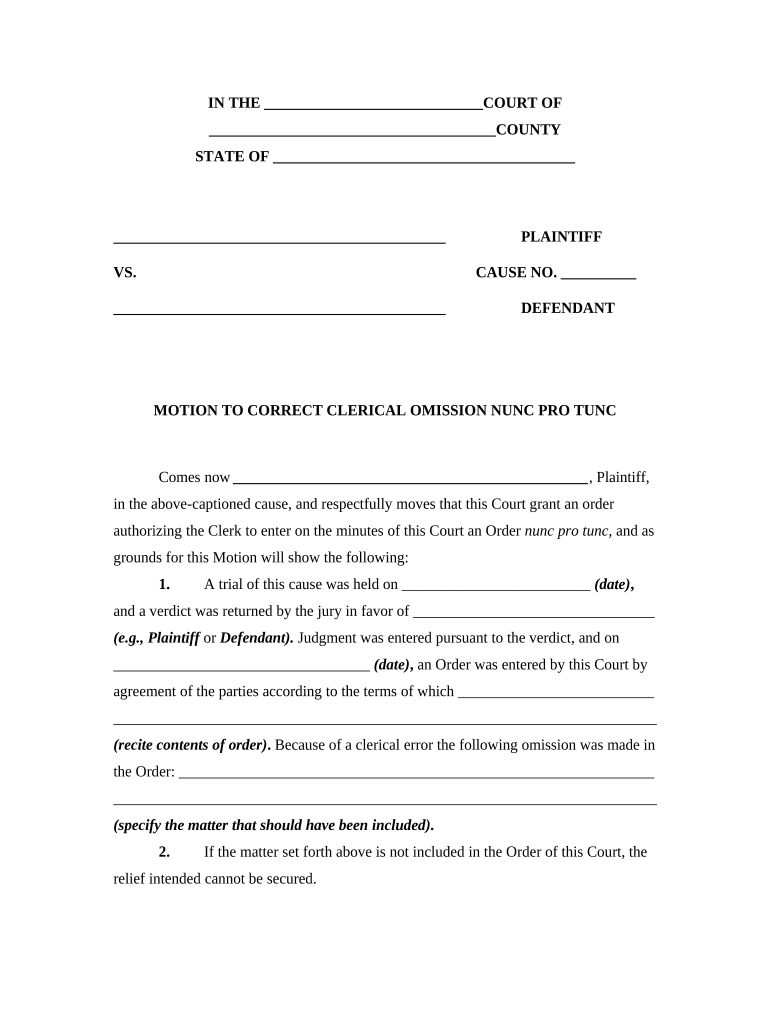
Motion to Correct Clerical Omission Nunc Pro Tunc

What the Motion to Correct Clerical Omission Nunc Pro Tunc Does

A Motion to Correct Clerical Omission Nunc Pro Tunc is a court filing requesting that a prior judgment, order, or docket entry be amended to reflect what the court actually intended at the original time of entry. The motion addresses clerical errors, omissions, or transcription mistakes — not substantive changes to rights or newly discovered facts. Courts grant nunc pro tunc relief when the record demonstrably fails to reflect an earlier decision. The remedy is retroactive: the corrected entry is treated as if it had been made on the original date.

Why This Motion Matters for Accurate Court Records

Correcting clerical omissions restores the official record to match the court’s original intent, prevents enforcement confusion, and preserves appellate rights tied to the original entry. It reduces downstream disputes over deadlines, fees, or enforcement actions caused by drafting or clerical mistakes.

Why This Motion Matters for Accurate Court Records

Who Commonly Prepares and Files This Motion

Typical filers include attorneys representing parties affected by the omission, pro se litigants correcting docket errors, and court staff preparing amended entries.

  • Private litigators seeking to align the record with the court’s prior oral ruling and preserve appeal rights.
  • Pro se parties correcting a misfiled date, name, or docket text that affects enforcement or compliance.
  • Court clerks or judges when preparing ministerial entries to reflect the court’s original disposition.

Representative Users and Roles

Civil Litigant

A party who discovers a typographical or docketing error that changes the apparent effective date of an order or misstates a party’s name; uses the motion to avoid unintended penalties or enforcement based on incorrect record entries.

Corporate Counsel

In corporate litigation or regulatory matters, counsel files the motion to correct contract docket entries, lien dates, or judgment language so downstream filings and compliance obligations reference accurate, court-approved record text.

Essential Elements of a Professional Motion to Correct Clerical Omission Nunc Pro Tunc

A properly drafted motion combines clear identification of the error, factual support, a legal basis, and a concise proposed correction. Include exhibits and a proposed order for the court's convenience.

Caption

Full court caption with case name, docket number, and current judge identified.
Statement of Error

A concise description of the clerical omission or transcription mistake reflected in the official record.

Factual Basis

Specific evidence showing the court’s original intent or the contemporaneous record demonstrating the error.

Legal Authority

Cite governing rules or common-law principles authorizing nunc pro tunc or clerical correction.

Proposed Amendment

Exact corrective text or redline the prior entry and attach a clean proposed order for the judge.

Service Certificate

Proof of service showing all parties received the motion and proposed order per local rules.

Stepwise Procedure to Prepare and File the Motion

Follow these steps to prepare a clear, court-ready motion that supports a clerical correction without attempting substantive revision.

  • 01
    Confirm the Error: Compare the docket, transcripts, and prior orders to identify the exact omission.
  • 02
    Gather Evidence: Collect transcripts, clerk notes, or signed orders proving the court’s original intent.
  • 03
    Draft Motion: State the omission, cite authority, propose the corrected text, and attach exhibits.
  • 04
    File and Serve: File per local e-filing rules and serve all parties; include the proposed order for the judge.

How to Configure an Online Filing Workflow

Set up e-filing and e-signature fields to match court requirements and to capture proof of service and acceptance.

Document Format PDF/A for court filings; flattened for final filing where required.
Signature Placement Place attorney signature block with printed name and bar number in the order.
Exhibit Attachment Combine exhibits into a single PDF or sequentially attach per court e-file specs.
Proof of Service Field Include date, method, and recipient list recorded for the court’s electronic record.
Audit Trail Retention Enable full audit logs capturing timestamps, IPs, and signer authentication used.

Where to File and How the Clerk Processes the Motion

Filing location and processing steps depend on court type; federal and state e-filing systems differ in required metadata.

  • Federal Courts: File via CM/ECF using the correct event code and attach proposed order.
  • State Courts: Use the state or county e-filing portal and follow local motion practice rules.
  • In-Person Filing: Deliver to the clerk’s office if e-filing is unavailable; bring multiple copies for stamp.
  • Judicial Review: Judge or clerk reviews record and either signs the proposed order or requests briefing.

Technical Requirements for eSubmission and eSigning

Ensure the platform supports court-acceptable PDF formatting, audit trails, and signer authentication before e-filing.

  • PDF Standards: Support PDF/A and preserve searchable text.
  • Audit Trail: Capture timestamps, IP addresses, and signer identity evidence.
  • Integrations: Integrate with document storage and court e-file portals where possible.

Timing Considerations and Typical Deadlines

File promptly after discovering the omission; courts treat delay differently depending on whether the correction is clerical or substantive.

Immediate Filing:

File as soon as the omission is discovered to reduce the risk of dispute or challenge.

Local Rule Windows:

Some courts require motions within a set period after entry; verify local rules before filing.

Service Timing:

Serve all parties per the court’s rules and include proof of service with the motion.

Response Period:

Allow standard opposition timing unless the court shortens or extends it by order.

Retroactive Effective Date:

If granted, the corrected entry is typically treated as effective on the original date of entry.

Key Milestones from Discovery to Record Correction

A typical timeline moves from discovery of error through filing, judicial review, and final entry of the corrected record.

01

Discovery

Identify the clerical omission and assemble supporting record materials.

02

Draft and File

Prepare the motion, proposed order, and exhibits; file with the clerk.

03

Court Review

Judge or clerk examines the record and may request further evidence or briefing.

04

Entry of Order

Court signs the corrected order or issues an amended docket entry reflecting nunc pro tunc relief.

Common Drafting and Filing Pitfalls to Avoid

  • Failing to attach the original order or transcript that proves the court’s initial intent, which undermines the motion’s evidentiary basis.
  • Framing the request as substantive relief rather than clerical correction, prompting the court to require full briefing or deny the motion.
  • Using inconsistent dates or party names, which can create additional clerical errors instead of resolving them.
  • Neglecting required service or proposed order formatting, causing processing delays or clerk rejection.

Risks and Consequences of an Incorrect or Overbroad Motion

Denial of Relief: Court may refuse the motion if it appears to change substantive rulings.
Sanctions Risk: Overreaching amendments can trigger sanctions under local rules.
Appeal Issues: Incorrect corrections may complicate or waive appellate arguments.
Delay Costs: Extended briefing or hearings prolong enforcement or compliance timelines.
Service Defects: Improper service can make the motion voidable and necessitate refiling.
Record Confusion: Poorly worded corrections can create ambiguity rather than clarity.

Document Metadata and Security Items to Record

Document Type: Motion; Proposed Order
Filing Court: Court name and division
Docket Number: Exact docket ID
Effective Date: Original entry date
Signer Identity: Attorney name and bar number
Audit Trail: Timestamps and delivery logs

Representative eSignature Pricing and Capability Snapshot

Comparison of common eSignature vendors and basic capability indicators relevant to preparing and executing court filings and correction motions.

signNow DocuSign Adobe Sign PandaDoc HelloSign
Starting Price $8/user/mo $15/user/mo $14/user/mo $19/user/mo $15/user/mo
Free Trial 7-day free trial Varies by vendor Varies by vendor Varies by vendor Varies by vendor
Bulk Send Yes Varies by plan Varies by plan Yes Varies by plan
Audit Trail Yes Yes Yes Yes Yes
Envelope Cap No envelope cap 100 envelopes/user/year Varies by plan Varies by plan Varies by plan

FAQs and Practical Answers for Common Questions

Answers to frequent questions about scope, timing, signatures, and supporting evidence for nunc pro tunc clerical corrections.


Need help? Contact support

be ready to get more
Join over 28 million airSlate SignNow users