Establishing secure connection… Loading editor… Preparing document…
Navigation

Fill and Sign the Obligations under 497334622 Form

Fill and Sign the Obligations under 497334622 Form

How it works

Open the document and fill out all its fields.
Apply your legally-binding eSignature.
Save and invite other recipients to sign it.

Rate template

4.4
41 votes
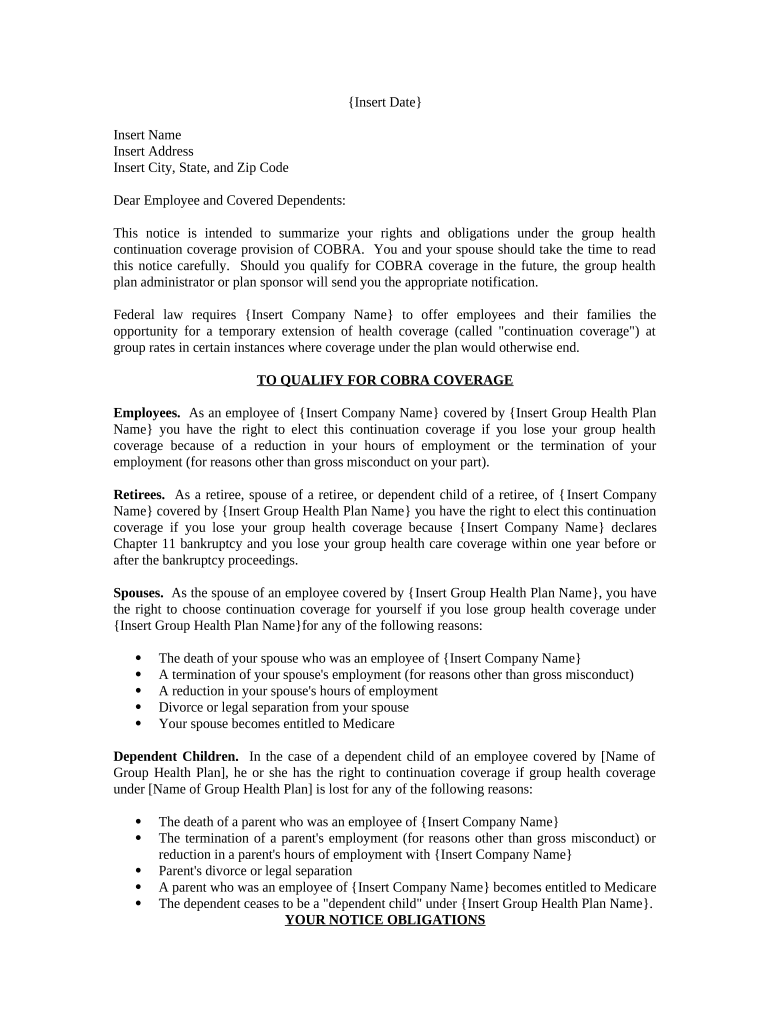
{ Insert Date } Insert Name Insert Address Insert City, State, and Zip Code Dear Employee and Covered Dependents: This notice is intended to summarize your rights and obligations under the group health continuation coverage provision of COBRA. You and your spouse should take the time to read this notice carefully. Should you qualify for COBRA coverage in the future, the group health plan administrator or plan sponsor will send you the appropriate notification. Federal law requires { Insert Company Name } to offer employees and their families the opportunity for a temporary extension of health coverage (called "continuation coverage") at group rates in certain instances where coverage under the plan would otherwise end. TO QUALIFY FOR COBRA COVERAGE Employees. As an employee of { Insert Company Name } covered by { Insert Group Health Plan Name } you have the right to elect this continuation coverage if you lose your group health coverage because of a reduction in your hours of employment or the termination of your employment (for reasons other than gross misconduct on your part). Retirees. As a retiree, spouse of a retiree, or dependent child of a retiree, of { Insert Company Name } covered by { Insert Group Health Plan Name } you have the right to elect this continuation coverage if you lose your group health coverage because { Insert Company Name } declares Chapter 11 bankruptcy and you lose your group health care coverage within one year before or after the bankruptcy proceedings. Spouses. As the spouse of an employee covered by { Insert Group Health Plan Name }, you have the right to choose continuation coverage for yourself if you lose group health coverage under { Insert Group Health Plan Name }for any of the following reasons:  The death of your spouse who was an employee of { Insert Company Name }  A termination of your spouse's employment (for reasons other than gross misconduct)  A reduction in your spouse's hours of employment  Divorce or legal separation from your spouse  Your spouse becomes entitled to Medicare Dependent Children. In the case of a dependent child of an employee covered by [Name of Group Health Plan], he or she has the right to continuation coverage if group health coverage under [Name of Group Health Plan] is lost for any of the following reasons:  The death of a parent who was an employee of { Insert Company Name }  The termination of a parent's employment (for reasons other than gross misconduct) or reduction in a parent's hours of employment with { Insert Company Name }  Parent's divorce or legal separation  A parent who was an employee of { Insert Company Name } becomes entitled to Medicare  The dependent ceases to be a "dependent child" under { Insert Group Health Plan Name }. YOUR NOTICE OBLIGATIONS Under the law, the employee or a family member has 60 days from (1) the date of the event or (2) the date on which coverage would be lost, whichever is later, to inform { Name and Address of Plan Administrator }of the employee's divorce or legal separation, or of the employee's child losing dependent status under { Insert Group Health Plan Name }. Please give notice in the following manner: [ specify if you want employee to call, write, etc .] Failure to give notice within the time limits can result in COBRA coverage being forfeited. { Insert Company Name } has the responsibility to notify { Name of Plan Administrator } of the employee's death, termination of employment, reduction in hours, or Medicare entitlement. TO ELECT COVERAGE When { Name of Plan Administrator } is notified that one of these events has happened, { Name of Plan Administrator } will in turn notify the employee, spouse and dependents that they have the right to choose COBRA continuation coverage. The employee and spouse have independent election rights. The employee, spouse and dependents have 60 days from either (1) the date coverage is lost under { Insert Group Health Plan Name }or (2) the date of the notice, whichever is later, to respond informing { Name of Plan Administrator } that they want to elect continuation coverage. There is no extension of the election period. If an employee, spouse or dependent does not elect continuation coverage within this election period, then rights to continue group health insurance will end. If an employee, spouse or dependent chooses continuation coverage and pays the applicable premium, { Insert Company Name } is required to provide coverage which, as of the time coverage is being provided, is identical to the coverage provided under the plan to similarly situated active employees or family members. If { Insert Company Name } changes or ends group health coverage for similarly situated active employees, your coverage will also change or end. DURATION OF COBRA COVERAGE Termination or Reduction in Hours. If group health coverage was lost because of a termination of employment (other than for reasons of gross misconduct) or a reduction in work hours, the continuation coverage period is 18 months from the date of the qualifying event, if elected. Employees, Spouses or Dependents with Disabilities. The 18 months of continuation coverage can be extended to 29 months if the Social Security Administration determines that the employee, spouse or dependent child was disabled on the date of the qualifying event according to Title II (Old Age Survivors and Disability Insurance) or XVI (Supplemental Security Income) of the Social Security Act. Disabilities that occur after the qualifying event do not meet the criteria for the extended COBRA coverage period. The employee, spouse or dependent must obtain the disability determination from the Social Security Administration and notify { Name of Plan Administrator } of the result within 60 days of the date of disability determination and before the close of the initial 18-month period. The employee, spouse or dependent has 30 days to notify { Name of Plan Administrator } from the date of a final determination that he or she is no longer disabled. Multiple Events. The 18-month continuation period can also be extended, if during the 18 months of continuation coverage, a second event takes place (divorce, legal separation, death, Medicare entitlement, or a dependent child ceasing to be a dependent). The 18 months of continuation coverage will be extended to 36 months from the date of the original qualifying event. Upon the occurrence of a second event, it is the employee's, spouse's or dependent's responsibility to notify { Name of Plan Administrator } within 60 days of the event and within the original 18-month COBRA period. COBRA coverage does not last beyond 36 months from the original qualifying event, no matter how many events occur. Other Qualifying Events. If group health coverage was lost because of the death of the employee, divorce, legal separation, Medicare entitlement, or a dependent child ceasing to be a dependent child under { Insert Group Health Plan Name }, then the continuation coverage period is 36 months from the date of the qualifying event, if elected. COBRA CANCELLATION The law provides that continuation coverage may be cut short for any of the following reasons:  { Insert Company Name } no longer provides group health coverage to any of its employees  The premium for continuation coverage is not paid in a timely manner  The employee, spouse or dependent becomes covered under another group health plan that does not contain any exclusion or limitation with respect to any preexisting condition  The employee or spouse becomes entitled to Medicare  The employee, spouse or dependent extended continuation coverage to 29 months due to a Social Security disability and a final determination has been made that he or she is no longer disabled  The employee, spouse or dependent notifies { Name of Plan Administrator } that they wish to cancel continuation coverage. PREMIUMS An employee, spouse or dependent does not have to show that they are insurable in order to choose continuation coverage. But an employee, spouse or dependent must have been actually covered by the group health plan the day before the qualifying event in order to elect COBRA coverage. An employee, spouse or dependent may have to pay all of the applicable premium, which generally can not exceed 102% of the plan costs for a 12-month period. An exception exists for coverage of employees with disabilities during the extension from the 19th month to the 29th month. During that time, 150% of the plan cost may be charged. The group health plan may increase the cost that must be paid for COBRA coverage if the applicable premium increases. The period for paying the initial COBRA premium following the election of coverage is 45 days. The first payment made is to be applied retroactively toward coverage for the period beginning after the date on which coverage would have been lost as a result of the qualifying event. There is a 30-day grace period following the date regularly scheduled monthly premiums are due. Only in the case of mental incapacity is any further extension permitted, since the group health plan does not permit extensions. CONVERSION PRIVILEGES At the end of the continuation coverage period, the employee, spouse or dependent must be allowed the option to enroll in an individual conversion health plan provided under [Name of Group Health Plan] if such conversion plan is available. FURTHER INFORMATION If you have any questions about the law or your obligations, please contact: { Name of Plan Administrator } { Address } { Telephone Number }

Practical advice on finalizing your ‘Obligations Under 497334622’ online

Are you fatigued by the inconvenience of managing paperwork? Look no further than airSlate SignNow, the leading electronic signature platform for individuals and enterprises. Bid farewell to the tedious routine of printing and scanning documents. With airSlate SignNow, you can conveniently finalize and endorse documents online. Utilize the powerful features provided by this user-friendly and cost-effective platform and transform your methodology to document administration. Whether you need to approve documents or collect eSignatures, airSlate SignNow simplifies the process, requiring only a few clicks.

Adhere to this detailed guide:

  1. Access your account or register for a complimentary trial with our service.
  2. Select +Create to upload a document from your device, cloud, or our template repository.
  3. Open your ‘Obligations Under 497334622’ in the editor.
  4. Click Me (Fill Out Now) to complete the form on your end.
  5. Insert and designate fillable fields for others (if necessary).
  6. Proceed with the Send Invite settings to solicit eSignatures from others.
  7. Save, print your copy, or convert it into a reusable template.

No need to worry if you need to collaborate with your teammates on your Obligations Under 497334622 or send it for notarization—our solution provides everything required for such tasks. Enroll with airSlate SignNow today and elevate your document management to new levels!

Here is a list of the most common customer questions. If you can’t find an answer to your question, please don’t hesitate to reach out to us.

Need help? Contact Support

The best way to complete and sign your obligations under 497334622 form

Save time on document management with airSlate SignNow and get your obligations under 497334622 form eSigned quickly from anywhere with our fully compliant eSignature tool.

How to Sign a PDF Online How to Sign a PDF Online

How to complete and sign paperwork online

In the past, coping with paperwork took pretty much time and effort. But with airSlate SignNow, document management is fast and easy. Our powerful and easy-to-use eSignature solution lets you effortlessly fill out and eSign your obligations under 497334622 form online from any internet-connected device.

Follow the step-by-step guidelines to eSign your obligations under 497334622 form template online:

  • 1.Register for a free trial with airSlate SignNow or log in to your account with password credentials or SSO authorization option.
  • 2.Click Upload or Create and add a file for eSigning from your device, the cloud, or our form library.
  • 3.Click on the file name to open it in the editor and use the left-side menu to complete all the empty areas properly.
  • 4.Drop the My Signature field where you need to approve your sample. Provide your name, draw, or import a photo of your regular signature.
  • 5.Click Save and Close to accomplish modifying your completed form.

After your obligations under 497334622 form template is ready, download it to your device, export it to the cloud, or invite other people to eSign it. With airSlate SignNow, the eSigning process only takes a few clicks. Use our robust eSignature tool wherever you are to handle your paperwork effectively!

How to Sign a PDF Using Google Chrome How to Sign a PDF Using Google Chrome

How to complete and sign documents in Google Chrome

Completing and signing documents is simple with the airSlate SignNow extension for Google Chrome. Adding it to your browser is a quick and productive way to manage your forms online. Sign your obligations under 497334622 form sample with a legally-binding eSignature in just a few clicks without switching between applications and tabs.

Follow the step-by-step guide to eSign your obligations under 497334622 form template in Google Chrome:

  • 1.Go to the Chrome Web Store, find the airSlate SignNow extension for Chrome, and install it to your browser.
  • 2.Right-click on the link to a form you need to eSign and select Open in airSlate SignNow.
  • 3.Log in to your account with your credentials or Google/Facebook sign-in buttons. If you don’t have one, sign up for a free trial.
  • 4.Utilize the Edit & Sign toolbar on the left to complete your template, then drag and drop the My Signature field.
  • 5.Insert a picture of your handwritten signature, draw it, or simply type in your full name to eSign.
  • 6.Verify all data is correct and click Save and Close to finish modifying your paperwork.

Now, you can save your obligations under 497334622 form template to your device or cloud storage, email the copy to other people, or invite them to eSign your document with an email request or a protected Signing Link. The airSlate SignNow extension for Google Chrome improves your document processes with minimum time and effort. Try airSlate SignNow today!

How to Sign a PDF in Gmail How to Sign a PDF in Gmail How to Sign a PDF in Gmail

How to fill out and sign forms in Gmail

When you get an email containing the obligations under 497334622 form for approval, there’s no need to print and scan a file or download and re-upload it to a different tool. There’s a better solution if you use Gmail. Try the airSlate SignNow add-on to promptly eSign any documents right from your inbox.

Follow the step-by-step guide to eSign your obligations under 497334622 form in Gmail:

  • 1.Visit the Google Workplace Marketplace and look for a airSlate SignNow add-on for Gmail.
  • 2.Install the program with a corresponding button and grant the tool access to your Google account.
  • 3.Open an email with an attached file that needs signing and utilize the S sign on the right panel to launch the add-on.
  • 4.Log in to your airSlate SignNow account. Opt for Send to Sign to forward the document to other parties for approval or click Upload to open it in the editor.
  • 5.Put the My Signature option where you need to eSign: type, draw, or import your signature.

This eSigning process saves time and only takes a couple of clicks. Use the airSlate SignNow add-on for Gmail to update your obligations under 497334622 form with fillable fields, sign paperwork legally, and invite other parties to eSign them al without leaving your mailbox. Enhance your signature workflows now!

How to Sign a PDF on a Mobile Device How to Sign a PDF on a Mobile Device How to Sign a PDF on a Mobile Device

How to complete and sign documents in a mobile browser

Need to rapidly complete and sign your obligations under 497334622 form on a smartphone while working on the go? airSlate SignNow can help without needing to install extra software applications. Open our airSlate SignNow tool from any browser on your mobile device and create legally-binding eSignatures on the go, 24/7.

Follow the step-by-step guidelines to eSign your obligations under 497334622 form in a browser:

  • 1.Open any browser on your device and go to the www.signnow.com
  • 2.Create an account with a free trial or log in with your password credentials or SSO option.
  • 3.Click Upload or Create and add a file that needs to be completed from a cloud, your device, or our form collection with ready-to go templates.
  • 4.Open the form and fill out the blank fields with tools from Edit & Sign menu on the left.
  • 5.Place the My Signature field to the form, then enter your name, draw, or add your signature.

In a few simple clicks, your obligations under 497334622 form is completed from wherever you are. When you're done with editing, you can save the file on your device, create a reusable template for it, email it to other individuals, or invite them eSign it. Make your documents on the go prompt and efficient with airSlate SignNow!

How to Sign a PDF on iPhone How to Sign a PDF on iPhone

How to complete and sign documents on iOS

In today’s corporate environment, tasks must be accomplished rapidly even when you’re away from your computer. Using the airSlate SignNow mobile app, you can organize your paperwork and sign your obligations under 497334622 form with a legally-binding eSignature right on your iPhone or iPad. Install it on your device to conclude agreements and manage documents from anyplace 24/7.

Follow the step-by-step guide to eSign your obligations under 497334622 form on iOS devices:

  • 1.Open the App Store, find the airSlate SignNow app by airSlate, and set it up on your device.
  • 2.Launch the application, tap Create to add a form, and choose Myself.
  • 3.Select Signature at the bottom toolbar and simply draw your signature with a finger or stylus to eSign the sample.
  • 4.Tap Done -> Save right after signing the sample.
  • 5.Tap Save or use the Make Template option to re-use this document later on.

This method is so easy your obligations under 497334622 form is completed and signed in a couple of taps. The airSlate SignNow app works in the cloud so all the forms on your mobile device are kept in your account and are available any time you need them. Use airSlate SignNow for iOS to improve your document management and eSignature workflows!

How to Sign a PDF on Android How to Sign a PDF on Android

How to fill out and sign documents on Android

With airSlate SignNow, it’s simple to sign your obligations under 497334622 form on the go. Install its mobile app for Android OS on your device and start boosting eSignature workflows right on your smartphone or tablet.

Follow the step-by-step guide to eSign your obligations under 497334622 form on Android:

  • 1.Navigate to Google Play, search for the airSlate SignNow app from airSlate, and install it on your device.
  • 2.Sign in to your account or create it with a free trial, then import a file with a ➕ button on the bottom of you screen.
  • 3.Tap on the uploaded document and select Open in Editor from the dropdown menu.
  • 4.Tap on Tools tab -> Signature, then draw or type your name to electronically sign the form. Fill out blank fields with other tools on the bottom if required.
  • 5.Utilize the ✔ key, then tap on the Save option to end up with editing.

With an easy-to-use interface and full compliance with major eSignature requirements, the airSlate SignNow application is the perfect tool for signing your obligations under 497334622 form. It even operates offline and updates all form changes when your internet connection is restored and the tool is synced. Fill out and eSign documents, send them for approval, and create re-usable templates whenever you need and from anywhere with airSlate SignNow.

Sign up and try Obligations under 497334622 form
  • Close deals faster
  • Improve productivity
  • Delight customers
  • Increase revenue
  • Save time & money
  • Reduce payment cycles