Establishing secure connection…Loading editor…Preparing document…

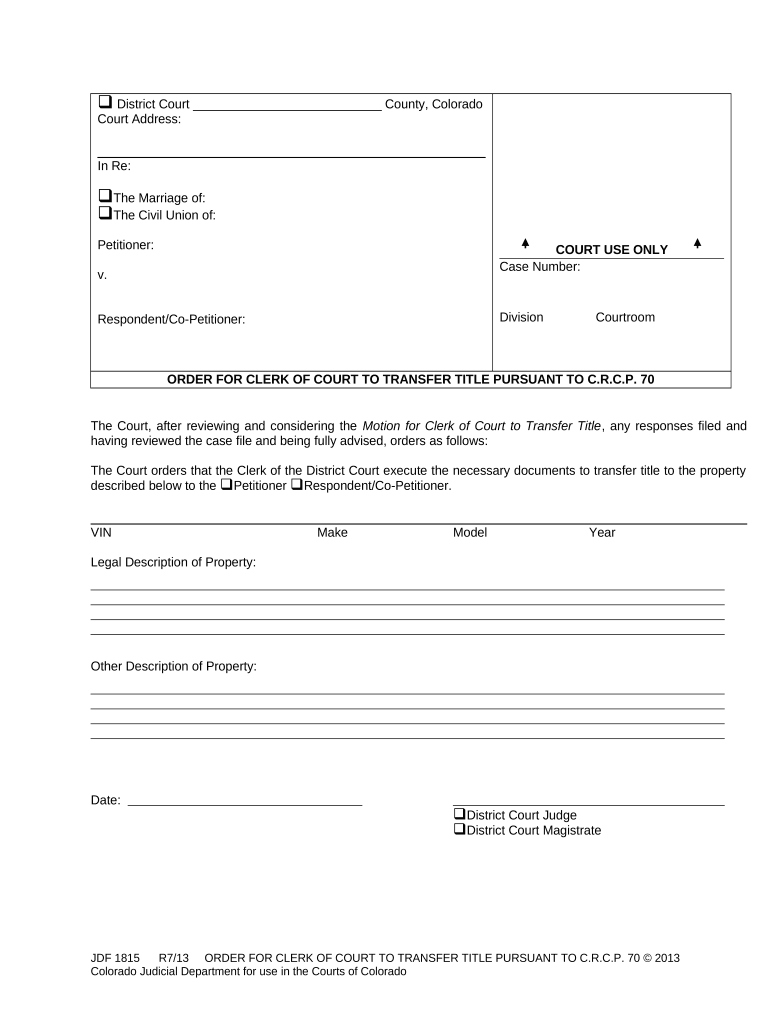
Colorado Order for Clerk of Court to Transfer Title

This template is fully customizable. Edit the text, fill out the fields, and send it for signature. Give it a try!
Colorado Order for Clerk of Court to Transfer Title

What the Colorado Order for Clerk of Court to Transfer Title Is

A Colorado Order for Clerk of Court to Transfer Title is a written court directive instructing a county clerk or recorder to change the official ownership record for a specific parcel or title entry. It typically follows a judicial determination—such as a quiet title judgment, probate order, judgment lien satisfaction, or tax sale confirmation—and is prepared under the court case number. The document names the affected property, the current record owner, the new title party, and the clerk action requested, and it is submitted for entry into the county land records and recording system.

Why this Court Order Matters for Clear Title

The order creates an official record that resolves competing claims and enables the county recorder to show a corrected chain of title, reducing title defects and supporting subsequent real estate transactions or financing. It ensures the court’s decision is implemented in public records and provides legal notice to third parties.

Why this Court Order Matters for Clear Title

Who typically prepares, signs, and relies on the order

Each party has procedural responsibilities: the court issues the order, the clerk implements it, and title professionals rely on the recorded result for downstream transactions.

  • County clerks and recorders processing the court directive and updating land records
  • Title insurers and escrow officers confirming clear chain of title before closing
  • Attorneys and petitioners who obtain the court order and submit it for recording

Typical signers and stakeholders

County Clerk

County clerks or recorders accept the signed court order and perform recordation tasks. They verify the order matches the court docket, apply recording fees, make an index entry, and publish the updated title record in county databases.

Attorney / Petitioner

The attorney of record or petitioner secures the judge’s signature or court seal and files the order with the clerk. They ensure attachments (legal description, case number) are accurate and provide certified copies to title companies or interested parties.

Essential elements to include in a professional order

A complete order is concise but specific: it must identify the case, name parties, describe the property, state the court directive, and direct the clerk with precise recording instructions.

Case Caption

Court name and case number that link the order to the underlying docket and judgment; necessary for clerk verification and indexing.
Parties Named

Full legal names of current record owner(s) and the transferee or title correction beneficiary, matching government ID and public record entries.

Property Description

Complete legal description or assessor parcel number; street addresses alone are insufficient for recording and land-title indexing.

Directive Language

Clear instruction such as 'Clerk of Court is ordered to transfer title to [name]' with any conditions or limitations stated plainly.

Clerk Instructions

Administrative steps for the clerk: record the order, index under grantor/grantee, and attach exhibits or certificates as required.

Judge Signature

Judge’s signature, printed name, date, and court seal; necessary to validate the order as an enforceable court document.

Step-by-step process to finalize and file the order

Follow these four practical steps from court approval through recording to ensure the title transfer is entered correctly in county records.

  • 01
    Prepare Order: Draft with full case caption and property legal description.
  • 02
    Obtain Signature: Judge signs and seals the order on the court docket.
  • 03
    File with Clerk: Deliver the signed order and pay recording/docket fees.
  • 04
    Record and Index: County recorder indexes and updates title records.

How to set up a digital workflow for this court order

When using an e-document workflow, configure required fields, signer roles, and file formats so the court, clerk, and title professionals receive validated, complete documents.

Field Recommended Setting
Template PDF/A template with fixed fields
Required Fields Case number, legal description, judge signature
Authentication Judge or court clerk wet-signature or court e-file
Attachments Certified exhibits, deed copies, title evidence

Where to submit the signed order and who receives copies

After the judge signs, route the original to the county clerk or recorder and provide certified copies to title companies, the parties, and the court file.

  • Clerk of Court: Original filed for docketing and clerk action.
  • County Recorder: Record the order in land records for public notice.
  • Title Company: Receive certified copy for title insurance and closing.
  • Parties Served: Provide copies to all interested parties and counsel.

Digital signing and e-submission considerations

Electronic workflows can speed distribution, but court filings and clerk recording often have format and authenticity requirements that must be met.

  • Accepted Formats: PDF/A preferred for archival integrity
  • eSignature Type: Court orders often need wet-signature or court-authorized e-filing
  • Integrations: Support for case management and recording systems

Typical timelines and processing expectations

Processing times vary by court and county; plan for immediate docketing followed by recorder processing and potential appeal windows that affect final title change timing.

Docket Entry:

Court issues and enters the order the same day signed.

Clerk Transmission:

Deliver to recorder immediately; timing depends on local practice.

Recorder Processing:

Recording may take 1–4 weeks depending on county workload.

Appeal Window:

Appeal periods vary by jurisdiction and case type.

Title Insurance Issuance:

Title companies often wait until recording confirmation.

Key milestones from order to recorded title

These sequential milestones show what happens after judgment and the typical order in which parties act to effectuate title transfer.

01

Court Issues Order

Judge signs and the order is entered on the docket.

02

Clerk Receives Order

Clerk accepts the document for processing and certification.

03

Recorder Records Order

County recorder indexes and updates ownership records.

04

Title Settlement

Title companies update policies and close dependent transactions.

Common mistakes that delay recording or invalidate transfers

  • Using an incomplete legal description or postal address only, causing the recorder to reject or mis-index the order and delaying title corrections.
  • Mismatched names between the court order and county records, which can trigger title exceptions or require amended orders and additional filings.
  • Failing to include required certified exhibits or pre-existing deed references that clerks expect for verification, resulting in processing denials or requests for clarification.
  • Attempting to use a simple electronic signature for a judicial order when local court rules require an original judge signature or court e-filing authentication.

Risks and legal consequences of incorrect or incomplete orders

Failed Recording: May leave title clouded or uncorrected
Title Defect: Leads to exceptions and refused insurance
Appeal Exposure: Parties may reopen or challenge the transfer
Tax Liens: Unresolved liens can survive an improper transfer
Invalid Order: Improper form or signature may render it void
Delay Costs: Additional attorney and filing fees accrue

Typical eSignature vendor pricing and feature comparison

Compare starting prices and core capabilities for eSignature vendors commonly used to prepare and manage court-related orders. Values reflect typical entry-level pricing and feature availability.

signNow DocuSign Adobe Sign PandaDoc HelloSign
Starting Price $8/user/mo $15/user/mo $14/user/mo $19/user/mo $15/user/mo
Free Trial 7-day free trial Varies by plan Varies by plan Varies by plan Varies by plan
Bulk Send Yes Yes Yes Yes Yes
Audit Trail Yes Yes Yes Yes Yes
HIPAA Compliant Yes Yes Yes Contact vendor Contact vendor
Envelope Cap No cap 100 envelopes/user/year Varies Varies Varies

Real-world scenarios where the order is used

Two common scenarios illustrate how the order finalizes title changes after judicial resolution and supports commercial transactions.

Probate Title Correction

A personal representative obtains a court decree to vest property in an heir.

  • The order instructs the clerk to transfer title to the heir.
  • Title company accepts the recorded order and issues a policy reflecting the new owner, enabling sale or refinance.

Quiet Title Judgment

A litigant wins a quiet title action to remove competing claims.

  • The court orders transfer or correction of the recorded interest.
  • The recorder updates the county index and the quiet title judgment clears the title for future transactions.

Frequently asked questions about preparing and recording the order

Answers to common procedural and compliance questions that arise when drafting, signing, and recording a court order to transfer title.


Need help? Contact support

be ready to get more
Join over 28 million airSlate SignNow users