Establishing secure connection…Loading editor…Preparing document…

Wisconsin Order for Supervised Release

This template is fully customizable. Edit the text, fill out the fields, and send it for signature. Give it a try!
Wisconsin Order for Supervised Release

What the Wisconsin Order for Supervised Release Is

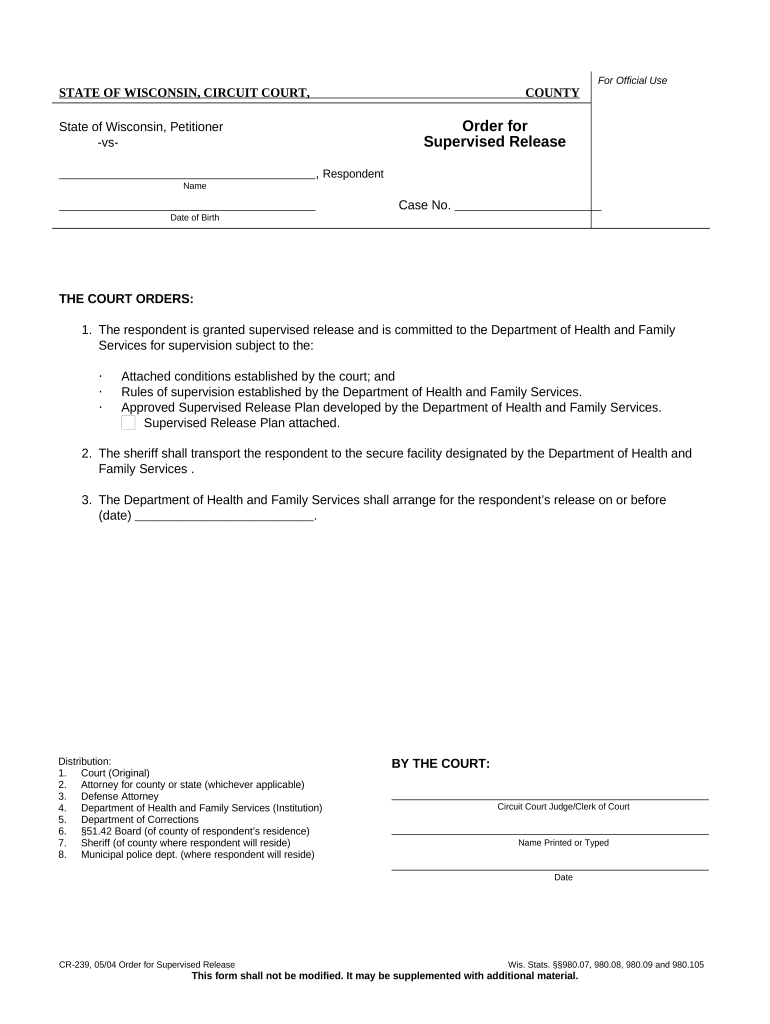
A Wisconsin Order for Supervised Release is a court-issued directive that sets the terms, conditions, and duration of community supervision for a defendant released from custody. Typically entered by a judge after sentencing or as part of post-conviction supervision, the order defines reporting requirements, prohibited conduct, treatment or program mandates, and consequences for violation. The document is a formal court record and must be prepared to match the court docket and case caption precisely. Electronic filing and execution practices vary by county and must conform to local court rules and statewide e-filing procedures.

Why a Clear, Accurate Order Matters

A precise supervised release order protects public safety, clarifies obligations for the supervised person, and preserves enforceability at compliance or violation hearings. Clear language reduces disputes, speeds case management, and supports consistent supervision by probation staff.

Why a Clear, Accurate Order Matters

Who Prepares and Relies on the Order

Multiple stakeholders prepare, serve, and rely on the order; accurate completion reduces downstream disputes and administrative delays.

  • Judicial officers and court staff who draft, sign, and docket the order for entry and enforcement.
  • Probation and community supervision officers who implement reporting schedules and monitor compliance.
  • Defense counsel and prosecutors who negotiate terms and advise clients about obligations and remedies.

Clear service and retention procedures help these parties locate and act on the order when adjustments or violations arise.

Typical Signatories and Their Roles

Presiding Judge

The judge signs to render the order a binding court directive. Judges ensure terms are lawful, proportionate, and clear to facilitate enforcement and later review.

Probation Officer

Probation officers receive a copy to supervise the individual, record compliance, and report alleged violations to the court for possible sanctions or modifications.

Key Information Required on the Order

Case Number: Include full county prefix
Court Name: Exact judicial designation
Defendant Name: Full legal name
Effective Date: MM/DD/YYYY format
Supervision Term: Length in months/years
Conditions List: Specific, numbered requirements

Consequences of an Incorrect or Incomplete Order

Enforceability Risk: Ambiguous terms may be unenforceable
Contempt Exposure: Violations can lead to contempt proceedings
Re-sentencing Delay: Errors may trigger remedial hearings
Service Defects: Improper service can void enforcement
Privacy Breach: Mishandled records risk HIPAA issues
Administrative Burden: Corrections require court time and cost

Common Preparation Mistakes to Avoid

  • Using inconsistent or abbreviated defendant names that do not match court filings, which can create confusion about who is covered by the order.
  • Failing to include precise effective or expiration dates; vague timing language complicates supervision and statutory compliance.
  • Omitting the case number or court identifier, making it difficult for probation or clerks to locate the record quickly.
  • Leaving conditions open-ended or duplicative; non-specific terms increase litigation risk and hinder consistent enforcement.

Step-by-Step: Completing the Order Accurately

Follow these procedural steps in order to prepare, sign, and distribute a legally effective supervised release order for Wisconsin courts.

  • 01
    Prepare Header: Enter court name, county, and case number exactly
  • 02
    Add Parties: Spell defendant and attorney names in full
  • 03
    Set Terms: List clear, numbered supervision conditions
  • 04
    Sign and Docket: Judge signs; clerk files and serves copies

How the Order Moves Through Court and Supervision

This sequence explains typical handoffs from drafting to supervision so each party knows when to expect the order and their next steps.

  • Drafting: Court or counsel prepares the proposed order
  • Judicial Review: Judge reviews and signs the order
  • Clerk Filing: Clerk dockets and distributes certified copies
  • Probation Receipt: Probation implements terms and monitors compliance

Digital Workflow Settings for Online Completion

When completing the order electronically, configure field placement and signer authentication to match court requirements and local e-filing rules.

Field Configuration
Signatory Order Judge signs last after court review
Authentication Method Use email + SMS code or court SSO where required
Document Locking Lock fields after judicial signature to prevent edits
Audit Trail Enable timestamp, IP, and signer attribution

Platform and Format Requirements for Electronic Orders

Use file formats and platform settings that courts accept and that preserve the signed order's integrity and metadata.

  • Accepted Formats: PDF/A preferred for filing
  • Authentication: Multi-factor where required
  • Audit Trail: Retain full signing history

Confirm local court e-filing rules before submission; ensure the platform used retains an auditable certificate of completion and supports required file formats.

eSignature Vendor Comparison for Executing Orders

Compare common eSignature alternatives for secure signing and audit trails; signNow is listed first to show commonly used pricing and feature distinctions.

signNow DocuSign Adobe Sign PandaDoc HelloSign
Starting Price $8/user/mo $15/user/mo $14/user/mo $19/user/mo $15/user/mo
Free Trial 7-day free trial Varies Varies Varies Varies
Bulk Send Yes Varies Varies Varies Varies
Audit Trail Yes Yes Yes Yes Yes
HIPAA Compliant Yes Yes Yes No No
Envelope Cap No envelope cap 100 envelopes/user/year Varies Varies Varies

Representative Use Cases

Two brief scenarios show how accurate orders reduce delays and support enforcement.

County Court E-Filing

A clerk uploads a standardized order template

  • the judge adds a digital signature in open court
  • the docketed order is distributed electronically to probation, reducing service lag and enabling prompt supervision.

Probation Implementation

A probation office receives a precise, numbered conditions list

  • officers schedule required reporting and referrals quickly
  • consistent terms lower violation disputes and improve supervision outcomes over time.

Practical Tips for Accurate, Efficient Completion

Applying consistent practices at drafting, signing, and filing stages prevents common defects and supports enforceable orders.

Verify Names and Docket
Cross-check defendant and case identifiers against the official docket before finalizing the order to avoid mismatches that delay service or enforcement.
Use Numbered Conditions
Number each condition separately and use plain, measurable language to reduce interpretive disputes between supervision officers and the court.
Capture Signature Metadata
When using electronic signatures, ensure the platform records signer identity, timestamp, and IP address to create a defensible audit trail.
Store Certified Copies Securely
Retain a certified court-filed copy in the case file and an encrypted digital copy in records management systems for accessibility and compliance.

Timing and Submission Deadlines to Track

Key dates govern effectiveness, service, and potential modification requests; track deadlines to maintain enforceability and compliance.

Effective Date Entry:

Set the start date explicitly; affects reporting obligations

Service Deadline:

Serve supervised person within days required by court rules

Reporting Schedule:

Specify frequency for probation check-ins (monthly, weekly)

Modification Window:

Note timeframe and process to request order changes

Violation Filing:

File alleged violation promptly to preserve remedies

Frequently Asked Questions and Troubleshooting

Answers to common questions about preparing, signing, filing, and correcting Wisconsin supervised release orders.


Need help? Contact support

be ready to get more
Join over 28 million airSlate SignNow users