Establishing secure connection…Loading editor…Preparing document…

Order to Authorize and Confirm Sale of Real Estate of Individual Under Guardianship or Conservatorship Wisconsin

This template is fully customizable. Edit the text, fill out the fields, and send it for signature. Give it a try!
Order to Authorize and Confirm Sale of Real Estate of Individual Under Guardianship or Conservatorship Wisconsin

What this Wisconsin court order does and when it applies

An Order to Authorize and Confirm Sale of Real Estate of an Individual under Guardianship or Conservatorship in Wisconsin is a circuit court document that grants a guardian or conservator authority to sell real property owned by the protected person (the ward). The order records the court's factual findings, authorizes the sale on specified terms, and directs the clerk or register of deeds for recording. It is used when the guardian or conservator lacks independent statutory authority or when the sale requires judicial confirmation under Wis. Stat. ch. 54 and related guardianship procedures.

Why a formal court order matters for guardian-conducted sales

A signed court order protects the guardian or conservator and the buyer by establishing judicial approval, clarifying sale terms, and creating a title-ready record for transfer and recording under Wisconsin practice.

Why a formal court order matters for guardian-conducted sales

Who typically prepares or relies on this order

Guardians, conservators, probate attorneys, title companies, and purchasers commonly interact with this order when selling property of a protected person.

  • Guardians or conservators completing a court-approved sale of ward property.
  • Estate or probate attorneys drafting pleadings and proposed orders for the court.
  • Title companies and closing agents verifying judicial authorization for recording and insuring title.

Each participant uses the order for different purposes: the guardian to obtain authority, the court to document findings, and third parties to accept cleared title.

Principal roles and responsibilities

Guardian / Conservator

A court-appointed fiduciary responsible for proposing the sale, disclosing terms to the court, and ensuring proceeds are managed in the ward's best interest; must follow statutory standards and court directions.

Circuit Court

The Wisconsin circuit court reviews the petition, makes factual findings, issues the order authorizing sale, and may set conditions for sale, distribution of proceeds, and confirmation to protect the ward.

Essential information the order must contain

Petition Number: Court case identifier
Ward Name: Full legal name
Property: Legal description
Sale Terms: Price and conditions
Purchaser: Buyer identity
Order Date: Court entry date

Consequences of inadequate or incorrect orders

Voidable Sale: Court may void transaction
Fiduciary Liability: Guardian may face damages
Title Issues: Recording may be rejected
Tax Exposure: Unplanned tax consequences
Delay Costs: Extended closings and fees
Criminal Risk: Intentional misconduct penalties

Common mistakes to avoid when preparing the order

  • Failing to include a complete legal description can prevent the register of deeds from accepting the recorded instrument and delay closing.
  • Leaving the court’s factual findings vague or unsupported may lead to objections and invalidate the sale authority on appeal.
  • Using mismatched names for the ward or guardian between court papers and title documents can trigger demands for corrected orders.
  • Omitting buyer protections or escrow instructions that the court expects can delay confirmation or require additional hearings.

Step-by-step: getting a sale order entered and recorded

Follow these core steps to prepare, obtain, and use the Wisconsin sale order from petition to recording.

  • 01
    File Petition: Prepare petition and proposed order; file with circuit court.
  • 02
    Provide Notice: Serve required parties and publish notice if statute requires.
  • 03
    Attend Hearing: Present evidence and court may set sale conditions.
  • 04
    Record Order: File order and deed with register of deeds for title transfer.

Where the order is filed and who receives copies

After entry, the order and related closing documents must be routed to parties and recorded where appropriate to clear title and document the sale.

  • Circuit Court Clerk: Original order remains in court file and clerk's record.
  • Register of Deeds: Record certified order or deed to transfer title.
  • Title Company: Receive order to underwrite and clear title exceptions.
  • Purchaser / Closing Agent: Get certified copies for settlement and lien searches.

Core elements to include in a professional sale order

A clear, well-structured order reduces objections and speeds title clearance by addressing statutory criteria and practical closing details.

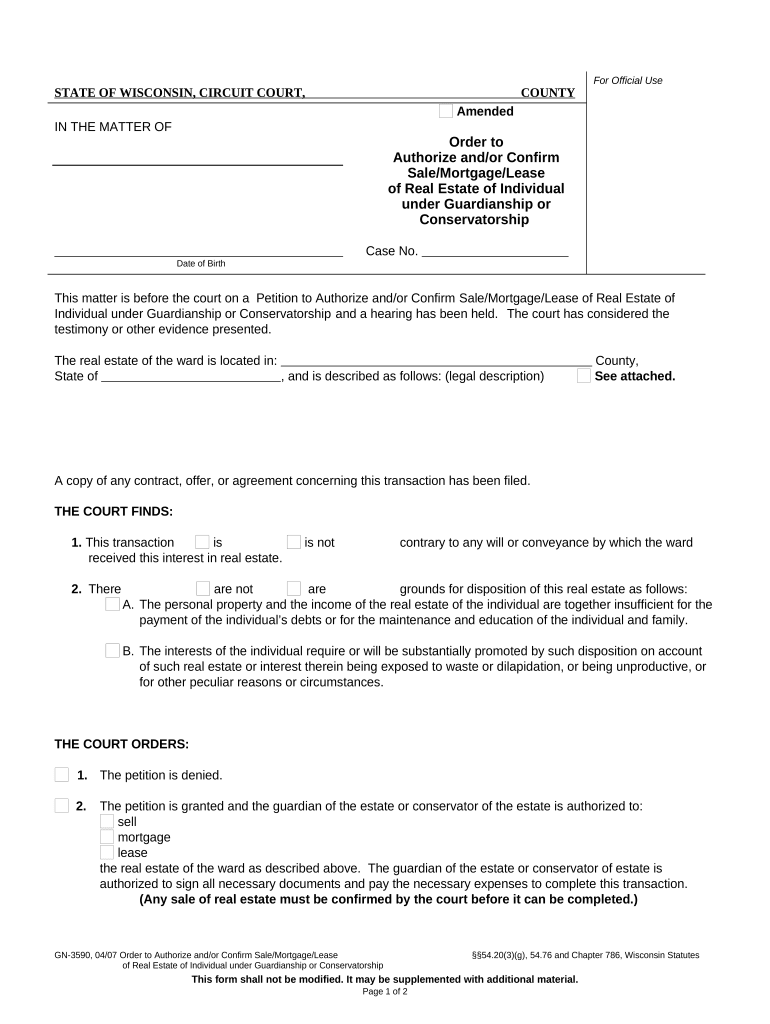
Caption

Court caption identifying case number, parties, and bench identifying who petitions for the sale to ensure proper docketing and recordkeeping.
Findings

Factual findings on the ward's incapacity, property necessity for sale, and why the sale serves the ward's best interests, supporting statutory requirements.

Authority

Explicit grant of authority to the guardian or conservator to execute documents, accept proceeds, and take necessary steps to effect the sale.

Sale Terms

Precise sale price, contingencies, escrow handling, and any court-required minimums or third-party approvals to guide closing.

Conditions

Conditions imposed by the court such as notice, appraisal requirement, or distribution instructions to protect the ward's assets.

Recording Instruction

Direction to record the order and deed with the register of deeds to perfect transfer and support title insurance issuance.

How to configure an online workflow for the order

When using an eSignature or document platform, set fields and routing to reflect court signing, notary needs, and delivery to title parties.

Field Configuration
File Upload Accept PDF/A; include proposed order and deed drafts
Signer Authentication Use email plus optional SMS or knowledge-based checks
Notary Allow for remote notary or in-person acknowledgment workflows
Routing Sequential routing: guardian, court, title company, register of deeds

Digital signing and submission considerations

Confirm the platform supports court-required authentication, notarization workflows, and produces a tamper-evident signed PDF with an audit trail.

  • Authentication: Email plus SMS code or stronger multi-factor options
  • Notary Support: Remote Online Notarization or in-person acknowledgement capability
  • Integrations: Connectors for title systems, document storage, and case management

Ensure the chosen platform preserves the audit trail, supports required signer identity checks, and exports ISO-compatible signed PDFs suitable for court and register of deeds submission.

Typical timing and required notice windows

Timing varies by county and by whether publication or creditor notice is required; follow local court rules and guardianship statute notice provisions.

Petition Filing:

File as soon as sale need is identified; counts as start of process

Service of Notice:

Serve interested parties per court order and statute before hearing

Hearing Scheduling:

Allow court calendar time; local scheduling varies by county

Sale Advertisement:

Post or publish notice if court orders publication prior to sale

Recording:

Record order and deed promptly after closing to clear title

Key milestones from petition to recorded deed

The sequential milestones below represent the usual lifecycle; local practice may add steps such as appraisals or bond requirements.

01

1. Petition Filed

Court receives petition and proposed order; case opened.

02

2. Notice and Appraisal

Appraisal obtained and statutory notice served to interested parties.

03

3. Court Hearing

Judge reviews evidence, may approve sale with conditions.

04

4. Closing and Recording

Sale closes under approved terms; order and deed recorded.

Practical examples from real practitioners

These short examples show how professionals have used online signing and court orders to complete guardian-authorized sales efficiently.

Martin Properties (Tim Martin)

Tim Martin streamlined closings for property sales under guardianship using an online workflow.

  • He emphasized mobile and offline signing capability.
  • His team reported more reliable compliance and faster turnarounds when court-certified orders and signed closing packages were delivered electronically to title companies and purchasers.

Fertility Centers (John Butler)

A legal operations lead used integrated signing and case management for court filings.

  • The API integration with their case system reduced manual uploads.
  • The organization highlighted improved coordination between counsel, court clerks, and closing agents when orders and deeds were standardized and digitally authenticated before recording.

Typical eSignature pricing and capability comparison

Basic plan pricing and key capability differences among common eSignature providers; signNow appears first for platform context and cost comparison.

signNow DocuSign Adobe Sign PandaDoc HelloSign
Starting Price $8/user/mo $15/user/mo $14/user/mo $19/user/mo $15/user/mo
Free Trial 7-day free trial Varies by vendor Varies by vendor Varies by vendor Varies by vendor
Bulk Send Yes (tiered) Yes Yes Yes Varies
Audit Trail Yes Yes Yes Yes Yes
HIPAA Compliant Yes Yes Yes No No
Envelope Cap No cap 100 envelopes/user/year Varies Varies Varies

Answers to frequent questions and practical clarifications

Common questions about authorization, signing, recording, and practical next steps when using an order for sale under guardianship in Wisconsin.


Need help? Contact support

be ready to get more
Join over 28 million airSlate SignNow users