Establishing secure connection…Loading editor…Preparing document…

Oregon Disability Benefits

This template is fully customizable. Edit the text, fill out the fields, and send it for signature. Give it a try!
Oregon Disability Benefits

What Oregon Disability Benefits documentation covers

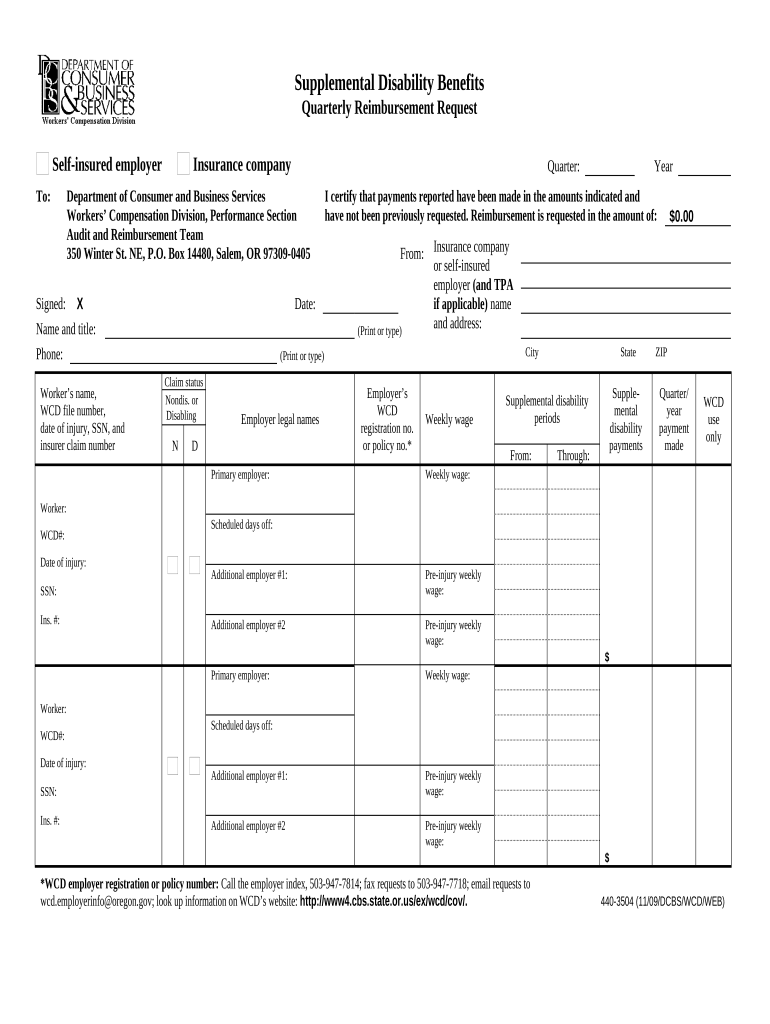
Oregon Disability Benefits documentation refers to the forms and supporting records used to apply for state-administered disability or paid leave benefits that replace a portion of wages when a worker is unable to perform job duties due to illness, injury, or qualifying family caregiving. Typical submissions include claimant information, employer verification, and medical certification. These documents establish eligibility, benefit amounts, and effective dates and support administrative review, appeals, and benefit payment. Accurate completion and retention of the files are essential to avoid delays or denials.

Why complete Oregon Disability Benefits forms carefully

Accurate, complete documentation speeds eligibility decisions, reduces administrative follow-up, and preserves appeal rights; it also supports correct benefit calculations and helps prevent penalties for errors or misstatements.

Why complete Oregon Disability Benefits forms carefully

Which parties complete and rely on these forms

Multiple stakeholders participate in the Oregon Disability Benefits process: claimants, employers, healthcare providers, and agency examiners each supply parts of the record.

  • Claimants: Provide personal data, employment history, and signature to start the claim.
  • Employers: Confirm wages, leave dates, and job status for benefit calculation.
  • Medical Providers: Submit objective certification of condition and work restrictions.

Each party’s timely and accurate input reduces processing time and supports an effective appeal if needed.

Stepwise process to prepare and submit a claim

Follow these steps to collect, complete, and submit Oregon Disability Benefits documentation in the correct order.

  • 01
    Gather documents: Collect ID, payroll records, and medical reports before starting.
  • 02
    Complete claimant section: Enter personal, employment, and contact information accurately.
  • 03
    Attach medical proof: Upload certification and test results supporting incapacity.
  • 04
    Submit to agency: Send via the agency portal or approved delivery method and keep confirmation.

Configuring an online submission workflow

When filing or accepting these forms electronically, configure fields, authentication, and notifications to match agency and legal requirements.

Form Field and Online Configuration Field | Configuration
Claimant Identity Field Claimant Email | Require email verification and optional SMS OTP
Medical Attachment Field Attachments | Make required; accept PDF, DOCX, JPG formats
Employer Verification Field Conditional | Show when employer confirmation required
Record Retention Setting Retention | Archive signed PDF with audit trail for compliance

How electronic submission and review typically flows

A standardized e-submission workflow reduces friction between claimant, employer, provider, and the administering agency.

  • Upload: Claimant or representative uploads completed form and attachments.
  • Authenticate: Platform verifies identity via email link or SMS code.
  • Review: Agency examiner and employer review submitted evidence.
  • Decision: Agency issues eligibility decision and benefit calculation.

Technical considerations for eSubmission and signatures

Use a secure e-signature platform that supports required authentication, audit trails, and accepted file formats when submitting disability benefit forms.

  • Authentication Options: Email verification, SMS OTP, or stronger KBA when required
  • File Formats: PDF, DOCX, JPG accepted; ensure scan legibility
  • Audit Trail: Capture timestamp, IP, and action log for each signer

Ensure the chosen platform supports ESIGN and UETA legal requirements, stores tamper-evident copies, and allows reproducible records on request.

Core components of a complete Oregon Disability Benefits submission

A professional submission includes clearly organized claimant details, employer confirmation, medical certification, calculations, notices, and an auditable signature record.

Eligibility Criteria

Clear statement of qualifying event, incapacity dates, and any relationship-based eligibility such as family care or parental leave documentation.
Medical Certification

Licensed provider’s diagnosis, dates of incapacity, work restrictions, and supporting clinical notes or test results on official letterhead.

Employer Statement

Employer verifies wages, leave dates, and whether paid leave was available or used during the claim period.

Benefit Calculation

Documentation of wage base, weekly benefit rate, waiting periods, and any offsets such as short-term disability or worker’s compensation.

Appeal and Notices

Information on appeal rights, internal review processes, and deadlines for requesting reconsideration or hearing.

Privacy and Consent

Notice of information sharing, HIPAA considerations when medical records are included, and consent language for electronic records.

Essential data fields to include

Claimant Name: Full legal name
SSN or TIN: Nine-digit taxpayer ID
Date of Birth: MM/DD/YYYY
Employer Details: Name and EIN
Medical Provider: Provider name and license
Claim Period: Start and end dates

Common preparation mistakes that cause delays

  • Submitting incomplete medical documentation or unsigned provider statements is a leading cause of delayed eligibility determinations and requests for follow-up.
  • Entering inconsistent or abbreviated names and mismatched SSNs prevents automated wage matches and may trigger additional identity verification steps.
  • Failing to include employer verification or correct wage information often requires agency outreach and slows benefit calculation.
  • Using low-resolution scans or improper file types for medical records can make documents unreadable and lead to re-submission requests.

Consequences of errors, omissions, or misstatements

Benefit Denial: Incomplete proof may result in claim denial
Repayment Liability: Overpayments can require repayment
Penalties: Fraudulent statements may trigger civil penalties
Processing Delays: Missing fields cause review delays
Identity Risk: Mismatched IDs increase verification steps
Appeal Costs: Administrative appeals consume time and resources

Representative eSignature vendor pricing and capabilities

Comparing common pricing and capability metrics for eSignature platforms relevant to processing Oregon Disability Benefits documents; signNow is listed first per table convention.

signNow DocuSign Adobe Sign PandaDoc HelloSign
Starting Price $8/user/mo $15/user/mo $14/user/mo $19/user/mo $15/user/mo
Free Trial 7-day free trial Varies by plan Varies by plan Varies by plan Varies by plan
Bulk Send Yes Yes Yes Yes No
Audit Trail Yes Yes Yes Yes Yes
HIPAA Compliant Yes Yes Yes No No

Frequently asked questions about filing and e-signing

Answers to common questions about completeness, electronic signatures, processing times, and correcting or appealing Oregon Disability Benefits submissions.


Need help? Contact support

be ready to get more
Join over 28 million airSlate SignNow users