Establishing secure connection…Loading editor…Preparing document…

Pennsylvania Small Estate Affidavit for Insurance Proceeds

This template is fully customizable. Edit the text, fill out the fields, and send it for signature. Give it a try!
Pennsylvania Small Estate Affidavit for Insurance Proceeds

What the Pennsylvania Small Estate Affidavit for Insurance Proceeds Is

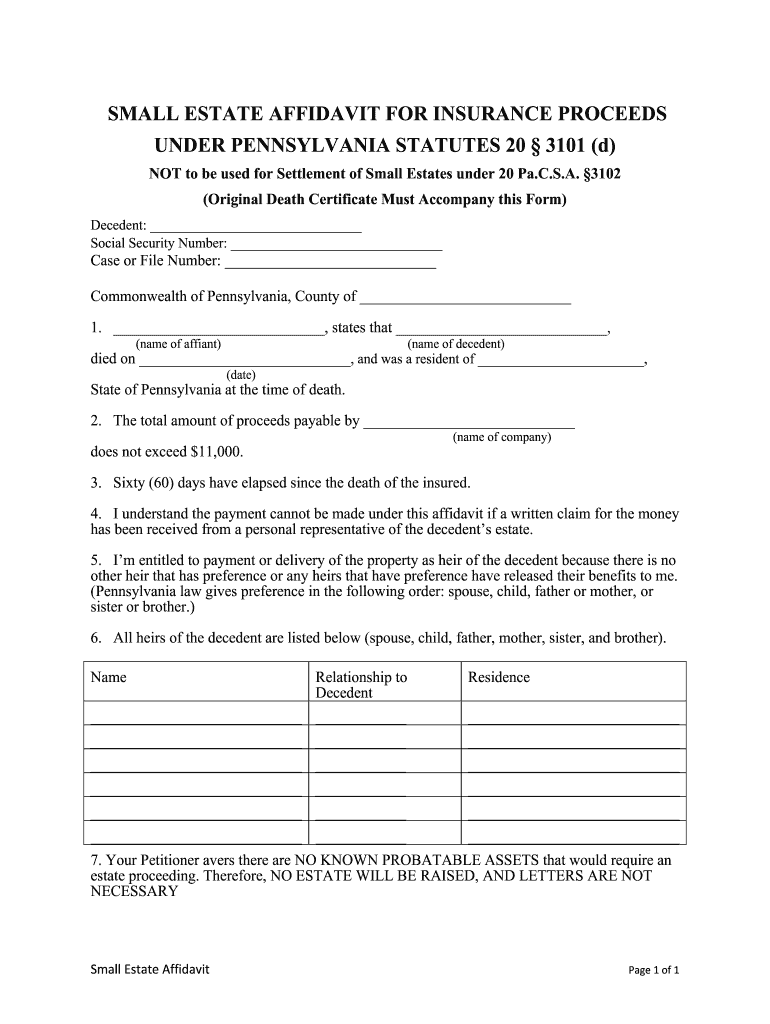
The Pennsylvania Small Estate Affidavit for Insurance Proceeds is a sworn written statement used by heirs or close relatives to claim insurance money or personal property from a deceased person's estate when the estate falls below statutory thresholds and formal probate is impractical. The affidavit identifies the decedent, describes the insurance policy and proceeds sought, states the claimant's relationship and entitlement, and confirms that no pending probate administration prevents distribution. Insurers and payors typically require supporting documents such as a death certificate, policy number, and identification for the claimant.

Why this affidavit matters for faster, lower‑cost distributions

A correctly prepared Pennsylvania Small Estate Affidavit for Insurance Proceeds can avoid full probate for small claims, reduce administrative costs and delays, and provide insurers a sworn record of entitlement to release proceeds directly to the claimant.

Why this affidavit matters for faster, lower‑cost distributions

Who typically completes this affidavit

In contested or complex estates, parties often consult an attorney before submitting the affidavit to insurers or financial institutions.

  • Surviving spouse filing for life insurance benefits on behalf of minor children
  • Adult child claiming small policy proceeds where probate is unnecessary
  • Named beneficiary who must document entitlement for the insurer

Typical signers and their roles

Affiant — Heir

A family member or named beneficiary who signs under oath, provides identification, and attests to the decedent's information and their right to proceeds; may act without an estate administrator when thresholds permit.

Personal Representative

Where an administrator or executor exists, that representative may use an affidavit to collect insurance proceeds in a streamlined manner while preserving fiduciary responsibilities and accounting obligations.

Essential verification and security items

Notarization: Notary acknowledgment required
Affiant Identity: Government ID and contact
Estate Value: Total gross estate amount
Policy Information: Insurer name and policy number
Beneficiary Details: Names and relationships
Supporting Documents: Death certificate, assignment, letters

Legal risks and consequences to avoid

False statement: Criminal penalties
Improper distribution: Civil liability to heirs
Missing notarization: Rejection by insurer
Incomplete documents: Processing delays
Tax exposure: Unreported income risk
Contested claim: Possible court action

Common preparation and submission pitfalls

  • Using an incorrect decedent name or nickname that does not match the death certificate, which commonly causes insurer or registry delays and additional verification requests.
  • Failing to include the insurance policy number or insurer contact information, leading payors to withhold payment until identity and policy ownership are confirmed.
  • Submitting unsigned or undated affidavits, or failing to obtain a required notary acknowledgment, which often leads to outright rejection by financial institutions.
  • Overlooking secondary beneficiaries or co-heirs; ambiguous distribution language can trigger disputes that require formal probate or litigation to resolve.

Step-by-step: completing and submitting the affidavit

Follow these sequential steps to prepare a Pennsylvania Small Estate Affidavit for Insurance Proceeds and submit it to the insurer or payor.

  • 01
    Gather documents: Collect death certificate, policy, IDs
  • 02
    Complete affidavit: Fill fields accurately, check totals
  • 03
    Notarize: Sign before a notary public
  • 04
    Submit to payor: Send affidavit and attachments to insurer

Configuring an online affidavit workflow

Set up a digital workflow that enforces required fields, attachments, and signer authentication for consistent processing.

Field Configuration
Required fields Make decedent, affiant, date mandatory
Attachments Require death certificate and policy scan
Signer authentication Use email + SMS or ID verification
Submission endpoint Route signed package to insurer email

How the digital submission process flows

A clear digital flow reduces errors and retains a complete audit trail for insurers and heirs.

  • Prepare: Upload affidavit and attachments
  • Assign signer: Enter affiant email and contact
  • Authenticate: Verify signer identity
  • Deliver: Send to insurer and save copy

Platform requirements for electronic completion and delivery

Use a platform that supports PDF and DOCX uploads, basic signer authentication, and audit trails for legal defensibility.

  • File formats: PDF and DOCX supported
  • Authentication: Email or SMS code options
  • Audit trail: IP, timestamp, action log

Core elements to include in a professional affidavit

A complete Pennsylvania Small Estate Affidavit for Insurance Proceeds should clearly describe the decedent, the proceeds claimed, and the legal basis for distribution, and include verification and routing details.

Sworn Statement

A concise oath describing entitlement and confirming no pending estate administration that would bar distribution; dated and signed under penalty of perjury.
Decedent Details

Full legal name, date of death, last address, and any identifying numbers that help insurers and registries match records.

Insurance Reference

Insurer name, policy number, type of policy, and the specific proceeds or benefits claimed to ensure accurate payor processing.

Claimant Identity

Affiant name, relationship to decedent, contact information, and a statement of how title or beneficiary status is derived.

Distribution Plan

Clear instructions whether proceeds go to a single claimant, are split among heirs, or held pending further order; specify percentages or amounts if splitting.

Notary and Attachments

Notary acknowledgment, death certificate, supporting beneficiary designations, and any letters or legal documents proving authority.

Real-world examples of when an affidavit is used

These scenarios illustrate common, practical uses for the Pennsylvania Small Estate Affidavit for Insurance Proceeds.

Surviving Spouse Claim

A spouse files an affidavit to obtain a small life insurance payment without opening probate;

  • The insurer requires a death certificate and ID;
  • The affidavit speeds payment, reduces fees, and documents distribution when the estate value is under local thresholds, avoiding a full administration where time and cost would otherwise be substantial.

Adult Child Beneficiary

An adult child named as beneficiary uses the affidavit to collect proceeds where no executor has been appointed;

  • The affiant attaches a certified death certificate and copies of the policy;
  • This approach allows disbursement directly to the beneficiary, subject to insurer review, when no creditor claims or contesting heirs exist and statutory criteria are met.

Common questions about Pennsylvania small estate affidavits

Answers to frequent questions address eligibility, signing authority, notarization, electronic submission, and dispute handling for insurance proceeds claims.


Need help? Contact support

Comparing eSignature providers for affidavit workflows (signNow first)

The table summarizes key pricing and capability differences to consider when choosing an eSignature vendor for affidavit completion and secure delivery.

signNow DocuSign Adobe Sign PandaDoc HelloSign
Starting Price $8/user/mo $15/user/mo $14/user/mo $19/user/mo $15/user/mo
Free Trial 7-day trial Varies Varies Varies Varies
Bulk Send Yes Yes Yes Yes No
Audit Trail Yes Yes Yes Yes Yes
HIPAA Compliant Yes Yes Yes No No
Envelope Cap No cap 100 envelopes/user/year Varies Varies Varies
be ready to get more
Join over 28 million airSlate SignNow users