Establishing secure connection…Loading editor…Preparing document…

Mississippi Complaint to Terminate Parental Rights and for Adoption

This template is fully customizable. Edit the text, fill out the fields, and send it for signature. Give it a try!
Mississippi Complaint to Terminate Parental Rights and for Adoption

What the Mississippi Complaint to Terminate Parental Rights and for Adoption Is

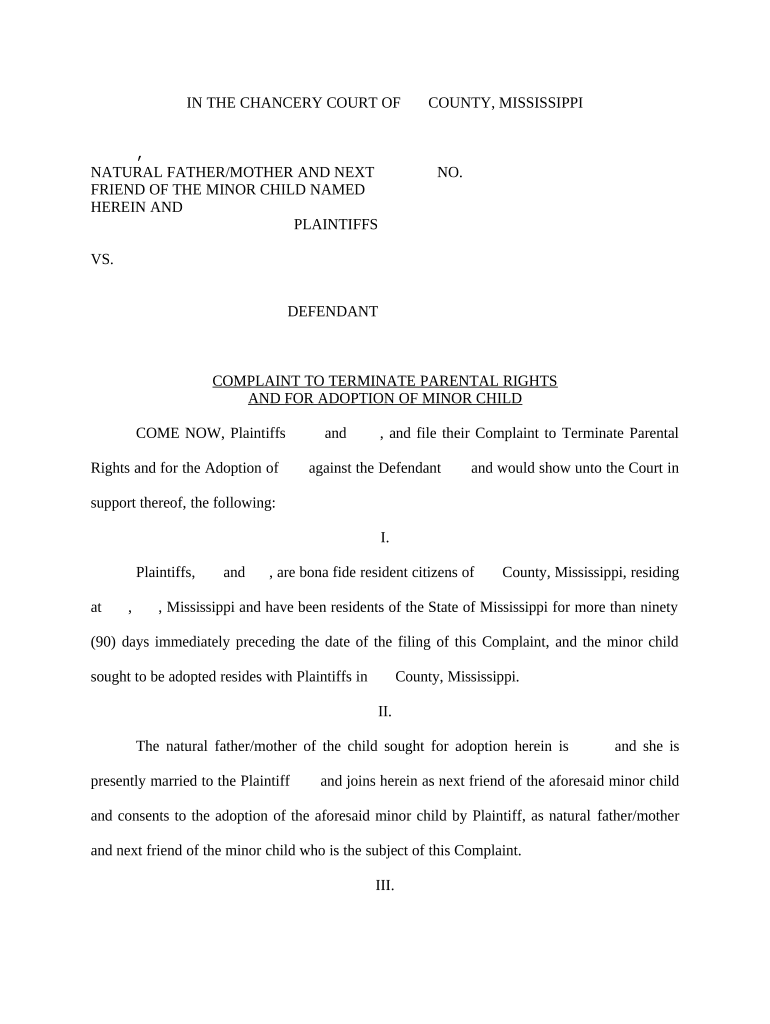
The Mississippi Complaint to Terminate Parental Rights and for Adoption is a court pleading filed in Mississippi chancery or circuit court seeking two remedies together: (1) legal termination of one or both parents' parental rights, and (2) entry of an adoption decree transferring legal parentage to the petitioner. The complaint identifies the child, parties, statutory or factual grounds for termination, and a request that the court approve adoption once parental rights are extinguished. The filing initiates notice, service, and court hearing processes that protect due process and the child's best interests.

Why this Complaint Matters

This document both severs legal ties that allow another person or couple to adopt and creates a permanent parent-child relationship recognized by Mississippi courts; it protects the child's welfare and provides legal certainty for custody, inheritance, and medical decision-making.

Why this Complaint Matters

Who Typically Files or Responds

Typical parties include prospective adoptive parents, stepparents, child-placing agencies, or guardians initiating termination and adoption in the child's best interest.

  • Prospective adoptive parents seeking legal parentage and custody of the child.
  • State child welfare agencies or licensed agencies seeking permanency for children in foster care.
  • Guardians or relatives petitioning when biological parents are unfit or absent.

Courts and clerks require careful service and documentation; representation by counsel is common given the seriousness of terminating parental rights.

Primary Roles and Typical Responsibilities

Petitioner — Prospective Parent

Petitioners prepare and file the complaint, attach supporting affidavits and evidence, request service on respondents, and attend hearings; they must show the adoption is in the child's best interest and that statutory grounds for termination exist.

Respondent — Biological Parent

Respondents receive service, may file an answer or contest, and have opportunity to present evidence; courts evaluate parental fitness, notice sufficiency, and compliance with due process before terminating rights.

Core Parts of a Professional Complaint

A well-prepared complaint organizes facts and relief clearly so the court can evaluate jurisdiction, notice, grounds for termination, and the proposed adoption plan without ambiguity.

Caption

Court name, county, case number space, and formal party designations; accuracy here ensures filing in the correct venue and proper docketing.
Parties and Jurisdiction

Full names, addresses, ages, and the court's basis to exercise jurisdiction over the child and respondents, including residency or child-placement facts supporting Mississippi venue.

Grounds Alleged

Clear statements of statutory or factual grounds for termination—abandonment, chronic neglect, unfitness, parental incapacity—and supporting factual detail or affidavit references.

Relief Sought

Specific requests that parental rights be terminated and that the petitioner be permitted to adopt, plus any temporary custody or visitation orders during proceedings.

Supporting Exhibits

Attach affidavits, CPS records, medical reports, investigation summaries, and consent forms where available to substantiate allegations and accelerate court review.

Signature Block

Attorney or pro se signer name, bar number if applicable, contact information, and date; notarization lines if the court or clerk requires original-signed filings.

Step-by-Step: Filing and Advancement of the Complaint

Follow these sequential steps to prepare, file, serve, and obtain a hearing for termination and adoption matters.

  • 01
    Prepare Complaint: Draft factual allegations, relief requested, and attach exhibits and affidavits.
  • 02
    File with Clerk: Submit complaint to the appropriate chancery or circuit court clerk for filing and docketing.
  • 03
    Effect Service: Serve respondent(s) per Mississippi rules using sheriff or process server and file proof of service.
  • 04
    Attend Hearing: Present evidence at hearing; court decides on termination and adoption based on best interest standard.

Typical Digital Workflow Settings for Online Completion

Configure your e-filing and eSign workflow to mirror court requirements and ensure reliable signer authentication and record retention.

Field Configuration
Document Type Complaint | PDF/A preferred for court records
Signer Order Petitioner then attorney then notary if required
Authentication Email + SMS code or identity proofing for sensitive filings
Notifications Automated reminders and completed PDF delivery

Overall Process from Filing to Final Decree

This high-level flow shows the essential milestones from filing through final adoption decree.

  • File Complaint: Clerk accepts and assigns case number for scheduling and service.
  • Serve Parties: Respondents receive legal notice and proof of service is filed with the court.
  • Hearing and Evidence: Court hears testimony, reviews records, and evaluates best interest factors.
  • Final Order: Court issues termination and adoption decree if grounds and best interest standard met.

Digital Filing and Signature Considerations

Courts and clerks vary on electronic filing and acceptance of e-signed documents; confirm local rules before e-submission.

  • E-Filing Support: Check county clerk requirements and allowed file formats (PDF/A preferred).
  • Signature Type: Some courts accept e-signatures; others require notarized originals for adoption decrees.
  • Authentication: Use multi-factor or identity proofing for sensitive child welfare documents.

When courts permit, maintain full audit trails, tamper-evident PDFs, and accessible copies to comply with ESIGN/UETA and local court rules.

Key Milestones from Filing to Final Order

A typical sequence shows when service, hearings, and final orders usually occur; calendars vary by court backlog and case complexity.

01

Filing

Complaint is filed and case number assigned; clerk sets initial deadlines.

02

Service

Respondents must be served and proof of service filed before hearings proceed.

03

Pretrial/Hearing

Court schedules hearing after discovery or investigation is complete.

04

Final Decree

Court issues termination and adoption order when legal standards are satisfied.

Common Timing Expectations and Procedural Deadlines

Timing and specific deadlines depend on local rules and whether the case involves CPS or inter-jurisdictional placement.

Service Deadline:

Complete service promptly; courts may dismiss for prolonged failure to serve.

Hearing Scheduling:

Clerk sets hearing date; expect calendar waits of weeks to months.

Temporary Orders:

Temporary custody or placement orders can be granted pending final hearing.

Appeal Period:

Appeal windows follow final orders per state appellate rules.

Document Amendments:

Amendments may require court leave depending on timing and prejudice to parties.

How This Complaint Differs from a Voluntary Relinquishment

Compare involuntary termination via complaint with voluntary relinquishment to understand consent, hearing, and legal effect differences.

Criteria Termination Complaint Voluntary Relinquishment
Court Hearing usually yes
Consent Required not always
Parental Rights End yes if proven yes upon valid relinquishment
Typical Venue chancery/circuit court chancery/circuit court

Supporting Documents Commonly Attached

Include essential exhibits that courts expect to see with the complaint to substantiate grounds and placement plans.

Summons and Service Return

Summons issued to respondents and proof of service filed so the court can confirm proper notice and jurisdiction.

Affidavit of Grounds

Detailed affidavit from petitioner or social worker describing factual basis for termination, with dates and corroborating facts.

Consent or Denial Documents

If available, attach any parental consents, relinquishment forms, or statements contesting the petition.

Placement and Home Study

Home study reports and placement assessments are often required to show the proposed adoptive environment is appropriate.

Security and Compliance Considerations

Encryption: TLS 1.2/1.3; AES-256 at rest
Audit Trail: Timestamps, IP addresses, action logs
HIPAA: BAA available for health data
ESIGN / UETA: Compliance with federal and state e-signature law
21 CFR Part 11: Support for FDA-regulated electronic records
Access Controls: SSO, multi-factor authentication

Consequences of Errors or Omissions

Service Defects: Dismissal or delay
Incorrect Venue: Case transfer or refiling
Missing Exhibits: Insufficient proof at hearing
Improper Signatures: Rejection or court requirement for originals
Failure to Notify: Due process violation risks
Inadequate Counsel: Substantive rights may be affected

Common Preparation Pitfalls

  • Using informal names or initials that do not match legal identification creates confusion and can require amended pleadings.
  • Failing to attach affidavits, CPS records, or home studies undermines factual assertions and prolongs proceedings.
  • Attempting to e-sign or e-file without confirming local court acceptance can lead to rejected filings or requirement to refile originals.
  • Neglecting to verify respondent contact information can prevent effective service and stall the case for months.

Practical Tips for Accurate, Efficient Completion

Adopt consistent practices that reduce errors, protect due process, and make hearings more effective.

Verify Identities
Confirm full legal names and dates of birth using government IDs or certified records before filing to prevent mismatches.
Organize Exhibits
Label and paginate exhibits as referenced in the complaint so the court and opposing parties can follow evidence easily.
Confirm Court Rules
Check local court clerk rules for e-filing, required original signatures, and any special forms for termination and adoption.
Consider Legal Counsel
Given long-term consequences of terminating parental rights, consult or retain counsel to ensure procedural and substantive compliance.

Real-World Scenarios Where This Complaint Is Used

These case examples illustrate typical fact patterns and outcomes when termination and adoption petitions proceed effectively.

Case Study 1

A foster agency sought termination due to parental abandonment

  • agency filed evidence of prolonged absence
  • court granted termination and approved adoption after home study and hearing, ensuring permanency for the child.

Case Study 2

A stepparent petitioned after long-term caregiving

  • biological parent contested on notice grounds
  • court found service valid and awarded adoption to the stepparent based on best interest findings.

eSignature Pricing and Feature Comparison

Basic pricing and feature availability for common eSignature vendors; signNow is listed first per vendor comparison conventions.

signNow DocuSign Adobe Sign PandaDoc HelloSign
Starting Price $8/user/mo $15/user/mo $14/user/mo $19/user/mo $15/user/mo
Free Trial 7-day free trial Varies Varies Varies Varies
Bulk Send Yes (Business Premium) Yes Yes Yes No
Audit Trail Yes Yes Yes Yes Yes
HIPAA Compliant Yes (BAA) Yes Yes No No
Envelope Cap No cap 100 envelopes/user/year Varies Varies Varies

Frequently Asked Questions and Practical Answers

Answers to common questions about filing, signatures, service, and court expectations for termination and adoption complaints in Mississippi.


Need help? Contact support

be ready to get more
Join over 28 million airSlate SignNow users