Establishing secure connection…Loading editor…Preparing document…

Mississippi Petition for Partial Distribution

This template is fully customizable. Edit the text, fill out the fields, and send it for signature. Give it a try!
Mississippi Petition for Partial Distribution

What the Mississippi Petition for Partial Distribution Is

The Mississippi Petition for Partial Distribution is a probate filing used to request court authorization to distribute part of an estate's assets to beneficiaries before final administration is complete. The petition explains which assets are available, states proposed amounts or fractions, identifies beneficiaries and creditors, and asks the probate court to issue an order permitting partial payments while remaining estate administration continues. It is a formal court document, typically signed by the personal representative or attorney, and must be accurately completed to avoid delays in distribution and potential creditor or tax complications.

Why filing a partial distribution petition matters

A petition for partial distribution lets administrators deliver needed funds or property to beneficiaries sooner, relieve estate carrying costs, and resolve urgent creditor or tax obligations with court approval. It reduces administrative backlog and documents judicial permission to protect executors from personal liability.

Why filing a partial distribution petition matters

Who typically prepares and relies on this petition

The petition is prepared by personal representatives, probate attorneys, or fiduciaries who manage estate administration in Mississippi.

  • Personal Representatives and Executors — Responsible for estate administration; prepare filings and provide accountings to justify requested partial distributions to beneficiaries.
  • Probate Attorneys — Draft petitions, assemble supporting schedules, and represent the estate in hearings to secure court orders authorizing distributions.
  • Beneficiaries and Heirs — May request or consent to partial distributions when funds are needed for expenses, inheritance, or urgent financial obligations.

Beneficiaries and courts both rely on accurate petitions to balance timely relief with protection of estate creditors and final claim resolution.

Stepwise process to prepare and file the petition

Follow these steps to assemble a complete petition package and reduce the chance of court rejection.

  • 01
    Assemble Records: Gather inventory, accountings, and creditor notice documentation.
  • 02
    Draft Petition: State proposed distributions, legal basis, and supporting calculations.
  • 03
    Attach Exhibits: Include asset schedules, bills, and beneficiary consents if available.
  • 04
    File and Serve: File with probate court and serve parties per local rules.

From petition to payout: the typical flow

These primary actions describe how a petition moves through the probate workflow and results in approved partial distributions.

  • Prepare Submission: Complete petition, exhibits, and proposed order for court review.
  • Court Review: Judge or clerk examines petition and may schedule a hearing.
  • Order Issued: If approved, court signs an order authorizing the partial distribution.
  • Disbursement: Executor distributes funds and records transactions in estate accounting.

Digital options for completing and sharing the petition

You can prepare, sign, and route the petition electronically using PDF or DOCX files and compliant eSignature workflows.

  • File Formats: PDF, Word DOCX, and OCR-friendly scans are commonly accepted.
  • Authentication: Use email link, SMS code, or higher assurance methods for signer identity.
  • Integrations: Connectors such as Microsoft 365, Google Workspace, and NetSuite speed document handling.

Verify the probate court accepts electronic submissions in your county and follow its rules for e-filing, notarization, and retention.

Configuring an e-filing workflow for the petition

A consistent workflow reduces rework. The table below pairs common fields with recommended configuration.

Field Configuration
Upload Document Use searchable PDF or DOCX; include bookmarks for exhibits.
Add Signature Fields Place signer, date, and notary fields in logical order.
Set Authentication Require email verification or SMS code for guest signers.
Attach Exhibits Combine exhibits or include as referenced appendices.

Comparing eSignature vendors for petitions and court filings

Basic pricing and capabilities for common eSignature providers. Verify plan details and court acceptance before purchase.

signNow DocuSign Adobe Sign PandaDoc HelloSign
Starting Price $8/user/mo $15/user/mo $14/user/mo $19/user/mo $15/user/mo
Free Trial 7-day free trial, no credit card Varies by plan Varies by plan Varies by plan Varies by plan
Bulk Send Yes Yes Yes Yes No
Audit Trail Yes Yes Yes Yes Yes
HIPAA Compliant Yes Yes Yes No No

Core elements to include in a professional petition

Ensure these elements are present to give the court a clear basis for authorizing a partial distribution.

Case Caption

Full court name, county, and case number to identify the estate and ensure the filing is placed in the correct docket.
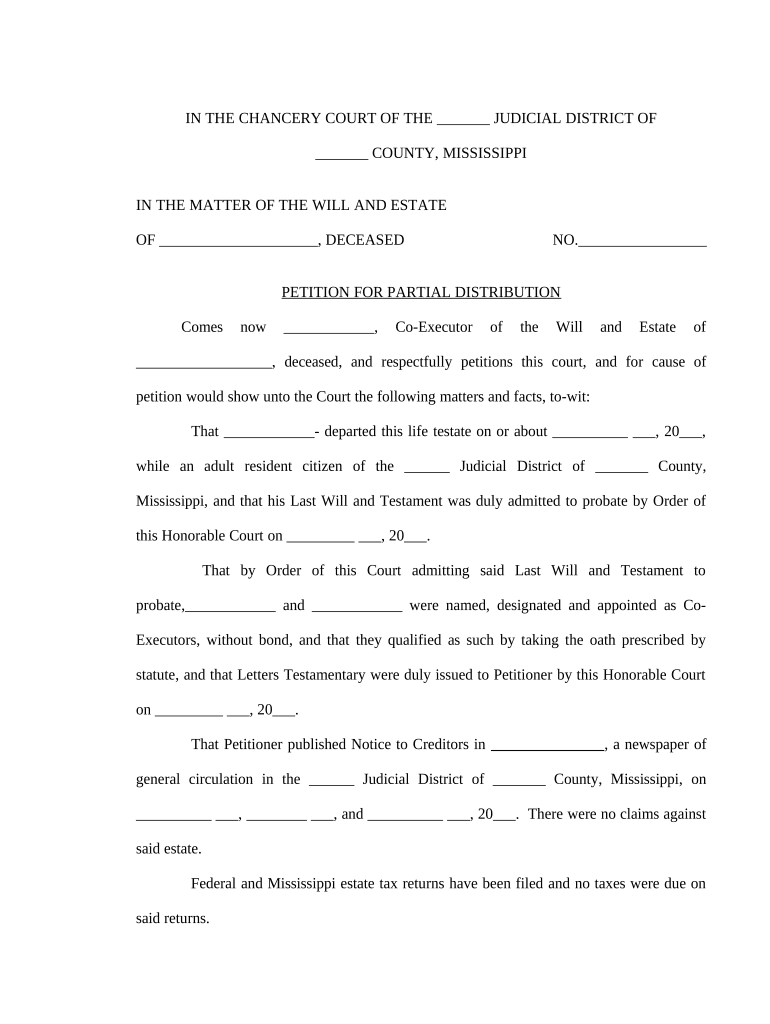
Statement of Authority

Identify the personal representative and cite appointment order or letters testamentary to show authority to petition the court.

Asset Schedule

Itemize assets available for distribution with current valuations and source documentation to substantiate the proposed payout.

Creditor Notice

Describe notice given to known creditors and efforts to locate unknown creditors; include dates and method of service.

Distribution Plan

Specify beneficiaries, amounts, and how distributions affect estate reserves and claims handling to justify the request.

Proposed Order

Provide a draft order for the judge to sign that mirrors the petition’s requests for clarity and efficiency.

Security and legal compliance points for electronic handling

Transport Encryption: TLS 1.2/1.3
Data At Rest: AES-256 encryption
Third-Party Audit: SOC 2 Type II
Healthcare Compliance: HIPAA (BAA required)
Federal E-Sign Laws: ESIGN and UETA compliant
Regulated Records: 21 CFR Part 11 supported

Consequences of incorrect or premature distributions

Probate Delays: Court may deny or delay distributions
Creditor Claims: Undisclosed claims can require recovery of funds
Tax Exposure: Incorrect withholding or reporting risks penalties
Personal Liability: Executors can be held liable for improper distributions
Sanctions: Court sanctions for incomplete disclosures
Order Revocation: Court can rescind authorization if errors surface

Common preparation mistakes to avoid

  • Using incorrect beneficiary names or outdated addresses leads to returned payments and administrative delays.
  • Failing to attach a complete asset schedule or valuation creates insufficient justification for the requested partial distribution.
  • Not documenting creditor notice or service can prompt objections or reversal of approved distributions.
  • Relying on informal approvals or unsigned consent forms risks invalidation of the distribution and potential liability.

Practical tips for accurate and efficient petitions

Adopt consistent procedures and document templates to lower errors and speed court review.

Verify Identities and Names
Confirm beneficiary names against government-issued ID or official records before disbursing funds. Name mismatches are a common cause of rejected payments and may complicate estate accounting and creditor responses.
Provide Complete Accountings
Include line-item schedules for assets and liabilities and explain reserve calculations. Transparent accounting reduces the likelihood of creditor objections and assists the court when evaluating whether partial distribution is prudent.
Document Creditor Notice
Keep proof of mailed notices, publications, or personal service. Clear evidence of creditor notification is frequently decisive in securing court approval for distributions.
Use Secure eSign Workflows
When permitted by the court, use compliant eSignature solutions that provide audit trails, authentication, and tamper-evident PDFs to speed signer collection while preserving legal admissibility.

Real-world examples of electronic filing and signing

These brief customer stories show how digital workflows support legal and estate processes in practice.

Martin Properties

A regional real estate firm digitized estate forms to support property distributions quickly

  • They used mobile signing on-site for owners and beneficiaries
  • The firm reported fewer missed signatures and faster settlement of small estate claims, reducing administrative follow-up and improving client communication.

BIS (Dan Rotelli)

A services company standardized document security and compliance for legal workflows

  • They emphasized SOC 2 and ESIGN/UETA alignment in vendor selection
  • The organization achieved consistent audit trails and streamlined approvals while maintaining required certifications for regulated transactions.

Frequently asked questions about partial distribution petitions

Answers to common procedural and technical questions when preparing a Mississippi Petition for Partial Distribution.


Need help? Contact support

be ready to get more
Join over 28 million airSlate SignNow users